

View in English

  • Apple Developer
    • Get Started

    Explore Get Started

    • Overview
    • Learn
    • Apple Developer Program

    Stay Updated

    • Latest News
    • Hello Developer
    • Platforms

    Explore Platforms

    • Apple Platforms
    • iOS
    • iPadOS
    • macOS
    • tvOS
    • visionOS
    • watchOS
    • App Store

    Featured

    • Design
    • Distribution
    • Games
    • Accessories
    • Web
    • Home
    • CarPlay
    • Technologies

    Explore Technologies

    • Overview
    • Xcode
    • Swift
    • SwiftUI

    Featured

    • Accessibility
    • App Intents
    • Apple Intelligence
    • Games
    • Machine Learning & AI
    • Security
    • Xcode Cloud
    • Community

    Explore Community

    • Overview
    • Meet with Apple events
    • Community-driven events
    • Developer Forums
    • Open Source

    Featured

    • WWDC
    • Swift Student Challenge
    • Developer Stories
    • App Store Awards
    • Apple Design Awards
    • Apple Developer Centers
    • Documentation

    Explore Documentation

    • Documentation Library
    • Technology Overviews
    • Sample Code
    • Human Interface Guidelines
    • Videos

    Release Notes

    • Featured Updates
    • iOS
    • iPadOS
    • macOS
    • watchOS
    • visionOS
    • tvOS
    • Xcode
    • Downloads

    Explore Downloads

    • All Downloads
    • Operating Systems
    • Applications
    • Design Resources

    Featured

    • Xcode
    • TestFlight
    • Fonts
    • SF Symbols
    • Icon Composer
    • Support

    Explore Support

    • Overview
    • Help Guides
    • Developer Forums
    • Feedback Assistant
    • Contact Us

    Featured

    • Account Help
    • App Review Guidelines
    • App Store Connect Help
    • Upcoming Requirements
    • Agreements and Guidelines
    • System Status
  • Quick Links

    • Events
    • News
    • Forums
    • Sample Code
    • Videos
 

Videos

Abrir menú Cerrar menú
  • Colecciones
  • Todos los videos
  • Información

Más videos

  • Información
  • Código
  • Meet ScreenCaptureKit

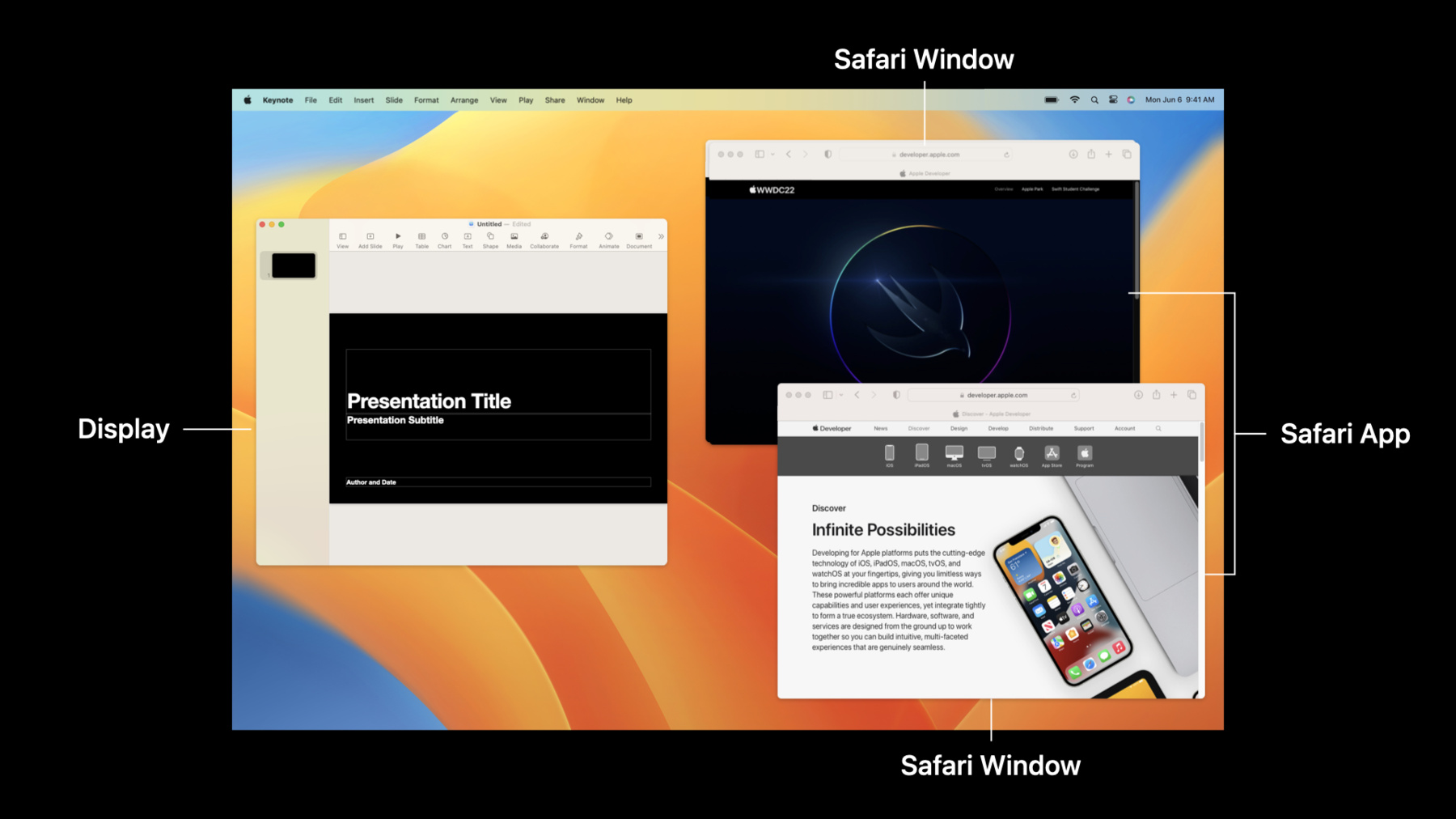
    Learn how ScreenCaptureKit can deliver high-performance screen capture for your macOS screen sharing applications, video conferencing apps, game streaming services, and more. We'll explore the building blocks of this API, learn how to configure streams to capture on-screen video and audio content, and share tips for integrating it into your existing apps.

    Recursos

    • ScreenCaptureKit
    • Capturing screen content in macOS
      • Video HD
      • Video SD

    Videos relacionados

    WWDC23

    • What’s new in ScreenCaptureKit

    WWDC22

    • Take ScreenCaptureKit to the next level
  • Buscar este video…
    • 6:53 - Creating a SCShareableContent object

      // Creating a SCShareableContent object
      
      // Get the content that's available to capture.
      let content = try await SCShareableContent.excludingDesktopWindows(
          false,
          onScreenWindowsOnly: true
      )
    • 8:32 - Creating a SCContentFilter object

      // Creating a SCContentFilter object
      
      // Get the content that's available to capture.
      let content = try await SCShareableContent.excludingDesktopWindows(
          false,
          onScreenWindowsOnly: true
      )
      
      // Exclude the sample app by matching the bundle identifier.
      let excludedApps = content.applications.filter { app in
          Bundle.main.bundleIdentifier == app.bundleIdentifier
      }
      
      // Create a content filter that excludes the sample app.
      filter = SCContentFilter(display: display,
                               excludingApplications: excludedApps,
                               exceptingWindows: [])
    • 10:23 - Creating a SCStreamConfiguration object

      // Creating a SCStreamConfiguration object
      let streamConfig = SCStreamConfiguration()
              
      // Set output resolution to 1080p
      streamConfig.width = 1920
      streamConfig.height = 1080
      
      // Set the capture interval at 60 fps
      streamConfig.minimumFrameInterval = CMTime(value: 1, timescale: CMTimeScale(60))
      
      // Hides cursor
      streamConfig.showsCursor = false
      
      // Enable audio capture
      streamConfig.capturesAudio = true
      
      // Set sample rate to 48000 kHz stereo
      streamConfig.sampleRate = 48000
      streamConfig.channelCount = 2
    • 11:46 - Creating and starting a SCStream object

      // Creating and starting a SCStream object
      
      // Create a capture stream with the filter and stream configuration
      stream = SCStream(filter: filter, configuration: streamConfig, delegate: self)
      
      // Start the capture session
      try await stream?.startCapture()      
      
      
      // ...
      // Error handling delegate 
      func stream(_ stream: SCStream, didStopWithError error: Error) {
          DispatchQueue.main.async {
              self.logger.error("Stream stopped with error: \(error.localizedDescription)")
              self.error = error
              self.isRecording = false
         }
      }
    • 13:07 - Getting media samples

      // SCStreamOutput protocol implementation
      func stream(_ stream: SCStream, didOutputSampleBuffer sampleBuffer: CMSampleBuffer, of type: SCStreamOutputType) {
          switch type {
          case .screen:
              handleLatestScreenSample(sampleBuffer)
          case .audio:
        handleLatestAudioSample(sampleBuffer)
          }
      }
      
      // ...
      // Create a capture stream with the filter and stream configuration
      stream = SCStream(filter: filter, configuration: streamConfig, delegate: self)
      
      // Add a stream output to capture screen and audio content
      try stream?.addStreamOutput(self, type: .screen, sampleHandlerQueue: screenFrameOutputQueue)
      try stream?.addStreamOutput(self, type: .audio, sampleHandlerQueue: audioFrameOutputQueue)
      
      // Start the capture session
      try await stream?.startCapture()

Developer Footer

  • Videos
  • WWDC22
  • Meet ScreenCaptureKit
  • Open Menu Close Menu
    • iOS
    • iPadOS
    • macOS
    • tvOS
    • visionOS
    • watchOS
    • App Store
    Open Menu Close Menu
    • Swift
    • SwiftUI
    • Swift Playground
    • TestFlight
    • Xcode
    • Xcode Cloud
    • Icon Composer
    • SF Symbols
    Open Menu Close Menu
    • Accessibility
    • Accessories
    • Apple Intelligence
    • Audio & Video
    • Augmented Reality
    • Business
    • Design
    • Distribution
    • Education
    • Games
    • Health & Fitness
    • In-App Purchase
    • Localization
    • Maps & Location
    • Machine Learning & AI
    • Security
    • Safari & Web
    Open Menu Close Menu
    • Documentation
    • Downloads
    • Sample Code
    • Videos
    Open Menu Close Menu
    • Help Guides & Articles
    • Contact Us
    • Forums
    • Feedback & Bug Reporting
    • System Status
    Open Menu Close Menu
    • Apple Developer
    • App Store Connect
    • Certificates, IDs, & Profiles
    • Feedback Assistant
    Open Menu Close Menu
    • Apple Developer Program
    • Apple Developer Enterprise Program
    • App Store Small Business Program
    • MFi Program
    • Mini Apps Partner Program
    • News Partner Program
    • Video Partner Program
    • Security Bounty Program
    • Security Research Device Program
    Open Menu Close Menu
    • Meet with Apple
    • Apple Developer Centers
    • App Store Awards
    • Apple Design Awards
    • Apple Developer Academies
    • WWDC
    Read the latest news.
    Get the Apple Developer app.
    Copyright © 2026 Apple Inc. All rights reserved.
    Terms of Use Privacy Policy Agreements and Guidelines