

View in English

  • Apple Developer
    • Get Started

    Explore Get Started

    • Overview
    • Learn
    • Apple Developer Program

    Stay Updated

    • Latest News
    • Hello Developer
    • Platforms

    Explore Platforms

    • Apple Platforms
    • iOS
    • iPadOS
    • macOS
    • tvOS
    • visionOS
    • watchOS
    • App Store

    Featured

    • Design
    • Distribution
    • Games
    • Accessories
    • Web
    • Home
    • CarPlay
    • Technologies

    Explore Technologies

    • Overview
    • Xcode
    • Swift
    • SwiftUI

    Featured

    • Accessibility
    • App Intents
    • Apple Intelligence
    • Games
    • Machine Learning & AI
    • Security
    • Xcode Cloud
    • Community

    Explore Community

    • Overview
    • Meet with Apple events
    • Community-driven events
    • Developer Forums
    • Open Source

    Featured

    • WWDC
    • Swift Student Challenge
    • Developer Stories
    • App Store Awards
    • Apple Design Awards
    • Apple Developer Centers
    • Documentation

    Explore Documentation

    • Documentation Library
    • Technology Overviews
    • Sample Code
    • Human Interface Guidelines
    • Videos

    Release Notes

    • Featured Updates
    • iOS
    • iPadOS
    • macOS
    • watchOS
    • visionOS
    • tvOS
    • Xcode
    • Downloads

    Explore Downloads

    • All Downloads
    • Operating Systems
    • Applications
    • Design Resources

    Featured

    • Xcode
    • TestFlight
    • Fonts
    • SF Symbols
    • Icon Composer
    • Support

    Explore Support

    • Overview
    • Help Guides
    • Developer Forums
    • Feedback Assistant
    • Contact Us

    Featured

    • Account Help
    • App Review Guidelines
    • App Store Connect Help
    • Upcoming Requirements
    • Agreements and Guidelines
    • System Status
  • Quick Links

    • Events
    • News
    • Forums
    • Sample Code
    • Videos
 

Videos

Abrir menú Cerrar menú
  • Colecciones
  • Todos los videos
  • Información

Más videos

  • Información
  • Código
  • Build an app with SwiftData

    Discover how SwiftData can help you persist data in your app. Code along with us as we bring SwiftData to a multi-platform SwiftUI app. Learn how to convert existing model classes into SwiftData models, set up the environment, reflect model layer changes in UI, and build document-based applications backed by SwiftData storage.

    To get the most out of this session, you should be familiar SwiftData. For an introduction, check out "Meet SwiftData" from WWDC23.

    Capítulos

    • 0:00 - Meet the app
    • 3:09 - SwiftData models
    • 5:30 - Querying models to display in UI
    • 9:43 - Creating and updating
    • 12:30 - Document-based apps

    Recursos

    • Building a document-based app using SwiftData
      • Video HD
      • Video SD

    Videos relacionados

    WWDC23

    • Discover Observation in SwiftUI
    • Dive deeper into SwiftData
    • Meet SwiftData
    • Migrate to SwiftData
    • Model your schema with SwiftData
    • What’s new in SwiftUI
  • Buscar este video…
    • 3:33 - Defining a SwiftData model

      @Model
      final class Card {
          var front: String
          var back: String
          var creationDate: Date
      
          init(front: String, back: String, creationDate: Date = .now) {
              self.front = front
              self.back = back
              self.creationDate = creationDate
          }
      }
    • 4:25 - Binding to a SwiftData model

      @Bindable var card: Card
    • 5:52 - Query models from SwiftData storage

      @Query private var cards: [Card]
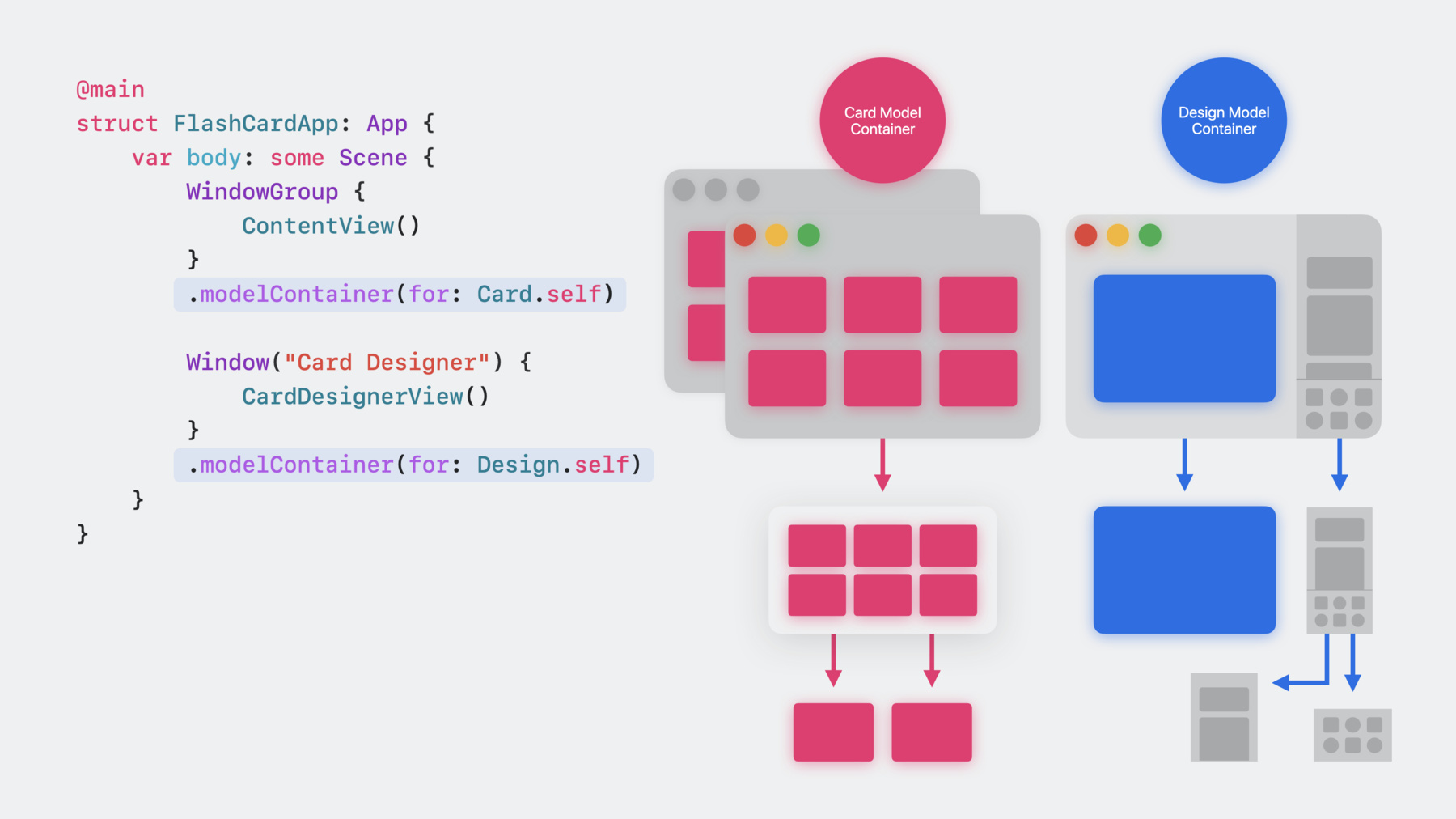
    • 8:27 - Setting up a model container for the window group

      WindowGroup {
          ContentView()
      }
      .modelContainer(for: Card.self)
    • 9:24 - Providing a preview with sample data

      #Preview {
          ContentView()
              .frame(minWidth: 500, minHeight: 500)
              .modelContainer(previewContainer)
      }
    • 10:30 - Accessing the model context of the ContentView

      @Environment(\.modelContext) private var modelContext
    • 10:51 - Insert a new model in the context

      let newCard = Card(front: "Sample Front", back: "Sample Back")
      modelContext.insert(object: newCard)
    • 13:34 - Start document-based application setup

      @main
      struct SwiftDataFlashCardSample: App {
          var body: some Scene {
              #if os(iOS) || os(macOS)
              DocumentGroup(editing: Card.self, contentType: <#UTType#>) {
                  <#code#>
              }
              #else
              WindowGroup {
                  ContentView()
                      .modelContainer(for: Card.self)
              }
              #endif
          }
      }
    • 16:51 - Finish document-based application setup

      @main
      struct SwiftDataFlashCardSample: App {
          var body: some Scene {
              #if os(iOS) || os(macOS)
              DocumentGroup(editing: Card.self, contentType: .flashCards) {
                  ContentView()
              }
              #else
              WindowGroup {
                  ContentView()
                      .modelContainer(for: Card.self)
              }
              #endif
          }
      }

Developer Footer

  • Videos
  • WWDC23
  • Build an app with SwiftData
  • Open Menu Close Menu
    • iOS
    • iPadOS
    • macOS
    • tvOS
    • visionOS
    • watchOS
    • App Store
    Open Menu Close Menu
    • Swift
    • SwiftUI
    • Swift Playground
    • TestFlight
    • Xcode
    • Xcode Cloud
    • Icon Composer
    • SF Symbols
    Open Menu Close Menu
    • Accessibility
    • Accessories
    • Apple Intelligence
    • Audio & Video
    • Augmented Reality
    • Business
    • Design
    • Distribution
    • Education
    • Games
    • Health & Fitness
    • In-App Purchase
    • Localization
    • Maps & Location
    • Machine Learning & AI
    • Security
    • Safari & Web
    Open Menu Close Menu
    • Documentation
    • Downloads
    • Sample Code
    • Videos
    Open Menu Close Menu
    • Help Guides & Articles
    • Contact Us
    • Forums
    • Feedback & Bug Reporting
    • System Status
    Open Menu Close Menu
    • Apple Developer
    • App Store Connect
    • Certificates, IDs, & Profiles
    • Feedback Assistant
    Open Menu Close Menu
    • Apple Developer Program
    • Apple Developer Enterprise Program
    • App Store Small Business Program
    • MFi Program
    • Mini Apps Partner Program
    • News Partner Program
    • Video Partner Program
    • Security Bounty Program
    • Security Research Device Program
    Open Menu Close Menu
    • Meet with Apple
    • Apple Developer Centers
    • App Store Awards
    • Apple Design Awards
    • Apple Developer Academies
    • WWDC
    Read the latest news.
    Get the Apple Developer app.
    Copyright © 2026 Apple Inc. All rights reserved.
    Terms of Use Privacy Policy Agreements and Guidelines