

-
What’s new in AppKit
Discover the latest advances in Mac app development. Get an overview of the new features in macOS Sequoia, and how to adopt them in your app. Explore new ways to integrate your existing code with SwiftUI. Learn about the improvements made to numerous AppKit controls, like toolbars, menus, text input, and more.
Capítulos
- 0:00 - Introduction
- 0:49 - New macOS features
- 0:52 - Writing Tools, Genmoji, and Image Playground
- 3:31 - Window Tiling
- 6:21 - More SwiftUI integrations
- 6:41 - Build menus with SwiftUI
- 7:39 - Get animated with SwiftUI
- 8:20 - API refinements
- 8:44 - Context menu refinements
- 9:42 - Text highlighting
- 11:00 - SF Symbols
- 11:59 - Save Panel refinements
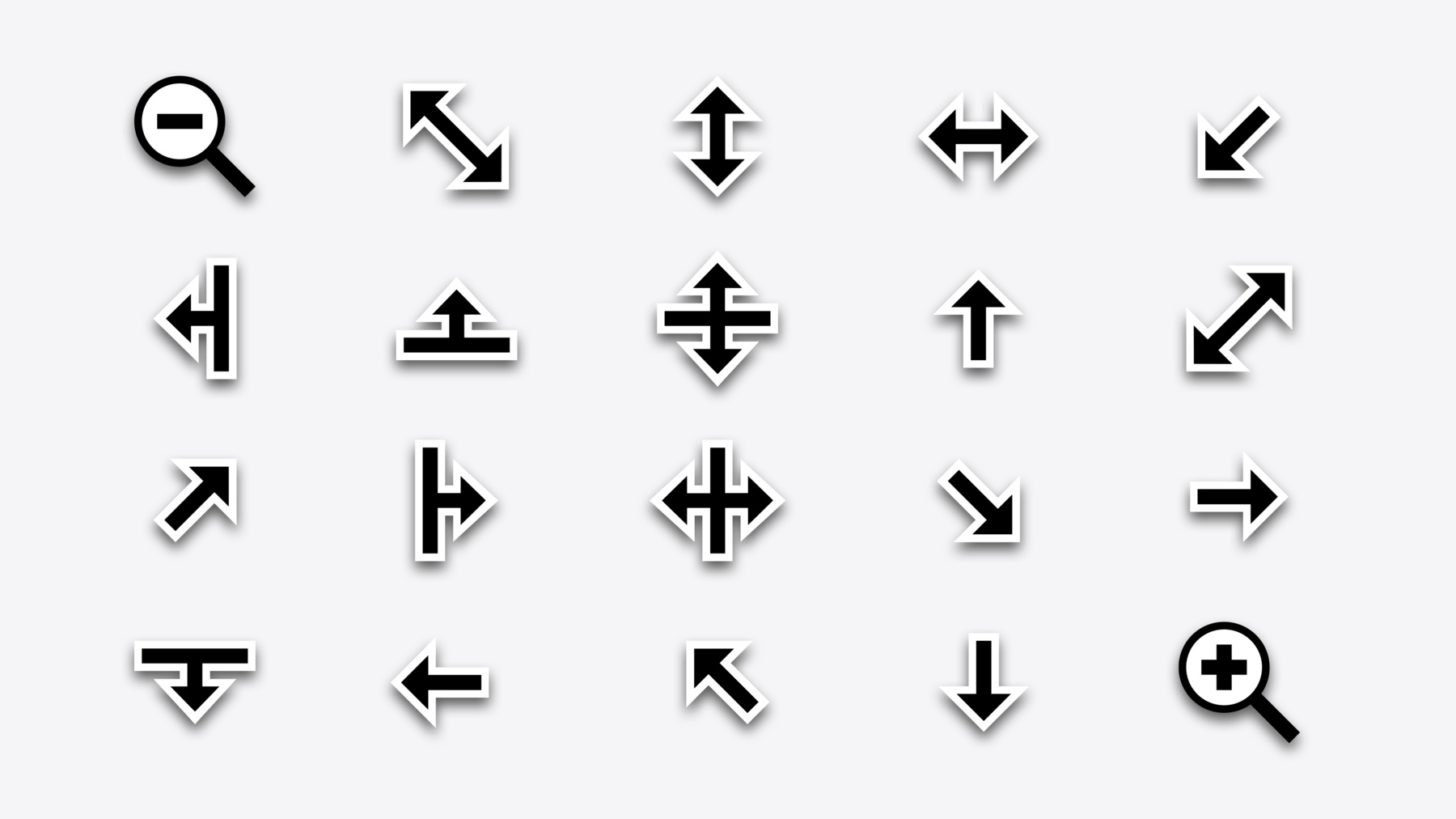
- 13:04 - Cursors refinements!
- 15:21 - Toolbar refinements
- 17:22 - Text entry suggestions
Recursos
Videos relacionados
WWDC24
- Bring expression to your app with Genmoji
- Enhance your UI animations and transitions
- Get started with Writing Tools
- What’s new in SF Symbols 6
WWDC23
-
Buscar este video…
-
-
2:09 - Adding the Image Playground experience
extension DocumentCanvasViewController { @IBAction func importFromImagePlayground(_ sender: Any?) { // Initialize the playground, get set up to be notified of lifecycle events. let playground = ImagePlaygroundViewController() playground.delegate = self // Seed the playground with concepts and source imagery. (Optional) playground.concepts = [.text("birthday card")] playground.sourceImage = NSImage(named: "balloons") presentAsSheet(playground) } } extension DocumentCanvasViewController: ImagePlaygroundViewController.Delegate { func imagePlaygroundViewController( _ imagePlaygroundViewController: ImagePlaygroundViewController, didCreateImageAt resultingImageURL: URL ) { if let image = NSImage(contentsOf: resultingImageURL) { imageView.image = image } else { logger.error("Could not read image at \(resultingImageURL)") } dismiss(imagePlaygroundViewController) } } -
5:50 - Using window resize increments
window.resizeIncrements = NSSize(width: characterWidth, height: characterHeight) -
7:05 - Build menus with SwiftUI
struct ActionMenu: View { var body: some View { Toggle("Use Groups", isOn: $useGroups) Picker("Sort By", selection: $sortOrder) { ForEach(SortOrder.allCases) { Text($0.title) } }.pickerStyle(.inline) Button("Customize View…") { <#Action#> } } } let menu = NSHostingMenu(rootView: ActionMenu()) let pullDown = NSPopUpButton(image: image, pullDownMenu: menu) -
7:43 - Get animated with SwiftUI
NSAnimationContext.animate(with: .spring(duration: 0.3)) { drawer.isExpanded.toggle() } -
7:55 - Get animated with SwiftUI
class PaletteView: NSView { @Invalidating(.layout) var isExpanded: Bool = false private func onHover(_ isHovered: Bool) { NSAnimationContext.animate(with: .spring) { isExpanded = isHovered layoutSubtreeIfNeeded() } } } -
10:31 - Text highlighting
let attributes: [NSAttributedString.Key: Any] = [ .textHighlight: NSAttributedString.TextHighlightStyle.systemDefault, .textHighlightColorScheme: NSAttributedString.TextHighlightColorScheme.pink, ] -
11:11 - SF Symbols effects
imageView.addSymbolEffect(.wiggle) imageView.addSymbolEffect(.rotate) imageView.addSymbolEffect(.breathe) -
11:24 - SF Symbols playback (periodic)
imageView.addSymbolEffect(.wiggle, options: .repeat(.periodic(3, delay: 0.5))) -
11:30 - SF Symbols playback (continuous)
imageView.addSymbolEffect(.wiggle, options: .repeat(.continuous)) -
11:37 - SF Symbols magic replace
imageView.setSymbolImage(badgedSymbolImage, contentTransition: .replace) -
12:19 - Save panel content types
extension ImageViewController: NSOpenSavePanelDelegate { @MainActor @IBAction internal func saveDocument(_ sender: Any?) { Task { let savePanel = NSSavePanel() savePanel.delegate = self savePanel.identifier = NSUserInterfaceItemIdentifier("ImageExport") savePanel.showsContentTypes = true savePanel.allowedContentTypes = [.png, .jpeg] let result = await savePanel.beginSheetModal(for: window) switch result { case .OK: let url = savePanel.url // Save the document to 'url'. It already has the appropriate extension. case .cancel: break default: break } } } func panel(_ panel: Any, displayNameFor type: UTType) -> String? { switch type { case .png: NSLocalizedString("PNG (Greater Quality)", comment: <#Comment#>) case .jpeg: NSLocalizedString("JPG (Smaller File Size)", comment: <#Comment#>) default: nil } } } -
13:34 - Frame-resize cursors
let cursor = NSCursor.frameResize(position: .bottomRight, directions: .all) -
14:20 - Column and row resize cursors
let cursor = NSCursor.columnResize(directions: .left) let cursor = NSCursor.rowResize(directions: .up) -
14:29 - Zoom in and out cursors
let cursor = NSCusor.zoomIn let cursor = NSCusor.zoomOut -
15:57 - Display mode customizable toolbar
let toolbar = NSToolbar(identifier: NSToolbar.Identifier("ViewerWindow")) toolbar.allowsDisplayModeCustomization // Defaults to `true`. -
16:57 - Hidden toolbar items
let downloadsToolbarItem: NSToolbarItem downloadsToolbarItem.isHidden = downloadsManager.downloads.isEmpty -
17:49 - Text entry suggestions
class MYViewController: NSViewController {

    let museumTextField = NSTextField(string: "")

    let museumTextSuggestionsController = MuseumTextSuggestionsController()

    override func viewDidLoad() {
        super.viewDidLoad()

        self.museumTextField.suggestionsDelegate = self.museumTextSuggestionsController
    }

}

class MuseumTextSuggestionsController: NSTextSuggestionsDelegate {

    typealias SuggestionItemType = Museum

    func textField(
        _ textField: NSTextField,
        provideUpdatedSuggestions responseHandler: @escaping ((ItemResponse) -> Void)
    ) {
        let searchString = textField.stringValue

        func museumItem(_ museum: Museum) -> Item {
            var item = NSSuggestionItem(representedValue: museum, title: museum.name)
            item.secondaryTitle = museum.address
            return item
        }

        let favoriteMuseums = Museum.favorites.filter({
            $0.matches(searchString)
        })

        let favorites = NSSuggestionItemSection(
            title: NSLocalizedString("Favorites", comment: "The title of suggestion results section containing favorite museums."),
            items: favoriteMuseums.map(museumItem(_:))
        )
        var response = NSSuggestionItemResponse(itemSections: [favorites])
        response.phase = .intermediate
        responseHandler(response)

        Task {
            let otherMuseums = await Museum.allMatching(searchString)
            let nonFavorites = NSSuggestionItemSection(items: otherMuseums.map(museumItem(_:)))

            var response = NSSuggestionItemResponse(itemSections: [
                favorites,
                nonFavorites,
            ])
            response.phase = .final
            responseHandler(response)
        }
    }

}
-