

View in English

  • Apple Developer
    • Get Started

    Explore Get Started

    • Overview
    • Learn
    • Apple Developer Program

    Stay Updated

    • Latest News
    • Hello Developer
    • Platforms

    Explore Platforms

    • Apple Platforms
    • iOS
    • iPadOS
    • macOS
    • tvOS
    • visionOS
    • watchOS
    • App Store

    Featured

    • Design
    • Distribution
    • Games
    • Accessories
    • Web
    • Home
    • CarPlay
    • Technologies

    Explore Technologies

    • Overview
    • Xcode
    • Swift
    • SwiftUI

    Featured

    • Accessibility
    • App Intents
    • Apple Intelligence
    • Games
    • Machine Learning & AI
    • Security
    • Xcode Cloud
    • Community

    Explore Community

    • Overview
    • Meet with Apple events
    • Community-driven events
    • Developer Forums
    • Open Source

    Featured

    • WWDC
    • Swift Student Challenge
    • Developer Stories
    • App Store Awards
    • Apple Design Awards
    • Apple Developer Centers
    • Documentation

    Explore Documentation

    • Documentation Library
    • Technology Overviews
    • Sample Code
    • Human Interface Guidelines
    • Videos

    Release Notes

    • Featured Updates
    • iOS
    • iPadOS
    • macOS
    • watchOS
    • visionOS
    • tvOS
    • Xcode
    • Downloads

    Explore Downloads

    • All Downloads
    • Operating Systems
    • Applications
    • Design Resources

    Featured

    • Xcode
    • TestFlight
    • Fonts
    • SF Symbols
    • Icon Composer
    • Support

    Explore Support

    • Overview
    • Help Guides
    • Developer Forums
    • Feedback Assistant
    • Contact Us

    Featured

    • Account Help
    • App Review Guidelines
    • App Store Connect Help
    • Upcoming Requirements
    • Agreements and Guidelines
    • System Status
  • Quick Links

    • Events
    • News
    • Forums
    • Sample Code
    • Videos
 

Videos

Abrir menú Cerrar menú
  • Colecciones
  • Todos los videos
  • Información

Más videos

  • Información
  • Código
  • Work with windows in SwiftUI

    Learn how to create great single and multi-window apps in visionOS, macOS, and iPadOS. Discover tools that let you programmatically open and close windows, adjust position and size, and even replace one window with another. We'll also explore design principles for windows that help people use your app within their workflows.

    Capítulos

    • 0:00 - Introduction
    • 1:19 - Fundamentals
    • 6:15 - Placement
    • 9:43 - Sizing
    • 12:03 - Next steps

    Recursos

    • BOT-anist
    • Forum: UI Frameworks
      • Video HD
      • Video SD

    Videos relacionados

    WWDC24

    • Tailor macOS windows with SwiftUI

    WWDC23

    • Design for spatial user interfaces
    • Elevate your windowed app for spatial computing
  • Buscar este video…
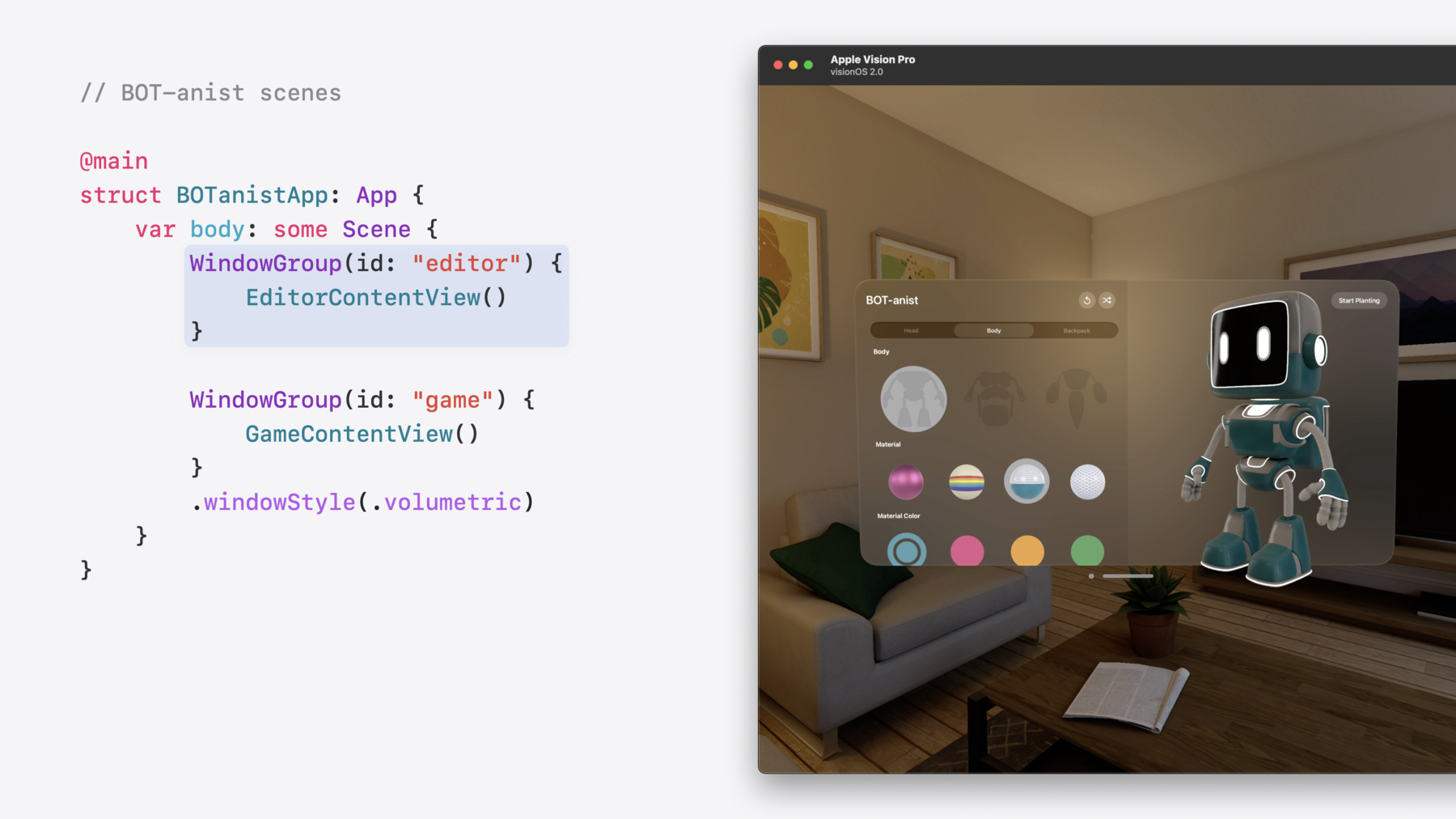
    • 2:36 - BOT-anist scenes

      @main
      struct BOTanistApp: App {
          var body: some Scene {
              WindowGroup(id: "editor") {
                  EditorContentView()
              }
      
              WindowGroup(id: "game") {
                  GameContentView()
              }
              .windowStyle(.volumetric)
          }
      }
    • 3:09 - Creating the movie WindowGroup

      @main
      struct BOTanistApp: App {
          var body: some Scene {
              WindowGroup(id: "editor") {
                  EditorContentView()
              }
      
              WindowGroup(id: "game") {
                  GameContentView()
              }
              .windowStyle(.volumetric)
      
              WindowGroup(id: "movie") {
                  MovieContentView()
              }
          }
      }
    • 3:55 - Opening a movie window

      struct EditorContentView: View {
          @Environment(\.openWindow) private var openWindow
      
          var body: some View {
              Button("Open Movie", systemImage: "tv") {
                  openWindow(id: "movie")
              }
          }
      }
    • 4:45 - Pushing a movie window

      struct EditorContentView: View {
          @Environment(\.pushWindow) private var pushWindow
      
          var body: some View {
              Button("Open Movie", systemImage: "tv") {
                  pushWindow(id: "movie")
              }
          }
      }
    • 5:34 - Toolbar

      CanvasView()
          .toolbar {
              ToolbarItem {
                  Button(...)
              }
              ...
          }
    • 5:40 - Title menu

      CanvasView()
          .toolbar {
              ToolbarTitleMenu {
                  Button(...)
              }
              ...
          }
    • 5:48 - Hiding window controls

      WindowGroup(id: "movie") {
          ...
      }
      .persistentSystemOverlays(.hidden)
    • 6:28 - Creating the controller window

      @main
      struct BOTanistApp: App {
          var body: some Scene {
              ...
      
              WindowGroup(id: "movie") {
                  MovieContentView()
              }
      
              WindowGroup(id: "controller") {
                  ControllerContentView()
              }
          }
      }
    • 6:34 - Opening the controller window

      struct GameContentView: View {
          @Environment(\.openWindow) private var openWindow
      
          var body: some View {
              ...
              Button("Open Controller", systemImage: "gamecontroller.fill") {
                  openWindow(id: "controller")
              }
          }
      }
    • 7:46 - Positioning the controller window

      WindowGroup(id: "controller") {
          ControllerContentView()
      }
      .defaultWindowPlacement { content, context in
          #if os(visionOS)
          return WindowPlacement(.utilityPanel)
          #elseif os(macOS)
          ...
          #endif
      }
    • 8:45 - Positioning the controller window continued

      WindowGroup(id: "controller") {
          ControllerContentView()
      }
      .defaultWindowPlacement { content, context in
          #if os(visionOS)
          return WindowPlacement(.utilityPanel)
          #elseif os(macOS)
          let displayBounds = context.defaultDisplay.visibleRect
          let size = content.sizeThatFits(.unspecified)
          let position = CGPoint(
              x: displayBounds.midX - (size.width / 2),
              y: displayBounds.maxY - size.height - 20
          )
          return WindowPlacement(position, size: size)
          #endif
      }
    • 10:12 - Default size

      @main
      struct BOTanistApp: App {
          var body: some Scene {
              ...
              WindowGroup(id: "movie") {
                  MovieContentView()
              }
              .defaultSize(width: 1166, height: 680)
          }
      }
    • 10:49 - Setting resize limits on the movie window

      @main
      struct BOTanistApp: App {
          var body: some Scene {
              ...
              WindowGroup(id: "movie") {
                  MovieContentView()
                      .frame(
                          minWidth: 680, maxWidth: 2720,
                          minHeight: 680, maxHeight: 1020
                      )
              }
              .windowResizability(.contentSize)
          }
      }
    • 11:37 - Controller window resizability

      @main
      struct BOTanistApp: App {
          var body: some Scene {
              ...
              WindowGroup(id: "controller") {
                  ControllerContentView()
              }
              .windowResizability(.contentSize)
          }
      }

Developer Footer

  • Videos
  • WWDC24
  • Work with windows in SwiftUI
  • Open Menu Close Menu
    • iOS
    • iPadOS
    • macOS
    • tvOS
    • visionOS
    • watchOS
    • App Store
    Open Menu Close Menu
    • Swift
    • SwiftUI
    • Swift Playground
    • TestFlight
    • Xcode
    • Xcode Cloud
    • Icon Composer
    • SF Symbols
    Open Menu Close Menu
    • Accessibility
    • Accessories
    • Apple Intelligence
    • Audio & Video
    • Augmented Reality
    • Business
    • Design
    • Distribution
    • Education
    • Games
    • Health & Fitness
    • In-App Purchase
    • Localization
    • Maps & Location
    • Machine Learning & AI
    • Security
    • Safari & Web
    Open Menu Close Menu
    • Documentation
    • Downloads
    • Sample Code
    • Videos
    Open Menu Close Menu
    • Help Guides & Articles
    • Contact Us
    • Forums
    • Feedback & Bug Reporting
    • System Status
    Open Menu Close Menu
    • Apple Developer
    • App Store Connect
    • Certificates, IDs, & Profiles
    • Feedback Assistant
    Open Menu Close Menu
    • Apple Developer Program
    • Apple Developer Enterprise Program
    • App Store Small Business Program
    • MFi Program
    • Mini Apps Partner Program
    • News Partner Program
    • Video Partner Program
    • Security Bounty Program
    • Security Research Device Program
    Open Menu Close Menu
    • Meet with Apple
    • Apple Developer Centers
    • App Store Awards
    • Apple Design Awards
    • Apple Developer Academies
    • WWDC
    Read the latest news.
    Get the Apple Developer app.
    Copyright © 2026 Apple Inc. All rights reserved.
    Terms of Use Privacy Policy Agreements and Guidelines