

-
Build AI-powered scripts with the fm CLI and Python SDK
Explore all the new ways to leverage Apple Foundation Models on macOS. The Foundation Models SDK for Python lets you integrate with popular tooling and evaluation packages in the Python ecosystem. Find out how to use the brand new fm command introduced in macOS 27 to streamline scripting, automate model workflows, and accelerate your development process.
Chapters
- 0:00 - Introduction
- 1:22 - Introducing the fm CLI and Python SDK
- 3:23 - Command line tool
- 5:02 - fm respond and structured output
- 6:11 - Automating file management with fm
- 8:52 - Python SDK
- 9:42 - Prompting, tool calling and guided generation
- 10:44 - Building an evaluation pipeline in Python
- 15:20 - Next steps
Resources
Related Videos
WWDC26
-
Search this video…
Hi! I'm Eric Gourlaouen, an engineer on the Foundation Models Framework team. Today, I'd like to introduce new ways you can leverage the Apple Foundation Models on macOS. At WWDC25, we introduced the Foundation Models Framework in Swift. You can use it to prompt the on-device Apple Foundation Model in your apps. It was introduced along with features like guided generation, to generate structured outputs, and Tool Calling, to let the model interact with the context of your app.
With macOS 27 and iOS 27 come a number of new features to the framework. Like support for passing images in your prompt. And access to server models, so that your app can leverage any large language model with the same Swift API.
Using the Foundation Models Framework lets you easily tap into the power of Apple Foundation Models. You can use those models on problems from just text extraction and analysis up to building advanced agentic workflows. And it's easy to set up, with no API key needed and no cloud API costs. But until now, those models were only available from Swift code.
This year, we're introducing new ways you can access Apple Foundation Models on macOS. We're introducing a new command line tool called fm, and a new Foundation Models SDK for Python. The fm command line tool comes pre-installed with macOS 27. It's a fantastic tool to quickly test prompts, right from a terminal, or to incorporate it in automation. It makes it really easy to test the model with some prompts without rebuilding your project in Xcode.
Using this command line tool is as easy as opening a terminal window, typing fm respond, typing my prompt, and pressing enter. And after a bit, I'll see the response from the model.
The Foundation Models SDK for Python is our other new way to access the on-device model. It supports the Foundation Models Framework's core features, like tool calling and guided generation. If you're a Swift developer and you've used the Foundation Models framework, you'll find the API very familiar to you. And if you're a machine learning engineer, you might use more Python than Swift. In that case, using this SDK makes it easy to use the on-device model in your Python code.
Python has a rich ecosystem of open-source packages for machine learning and data science. With the Python SDK, you can write evaluation pipelines in Python and leverage those packages to quantify the quality of your feature. And because Python is a scripting language, it makes it easy to quickly test prompts, see results, and iterate. Let's dive into what's possible with those new options. I'll start by going over the new fm command line tool. We'll go over the basics of using it, and then I'll show you how you can use it to create an automation script. Next, I'll introduce the Python SDK. I'll show you how to interact with the model, and then how to leverage advanced SDK options. I'll then show you through a case study how you can use Python tools to analyze your prompt outputs, and improve the quality of your app.
Let's start by discussing the command line tool fm. Starting from macOS 27, this command line tool comes pre-installed on your Mac. It's available right from your Terminal app. To get started with fm, just open the Terminal and type fm.
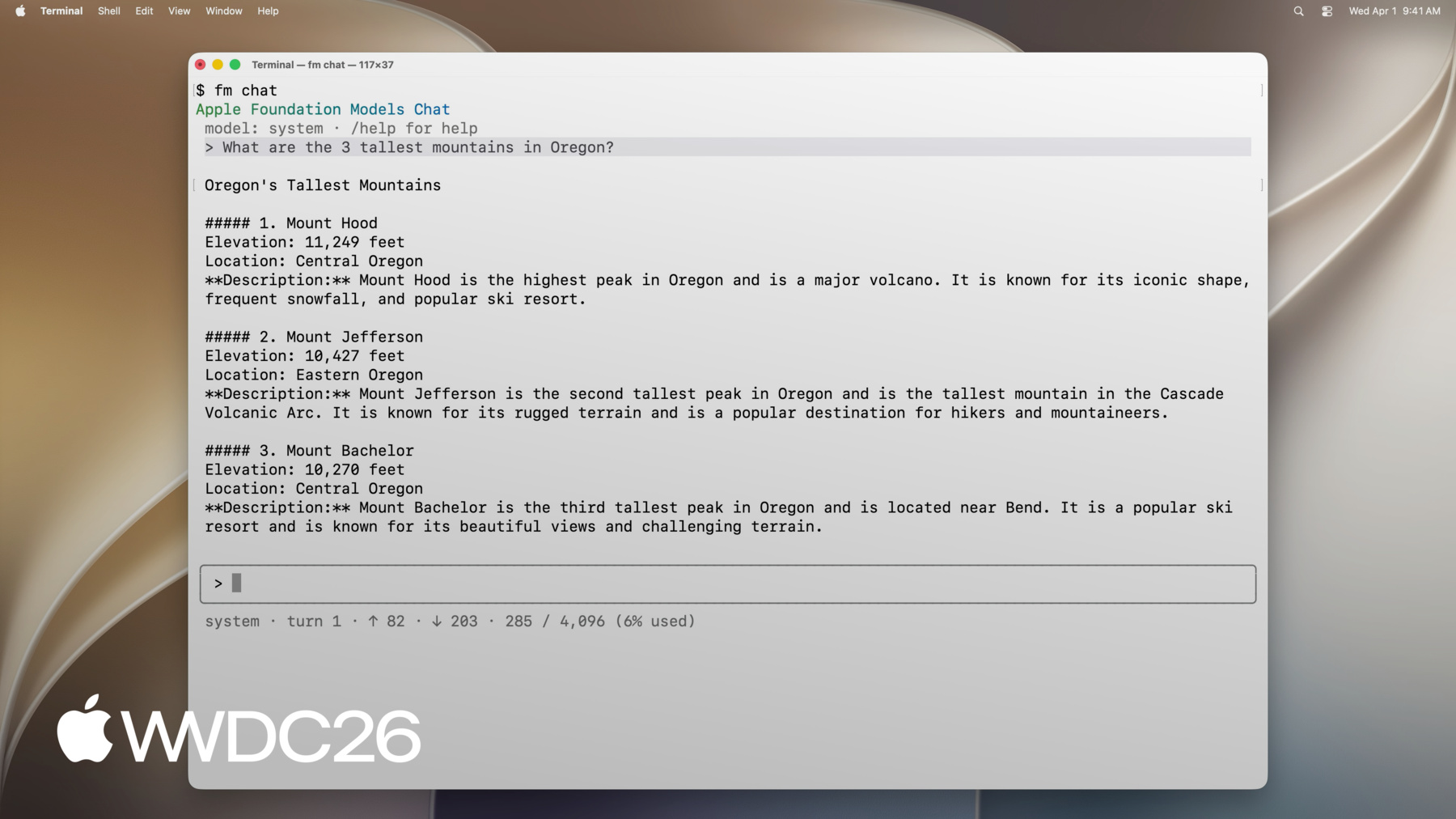
You can see a list of commands that are available. For example, you can use respond to prompt the model and return a response, chat to start an interactive interface, schema to create a schema, and more. To show you what fm is capable of, let's try using fm chat.
With this new terminal interface, I can start a conversation with the on-device model, right from my terminal. I can start with a first question, then ask a follow-up question.
fm chat comes with a number of commands. For example, with /model, I can switch the conversation to use the Private Cloud Compute model.
Or, with /save, I can save the current conversation to resume later.
Interactive sessions with fm chat are great for getting a first pulse of the model. So if you're exploring a new idea, you can pry the model and see how it performs with your prompts. When you'd rather have inline responses, like in scripts, use the command fm respond instead. Run fm respond with a prompt in a terminal, and you'll receive the response from the model as output.
fm respond has a number of options, like the model option, that lets you prompt the Private Cloud Compute model. Or the image option, to include an image in your prompt. Just like with the Swift framework, I can use the model to produce structured outputs. Using the command fm schema object, I can create a schema, and I can then use it with fm respond with the schema option.
There's more options that could be useful to you. To check out all the options, use the help option. As you've seen so far, the fm command line tool lets you use either the on-device model, or the Apple Foundation Model on Private Cloud Compute. By default, it uses the on-device model that comes with macOS, and that's always available.
You can also use the Apple Foundation Model on Private Cloud Compute, which has usage limits. It's a much bigger model than the on-device model, so it will perform better on complex problems.
Let's put together what we learned to solve a practical problem. I just completed a presentation project on my Mac. The folder where I was storing my assets is full of drafts, and I'd like to free up space on disk. I'd like to clean up this folder to only keep the final versions of my assets. I'll use Foundation Models to sort out my files, keep only the essentials, back them up, and move the old ones to my archive disk. I'd like to automate this in a script so that whenever this happens again, I can just rerun this script. Using fm here lets me call into a language model that can sort draft versus final files in my script. So that the script works even if the names are messy and are difficult to sort predictably.
I've prepared a script that uses fm to distinguish draft files from final files, and moves the files accordingly. It's going to sort the working folder.
Right now, this folder has both draft and final files. I'll go ahead and execute the script.
Now that it's complete, I can see that the old files were correctly moved out of the folder. I'll now open the archive folder.
I can see that the draft files were moved there, and, I'll open the backup directory.
I can see that the final files were copied there too as backup. Let's go over the script together to understand how I used fm to sort those files.
We start by loading a list of the files in the working directory. Next, we prompt the model to sort this list, and provide me with a list of draft files, as well as a list of the final files. I can do this with the fm respond command, passing my instructions and my prompt. To get a structured result from the model, I define a schema using the fm schema object command further up. The structured output will have two fields, a list of final files, and a list of draft files. I then use fm respond's schema option to use this schema to generate the output.
The output of fm respond contains a result in a JSON that's generated by the model. I can then use this result to first, copy the final files to my backup, and move the draft files to the archive.
There's more to discover with fm, so check out the tool on macOS 27 today, and try using the tool in automation. Let's talk now about the Python SDK. The Python SDK gives you access to Apple Foundation Models right from Python code. You can install it on a Python environment on your Mac, provided that the Python version is at least Python 3.10, that you have Xcode installed, and that you're using an Apple Silicon Mac. It's installed through pip, or any other package manager of your choice. The Python SDK includes the core features of the framework. If you've already used it in Swift, the APIs and abstractions will quickly feel familiar. You can use it to prompt a model with text inputs and image inputs, and you can use it to stream responses. Just like in Swift, you can use guided generation to have the model generate structured outputs. And you can use tool calling to enable the model to interact with code. Let's go over a practical example. I'm building an app to order groceries, and I'd like to let the user prompt the app using the on-device model. As I'm starting to add features, I'd like to evaluate the accuracy of my prompts. So I'll prototype them in Python, before implementing them in Swift. Prompting the model is done just like in Swift. I start by creating a LanguageModelSession, to which I can pass instructions if I'd like. Then, I call session.respond, passing my prompt as an argument. The result of method contains the output of the model.
Just like in the Swift Framework, I can expose tools to the model to interact with the user's context. For example, I can define a tool that the model can call to fetch the last few orders, so that it can provide more personalized information. Just like in the Swift Framework and in the command line tool, I can also constrain the model to produce structured outputs. For example, in this code, I'm using guided generation to ensure the output of the model is captured in an ItemsSuggestion object. Here, using the fm.generable decorator, I define the desired output structure, and I pass it to fm.respond as the generating argument. One of the main benefits of our Python SDK is easy integration with Python's ecosystem. Let me illustrate this with a use case where we'll use some open-source Python packages to set up an evaluation pipeline. As I'm designing an app to order groceries, one feature I'm working on is the ability to prepare the user's next order. Using a language model, I'd like to predict what users would like to add to their cart based on their previous orders.
As I'm designing this feature, I'd like to make sure the output reliably works off of the previous orders. And also, that the prediction accounts for any items already in the cart. I've prepared a few different implementations for this feature, each with different prompts. And I'd like to quantify their accuracy, so I can select the best one and make sure it performs well.
To evaluate their prompt and iterate, Swift developers can leverage the Evaluations framework. It's available with Xcode 27, and it makes it easy to create evaluations, and track the accuracy of your features across multiple iterations. But many data scientists might be more familiar with Python than with Swift. If you fall under this scenario, let me show you how I can perform this analysis in Python by using the Python SDK from a Jupyter Notebook.
First, I used a large server model to generate evaluation data. I now have some inputs, and for each of those, data on what I expect in the output.
I'll write a number of implementations that use different prompts. Then, for each of my evaluation inputs, I'll generate outputs using each of those different implementations. I'll then save this data as rows in a Pandas DataFrame. Next, I've designed some judge functions that rely on a server model. They will score each output on the criteria of my choice. I'll then save those metrics in the Pandas DataFrame. I can now generate some charts to see them visually. Let's see it in action.
My notebook contains evaluation data, with inputs and expected outputs. I prepared three different implementations of how to complete the user's cart. Each of those leverage the on-device model by prompting it differently. The first method uses a very minimal prompt.
The second one uses a more descriptive prompt, and describes the task more in detail.
And the third one has the most comprehensive prompts, and describes a list of rules to the model.
For each row in my evaluation dataset, I went ahead and generated the outputs for each of those implementations. I then stored those inputs and outputs in a Pandas DataFrame.
I passed this data to a third party model that I'm using as a judge model. Which will score each result on a set of criteria. With the gradings generated, I can use matplotlib to generate charts. So that I can quickly see how each set of prompts performs. Here, since the data has already been generated and graded, I can run this cell and the below to generate the charts.
Let's look at the charts.
First, by looking at the errors generated by setup, I can see that the detailed prompt leads to a high percentage of generation errors. This can happen, for example, when we reach the model's max context window size. Next, we can see that the two less detailed prompts tend to lead to excess items added to the cart, while the more detailed one has less excess items. However, with the more detailed prompts, we tend to miss more items that were expected.
The first prompt also tends to lead to more hallucinated items added to the cart. I can use those insights to iterate on those prompts. With Python, I can make those iterations quickly right from my notebook without having to rebuild the whole project. It makes it so convenient to test and make changes! With this example, we saw how you could generate outputs, grade them, and create charts with the Python SDK. Python has a strong open-source ecosystem of machine learning and data science packages, and we used some of those today in our automation. If you develop automation in Python, I encourage you to explore the ecosystem and see if you can reuse existing packages. Let's wrap this up. We just went over the new ways you can interact with Apple's Foundation Models. I encourage you to try them out today on macOS 27. You can use those tools alongside your Xcode project, as a way to prototype and evaluate prompts. Or you can use them on their own, to use the model in novel ways. To get more familiar with those tools, here are a few next steps that I recommend.
First, start by exploring the command line tool from the Terminal app. Explore the different options and features, and try them out. Next, to learn more about how to use the Python SDK, head to the GitHub repository. You'll find some example snippets and some documentation that you can use as a reference on how to build advanced workflows. Once you've gotten the hang of the Python SDK, put this new knowledge in practice to create an evaluation pipeline. Think of a way you can use the model, and after you find some working prompts, quantify the results of the model against an evaluation dataset to measure the effectiveness of your prompts. I hope using those new tools will inspire you to use language models in new and exciting ways. Happy building!
-
-
5:07 - Prompt the on-device model with fm respond
$ fm respond "Provide a basic regex in Swift to parse an email address" # Here is a basic regex to parse an email address in Swift: [...] $ fm respond "Provide a comprehensive regex in Swift to parse an email address" --model pcc # [...] Here's a robust Swift implementation using 'NSRegularExpression' to validate a typical email address: $ fm respond "What app is the user using in this screenshot?" --model pcc \ --image Screenshot.png # The user is using the Mail app. $ fm schema object --name AppsIdentified --string app_names --array > schema.json $ fm respond "What apps are the user actively using in this screenshot?" \ --image Screenshot.png --model pcc --schema schema.json # {"app_names": ["Messages", "Mail", "Calendar"]} $ fm respond --help -
7:55 - Sort files with fm respond and a schema
fm schema object --name "TriagedFileList" \ --string 'final_files' --array \ --string 'draft_files' --array > /tmp/schema.json output=$(fm respond \ --instructions "I just completed a project, and I need help triaging the latest version of the files from the previous versions. I will give you a list of files. Return a list of the latest files (i.e., all files that, you can infer from their name in the list, are the latest versions), and then return separately a list of all draft files (i.e., all files that weren't considered final)." \ "This is the list of all files:\n\n${files_list}" \ --schema /tmp/schema.json ) echo "${output}" | jq -r '.final_files[]' | while read -r file; do cp "${DIRECTORY_TO_TRIAGE}/${file}" "${FINAL_FILES_STORAGE_DIRECTORY}" done echo "${output}" | jq -r '.draft_files[]' | while read -r file; do mv "${DIRECTORY_TO_TRIAGE}/${file}" "${DRAFT_FILES_STORAGE_DIRECTORY}" done -
8:54 - Install the Foundation Models Python SDK
pip install apple_fm_sdk -
10:00 - Create a session and respond to a prompt
import apple_fm_sdk as fm INSTRUCTIONS = "You're an AI assistant for Cupertino Mart, a grocery store with in-app ordering." async def answer_question(prompt: str) -> str: session = fm.LanguageModelSession(instructions=INSTRUCTIONS) return await session.respond(prompt) -
10:21 - Define a Tool for the language model
class GetPastOrdersTool(fm.Tool): name = "get_past_orders" description = "Retrieves information about this user's past orders." @fm.generable("Past orders query parameter") class Arguments: number_orders: str = fm.guide("How many of the last orders to retrieve") @property def arguments_schema(self) -> fm.GenerationSchema: return self.Arguments.generation_schema() async def call(self, args: fm.GeneratedContent) -> str: number_orders = args.value(int, for_property="number_orders") return await Orders.load_last_orders(user_id=user_id, amount=number_orders) -
10:35 - Generate structured output with @fm.generable
@fm.generable("Suggested items")
class ItemsSuggestion:
	item_names: list[str] = fm.guide("Names of the suggested items")

INSTRUCTIONS = "You're an AI assistant tasked with returning potential grocery items that the user might be interested in."

async def generate_suggested_cart_items(user_input: Optional[str]) -> ItemsSuggestion:
	session = fm.LanguageModelSession(instructions=INSTRUCTIONS, tools=load_tools())
	prompt = """Using the tools to load the user's previous orders, \
              return a list of items the user has already ordered \
              and that they might be interested in again \
              as they're getting ready to place a new grocery order."""
	if user_input is not None:
    prompt += f"\nAccount for the following request from the user: {user_input}"
    return await session.respond(prompt, generating=ItemsSuggestion)
-
-
- 0:00 - Introduction
Overview of the Foundation Models Framework — guided generation, tool calling, and new macOS 27 features like image inputs and server model access.
- 1:22 - Introducing the fm CLI and Python SDK
Two new ways to access Apple Foundation Models on macOS: the fm command line tool (pre-installed with macOS 27 for terminal-based prompting and automation) and the Foundation Models SDK for Python (for ML engineers who work more in Python than Swift).
- 3:23 - Command line tool
How to use the fm command line tool — browsing available commands, starting an interactive conversation with fm chat, switching between the on-device and Private Cloud Compute models, and saving sessions to resume later.
- 5:02 - fm respond and structured output
How to use fm respond for inline scripting — passing prompts and getting responses as terminal output, using the model and image options, and combining fm schema object with the schema option to produce structured JSON outputs.
- 6:11 - Automating file management with fm
A practical automation demo: using fm in a shell script to intelligently sort a messy presentation folder — prompting the model with a file list to classify drafts versus finals, generating structured JSON output, and routing files to backup and archive accordingly.
- 8:52 - Python SDK
Introduction to the Foundation Models SDK for Python — installation requirements (Python 3.10+, Xcode, Apple Silicon), core features mirroring the Swift framework (text and image inputs, streaming, tool calling, guided generation), and its value for ML engineers and rapid prototyping.
- 9:42 - Prompting, tool calling and guided generation
How to use the Python SDK in a grocery app prototype — creating a LanguageModelSession, calling session.respond with a prompt, exposing tools for the model to fetch order history, and using the fm.generable decorator for structured output into a typed ItemsSuggestion object.
- 10:44 - Building an evaluation pipeline in Python
A case study using the Python SDK with Jupyter, Pandas, and matplotlib to evaluate three prompt implementations for a cart completion feature — generating outputs with the on-device model, scoring them with a server judge model on criteria like excess items, missing items, and hallucinations, and visualizing results to guide prompt iteration.
- 15:20 - Next steps
Summary of the new macOS tools and next steps: explore fm in Terminal, visit the Python SDK GitHub for example snippets, and build an evaluation pipeline to measure and improve prompt quality.