

-
Explore HDR rendering with EDR
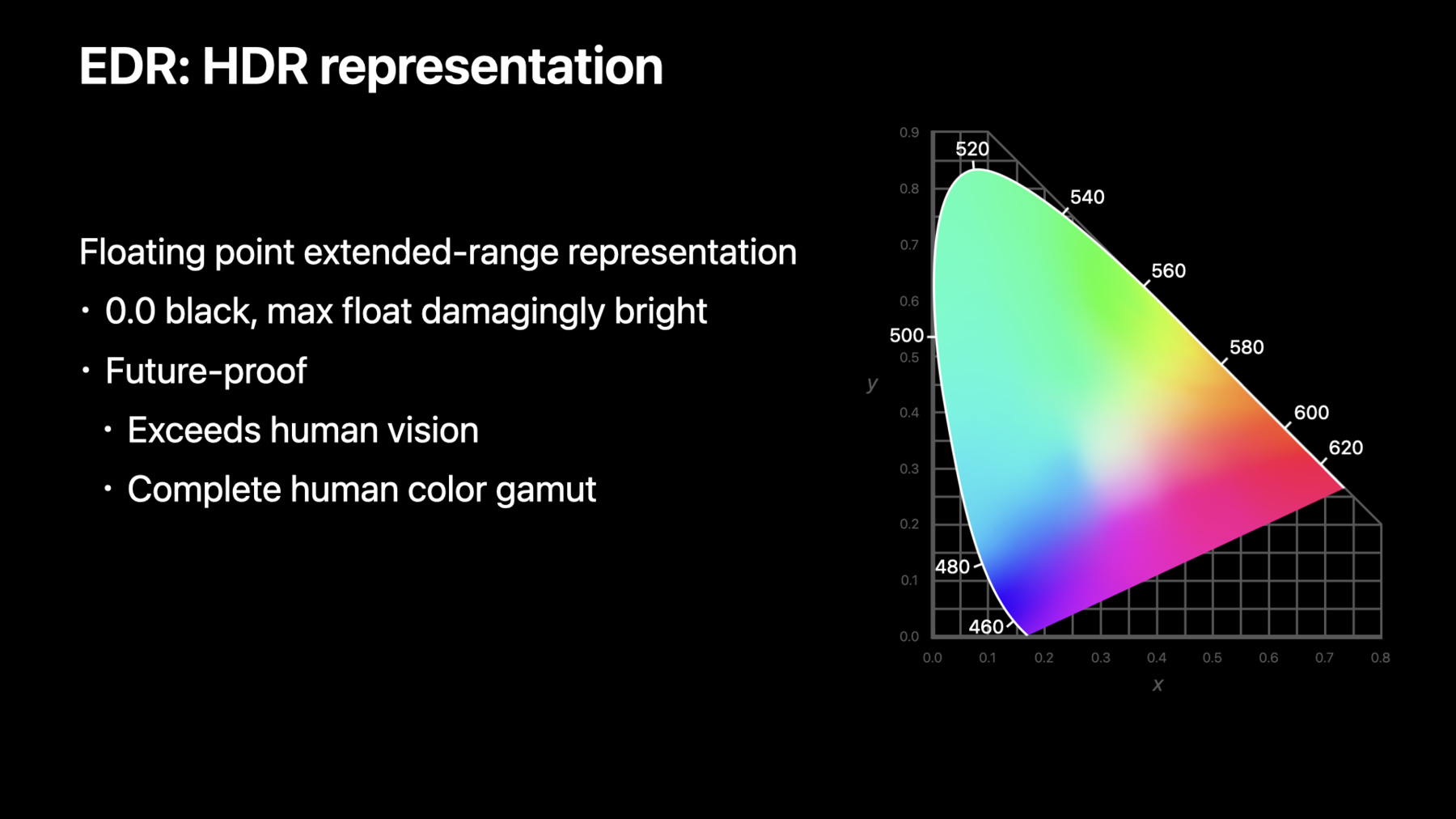
EDR is Apple's High Dynamic Range representation and rendering pipeline. Explore how you can render HDR content using EDR in your app and unleash the dynamic range capabilities of your HDR display including Apple's internal displays and Pro Display XDR.
We'll show you how game and pro app developers can take advantage of the native EDR APIs on macOS for even more control, and provide best practices for deciding when HDR is appropriate, applying tone-mapping, and delivering HDR content.Ressources
- Processing HDR images with Metal
- Edit and play back HDR video with AVFoundation
- Export HDR media in your app using AVFoundation
- Editing and playing HDR video
- Metal
- Metal Shading Language Specification
Vidéos connexes
WWDC23
Tech Talks
- Discover Reference Mode
- Discover Metal enhancements for A14 Bionic
- Support Apple Pro Display XDR in your apps
- Metal Enhancements for A13 Bionic
- An Introduction to HDR Video
- Authoring 4K and HDR HLS Streams
- Updating Your App for Apple TV 4K
WWDC22
WWDC20
WWDC19
-
Rechercher dans cette vidéo…
-
-
16:00 - AVPlayer automatically uses EDR with HDR content
// Instantiate AVPlayer with HDR Video Content VPLayer* player = [AVPLayer playerWithURL:HDRVideoURL]; AVPlayerLayer* playerLayer = [AVPlayerLayer playerLayerWithPlayer:player]; // Play HDR Video via EDR AVPlayerViewController* controller = [[AVPlayerViewController alloc] init]; controller.player = player; [player play]; -
17:52 - EDR with CAMetalLayer 1
// Opt-in to EDR metalLayer.wantsExtendedDynamicRangeContent = YES; // Set extended-range colorspace metalLayer.colorspace = CGColorSpaceCreateWithName(kCGColorSpaceExtendedLinearDisplayP3); // Select FP16 pixel buffer format metalLayer.pixelFormat = MTLPixelFormatRGBA16Float; -
18:53 - EDR with CAMetalLayer 2
// Create CGImage from HDR Image CGImageSourceRef isr = CGImageSourceCreateWithURL((CFURLRef)HDRimageURL, NULL); CGImageRef img = CGImageSourceCreateImageAtIndex(isr, 0, NULL); // Draw into floating point bitmap context size_t width = CGImageGetWidth(img); size_t height = CGImageGetHeight(img); CGBitmapInfo info = kCGBitmapByteOrder16Host | kCGImageAlphaPremultipliedLast | kCGBitmapFloatComponents; CGContextRef ctx = CGBitmapContextCreate(NULL, width, height, 16, 0, metalLayer.colorspace, info); CGContextDrawImage(ctx, CGRectMake(0, 0, width, height), img); // Create floating point texture MTLTextureDescriptor* desc = [[MTLTextureDescriptor alloc] init]; desc.pixelFormat = MTLPixelFormatRGBA16Float; desc.textureType = MTLTextureType2D; id<MTLTexture> tex = [metalLayer.device newTextureWithDescriptor:desc]; // Load EDR bitmap into texture const void* data = CGBitmapContextGetData(ctx); [tex replaceRegion:MTLRegionMake2D(0, 0, width, height) mipmapLevel:0 withBytes:data bytesPerRow:CGBitmapContextGetBytesPerRow(ctx)]; // Draw with the texture in your EDR enabled metal pipeline -
20:30 - EDR with NSOpenGLView
// Opt-in to EDR - (void) viewWillMoveToWindow:(nullable NSWindow *)newWindow { self.wantsExtendedDynamicRangeOpenGLSurface = YES; } // Select OpenGL float pixel buffer format NSOpenGLPixelFormatAttribute attribs[] = { NSOpenGLPFADoubleBuffer, NSOpenGLPFAMultiSample, NSOpenGLPFAColorFloat, NSOpenGLPFAColorSize, 64, NSOpenGLPFAOpenGLProfile, NSOpenGLProfileVersion4_1Core, 0}; NSOpenGLPixelFormat* pf = [[NSOpenGLPixelFormat alloc] initWithAttributes:attribs]; // Draw EDR content into NSOpenGLView -
21:46 - EDR with NSOpenGLView
// Get existing colorspace from the window CGColorSpaceRef color_space = [view.window.colorSpace CGColorSpace]; // Promote the colorspace to extended-range CGColorSpaceRef color_space_extended = CGColorSpaceCreateExtended(color_space); // Apply the extended-range colorspace to your app NSColorSpace* extended_ns_color_space = [[NSColorSpace alloc] initWithCGColorSpace:color_space_extended]; view.window.colorSpace = extended_ns_color_space; CGColorSpaceRelease(color_space_extended); -
29:00 - EDR display change notifications via NSScreen
// Read static values NSScreen* screen = window.screen; double maxPotentialEDR = screen.maximumPotentialExtendedDynamicRangeColorComponentValue; double maxReferenceEDR = screen.maximumReferenceExtendedDynamicRangeColorComponentValue; // Register for dynamic EDR notifications NSNotificationCenter* notification = [NSNotificationCenter defaultCenter]; [notification addObserver:self selector:@selector(screenChangedEvent:) name:NSApplicationDidChangeScreenParametersNotification object:nil]; // Query for latest values - (void)screenChangedEvent:(NSNotification *)notification { double maxEDR = screen.maximumExtendedDynamicRangeColorComponentValue; } -
30:28 - CAEDRMetadata tone-mapper
// HLG CAEDRMetadata* edrMetaData = [CAEDRMetadata HLGMetadata]; // HDR10 CAEDRMetadata* edrMetaData = [CAEDRMetadata HDR10MetadataWithMinLuminance:minLuminance maxLuminance:maxContentMasteringDisplayBrightness opticalOutputScale:outputScale]; // Set on CAMetalLayer metalLayer.EDRMetadata = edrMetaData; -
31:35 - Computing your app’s brightest pixel
// Create the linear pixel we want to render

double EDRmaxComponents[4] = {EDRmax, EDRmax, EDRmax, 1.0};

CGColorSpaceRef linearColorSpace =
                   CGColorSpaceCreateWithName(kCGColorSpaceExtendedLinearDisplayP3);

CGColorRef EDRmaxColorLinear = CGColorCreate(linearColorSpace, EDRmaxComponents);

// Convert from linear to application’s colorspace

CGColorSpaceRef winColorSpace = [self.window.colorSpace CGColorSpace];

CGColorRef EDRmaxColor = CGColorCreateCopyByMatchingToColorSpace(winColorSpace,
                                                                 kCGRenderingIntentDefault,
                                                                 EDRmaxColorLinear,
                                                                 NULL);
-