

View in English

  • Apple Developer
    • Get Started

    Explore Get Started

    • Overview
    • Learn
    • Apple Developer Program

    Stay Updated

    • Latest News
    • Hello Developer
    • Platforms

    Explore Platforms

    • Apple Platforms
    • iOS
    • iPadOS
    • macOS
    • tvOS
    • visionOS
    • watchOS
    • App Store

    Featured

    • Design
    • Distribution
    • Games
    • Accessories
    • Web
    • Home
    • CarPlay
    • Technologies

    Explore Technologies

    • Overview
    • Xcode
    • Swift
    • SwiftUI

    Featured

    • Accessibility
    • App Intents
    • Apple Intelligence
    • Games
    • Machine Learning & AI
    • Security
    • Xcode Cloud
    • Community

    Explore Community

    • Overview
    • Meet with Apple events
    • Community-driven events
    • Developer Forums
    • Open Source

    Featured

    • WWDC
    • Swift Student Challenge
    • Developer Stories
    • App Store Awards
    • Apple Design Awards
    • Apple Developer Centers
    • Documentation

    Explore Documentation

    • Documentation Library
    • Technology Overviews
    • Sample Code
    • Human Interface Guidelines
    • Videos

    Release Notes

    • Featured Updates
    • iOS
    • iPadOS
    • macOS
    • watchOS
    • visionOS
    • tvOS
    • Xcode
    • Downloads

    Explore Downloads

    • All Downloads
    • Operating Systems
    • Applications
    • Design Resources

    Featured

    • Xcode
    • TestFlight
    • Fonts
    • SF Symbols
    • Icon Composer
    • Support

    Explore Support

    • Overview
    • Help Guides
    • Developer Forums
    • Feedback Assistant
    • Contact Us

    Featured

    • Account Help
    • App Review Guidelines
    • App Store Connect Help
    • Upcoming Requirements
    • Agreements and Guidelines
    • System Status
  • Quick Links

    • Events
    • News
    • Forums
    • Sample Code
    • Videos
 

Videos

Abrir menú Cerrar menú
  • Colecciones
  • Todos los videos
  • Información

Más videos

  • Información
  • Código
  • Capture HDR content with ScreenCaptureKit

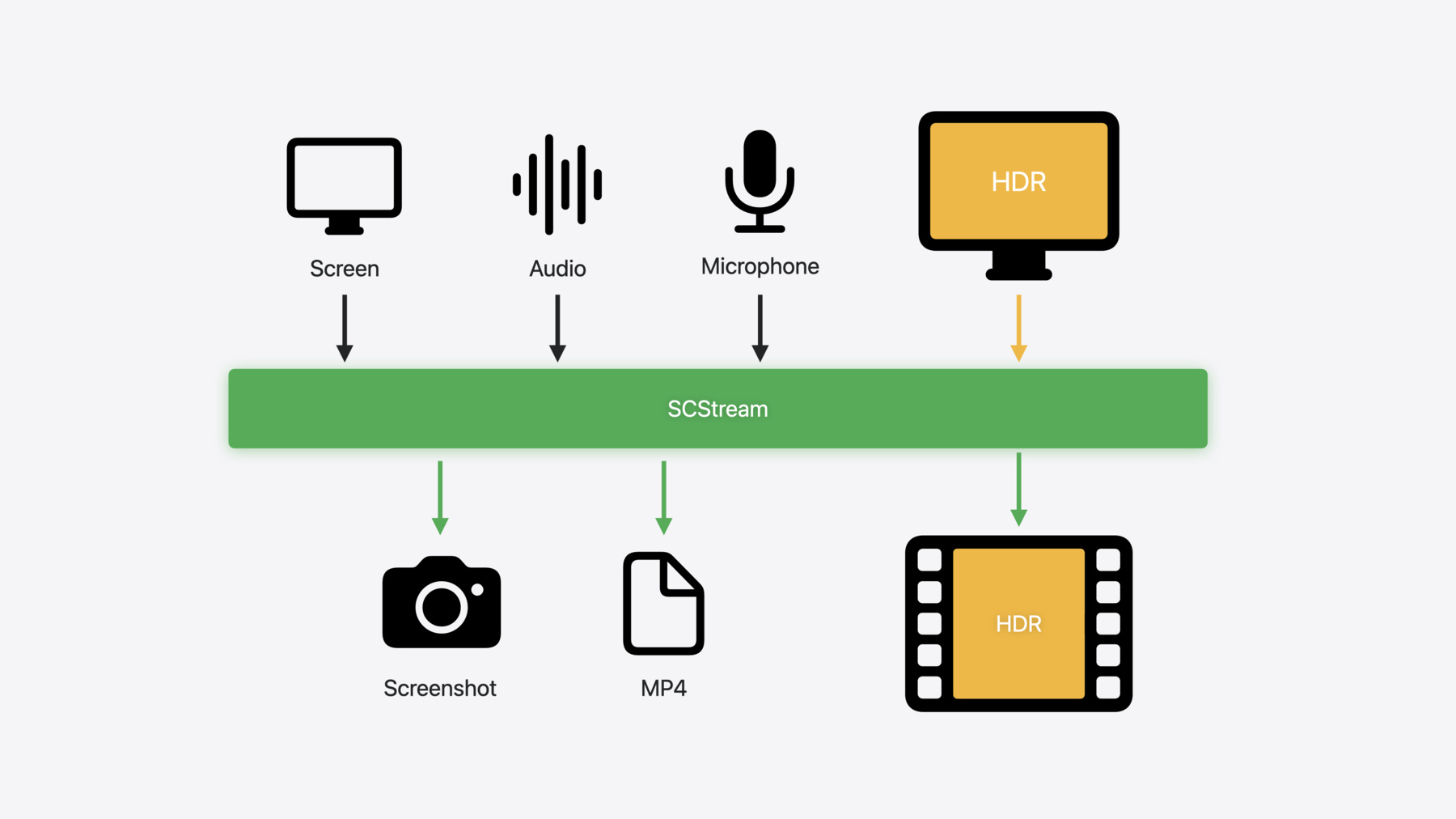
    Learn how to capture high dynamic colors using ScreenCaptureKit, and explore new features like HDR support, microphone capture, and straight-to-file recording.

    Capítulos

    • 0:00 - Introduction and ScreenCaptureKit recap
    • 1:20 - Capture HDR content
    • 7:14 - Add microphone output
    • 8:41 - Record to file

    Recursos

    • Forum: Media Technologies
    • ScreenCaptureKit
      • Video HD
      • Video SD

    Videos relacionados

    WWDC24

    • Use HDR for dynamic image experiences in your app

    WWDC23

    • Support HDR images in your app
    • What’s new in ScreenCaptureKit

    WWDC22

    • Meet ScreenCaptureKit
    • Take ScreenCaptureKit to the next level
  • Buscar este video…
    • 5:22 - Capture HDR

      // Get content that is currently available for capture.
      let availableContent = try await SCShareableContent.current
              
      // Create instance of SCContentFilter to record entire display.
      guard let display = availableContent.displays.first else { return }
      let filter = SCContentFilter(display: display, excludingWindows: [])
      
      // Create a configuration using preset for HDR stream canonical display.
      let config = SCStreamConfiguration(preset: .captureHDRStreamCanonicalDisplay)
      
      // Create a stream with the filter and stream configuration.
      let stream = SCStream(filter: filter, configuration: config, delegate: self)
      
      // Add a stream output to capture screen content.
      try stream.addStreamOutput(self, type: .screen, sampleHandlerQueue: nil)
      
      // Start the capture session.
      try await stream.startCapture()
    • 6:40 - Use a local display preset to capture HDR

      // Create an SCStreamConfiguration with preset for HDR.
      let config = SCStreamConfiguration(preset: .captureHDRScreenshotLocalDisplay)
      
      // Call the screenshot API to get CMSampleBuffer representation
      let screenshotBuffer = try await SCScreenshotManager.captureSampleBuffer(contentFilter: filter, configuration:config)
      
      // Call the screenshot API to get CGImage representation.
      let screenshotImage = try await SCScreenshotManager.captureImage(contentFilter: filter, configuration:config)
    • 8:05 - Capture samples of microphone audio

      // Create instance of SCStreamConfiguration.
      let config = SCStreamConfiguration()
      
      // Enable microphone capture and set id of microphone to capture.
      config.captureMicrophone = true
      config.microphoneCaptureDeviceID = AVCaptureDevice.default(for: .audio)?.uniqueID
      
      // Create an SCStream instance.
      let stream = SCStream(filter: filter, configuration: config, delegate: self)
      
      // Add stream outputs for capturing screen and microphone.
      try stream.addStreamOutput(self, type: .screen, sampleHandlerQueue: nil)
      try stream.addStreamOutput(self, type: .microphone, sampleHandlerQueue: nil)
      
      // Start the capture session
      try await stream.startCapture()
      
      // Implement SCStreamOutput function to receive samples.
      func stream(_ stream: SCStream, didOutputSampleBuffer sampleBuffer: CMSampleBuffer, of type: SCStreamOutputType) {
          switch type {
          case .screen:
              handleLatestScreenSample(sampleBuffer)
          case .audio:         
              handleLatestAudioSample(sampleBuffer)
          case .microphone:
              handleLatestMicrophoneSample(sampleBuffer)
          }
      }
    • 9:38 - Record to file

      // Create a recording output configuration.
      let recordingConfiguration = SCRecordingOutputConfiguration()
      
      // Configure the outputURL (optionally set file type and video codec).
      recordingConfiguration.outputURL = url
      recordingConfiguration.outputFileType = .mov
      recordingConfiguration.videoCodecType = .hevc
              
      // Create the recording output with the configuration.
      let recordingOutput = SCRecordingOutput(configuration: recordingConfiguration, delegate: self)
      
      // Add an SCRecordingOutput to the stream.
      try stream.addRecordingOutput(recordingOutput)
      
      // Start capturing (which will also start recording).
      try await stream.startCapture()
      
      // Stop recording.
      try await stream.stopCapture()
      
      //OR
      // Stop recording, but keep stream running.
      try stream.removeRecordingOutput(recordingOutput)
    • 10:27 - Respond to delegate events

      func recordingOutputDidStartRecording(_ recordingOutput: SCRecordingOutput) {
          // Recording started asynchronously after addRecordOutput.
      }
      
      func recordingOutput(_ recordingOutput: SCRecordingOutput, didFailWithError error: Error) {
          // Recording failed with error.
      }
              
      func recordingOutputDidFinishRecording(_ recordingOutput: SCRecordingOutput) {
          // Recording finished after calling either removeRecordOutput or stopCapture.
      }

Developer Footer

  • Videos
  • WWDC24
  • Capture HDR content with ScreenCaptureKit
  • Open Menu Close Menu
    • iOS
    • iPadOS
    • macOS
    • tvOS
    • visionOS
    • watchOS
    • App Store
    Open Menu Close Menu
    • Swift
    • SwiftUI
    • Swift Playground
    • TestFlight
    • Xcode
    • Xcode Cloud
    • Icon Composer
    • SF Symbols
    Open Menu Close Menu
    • Accessibility
    • Accessories
    • Apple Intelligence
    • Audio & Video
    • Augmented Reality
    • Business
    • Design
    • Distribution
    • Education
    • Games
    • Health & Fitness
    • In-App Purchase
    • Localization
    • Maps & Location
    • Machine Learning & AI
    • Security
    • Safari & Web
    Open Menu Close Menu
    • Documentation
    • Downloads
    • Sample Code
    • Videos
    Open Menu Close Menu
    • Help Guides & Articles
    • Contact Us
    • Forums
    • Feedback & Bug Reporting
    • System Status
    Open Menu Close Menu
    • Apple Developer
    • App Store Connect
    • Certificates, IDs, & Profiles
    • Feedback Assistant
    Open Menu Close Menu
    • Apple Developer Program
    • Apple Developer Enterprise Program
    • App Store Small Business Program
    • MFi Program
    • Mini Apps Partner Program
    • News Partner Program
    • Video Partner Program
    • Security Bounty Program
    • Security Research Device Program
    Open Menu Close Menu
    • Meet with Apple
    • Apple Developer Centers
    • App Store Awards
    • Apple Design Awards
    • Apple Developer Academies
    • WWDC
    Read the latest news.
    Get the Apple Developer app.
    Copyright © 2026 Apple Inc. All rights reserved.
    Terms of Use Privacy Policy Agreements and Guidelines