

View in English

  • Apple Developer
    • Get Started

    Explore Get Started

    • Overview
    • Learn
    • Apple Developer Program

    Stay Updated

    • Latest News
    • Hello Developer
    • Platforms

    Explore Platforms

    • Apple Platforms
    • iOS
    • iPadOS
    • macOS
    • tvOS
    • visionOS
    • watchOS
    • App Store

    Featured

    • Design
    • Distribution
    • Games
    • Accessories
    • Web
    • Home
    • CarPlay
    • Technologies

    Explore Technologies

    • Overview
    • Xcode
    • Swift
    • SwiftUI

    Featured

    • Accessibility
    • App Intents
    • Apple Intelligence
    • Games
    • Machine Learning & AI
    • Security
    • Xcode Cloud
    • Community

    Explore Community

    • Overview
    • Meet with Apple events
    • Community-driven events
    • Developer Forums
    • Open Source

    Featured

    • WWDC
    • Swift Student Challenge
    • Developer Stories
    • App Store Awards
    • Apple Design Awards
    • Apple Developer Centers
    • Documentation

    Explore Documentation

    • Documentation Library
    • Technology Overviews
    • Sample Code
    • Human Interface Guidelines
    • Videos

    Release Notes

    • Featured Updates
    • iOS
    • iPadOS
    • macOS
    • watchOS
    • visionOS
    • tvOS
    • Xcode
    • Downloads

    Explore Downloads

    • All Downloads
    • Operating Systems
    • Applications
    • Design Resources

    Featured

    • Xcode
    • TestFlight
    • Fonts
    • SF Symbols
    • Icon Composer
    • Support

    Explore Support

    • Overview
    • Help Guides
    • Developer Forums
    • Feedback Assistant
    • Contact Us

    Featured

    • Account Help
    • App Review Guidelines
    • App Store Connect Help
    • Upcoming Requirements
    • Agreements and Guidelines
    • System Status
  • Quick Links

    • Events
    • News
    • Forums
    • Sample Code
    • Videos
 

Videos

Abrir menú Cerrar menú
  • Colecciones
  • Todos los videos
  • Información

Más videos

  • Información
  • Código
  • Squeeze the most out of Apple Pencil

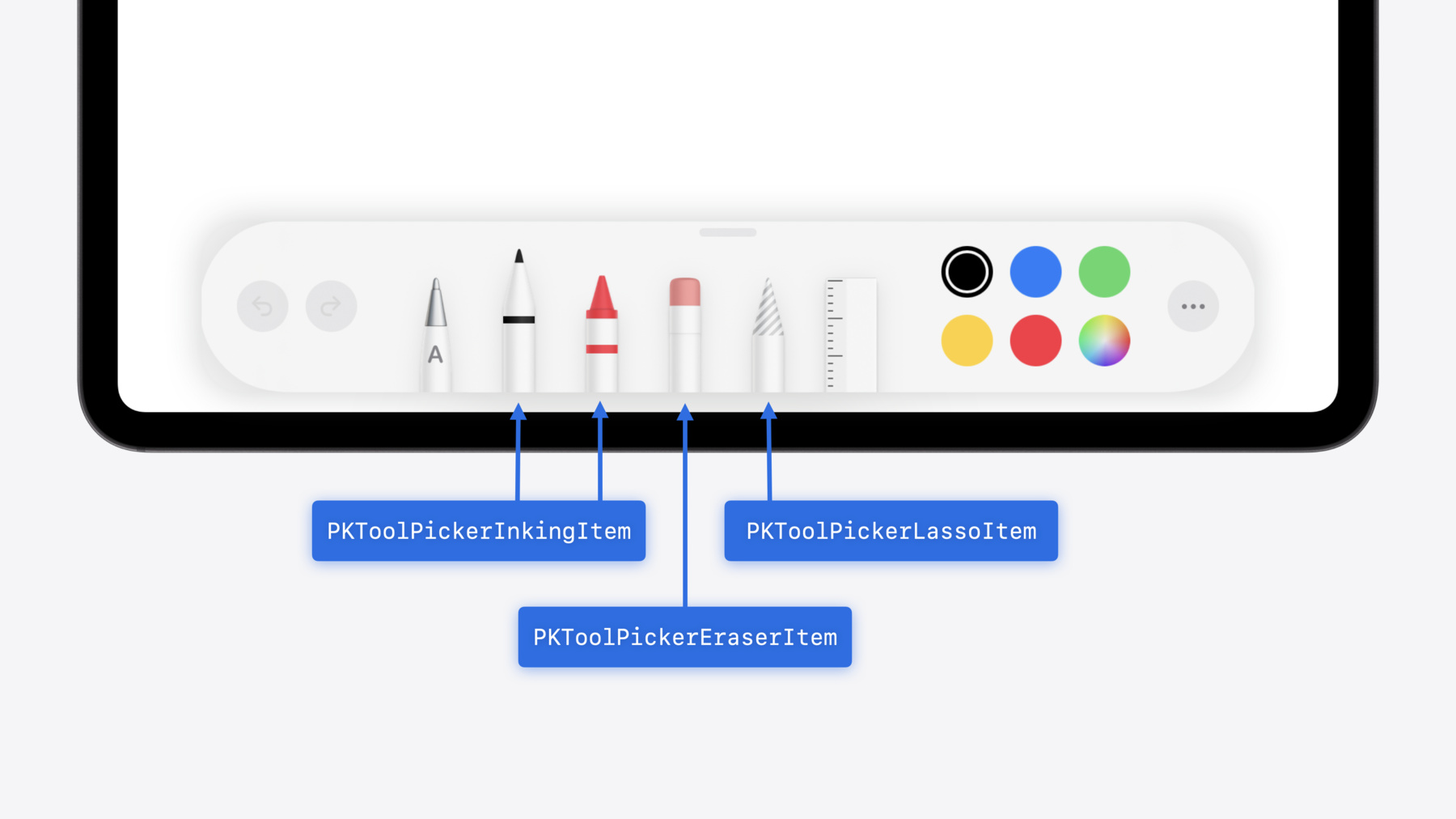
    New in iOS 18, iPadOS 18, and visionOS 2, the PencilKit tool picker gains the ability to have completely custom tools, with custom attributes. Learn how to express your custom drawing experience in the tool picker using the same great tool picking experience available across the system. Discover how to access the new features of the Apple Pencil Pro, including roll angle, the squeeze gesture, and haptic feedback.

    Capítulos

    • 0:00 - Introduction
    • 1:16 - Configuring the tool picker
    • 5:20 - Custom tools in the tool picker
    • 8:47 - Apple Pencil Pro features and APIs

    Recursos

    • Playing haptic feedback in your app
    • Apple Pencil
    • Configuring the PencilKit tool picker
    • Apple Pencil updates
    • Forum: UI Frameworks
    • Human Interface Guidelines: Apple Pencil and Scribble
      • Video HD
      • Video SD

    Videos relacionados

    WWDC20

    • Inspect, modify, and construct PencilKit drawings
    • Meet Scribble for iPad

    WWDC19

    • Introducing PencilKit
  • Buscar este video…
    • 10:24 - Respond to squeeze in UIKit

      class MyViewController: UIViewController, UIPencilInteractionDelegate {
          
          func pencilInteraction(_ interaction: UIPencilInteraction, 
                     didReceiveSqueeze squeeze: UIPencilInteraction.Squeeze) {
      
              if UIPencilInteraction.preferredSqueezeAction == .showContextualPalette &&
                 squeeze.phase == .ended {
                 let anchorPoint = squeeze.hoverPose?.location ?? myDefaultLocation
                 presentMyContextualPaletteAtPosition(anchorPoint)
              }
          }
      }
    • 10:46 - Respond to squeeze in SwiftUI

      @Environment(\.preferredPencilSqueezeAction) var preferredAction
      @State var contextualPalettePresented = false
      @State var contextualPaletteAnchor = MyPaletteAnchor.default
      
      var body: some View {
          MyView()
              .onPencilSqueeze { phase in
                  if preferredAction == .showContextualPalette, case let .ended(value) = phase {
                      if let anchorPoint = value.hoverPose?.anchor {
                          contextualPaletteAnchor = .point(anchorPoint)
                      }
                      contextualPalettePresented = true
                  }
              }
      }
    • 11:50 - Provide canvas feedback in UIKit

      class MyViewController: UIViewController {
          @ViewLoading var feedbackGenerator: UICanvasFeedbackGenerator
          
          override func viewDidLoad() {
              super.viewDidLoad()
              feedbackGenerator = UICanvasFeedbackGenerator(view: view)
          }
      
          func dragAlignedToGuide(_ sender: MyDragGesture) {
              feedbackGenerator.alignmentOccurred(at: sender.location(in: view))
          }
      
          func snappedToShape(_ sender: MyDrawGesture) {
              feedbackGenerator.pathCompleted(at: sender.location(in: view))
          }
      }
    • 12:29 - Provide canvas feedback in SwiftUI

      @State var dragAlignedToGuide = 0
      @State var snappedToShape = 0
       var body: some View {
          MyView()
              .sensoryFeedback(.alignment, trigger: dragAlignedToGuide)
              .sensoryFeedback(.pathComplete, trigger: snappedToShape)
      }

Developer Footer

  • Videos
  • WWDC24
  • Squeeze the most out of Apple Pencil
  • Open Menu Close Menu
    • iOS
    • iPadOS
    • macOS
    • tvOS
    • visionOS
    • watchOS
    • App Store
    Open Menu Close Menu
    • Swift
    • SwiftUI
    • Swift Playground
    • TestFlight
    • Xcode
    • Xcode Cloud
    • Icon Composer
    • SF Symbols
    Open Menu Close Menu
    • Accessibility
    • Accessories
    • Apple Intelligence
    • Audio & Video
    • Augmented Reality
    • Business
    • Design
    • Distribution
    • Education
    • Games
    • Health & Fitness
    • In-App Purchase
    • Localization
    • Maps & Location
    • Machine Learning & AI
    • Security
    • Safari & Web
    Open Menu Close Menu
    • Documentation
    • Downloads
    • Sample Code
    • Videos
    Open Menu Close Menu
    • Help Guides & Articles
    • Contact Us
    • Forums
    • Feedback & Bug Reporting
    • System Status
    Open Menu Close Menu
    • Apple Developer
    • App Store Connect
    • Certificates, IDs, & Profiles
    • Feedback Assistant
    Open Menu Close Menu
    • Apple Developer Program
    • Apple Developer Enterprise Program
    • App Store Small Business Program
    • MFi Program
    • Mini Apps Partner Program
    • News Partner Program
    • Video Partner Program
    • Security Bounty Program
    • Security Research Device Program
    Open Menu Close Menu
    • Meet with Apple
    • Apple Developer Centers
    • App Store Awards
    • Apple Design Awards
    • Apple Developer Academies
    • WWDC
    Read the latest news.
    Get the Apple Developer app.
    Copyright © 2026 Apple Inc. All rights reserved.
    Terms of Use Privacy Policy Agreements and Guidelines