

-
アプリへのMusicKitの統合
MusicKitを使って、Apple Musicの機能をアプリに組み込みましょう。このセッションでは、認可、サブスクリプション状況の確認、楽曲の選択、再生のコントロール、複数のストアフロント間での楽曲共有といったトピックを取り上げます。Apple Musicカタログや個人用ライブラリを閲覧できる機能を、新しいミュージックピッカーを使ってユーザーに提供する方法を解説します。また、SystemMusicPlayerとApplicationMusicPlayerの違いや、再生の状態をオブザーブする方法も紹介します。
関連する章
- 0:00 - はじめに
- 2:11 - プロジェクトの設定とアクセス許可
- 7:10 - ミュージック項目とミュージックピッカー
- 10:54 - 音楽プレイヤーと再生
- 16:26 - カタログリクエスト
- 20:11 - 次のステップ
リソース
関連ビデオ
WWDC23
WWDC22
-
このビデオを検索
WWDC 2026へようこそ。 私はMusicKitチームの エンジニア、Cathyです! 今日は、チームメイトのAlanと私が MusicKitをアプリに統合する方法をご紹介します。
MusicKitはAppleプラットフォーム向けの Swiftフレームワークで、 一連のAPIを提供しており、 アプリから音楽にアクセスして 再生することができます。 Swift並行処理とSwiftUIを 念頭に設計されており、 MusicKitはApple Musicとの 統合を効率化します。 音楽を活かした豊かな体験を構築できるため、 Apple Musicカタログを ブラウズして再生したり、 ユーザーのメディアライブラリを利用したりできます。 アプリから直接。 今日は、Alanと私が多くの 主要なMusicKitコンセプトをカバーします。 私たちが作ったワークアウトアプリを 強化しながら。 まず、Xcodeの設定方法と 音楽アクセスの処理方法を説明します。
次に、MusicKitの音楽アイテムとは何かについて説明し、 その選択方法をご紹介します。
Alanは私の音楽選択の作業を引き継ぎ、 選択した楽曲を再生できるよう準備します。
最後に、Alanが音楽カタログのリクエストについて詳しく解説し、 私たちが作ったアプリをさらにカスタマイズします。 では、MusicKit統合に入る前に ワークアウトアプリの フローを確認したいと思います。 参照用に、完成したサンプルコードは デベロッパードキュメントサイトでご覧いただけます。
アプリを起動して、現在のフローを確認します。 バイクワークアウトを開始すると、 ストップウォッチが表示された画面が現れ、 セッションを終了するボタンも表示されます。
良いスタートですが、ワークアウト中に 再生する音楽を選びたいので、 MusicKitを統合したいと思います!
コーディングを始める前に、 いくつかの設定を行う必要があります。 プロジェクトの設定の一部として。 その設定の一つは、デベロッパーポータルでの デベロッパートークンの登録です。 MusicKitリクエストに必要です。 デベロッパートークンを登録すると、 自動的に生成されます。
自動トークン生成を有効にするには、 App IDを登録するページに 移動します。 「App Services」タブでMusicKitの チェックボックスがオンになっていることを確認します。
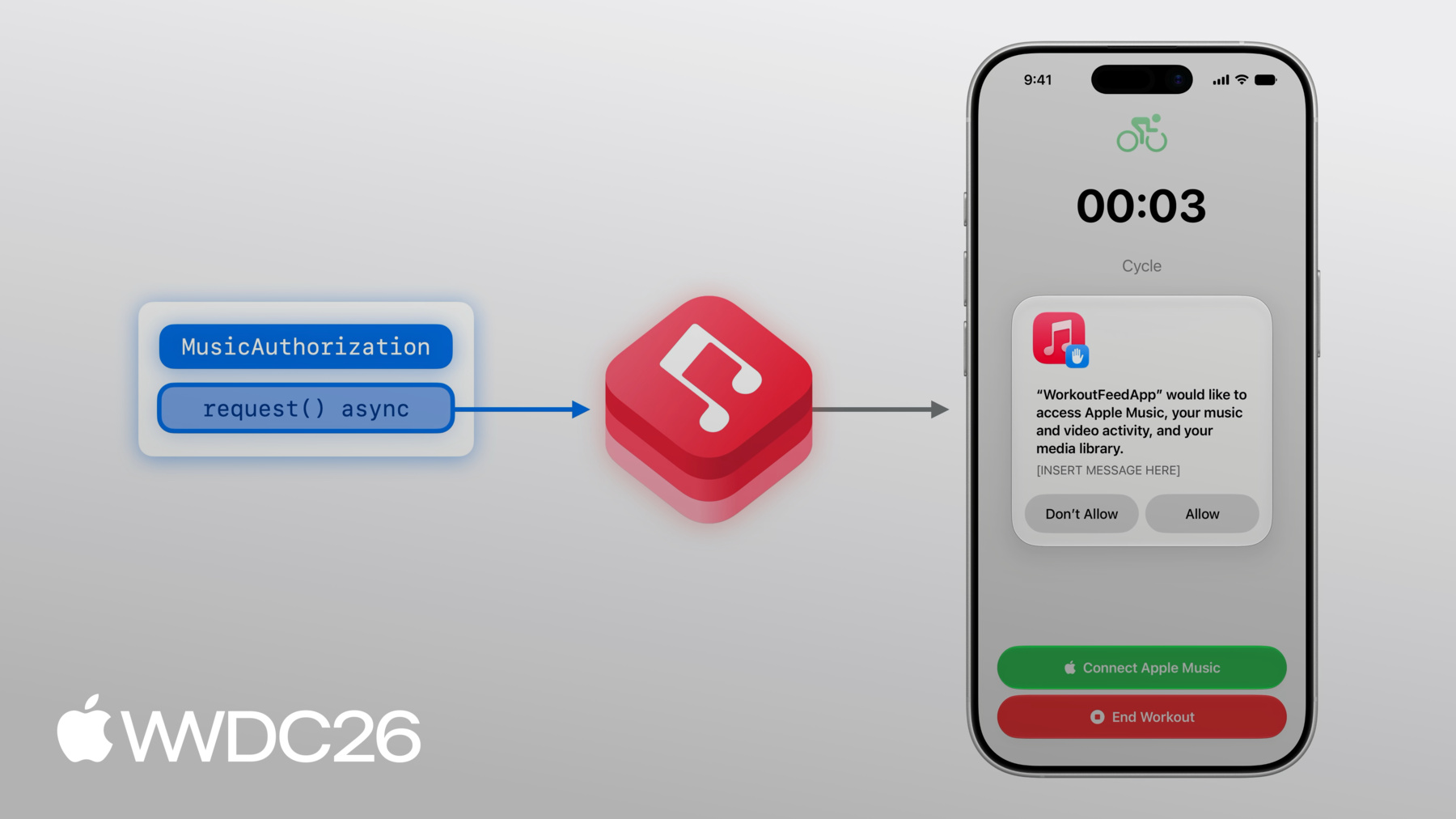
トークンはデベロッパーアカウントに 関連付けられているため、 Xcodeで同じアカウントにログインしていることを確認します。 では、アプリに戻りましょう! ワークアウト中に再生する音楽を 選びたいのですが、 音楽を選ぶ前に、 MusicKitが音楽コンテンツにアクセスするための 許可が必要です。 承認をリクエストするには、 MusicKitのMusicAuthorization requestメソッドを使用します。 これは非同期メソッドで、 アプリの音楽アクセスが 承認されているかどうかを返します。 MusicKitは、許可を求めるアラートを ユーザーに表示します。
このアラートの説明文をカスタマイズして、 アプリがアクセスをどのように使用するかについての 詳細なコンテキストを追加できます。 プロジェクト設定で行います。
音楽コンテンツへのアクセス理由を 提供するために、 Xcodeプロジェクトの「Signing & Capabilities」タブに移動し、 メディアライブラリ機能を追加します。 テキストボックスに、アプリがユーザーの ミュージックライブラリをどのように 使用するかを説明できます。 この説明は、許可アラートの 下部に表示されます。 承認をリクエストすると表示されます。 Apple Musicに未加入のユーザーがコンテンツを聴きたい場合、 Apple Musicカタログの 加入する方法を提供したいと思います。 Apple MusicサブスクリプションはMusicKitの使用に 必須ではありませんが、 サブスクリプションがない場合、 購入またはSyncした音楽のみアクセス可能です。 アクティブなサブスクリプションがない場合、 MusicKitのサブスクリプションオファー ビューモディファイアを使用して、 アプリを離れることなくApple Musicへの 加入機会を提供できます。 .musicSubscriptionOfferはビューモディファイアで、 isPresentedバインディングパラメータを受け入れます。 これは、ボタンがタップされたときに このビューで変化します。
表示されると、サブスクリプションオファーUIは ユーザーに手順を示し、 Apple Musicサブスクリプションに 素早く登録できます。 デベロッパーとして、 コミッションを得る可能性があります。 アプリを通じてApple Musicに 誰かが登録した場合、 Apple Services Performance Partner Programの一環として。 このプログラムのための情報を MusicSubscriptionOffer.Options構造体で指定し、 ビューモディファイアに渡すことができます。 options構造体ではメッセージ識別子を 設定することもでき、 表示されるUIを変更できます。 私の最終目標は音楽を再生することなので、 messageIdentifierを optionsの.playMusicとして設定します。
メッセージ識別子をカスタマイズして、 ユースケースに合わせた異なるUI処理を提供できます。
メインビューでは、@Stateプロパティを 宣言する必要があります。 サブスクリプション状態を 表すものです。 ユーザーが未加入の場合にのみ サブスクリプションボタンを表示したく、 加入可能な状態にある必要があります。 サブスクリプション状態を更新するには、 承認が付与されたときに実行される.taskを追加できます。 ここでは、現在の値を取得し、 発生する可能性のある更新も リッスンして、値を適切に設定します。
承認とサブスクリプションが完了したので、 サブスクリプションを使用して Apple Musicカタログから音楽を 再生できます。 ワークアウト中に! まず、再生する楽曲を選ぶ必要があります。 具体的には、MusicKitのSongオブジェクトを選択します。 MusicItemsはMusicKit APIを 使用するための構成要素で、 まずそれについて説明します。 次に、ミュージックピッカーを使って 音楽アイテムを選ぶ方法を説明します。 まず、音楽アイテムについて詳しく見ていきます。
例えばAlbumという音楽アイテムは、 値型です。 MusicKitのモデルレイヤーにあります。
各音楽アイテムにはAttributesがあり、 シンプルな組み込みプロパティです。 例えばAlbumオブジェクトには 説明するアトリビュートがあり、 アルバムのタイトル、 またはアルバムのcontentRatingが何かを説明します。
音楽アイテムにはRelationshipsもあり、 関連コンテンツを説明します。 例えばAlbumのトラックは、 別のMusicKitの音楽アイテム型です。
Associationsも型の関連コンテンツを 説明しますが、 Associationsは通常、Relationshipよりも 型との結びつきが弱いです。 Albumのアソシエーションの一つは otherVersionsで、 他のアルバムのコレクションです。
ここまではAlbumに焦点を当てましたが、 他にも多くのMusicKitの音楽アイテム型があり、 Genres、Stations、Playlistsなどがあります。
音楽アイテムとは何かを説明したので、 実際に使い始めましょう! ワークアウト中に聴く音楽を選ぶには、 ミュージックピッカーを使用できます。 Apple Musicカタログとミュージックライブラリの 両方を表示し、 統一されたインターフェースで利用できます。 ミュージックピッカーは1か所で多くの種類の MusicKitリクエストを活用し、 聴きたい音楽をさまざまな方法で 見つけることができます。 MusicKitのSongを選ぶには、 .musicPickerというSwiftUIの ビューモディファイアを追加します! ベースのボタンはすでにありますが、 いくつかの状態変数を追加する必要があります。 まず、ピッカーを表示するかどうかの トグルから始めます。 次に、selectedSongプロパティは 初期の楽曲選択を表します。 まだ何も選択していないので、 デフォルトでnilにできます。
では、モディファイアを追加できます。
次に、musicPickerButtonボタンを メインビューに追加します。 他のボタンを追加した場所に。 ミュージックピッカーは サブスクリプションを必要とせず、 そのため、サブスクリプションの確認に 関わらず表示されます。 サブスクリプションがない場合、 ピッカーはライブラリの音楽アイテムのみを表示し、 ライブラリとカタログの両方ではなく、 ライブラリのみとなります。 ビルドして実行してみましょう! Olivia Deanが大好きなので、 今のお気に入りの曲を選びます。 そのために、検索バーをタップして 曲を検索します。 目的の結果が見つかったら、 プラスボタンをタップできます。 曲情報の右側にある ピッカーを閉じます。 素晴らしい、バイクライドのために 「Lady Lady」が選択されました。 でも30分のワークアウトのために、 1曲以上聴きたいと思います。
ピッカーで複数選択を できるようにする必要があります。 選択オブジェクトを 配列に変更することで。
まず3曲を選びます。 アルバムやプレイリスト全体も 選択することができ、 詳細ページに移動して 上部のプラスボタンを押します。 曲を選びました。 ピッカーを閉じることができます。
音楽を選択したので、 再生したいと思います。 チームメイトのAlanに引き継ぎます。 ワークアウトアプリへの 再生機能の追加を説明します。
ありがとう、Cathy。 MusicKitのMusicPlayersを使って 音楽を再生しましょう! MusicKitは2つの異なるプレーヤーを提供します。 SystemMusicPlayerと ApplicationMusicPlayerです。 どちらのプレーヤーも MusicPlayerのサブクラスです。 SystemMusicPlayerは システムのMusicアプリを制御し、 ApplicationMusicPlayerは アプリから再生します。
SystemMusicPlayerでは、 キューの設定のみができます。 現在再生中のアイテム以外は キューの内容を確認できません。
一方、ApplicationMusicPlayerのキューには 完全な読み書きアクセスが可能です。
どちらのプレーヤーも、キューが MusicアプリのRecently Playedに 表示されるかどうかを設定でき、 どちらも再生状態を設定でき、 リピートやシャッフルモードなども設定できます。
最後に、SystemMusicPlayerは システムのMusicアプリを制御するため、 アプリがバックグラウンドになったり 終了しても再生が続きます。 ApplicationMusicPlayerで 同様のバックグラウンド動作を実現するには、 AudioバックグラウンドMode機能を 有効にします。 Xcodeプロジェクトの設定で行います。
キューは再生可能な音楽アイテムの コレクションで構成されており、 楽曲などが含まれます。 キューはMusicPlayerに設定されます。
MusicPlayerのリピートまたはシャッフルの動作は、 その状態で設定できます。
再生を開始するには、MusicPlayerの play()を呼び出します。 再生を停止するには、pause()を呼び出します。
まず、MusicPlayerがキューを読み込みます。
次に、MusicPlayerがオーディオアセットを 読み込む必要があります。 プレーヤーが音楽を出力する前に!
これには少し時間がかかる場合があります。
何を再生するか事前にわかっている場合は、 MusicPlayerをバッファリングしてください。 prepareToPlay()を使用します。 これにより、play()を呼び出したときに 音楽を出力するまでの時間を短縮できます。
キューは楽曲などの再生可能な 音楽アイテムから作成できます。 またはアルバムやプレイリストなどの コンテナ型からも作成できます。
コンテナ型に特別なキュー イニシャライザを使用すると、 ミュージックプレーヤーがコンテナのアイテムを 遅延読み込みでき、 読み込み時間をさらに短縮できます! MusicKitを使って音楽を再生すると、 通常は ユーザーのMusicアプリの 再生履歴に表示されます。 affectsListeningHistoryは インスタンスプロパティで、 キューが表示されるかどうかを 決定します。 MusicアプリのRecently Played シェルフに表示されます。 デフォルトは"true"ですが、 MusicアプリのUse Listening History設定を 尊重します。 プレーヤーを監視して制御するために、 どちらのMusicPlayerも 再生状態とキューの observableプロパティを持ちます。
ApplicationMusicPlayerには 完全なコントロールが可能なキューがあります。 これらはSwiftUIビューで 直接使用できるobservableクラスです。
Swiftのobservationについて詳しくは、 Discover Observationをご覧ください。 WWDC 2023のSwiftUIセッションで。 ワークアウトアプリでは、 アートワークをワークアウト中に 前面中央に表示したいと思います。 現在の曲のタイトルとサブタイトル、 そしてコントロールセットも表示します。
現在再生中の曲を取得するには、 プレーヤーのキューを参照します。
キューで現在再生中の曲に アートワークがある場合、 MusicKitのArtworkImage SwiftUIビューを使用して アートワークを表示します。
曲情報を表示するには、 現在再生中のエントリの タイトルとサブタイトルを使用します。
再生/一時停止を制御するため、ボタンを追加します。 ApplicationMusicPlayerの状態を読み込み、 playbackStatusを確認することで 現在再生中かどうかを判断します。
プレーヤーが現在再生中の場合、 ボタンは"pause"を呼び出します。 それ以外の場合は"play"を呼び出します。
最後に、BackボタンはskipToPreviousEntryを 呼び出して 前の曲に移動し、 NextボタンではskipToNextEntryを呼び出します。
ミュージックピッカーで、ランニングプレイリストの 上部のプラスボタンをタップして プレイリスト内のすべての曲を選べます。 次に、Doneをタップします。 最初の曲が再生されています。 先ほど追加したArtworkImageが 現在再生中の曲を反映しています! Pauseをタップすると、プレーヤーが一時停止します。 Nextをタップすると、アートワークが 次の曲を表示します!
アプリを使用する人にとって もっと便利にしたいと思います。 ワークアウトを始めるために ワークアウトビューでタップできる曲を 提案することで、 すぐに聴き始めることができます!
カタログリクエストにより、アプリがApple Musicをクエリして 音楽コンテンツを提供できます。 ユーザーのライブラリとは独立して、 アプリ向けのキュレーションコンテンツなどを提供します。
MusicKitでは、構造化された 音楽カタログリクエストにより Apple Music APIから コンテンツを取得できます。 MusicKitにはいくつかの 構造化されたリクエストがあり、 特定のフィルターに基づくアイテムの取得、 音楽の検索、 その他のApple Musicのキュレーションや パーソナライズされたコンテンツがあります! 完全なリストと使い方については、 MusicKitドキュメントをご覧ください。
MusicCatalogResourceRequest は特定のリソースに対する 構造化されたカタログリクエストです。 特定のリソースに対するものです。 この例では、楽曲のリクエストを行います。 リクエストにはいくつかの設定が含まれており、 optionsなどがあります。 リクエストの動作を 設定したい場合に使います。 optionsについては後ほど詳しく説明します。
リクエストに、取得したい リレーションシップを指定するプロパティを設定できます。 および取得したいアソシエーション この楽曲リクエストの一部として。 例えば、楽曲のArtistsリレーションシップも 取得したい場合があります。
また、レスポンスで返す アイテム数の上限を設定できます。
非同期のresponse()メソッドを呼び出すと、 MusicKitがリクエストを実行します。
このメソッドはMusicCatalogResourceResponseを返し、 リクエストの結果を含んでいます。 強く型付けされたMusicItemCollectionとして。 MusicItemCollectionはMusicKitの型で、 音楽アイテムのコレクションを含みます。 この例ではSongsが含まれます。
MusicItemCollectionはページネーションに 対応しており、 リクエストの結果が多すぎる場合、 hasNextBatchが"true"になり、 次のページを取得できます。 非同期のnextBatch()メソッドを使用します。 リソースリクエストを行う際、 リソースの利用可能性はアカウントの設定と ストアフロントまたはリージョンに依存します。 例えば、あるリージョンでリクエストした リソースが 別のリージョンでは異なるIDの 同等リソースとして存在する場合があります。 また、露骨なコンテンツの リソースには 同等のクリーンなリソースがある場合があります。 アカウントが露骨なコンテンツを 許可していない場合。
楽曲IDのコレクションを入力として受け取る fetchSongsメソッドを作成します。 最初のIDはフィーチャー楽曲として 扱われます。 このメソッドはMusicCatalogResourceRequestを 使用して IDに一致する楽曲を検索します。 songIDs引数にある。
findEquivalentsオプションフラグも追加して 先ほど説明したリソース等価性の 動作を有効にします。 次に、response()メソッドを呼び出して コンテンツを取得します。
フィーチャー楽曲を取得するには、 item(for:)メソッドを使用します。 入力されたIDコレクションの 最初のIDを使って。 カタログリクエストは、リクエストされたすべてを 返す保証はありません。 リソースが利用できない場合などがあります。
最後に、他の楽曲を順番に取得します。
ワークアウトの準備ができました! アプリに戻り、別のワークアウトを開始します。 すぐに選べる楽曲のシェルフが表示され、 ワークアウトをすぐに始めたいときに 素早く選択できます!
これらのアートワークの一つをタップすると すぐに再生が始まります!
MusicKitをアプリに統合するために 知っておくべきことはすべてここにあります! Cathyが説明したように、 ミュージックピッカービューモディファイアを採用して アプリで統一された使い慣れた 音楽選択体験を提供しましょう!
Apple Musicカタログにはアプリが再生できる 豊富なコンテンツがあります。 例えば、アプリ体験を豊かにするための バックグラウンド音楽を追加しましょう! また、他のMusicKit APIもご確認ください。 ライブラリコンテンツの閲覧と変更のリクエストなど 「Explore more content with MusicKit」で カバーされています。 WWDC2022より。 AndroidやWebへの統合に興味がある場合は、 「Meet Apple Music API and MusicKit」をご確認ください。 ご視聴ありがとうございました。
-
-
4:47 - Presents the Apple Music subscription offer
@State var showSubscriptionOffer = false let options = MusicSubscriptionOffer.Options( messageIdentifier: .playMusic ) @ViewBuilder var musicSubsriptionButton: some View { Button("Subscribe to Apple Music", systemImage: "music.note") { showSubscriptionOffer = true } .musicSubscriptionOffer(isPresented: $showSubscriptionOffer, options: options) } -
5:59 - Adds subscription button to main view
@State var subscription: MusicSubscription? var body: some View { VStack { // ... if let subscription, subscription.canBecomeSubscriber { musicSubscriptionButton } } .task(id: isAuthorized) { self.subscription = try? await MusicSubscription.current for await subscription in MusicSubscription.subscriptionUpdates { self.subscription = subscription } } } -
8:48 - Add .musicPicker() modifier
@State var showMusicPicker = false @State var selectedSong: Song? = nil @ViewBuilder var musicPickerButton: some View { Button("Pick some Music", systemImage: "music.note.list") { showMusicPicker = true } .musicPicker(isPresented: $showMusicPicker, selection: $selectedSong) } var body: some View { VStack { if let subscription, subscription.canBecomeSubscriber { musicSubscriptionButton } musicPickerButton } } -
14:49 - Artwork
@State var queue = ApplicationMusicPlayer.shared.queue var body: some View { VStack { if let artwork = queue.currentEntry?.artwork { ArtworkImage(artwork, width: 200, height: 200) } else { // Placeholder artwork RoundedRectangle(cornerRadius: 16) .fill(.quaternary) .frame(width: 200, height: 200) } } } -
15:06 - Current entry info
@State var queue = ApplicationMusicPlayer.shared.queue var body: some View { VStack { // ... if let currentSong = queue.currentEntry { Text(currentSong.title) .font(.title3.bold()) if let subtitle = currentSong.subtitle { Text(subtitle) .font(.subheadline) .foregroundStyle(.secondary) } } } } -
15:14 - Playback controls (play, pause)
let player = ApplicationMusicPlayer.shared @State var state = ApplicationMusicPlayer.shared.state var isPlaying: Bool { state.playbackStatus == .playing } var playPause: some View { Button ( isPlaying ? "Pause": "Play", systemImage: isplaying ? "pause.fill" : "play.fill" ) { if isPlaying { player.pause() } else { Task { try await player.play() } } } } -
15:38 - Playback controls (next, previous)
let player = ApplicationMusicPlayer.shared var controls: some View { HStack { Button("Back", systemImage: "backward.fill") { Task { try await player.skipToPreviousEntry() } } // ... Button("Next", systemImage: "forward.fill") { Task { try await player.skipToNextEntry() } } } } -
18:58 - Music catalog resource request
func fetchSongs(songIDs: [MusicItemID]) async throws -> (featured: Song?, other: [Song]) {
    var request = MusicCatalogResourceRequest‹Song>(matching: \.id, memberOf: songIDs)
    request.options = [.findEquivalents]

    let response = try await request.response()

    let featuredSongID = songIDs[0]
    let featuredSong = response.item(for: featuredSongID)

    let others: [Song] = songIDs[1...].compactMap { songID in
        return response.item(for: songID)
    }

    return (featuredSong, others)
}
-