

-
Code Along:SwiftUIによるパワフルなドラッグ&ドロップ機能の構築
一緒にソリティアゲームを作りながら、SwiftUIの最新のドラッグ&ドロップ機能について学びましょう。ユーザーがコンテンツを整理できる機能を並べ替えのための新しいAPIにより実装する方法、複数のアイテムを一度に移動できるドラッグコンテナを実装する方法、アプリのルールに合わせてドラッグ&ドロップのライフサイクルをカスタマイズする方法を紹介します。このセッションの内容を十分理解できるよう、WWDC22の「Meet Transferable」を視聴することをおすすめします。
関連する章
- 0:00 - はじめに
- 1:42 - 並べ替え
- 6:50 - 複数項目のドラッグ
- 9:59 - dragConfiguration
- 14:29 - 次のステップ
リソース
関連ビデオ
WWDC22
-
このビデオを検索
こんにちは。UI Frameworksチームの エンジニア、Jackです。 このビデオでは、2027年リリースで 利用可能になった 新しいドラッグ&ドロップAPIを ご紹介します。
iOS 16以降、SwiftUIは ドラッグ&ドロップを draggableモディファイアと dropDestinationモディファイアで 提供してきました。 draggableモディファイアを使うと、 写真やテキストなどのコンテンツを ドラッグジェスチャーでシステム全体に わたって移動させることができます。 データをTransferableプロトコルに 適合させることで、 システム全体でドラッグできる 転送表現を与え、 他のアプリでも受け入れられるように なります。 例えば、カード型をTransferableに 適合させ、 そのインスタンスをdraggable モディファイアに渡すことができます。 dropDestinationモディファイアを使うと、 アプリやビューがあらゆる種類の コンテンツを受け入れられるように なります。 ビューが扱えるデータは 受け入れるTransferable型を 指定することで決まります。 例えば、ビューでカードのインスタンスを 受け入れたい場合は、 dropDestinationモディファイアに カード型を指定します。 コンテンツをTransferableにする方法の 詳細については、 WWDC 2022の「Meet Transferable」 というビデオをご覧ください。 SwiftUIのドラッグ&ドロップ機能が 3つの主要な点で拡張されました。 新しい並べ替えAPIが追加され、
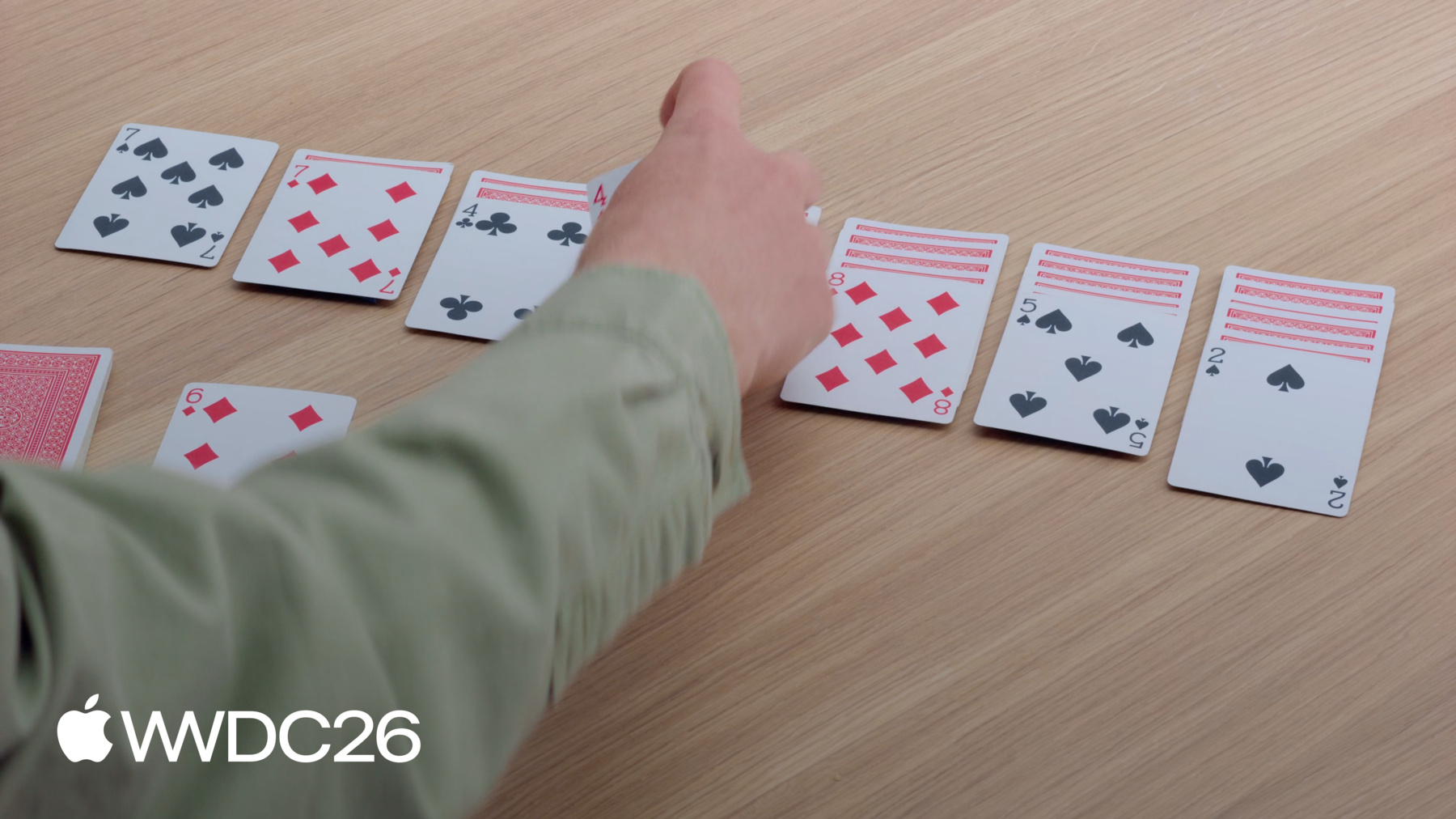
ドラッグ&ドロップでコンテンツを 並べ替えられるようになりました。 Drag Container APIを使って、 複数のアイテムを 同時にドラッグできるようになりました。 また、ドラッグ時および dropDestinationでの データ転送方法を設定できる ようになりました。 ソリティアゲームに ドラッグ&ドロップの操作を 実装していきます。 このゲームは、これらのトランプカードを 並べたような見た目になります。 カードをパイル間で移動させ、
残りのカードのデッキから 引くことができます。
ソリティアのルールを 知らなくても これから説明するAPIは 理解できます。 一緒に進めたい方は、 サンプルプロジェクトをダウンロード してください。 開始するために必要なビューと ゲームロジックが含まれています。 まず、新しい並べ替え可能APIを アプリに導入します。 ソリティアのカードと同様に、 アプリのコンテンツは 何らかの順序で存在しています。 しかし、ユーザーはコンテンツを 整理するために、 自分に合った方法で 並び替えたいと思うかもしれません。 ソリティアゲームのカードを 並べ替え可能にすると、 1枚ずつドラッグできる ようになります。 ビューをドラッグすると、 ビュー階層内のその位置から 持ち上げられ、 空のプレースホルダーが その場所に表示されます。 その後、アプリ内でこのカードを 自由にドラッグできます。 カードを他のカードの上に 移動させると、 ドラッグ中のカードをドロップする スペースが作られます。 プレースホルダーは、ドロップしたときに カードが置かれる場所を反映して 更新されます。 カードをドロップすると、 新しい位置に移動します。 この機能をソリティアゲームに 追加します。 まず、ゲームルールを適用せずに 並べ替えを実装します。 すべてが動作するようになったら、 ルールを含めるように 実装を改良します。 このアプリのXcodeプロジェクトを 開きました。 内容はGameとViewsという 2つのメインフォルダに分かれています。 Gameフォルダには、SwiftDataの モデルとその更新コードが含まれています。 SwiftUIが含まれるViewsフォルダで 主に作業します。 プレイエリアのレイアウトとビューが 含まれるGameViewを開きます。 ただし、並べ替えをアプリに追加する前に、 Previewでテストします。 このファイルの下部に、 緑の背景に4枚のカードを表示する Previewがあります。 並べ替えを有効にするには、 カードを作成するForEachに reorderableモディファイアを追加します。
次に、HStackに reorderContainerモディファイアを 適用します。
コンテナのアイテム型として CardValueを指定します。 これはForEachビューで 使われている型と一致します。 クロージャーでは、操作終了時に 差分が渡されます。 その差分を使ってcardsの配列を 更新します。
これで、Previewを操作して カードを並べ替えられるようになりました。 クラブのAを左からドラッグして 末尾にドロップできます。 ソリティアでは、カードをパイル間で 移動させて整理するのが目的です。 そのため、アプリではすべてのパイルを 同じreorderContainerに含めます。
パイルを含むHStackに reorderContainerモディファイアを 追加することで実現できます。
コンテナのアイテム型として 同じCardValue型を指定します。 複数のパイルがあるため、 それぞれを一意に参照する 方法が必要です。 Card.Group型を使って各パイルを識別し、 クロージャーで複数パイルにわたる 差分を処理します。
最後に、PileViewに移動して reorderableモディファイアを追加します。 同じコンテナ内に複数の reorderableモディファイアがあるため、 それぞれに一意の識別子を 指定する必要があります。 これで、ダイヤの4をドラッグして、 スペードの5があるパイルに ドロップできます。
素晴らしいですが、もう1つ 改良したいことがあります。 ソリティアでは、裏向きのカードは 並べ替えできません。 しかし今は、パイルから 裏向きのカードを持ち上げられます。 これは、PileViewのカード配列全体を 並べ替え可能にしているためです。 高度なドラッグ&ドロップAPIを 使う方法もありますが、 もっと簡単な解決策があります。
reorderableモディファイアなしの 2つ目のForEachビューを追加して、 cards配列を2つの間で 分割できます。
最初のForEachビューには 裏向きのカードがすべて含まれます。
reorderableモディファイアのある2つ目には 表向きのカードがすべて含まれます。 この変更により、表向きのカードは 引き続き並べ替えできますが、
裏向きのカードをドラッグしても 何も起きません。
これで、ソリティアの基本的な インタラクションが実装できました。 reorderableモディファイアのおかげで、 カードを1枚ずつドラッグして 並べ替えられるようになりました。 reorderContainerモディファイアにより、 すべてのパイルを含む範囲で 並べ替えをスコープできました。 裏向きのカードを別のForEachに 移動させることで、 並べ替えられないように できました。 これらのAPIは、ドラッグ&ドロップを サポートするすべてのAppleプラットフォームで 新たに利用可能になりました。
しかし、ソリティアゲームにはまだ足りない 複数のカードを一度に移動させる 機能です。 ソリティアでは、パイルの途中の カードをドラッグすると、 その上に積まれたカードも 一緒に動きます。 しかし、アプリによってはインタラクション モデルがそれほど単純ではないかもしれません。 解決策の1つは、ドラッグ可能な アイテムに選択機能を追加することです。 この例では、タップして選択する シンプルなインタラクションモデルを使います。 各カードをタップすると、 選択に追加されます。
選択されたカードの1枚に対して ドラッグジェスチャーを実行すると、 3枚のカードが一緒に持ち上がります。
ソリティアゲームに複数のカードを 一度にドラッグする機能を追加します。 GameViewに戻り、 reorderContainerモディファイアを 追加した場所を開きます。
reorderContainerは暗黙的に 独自のdragContainerを提供します。 またdropDestinationの機能も 提供しますが、 独自のものを追加して 動作をカスタマイズできます。 reorderContainerモディファイアの下に dragContainerモディファイアを宣言します。 連携させるためには、 同じ型、CardValueを使用する 必要があります。
クロージャーでは アイテム識別子が渡されます。 移動させたいアイテムの 転送可能なデータを提供する必要があります。
ゲームロジックを呼び出して、 ドラッグしようとしているカードの 上に積まれたカードを見つけます。
ダイヤの3の下にある クラブの4をドラッグすると、 2枚のカードが同じドラッグで 取得できるようになりました。
カードのスタックを一緒にドラッグすると、 最初のカードを一番上にして パイルに折り畳まれます。 これはデフォルトのプレビューですが、 いくつかのオプションに設定できます。 pile、list、stackが含まれます。 dragPreviewsFormationモディファイアで 設定できます。
コンパクトでカードが積み重なった 感覚があるためstackを選びます。 クラブの4をドラッグすると、 カードがきれいなスタックを形成します。 しかし、パイルの上にドラッグすると、 デフォルトの見た目に 戻ってしまいます。 reorderContainerのdropDestinationの 上にあるため、 そのドロップフォーメーションを 使用しています。 設定するには、 dropPreviewsFormationモディファイアが 使えます。 アプリ内のすべてのdropDestinationで 一貫性を保つために、 GameViewのルートレイアウトに このモディファイアを宣言します。 これでドラッグしたカードが プレイエリア全体で同じ見た目を維持します。
ソリティアゲームで複数のカードを 一度にドラッグできるようになりました。 Drag Container APIを使って 複数枚を一度に持ち上げられるように しました。 dragPreviewsFormationを追加して 持ち上げたカードの見た目をカスタマイズし、 一貫した見た目を保つために dropPreviewsFormationにも 同じ値を設定しました。 dragContainerモディファイアはiOS、 iPadOS、visionOS 27で 新たに利用可能になりました。 3つのモディファイアはすべて macOS 26以降で利用できます。
ゲームの残りの部分を実装するために、 新しいDrag Configuration APIを 使います。 カードビューにドラッグ機能を 追加する際は、 そのカードの値をどのように 移動させるか考える必要があります。 ソリティアゲームでは、 パイルに新しいカードをドラッグします。 デフォルトでは、SwiftUIはデータを コピーで移動することを提案します。 アプリ間でデータを移動したり 新しいものを挿入したりするときに 適した方法です。 しかし、カードゲームでは、 カードをドラッグしても 目的地にコピーを作るべきではありません。 代わりに、カードをデッキから パイルに移動させたいのです。 移動を処理するように設計された reorderContainerとは異なり、 これらのビューは独立した ドラッグソースとdropDestinationです。 これを実現するには、新しい Drag Configuration APIが必要です。 Drag Configuration APIを使って、 重複せずにカードをパイルに 移動できる機能を追加します。 アプリでは、プレイエリアの左上に 残りのカードのデッキがあります。 このダイヤの6を スペードの7があるパイルに ドラッグしたいと思います。
まず、XcodeでRemainderViewを 開きます。
ゲームのこの部分のビューが 含まれています。 現在の表向きカードには すでに独自のドラッグモディファイアが あります。 デフォルトでは、このビューは 値をコピーで転送します。 このビューにdragConfigurationモディファイアを 追加し、 このカードを移動で転送するという 意図を指定します。
しかし、データの転送方法を決めるのは dropDestinationです。 この場合、dropDestinationは GameViewのreorderContainerです。 デフォルトでは、reorderContainerは コンテナ内の移動のみを受け入れます。 新しいアイテムを受け入れるには、 独自のdropDestinationモディファイアを 提供する必要があります。 dragContainerの下に追加し、 同じカード型を受け入れることを 指定します。
挿入されたアイテムの reorderContainerのdestination Valueを読み取り、 それが存在する場合は、 ゲームロジックを呼び出して newCardsを目的地に挿入します。
パイル間の移動は引き続きクロージャーで 処理されます。 reorderContainerモディファイアの クロージャーです。
dropDestinationが整ったので、 アイテムの受け取り方を設定できます。 dropConfigurationモディファイアを 追加します。 このモディファイアがデータの 転送方法について最終決定を行います。
クロージャーではセッション情報が 渡されます。 それを使ってdropConfigurationを 返すことができます。 dropDestinationにカードの 受け入れ方を伝えます。 このクロージャーで3つのことを行います。 まず、ドラッグがどこにあるかを確認して、 カードを受け取るべきパイルを特定します。 ドラッグの位置を確認します。 そのパイルの識別子を持つ destination valueを作成してSwiftUIに カードの行き先を伝えます。
次に、移動ベースの転送のみを サポートする意図を表明します。 通常は、移動が利用できない場合の フォールバックとしてコピーをサポート しますが、 カードゲームではコピーは 意味をなしません。 そして3つ目に、 このdestination valueが ゲームのルール内で許可されているか 検証します。 禁止操作を返した場合、 SwiftUIはdropDestinationが カードを受け取れないようにします。
これらの変更により、 カードをプレイに引き込める準備ができました。 ダイヤの6を残りのデッキから ドラッグして、 ルールが許可している場合に限り、 スペードの7のパイルにドロップできます。 ドロップすると、ダイヤの6は 残りのデッキからパイルに移動します。 ダイヤの7があるパイルに ダイヤのクイーンをドロップしようとすると、 クイーンは残りのデッキに 戻ります。 移動が有効ではないためです。
新しい設定モディファイアを使って カードをパイルにドラッグできました。 ソースカードにdragConfigurationを 追加することから始めて、 カードを移動で転送するという 意図を指定しました。 次に、dropDestinationを使って reorderContainerが新しいカードを 受け入れられるようにしました。 そしてdropConfigurationを その目的地に適用して、 プレイが許可されている場合に 移動でカードを取得するようにしました。
reorderableとreorderContainerモディファイア だけでアプリの構築を始めました。 しかし、並べ替えを完全に カスタマイズできました。 ドラッグ&ドロップモディファイアを 組み合わせることで実現しました。 これで、完全なソリティアゲームが 完成しました。 ソリティアを作っていなくても、 これらのAPIを使って アプリをより良くできます。 アプリのコンテンツを並べ替える 機能をユーザーに提供することを 検討してください。 また、Drag Container APIで 複数のアイテムを一度にドラッグする 機能も提供できることを覚えておいてください。 ドラッグ&ドロップの設定で アプリを微調整すると、 使い心地が格段に向上します。 それでは、私は作業に 戻らなければなりません!
ご視聴ありがとうございました!
-
-
3:40 - Add reorderable to the preview
#Preview { @Previewable @State var cards = [ CardValue(rank: .ace, suit: .clubs), CardValue(rank: .ace, suit: .diamonds), CardValue(rank: .ace, suit: .hearts), CardValue(rank: .ace, suit: .spades) ] HStack { ForEach(cards) { card in CardFaceView(card: card) } .reorderable() } .frame(maxWidth: .infinity, maxHeight: .infinity) .reorderContainer(for: CardValue.self) { difference in cards.apply(difference: difference) } .padding() .background(.green.gradient) } -
4:40 - Add reorder container to the GameView
struct GameView: View { var game: Game var body: some View { GeometryReader { proxy in let spacing: CGFloat = 10 let cardWidth = (proxy.size.width - 6 * spacing) / 7 VStack { HStack(alignment: .top, spacing: spacing) { Group { RemainderView(game: game) CardBackView() .hidden() ForEach(CardValue.Suit.allCases) { suit in DestinationView(game: game, suit: suit) } } .frame(width: cardWidth) } .padding(.bottom, 20) HStack(alignment: .top, spacing: spacing) { ForEach(0..<7) { index in PileView(game: game, index: index) .frame(width: cardWidth) } } .frame(maxHeight: .infinity, alignment: .top) // Add the reorder container modifier. .reorderContainer(for: CardValue.self, in: Card.Group.self) { difference in game.moveCards(difference: difference) } } } .padding() } } -
5:58 - Add reorderable to PileView
struct PileView: View { var game: Game var index: Int @Query var cards: [Card] var body: some View { ZStack(alignment: .topLeading) { CardPlaceholderView() PileLayout { let index = firstFaceUpIndex // Iterates over the face down cards. ForEach(cards[..<index]) { card in CardView(card: card) } // Iterates over the face up cards. ForEach(cards[index...], id: \.value) { card in CardView(card: card) } .reorderable(collectionID: Card.Group.pile(index)) } } } var firstFaceUpIndex: Int { cards.firstIndex { !$0.isFaceDown } ?? cards.endIndex } } -
7:50 - Add dragContainer to customize the reorderContainer modifier.
struct GameView: View { var game: Game var body: some View { GeometryReader { proxy in let spacing: CGFloat = 10 let cardWidth = (proxy.size.width - 6 * spacing) / 7 VStack { HStack(alignment: .top, spacing: spacing) { Group { RemainderView(game: game) CardBackView() .hidden() ForEach(CardValue.Suit.allCases) { suit in DestinationView(game: game, suit: suit) } } .frame(width: cardWidth) } .padding(.bottom, 20) HStack(alignment: .top, spacing: spacing) { ForEach(0..<7) { index in PileView(game: game, index: index) .frame(width: cardWidth) } } .frame(maxHeight: .infinity, alignment: .top) .reorderContainer(for: CardValue.self, in: Card.Group.self) { difference in game.moveCards(difference: difference) } // Add dragContainer to customize reorderContainer. .dragContainer(for: CardValue.self) { cardID in game.cardStack(startingAt: cardID) } } } .padding() } } -
8:45 - Add dragPreviewsFormation to customize how the dragged cards appear
struct GameView: View { var game: Game var body: some View { GeometryReader { proxy in let spacing: CGFloat = 10 let cardWidth = (proxy.size.width - 6 * spacing) / 7 VStack { HStack(alignment: .top, spacing: spacing) { Group { RemainderView(game: game) CardBackView() .hidden() ForEach(CardValue.Suit.allCases) { suit in DestinationView(game: game, suit: suit) } } .frame(width: cardWidth) } .padding(.bottom, 20) HStack(alignment: .top, spacing: spacing) { ForEach(0..<7) { index in PileView(game: game, index: index) .frame(width: cardWidth) } } .frame(maxHeight: .infinity, alignment: .top) .reorderContainer(for: CardValue.self, in: Card.Group.self) { difference in game.moveCards(difference: difference) } .dragContainer(for: CardValue.self) { cardID in game.cardStack(startingAt: cardID) } // Have dragged cards appear as a stack. .dragPreviewsFormation(.stack) } } .padding() } } -
9:14 - Add dropPreviewsFormation to customize how dragged cards appear over a destination
struct GameView: View { var game: Game var body: some View { GeometryReader { proxy in let spacing: CGFloat = 10 let cardWidth = (proxy.size.width - 6 * spacing) / 7 VStack { HStack(alignment: .top, spacing: spacing) { Group { RemainderView(game: game) CardBackView() .hidden() ForEach(CardValue.Suit.allCases) { suit in DestinationView(game: game, suit: suit) } } .frame(width: cardWidth) } .padding(.bottom, 20) HStack(alignment: .top, spacing: spacing) { ForEach(0..<7) { index in PileView(game: game, index: index) .frame(width: cardWidth) } } .frame(maxHeight: .infinity, alignment: .top) .reorderContainer(for: CardValue.self, in: Card.Group.self) { difference in game.moveCards(difference: difference) } .dragContainer(for: CardValue.self) { cardID in game.cardStack(startingAt: cardID) } .dragPreviewsFormation(.stack) } // Have a consistent appearance over drop destinations. .dropPreviewsFormation(.stack) } .padding() } } -
11:40 - Add a drag configuration to allow move.
struct RemainderView: View { @Query var cards: [Card] var game: Game var body: some View { Button { incrementCardIndex() } label: { ZStack { CardPlaceholderView() CardBackView() .opacity(cards.isEmpty ? 0 : 1) } } .buttonStyle(.plain) .disabled(cards.isEmpty) ZStack { CardPlaceholderView() if let currentCard { CardFaceView(card: currentCard.value) .draggable(containerItemID: currentCard.value) .opacity(currentCard.value == hiddenCard ? 0 : 1) } } .dragContainer(for: CardValue.self) { cardID in [cardID] } // Add the drag configuration to allow me. .dragConfiguration(DragConfiguration(allowMove: true)) } } -
12:05 - Add a drop destination modifier and configure it
struct GameView: View {
    var game: Game

    var body: some View {
        GeometryReader { proxy in
            let spacing: CGFloat = 10
            let cardWidth = (proxy.size.width - 6 * spacing) / 7
            VStack {
                HStack(alignment: .top, spacing: spacing) {
                    Group {
                        RemainderView(game: game)
                        CardBackView()
                            .hidden()
                        ForEach(CardValue.Suit.allCases) { suit in
                            DestinationView(game: game, suit: suit)
                        }
                    }
                    .frame(width: cardWidth)
                }
                .padding(.bottom, 20)
                HStack(alignment: .top, spacing: spacing) {
                    ForEach(0..<7) { index in
                        PileView(game: game, index: index)
                            .frame(width: cardWidth)
                    }
                }
                .frame(maxHeight: .infinity, alignment: .top)
                .reorderContainer(for: CardValue.self, in: Card.Group.self) { difference in
                    game.moveCards(difference: difference)
                }
                .dragContainer(for: CardValue.self) { cardID in
                    game.cardStack(startingAt: cardID)
                }
                .dragPreviewsFormation(.stack)
                .dragConfiguration(DragConfiguration(allowMove: true))
                // Add a drop destination to accept inserts
                .dropDestination(for: CardValue.self) { newCards, session in
                    if let destination = session.reorderDestination(
                        for: CardValue.self, in: Card.Group.self) {
                        game.insertCards(newCards, to: destination)
                    }
                }
                // Configure where cards will go when reordering,
                // and accept them by move.
                .dropConfiguration { session in
                    // Calculate which pile is being dragged over.
                    let alignedX = session.location.x - 0.5 * spacing
                    let pile = Int(alignedX / (cardWidth + spacing))
                    let destination = ReorderDifference<CardValue, Card.Group>
                        .Destination(position: .end, collectionID: .pile(pile))
                    // Check if the move is allowed.
                    let allowed = session.suggestedOperations.contains(.move)
                    && game.validateMove(session: session, destination: destination)
                    let operation: DropOperation = allowed ? .move : .forbidden
                    return DropConfiguration(operation: operation, destination: destination)
                }
            }
            .dropPreviewsFormation(.stack)
        }
        .padding()
    }
}
-