

-
fm CLIとPython SDKによるAI活用型スクリプトの作成
macOSでAppleのFoundation Modelを活用する各種の新しい方法を紹介します。Foundation Models SDK for Pythonを使用すると、Pythonエコシステムの人気のツールや評価パッケージと統合できます。macOS 27で導入された新しいfmコマンドを使用して、スクリプト作成の効率化、モデルワークフローの自動化、開発プロセスの高速化を推進する方法を学びましょう。
関連する章
- 0:00 - はじめに
- 1:22 - fm CLIとPython SDKの紹介
- 3:23 - コマンドラインツール
- 5:02 - fm respondと構造化された出力
- 6:11 - fmによるファイル管理の自動化
- 8:52 - Python SDK
- 9:42 - プロンプティング、ツール呼び出し、ガイド付き生成
- 10:44 - Pythonでの評価パイプラインの構築
- 15:20 - 次のステップ
リソース
関連ビデオ
WWDC26
-
このビデオを検索
こんにちは!Eric Gourlaouen です。 Foundation Models Framework チームのエンジニアです。 今日は Apple Foundation Modelsを macOSで活用する新しい方法を 紹介します。 WWDC25では Foundation Models FrameworkをSwiftで導入しました。 アプリ内でオンデバイスの Apple Foundation Modelを利用できます。 guided generationなどの機能も 合わせて導入しました。 構造化された出力の生成や Tool Callingも使えます。 モデルがアプリのコンテキストと インタラクションできます。
macOS 27と iOS 27では フレームワークに多くの新機能が追加されます。 プロンプトに画像を渡す サポートが加わりました。 サーバーモデルへのアクセスも 提供されます。 同じ Swift APIで大規模言語モデルを アプリで活用できます。 Foundation Models Frameworkを 使うと、 Apple Foundation Modelsのパワーを 簡単に活用できます。 テキストの抽出・分析といった問題から 高度なエージェントワークフローの 構築まで対応しています。 APIキーもクラウドAPIコストも不要で 簡単に設定できます。 しかしこれまでこれらのモデルは Swiftコードからのみ利用可能でした。 今年は、 macOSで Apple Foundation Modelsに アクセスする新しい方法を導入します。
fmという新しいコマンドライン ツールを導入します。 Python向けの新しい Foundation Models SDKも用意しました。 fmコマンドラインツールは macOS 27にプレインストールされています。 プロンプトをすばやくテストするのに 最適なツールです。 ターミナルから直接使ったり 自動化に組み込んだりできます。 プロンプトでモデルをテストするのが とても簡単になります。 Xcodeでプロジェクトを リビルドする必要がありません。
このツールの使い方は簡単で ターミナルウィンドウを開くだけです。 fm respondと入力してプロンプトを 入力し、
Enterを押すだけです。 しばらくするとモデルからの レスポンスが表示されます。
Python向けの Foundation Models SDKは、 オンデバイスモデルにアクセスする もう一つの新しい方法です。 Foundation Models Frameworkの コア機能をサポートしています。 Tool CallingやGuided Generationも 使えます。 SwiftデベロッパでFoundation Models Frameworkを使ったことがあれば、 APIはとても馴染みやすいと 感じるでしょう。 機械学習エンジニアは SwiftよりPythonをよく使うかもしれません。 その場合は、 このSDKを使うとPythonコードで オンデバイスモデルを簡単に活用できます。
Pythonには機械学習と データサイエンス向けの 豊富なオープンソースパッケージが あります。 Python SDKを使えばPythonで 評価パイプラインを構築し、 それらのパッケージで機能の 品質を定量化できます。 PythonはScripting言語なので、 プロンプトを素早くテストして 結果を確認しながら反復できます。 これらの新しいオプションで 何ができるか見ていきましょう。 まず新しいfmコマンドライン ツールを紹介します。 基本的な使い方を説明してから、 自動化スクリプトの作成方法を お見せします。 次にPython SDKを紹介します。 モデルとのインタラクション方法と SDKの高度なオプションの 活用方法を説明します。 次に事例研究を通じて、 Pythonツールでプロンプト出力を 分析する方法と アプリの品質を向上させる 方法を紹介します。
コマンドラインツールfmについて 説明しましょう。 macOS 27以降、このコマンドラインツールは Macにプレインストールされています。 Terminal appから すぐに使えます。 fmの使い方はTerminalを開いて fmと入力するだけです。
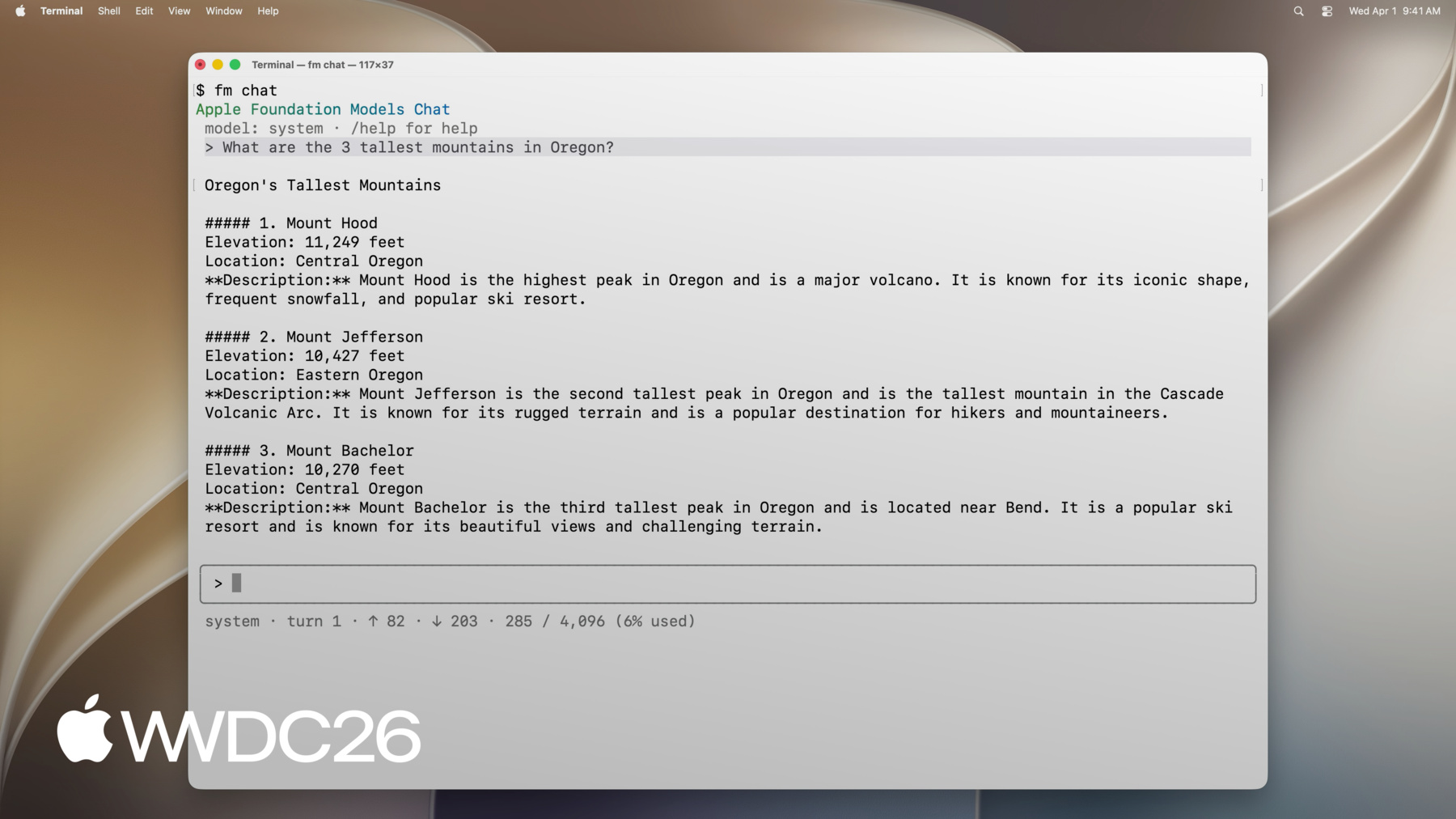
使用可能なコマンドの 一覧が表示されます。 例えばrespondを使うとモデルへの プロンプト送信とレスポンス取得ができ、 chatでインタラクティブ画面を起動し schemaでスキーマを作成できます。 fmの機能を確認するため fm chatを使ってみましょう。
この新しいターミナルインターフェイスで オンデバイスモデルと ターミナルから直接 会話できます。 最初の質問を入力し、
続けてフォローアップの質問も できます。
fm chatにはいくつかの コマンドが用意されています。 例えば /modelを使うと、 Private Cloud Computeモデルを 使用するよう会話を切り替えられます。
または /saveで現在の会話を保存して 後から再開できます。
fm chatでのインタラクティブな セッションは モデルの最初のフィーリングを 確認するのに最適です。 新しいアイデアを探っているなら、 モデルを試してプロンプトでの 動作を確認できます。
スクリプトなどでインラインの レスポンスが必要な場合は fm respondコマンドを 使ってください。 ターミナルでfm respondに プロンプトを付けて実行すると、 モデルからのレスポンスを 出力として受け取れます。
fm respondには いくつかのオプションがあります。 modelオプションでは Private Cloud Computeモデルに プロンプトを送れます。またimageオプションで プロンプトに画像を含められます。 Swift frameworkと同様に、 モデルを使って構造化された 出力を生成できます。 fm schema objectコマンドで スキーマを作成して、 fm respondのschemaオプションと 合わせて使えます。
他にも役立つオプションが あります。 すべてのオプションを確認するには helpオプションを使ってください。 ここまで見てきたように、 fmコマンドラインツールでは オンデバイスモデルと Private Cloud Compute上の Apple Foundation Modelの どちらでも使えます。デフォルトでは macOSに付属のオンデバイスモデルを使用し、 常に利用可能です。
Private Cloud Compute上の Apple Foundation Modelも使えますが、 使用制限があります。 オンデバイスモデルよりも はるかに大きなモデルなので、 複雑な問題でも より高い性能を発揮します。
ここまで学んだことをまとめて 実際の問題を解決しましょう。 私はMacでプレゼンテーション プロジェクトを完了しました。 アセットを保存していたフォルダは 下書きでいっぱいです。 ディスクの空き容量を 増やしたいと思います。 アセットの最終バージョンだけを 残すようフォルダを整理します。 Foundation Modelsを使ってファイルを 整理し必要なものだけを残して、 バックアップを取り古いものを アーカイブディスクに移動します。 同じことが起きたときのために スクリプトで自動化したいと思います。 このスクリプトを再実行するだけです。 ここでfmを使うことで 言語モデルを呼び出せます。 スクリプト内で下書きと 最終ファイルを仕分けられます。 名前が整理されていなくても スクリプトが機能します。 予測通りに仕分けるのが 難しい場合でも対応できます。
下書きと最終ファイルを区別して ファイルを移動するスクリプトを用意しました。 fmを使ってファイルを 適切に移動します。 作業フォルダを整理します。
現在このフォルダには 下書きと最終ファイルが混在しています。 スクリプトを実行します。
完了しました。 古いファイルが正しく フォルダから移動されました。 アーカイブフォルダを 開いてみましょう。
下書きファイルが移動されているのが 確認できます。 バックアップディレクトリも 開いてみます。
最終ファイルもバックアップとして コピーされています。 スクリプトを一緒に確認して fmを使ってファイルを仕分けた 方法を理解しましょう。 まず作業ディレクトリの ファイルリストを読み込みます。 次にモデルにこのリストを 仕分けるようプロンプトを送ります。 下書きファイルのリストと 最終ファイルのリストを返してもらいます。 fm respondコマンドで指示と プロンプトを渡すことでできます。 モデルから構造化された 結果を取得するには、 上部でfm schema objectコマンドを 使ってスキーマを定義します。 構造化された出力は 2つのフィールドを持ちます。 最終ファイルのリストと 下書きファイルのリストです。 fm respondのschemaオプションを使って このスキーマで出力を生成します。
fm respondの出力にはモデルが 生成したJSONの結果が含まれます。 この結果を使って、まず 最終ファイルをバックアップにコピーして 下書きファイルをアーカイブに移動します。 fmにはまだ多くの機能があります。 macOS 27でぜひ試してみてください。 自動化にも活用してみてください。
次にPython SDKについて説明します。 Python SDKを使えばPythonコードから Apple Foundation Modelsを利用できます。 Mac上のPython環境に インストールできます。 Python 3.10以上が必要です。 Xcodeがインストールされており Appleシリコン搭載Macである必要があります pipまたはお好みのパッケージ マネージャでインストールできます。 Python SDKにはフレームワークの コア機能が含まれています。 Swiftで使ったことがあれば、 APIと抽象化はすぐに 馴染みやすく感じるでしょう。 テキストと画像の入力で モデルにプロンプトを送ることができ、 レスポンスをストリーミングで 受け取ることもできます。 Swiftと同様に、 guided generationを使ってモデルに 構造化された出力を生成させることができます。 Tool Callingを使ってモデルが コードとインタラクションできます。 実用的な例を見てみましょう。
食料品の注文アプリを 開発しています。 ユーザーがオンデバイスモデルを使って アプリにプロンプトを送れるようにします。 機能を追加し始めるにあたり プロンプトの精度を評価したいと思います。 Swiftで実装する前にPythonで プロトタイプを作成します。 モデルへのプロンプト送信は Swiftと同じようにできます。 まずLanguageModelSessionを 作成します。 必要であれば指示を 渡すこともできます。 次にsession.respondを呼び出して プロンプトを引数として渡します。 メソッドの結果にはモデルの 出力が含まれています。
Swift Frameworkと同様に、 ツールをモデルに公開してユーザーの コンテキストとインタラクションできます。 例えば、 モデルが直近の注文を 取得するためのツールを定義できます。 よりパーソナライズされた情報を 提供できるようになります。 Swift Frameworkや コマンドラインツールと同様に、 モデルが構造化された出力を 生成するよう制約することもできます。 例えばこのコードでは、 guided generationを使ってモデルの 出力が確実に ItemsSuggestionオブジェクトとして 取得されるようにしています。
fm.generableデコレータを使って 目的の出力構造を定義し、 fm.respondのgenerating引数として 渡します。 Python SDKの主な利点の一つは Pythonのエコシステムとの 簡単な統合です。 ユースケースで説明します。 オープンソースのPythonパッケージを使って 評価パイプラインを設定します。 食料品の注文アプリを 設計するにあたり、 ユーザーの次の注文を準備する 機能に取り組んでいます。 言語モデルを使って、 ユーザーが以前の注文に基づいて カートに追加したいものを 予測できるようにします。 この機能を設計するにあたり、 出力が以前の注文に基づいて 確実に機能することを確認します。 また予測がカートに既にある アイテムを考慮することも確認します。 この機能についていくつかの 異なる実装を用意しました。 それぞれ異なるプロンプトを 使用しています。 精度を定量化して 最良のものを選択し 適切に機能することを確認します。 プロンプトを評価して反復するには、 SwiftデベロッパはEvaluations Frameworkを活用できます。 Xcode 27で利用可能で 評価を簡単に作成できます。 複数のイテレーションにわたって 機能の精度を追跡できます。 多くのデータサイエンティストは SwiftよりPythonに慣れているかもしれません。 その場合は、 Jupyter Notebookから Python SDKを使って この分析をPythonで 実行する方法を紹介します。
まず大規模サーバーモデルを使って 評価データを生成しました。 いくつかの入力があり それぞれについて 出力に期待するデータが あります。
異なるプロンプトを使う 実装をいくつか作成します。 次に評価入力ごとに それぞれの実装を使って 出力を生成します。 このデータをPandas DataFrameの行として保存します。 次にサーバーモデルに依存する Judge関数をいくつか設計しました。 選択した基準で各出力を スコアリングします。 これらのメトリクスをPandas DataFrameに保存します。 チャートを生成して 視覚的に確認できます。 実際に見てみましょう。
Notebookには入力と期待される出力を含む 評価データが含まれています。 ユーザーのカートを補完する 3つの異なる実装を用意しました。 それぞれオンデバイスモデルを 異なる方法でプロンプトして活用します。 最初の方法は非常に シンプルなプロンプトを使います。
2つ目はより詳細なプロンプトを使い、 タスクをより詳しく説明します。
3つ目は最も包括的なプロンプトで、 モデルにルールの リストを提示します。
評価データセットの各行について、 それぞれの実装で 出力を生成しました。 これらの入力と出力を Pandas DataFrameに保存しました。 このデータをJudgeモデルとして 使うサードパーティモデルに渡しました。 設定した基準で各結果を スコアリングします。 採点が生成されたら、 matplotlibを使って チャートを生成できます。 各プロンプトセットの パフォーマンスをすばやく確認できます。 ここではデータがすでに 生成・採点済みなので、 このセルと以下を実行して チャートを生成できます。
チャートを見てみましょう。
まずSetupごとの エラーを確認すると、 詳細なプロンプトは生成エラーの 割合が高いことがわかります。 例えばモデルの最大コンテキスト ウィンドウサイズに達した場合などです。 次に詳細度の低い2つのプロンプトは カートへの過剰な アイテム追加につながりやすく 詳細なプロンプトは過剰アイテムが少ないです。 ただし詳細なプロンプトでは、 期待されるアイテムを 見逃しがちです。
最初のプロンプトはカートに 幻覚アイテムが追加されやすい傾向があります。 これらの知見を使って プロンプトを改善できます。 Pythonを使えばプロジェクト全体を リビルドせずに Notebookから素早く 反復できます。 テストや変更がとても 便利になります! この例では出力の生成、 採点、Python SDKを使った チャート作成を確認しました。 Pythonには強力な オープンソースエコシステムがあります。 機械学習と データサイエンスのパッケージも充実しています。 今日の自動化でも いくつか活用しました。 Pythonで自動化を開発するなら エコシステムを探索して 既存のパッケージを 再利用できるか確認してみてください。
まとめましょう。 AppleのFoundation Modelsと インタラクションする新しい方法を紹介しました。 ぜひmacOS 27で 今日試してみてください。 Xcodeプロジェクトと 並行してこれらのツールを使い、 プロンプトのプロトタイプ作成と 評価に役立ててください。 または単独で使って モデルを新しい方法で活用してください。 これらのツールをより深く理解するために、 いくつかの次のステップを おすすめします。
まずTerminal appから コマンドラインツールを探索してみてください。 さまざまなオプションと機能を 試してみてください。 次にPython SDKの 詳しい使い方はGitHubリポジトリをご覧ください。 GitHubリポジトリにアクセスしてください。 コードスニペットとドキュメントが 用意されています。 高度なワークフローの構築方法の 参考として使えます。 Python SDKに慣れたら、 この新しい知識を活かして 評価パイプラインを作成してください。 モデルの活用方法を考えて 適切なプロンプトが見つかったら、 評価データセットに対して モデルの結果を定量化して プロンプトの有効性を 測定してください。 これらの新しいツールを使って 言語モデルを新しく刺激的な 方法で活用するきっかけになれば幸いです。 ご視聴ありがとうございました!
-
-
5:07 - Prompt the on-device model with fm respond
$ fm respond "Provide a basic regex in Swift to parse an email address" # Here is a basic regex to parse an email address in Swift: [...] $ fm respond "Provide a comprehensive regex in Swift to parse an email address" --model pcc # [...] Here's a robust Swift implementation using 'NSRegularExpression' to validate a typical email address: $ fm respond "What app is the user using in this screenshot?" --model pcc \ --image Screenshot.png # The user is using the Mail app. $ fm schema object --name AppsIdentified --string app_names --array > schema.json $ fm respond "What apps are the user actively using in this screenshot?" \ --image Screenshot.png --model pcc --schema schema.json # {"app_names": ["Messages", "Mail", "Calendar"]} $ fm respond --help -
7:55 - Sort files with fm respond and a schema
fm schema object --name "TriagedFileList" \ --string 'final_files' --array \ --string 'draft_files' --array > /tmp/schema.json output=$(fm respond \ --instructions "I just completed a project, and I need help triaging the latest version of the files from the previous versions. I will give you a list of files. Return a list of the latest files (i.e., all files that, you can infer from their name in the list, are the latest versions), and then return separately a list of all draft files (i.e., all files that weren't considered final)." \ "This is the list of all files:\n\n${files_list}" \ --schema /tmp/schema.json ) echo "${output}" | jq -r '.final_files[]' | while read -r file; do cp "${DIRECTORY_TO_TRIAGE}/${file}" "${FINAL_FILES_STORAGE_DIRECTORY}" done echo "${output}" | jq -r '.draft_files[]' | while read -r file; do mv "${DIRECTORY_TO_TRIAGE}/${file}" "${DRAFT_FILES_STORAGE_DIRECTORY}" done -
8:54 - Install the Foundation Models Python SDK
pip install apple_fm_sdk -
10:00 - Create a session and respond to a prompt
import apple_fm_sdk as fm INSTRUCTIONS = "You're an AI assistant for Cupertino Mart, a grocery store with in-app ordering." async def answer_question(prompt: str) -> str: session = fm.LanguageModelSession(instructions=INSTRUCTIONS) return await session.respond(prompt) -
10:21 - Define a Tool for the language model
class GetPastOrdersTool(fm.Tool): name = "get_past_orders" description = "Retrieves information about this user's past orders." @fm.generable("Past orders query parameter") class Arguments: number_orders: str = fm.guide("How many of the last orders to retrieve") @property def arguments_schema(self) -> fm.GenerationSchema: return self.Arguments.generation_schema() async def call(self, args: fm.GeneratedContent) -> str: number_orders = args.value(int, for_property="number_orders") return await Orders.load_last_orders(user_id=user_id, amount=number_orders) -
10:35 - Generate structured output with @fm.generable
@fm.generable("Suggested items")
class ItemsSuggestion:
	item_names: list[str] = fm.guide("Names of the suggested items")

INSTRUCTIONS = "You're an AI assistant tasked with returning potential grocery items that the user might be interested in."

async def generate_suggested_cart_items(user_input: Optional[str]) -> ItemsSuggestion:
	session = fm.LanguageModelSession(instructions=INSTRUCTIONS, tools=load_tools())
	prompt = """Using the tools to load the user's previous orders, \
              return a list of items the user has already ordered \
              and that they might be interested in again \
              as they're getting ready to place a new grocery order."""
	if user_input is not None:
    prompt += f"\nAccount for the following request from the user: {user_input}"
    return await session.respond(prompt, generating=ItemsSuggestion)
-