
Submit your apps and games today
Take advantage of the latest capabilities in Apple platforms and the App Store to deliver your most innovative apps yet.

 Update for the latest OS releases
Build and test with Xcode 27, which supports the latest SDKs for iOS, iPadOS, macOS, tvOS, visionOS, and watchOS to take advantage of the latest advancements in Apple platforms. Make sure your apps and games work as expected on Apple devices running the latest OS releases. Starting April 2027, apps and games uploaded to App Store Connect need to meet the following minimum requirements.
- iOS and iPadOS apps must be built with the iOS & iPadOS 27 SDK or later, and target iOS 15 or later
- tvOS apps must be built with the tvOS 27 SDK or later
- visionOS apps must be built with the visionOS 27 SDK or later
- watchOS apps must be built with the watchOS 27 SDK or later

iPhone Duo will be available starting October 23, and app submissions are officially open. Make sure you’re ready on day one.

 Set up in App Store Connect
When you distribute on the App Store, people around the world can discover and download your apps and games in 175 storefronts and 50 languages.
App Review
The guiding principle of the App Store is simple — we want to provide a trusted experience for people to get apps and games, and a great opportunity for developers to succeed. To do this, Apple reviews submissions to confirm they're safe, secure, and reliable. This includes apps and app updates, as well as bundles, Apple In-App Purchases, In-App Events, App Store metadata, and other content you submit for review. As you plan and build, get acquainted with the App Review Guidelines early on in your app or game’s development in order to make appropriate design decisions and help your review process goes as smooth as possible.
TestFlight
You can get feedback on your apps, games, and App Clips throughout your development using TestFlight, Apple’s beta app testing service. Simply add testers from your internal team, or invite external testers via email or public link. Testers download, test, and provide feedback on your beta app, using the TestFlight app. You can then use their provided feedback — including screenshots with contextual feedback, or crash details — to improve your app or game.
Product page
Make sure your app’s name, icon, description, screenshots, app previews, and keywords are ready for your App Store product page. You can also take this opportunity to update your subtitle and promotional text, and choose to promote any new Apple In-App Purchases. Before submitting, make sure to:
Complete the age rating questionnaire. Respond to the age rating questionnaire in App Store Connect. This questionnaire includes a list of content descriptors, in-app controls, and capabilities that allow you to specify the frequency of each content type in your app. An Apple global age rating is provided based on your responses, as well as additional region-specific ratings if required. Learn how to set an app rating.
Provide your app’s privacy details. Enter all necessary information about your app’s privacy practices, including the practices of third‑party partners whose code you integrate into your app, in App Store Connect. These details inform the Privacy Nutrition Label that appears on your product page and are required in order to submit new apps and app updates to the App Store.
Indicate your accessibility support. You can share information in App Store Connect about your app or game’s support — such as whether it includes VoiceOver, Voice Control, Larger Text, Captions, and more. Based on this information, an Accessibility Nutrition Label will appear on your App Store product page, specific to each platform you support. If you’d like, you can also add a URL on your App Store product page that links people to a website with even more details.
Learn about creating product pages
Availability options
Verify required device capabilities. The App Store is designed to provide users with apps that work seamlessly with their devices’ capabilities. Verify that your information property list (info.plist) is compatible with any device requirements when submitting a new app that takes advantage of the latest technologies.
Explore universal purchase. With universal purchase, people can discover and enjoy your app or game across their Apple devices with a single purchase. Apple In-App Purchases and subscriptions can also easily be set up and shared across platforms. Your product page shows the other platforms your app supports along with screenshots, and you’ll be able to promote your app using a single URL across your marketing channels.
Offer iPadOS and iOS apps on Mac computers and Apple Vision Pro. Most iPadOS and iOS apps can run unmodified on Apple Vision Pro and on Mac computers with Apple silicon, so your app can easily extend to these platforms — with no additional work required. By default, your compatible apps are published automatically on the App Store for Apple Vision Pro or Mac using the metadata you’ve already provided in App Store Connect.
Learn about managing your app’s availability

 Increase discoverability
Boost discoverability for your app or game with built-in marketing features on the App Store.
Grow with App Store features
Create assets for your product page headers and search results. Make a strong impression to drive people to download your app or game using compelling assets across the App Store. Take advantage of product page headers and search result assets to further showcase your app or game’s value in addition to your app previews and screenshots. You can also use the product page preview tool to visualize your product page before it’s published on the App Store. Get guidance and ready-made templates to create captivating assets that people will love.
Create custom product pages. In addition to your default product page, you can use custom product pages to showcase a particular feature, content, character, or aspect of gameplay. Highlight this content on each page with unique screenshots, app previews, and promotional text that differ from your default product page. Share a particular page with people by using its unique URL in your marketing efforts or an Apple Ads campaign.
Optimize your product page. Test different elements of your App Store product page to understand if different app icons, screenshots, or app preview videos result in more engagement.
Offer In-App Events. Promote timely content within your app or game — such as game competitions, movie premieres, livestreamed experiences, and more — using In-App Events. People can find In-App Events across the App Store, including on your product page, in search results, and on the Today, Games, and Apps tabs. Learn about In-App Events.
Promote your apps and games
Share your story with us. Use Featuring Nominations in App Store Connect to share your story with our team. The App Store showcases incredible apps and games that people love across Apple platforms, and shines a spotlight on developers from communities around the world. Each Apple platform has a dedicated App Store to help people discover the best apps, games, in-app content, and more. Learn about getting featured.
Get custom marketing assets. Use the App Store marketing tools and the App Store Connect app to get premade assets to celebrate moments such as a launch, new version, and more. Simply download your selected assets, then share them using your social media or marketing channels to amplify your app or game. Learn about marketing assets.
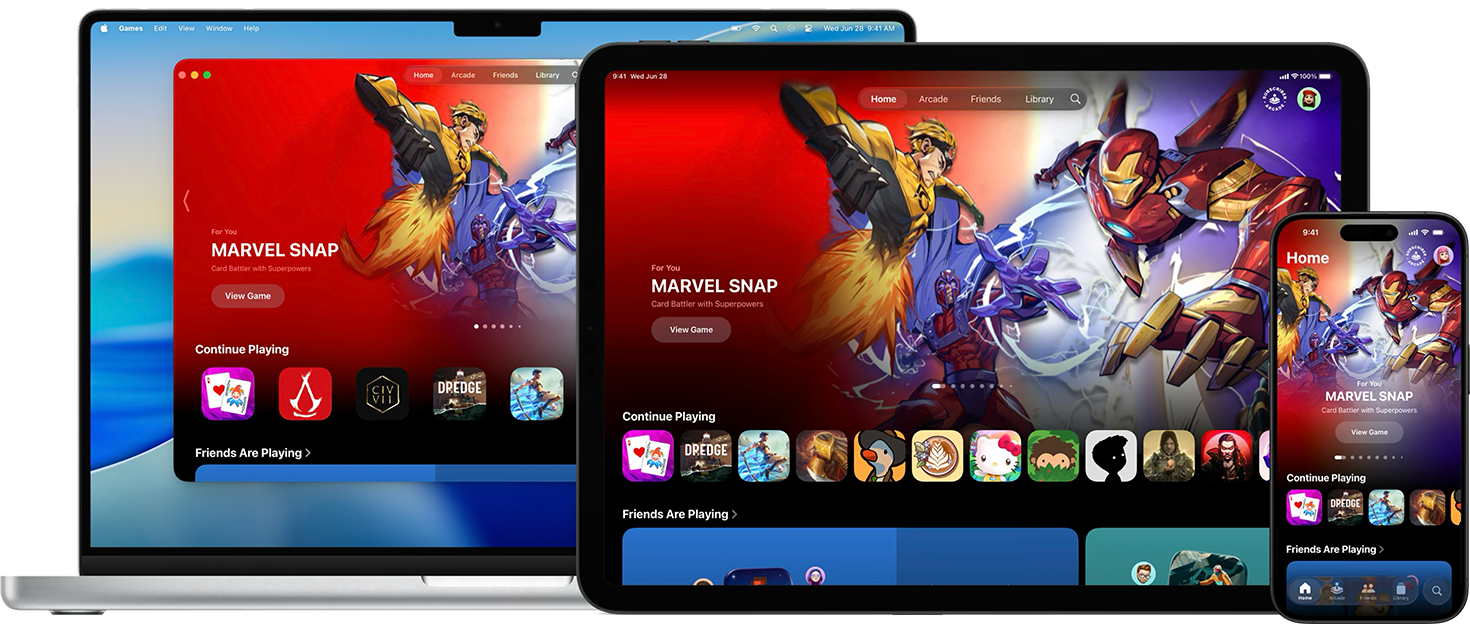
Apple Games app
Games that are available on the App Store will automatically appear on the Games app, including in search results, the Library tab, and the Continue Playing section. Additionally, games that include Game Center features and In-App Events are prominently displayed across the Games app in order to help players discover and engage deeper with them.