

-
ウォレットの新機能
Appleウォレットのパスについて、最新のデザインのアップデートとデベロッパ向けツールを確認しましょう。リッチで鮮やかなデザインの新しいスタイルは、パスの雰囲気をリフレッシュさせるのに最適です。新しいバーコードの形式、パスのアクションに関する柔軟なAPIや、パスの設計、パーソナライズ、大規模な配布を効率化する強力なツールであるPass DesignerとPass Builderについても紹介します。
関連する章
- 0:01 - はじめに
- 0:40 - Poster Generic
- 2:36 - バーコード
- 4:27 - フィーチャーアクション
- 5:46 - デベロッパツール
- 5:47 - Pass Designer
- 10:40 - Pass Builder
- 13:50 - パスのテンプレートのパーソナライズ
- 15:01 - 次のステップ
リソース
- Pass Designer
- Creating a pass with Pass Designer
- Pass Builder
- Pass.Barcodes
- Learn more about Pass Designer
関連ビデオ
WWDC25
WWDC24
-
このビデオを検索
こんにちは、Shaunです。 「Walletの新機能」へようこそ。 登場以来、 パスは人々の日常生活に 欠かせない存在となっています。 朝のコーヒーを受け取ることから、 交通機関のゲートをタップし、 フライトのチェックインと搭乗まで、 物理的なカードを 渡すことなく行えます。
パスは人々がより速く、よりプライベートに、 より安全に行動できるよう支援します。 iOS 27では、パスを これまで以上に進化させています。 iOS 27では、Poster Genericという 素晴らしい新しいパススタイルが導入されます。 4つの新しいバーコードタイプにより、 提示時の柔軟性が向上します。 そして、パスが関連するアクションを 表示する強力な新しい方法が、 パス面のすぐ下に追加されます。
また、Mac向けの全く新しい デベロッパツール一式も導入しています。 そしてサーバープラットフォーム向けに、 設計を パーソナライズし、優れたパスを 構築することがこれまでより簡単になります。
カバーすることが多くありますが、 まず全く新しいパススタイル、 Poster Genericから始めましょう。
Poster Genericは会員カード、 ロイヤリティプログラム、 ストアカード、そして大胆でカラフルな アートワークを主役にしたい場所に最適です。
パス面は背景画像で 構成されており、 プライマリロゴ、 ヘッダーフィールド、
プライマリフィールド、
フッターフィールド、 そして最後に、提供されている場合は バーコードで構成されています。 このパススタイルを採用するには、 パスバンドルのpass.jsonで、 posterGenericroleのトップレベル スタイルキーを指定します。
次に、通常のパスフィールド構造で コンテンツを追加すると、 パスがパス面全体の レイアウトを処理します。
注意すべき点が1つあります。 パス面はフッターフィールドを 1つだけサポートしているため、 複数含めた場合、 最初のものだけが表示されます。
Poster GenericにはiOS 27以降が必要です。
iOS 26以前のお客様を サポートするには、 既存のgenericトップレベル スタイルキーを含めることをお勧めします。 pass.jsonのposterGenericスタイルキーと 並べて、 それぞれの下に関連フィールドを設定します。
そうすれば、まだiOS 27に アップデートしていないお客様も、 引き続きWalletに パスを追加できます。 次に、iOS 27では、パスが 4つの新しいバーコードタイプをサポートします。
EAN-13、Code 39、Codabar、およびITF。
これらは既存のbarcodeオブジェクトを 使用して指定します。 およびpass.jsonのbarcodesアレイを 使用して指定します。
例えば、バーコードをCodabar形式で 表示するには、 バーコードのフォーマットを PKBarcodeFormatCodabarに設定します。
フォーマット定義の 完全なリストは Wallet Passesドキュメントで 確認できます。 iOS以前のバージョンは これらの新しいフォーマットを サポートしていないため、 優先順位でバーコードの配列を 提供することを強くお勧めします。 複数のバーコードを提供することで、 ハードウェアがスキャンできるバーコードを システムがレンダリングする最良の機会を与えます。 お客様がどのオペレーティングシステム バージョンを使用しているかに関係なく。
新しいバーコードタイプの1つだけを 提供し、他に何も提供しない場合、 パスはiOS 26以前で バーコードをレンダリングしません。
そのため、希望するフォーマットを 優先し、 適切にフォールバックすることを お勧めします。
いくつかの状況があることは 認識しています。 複数のバーコードタイプのサポートが 単純に選択肢にない場合です。
その場合、実施すべきことが 2つあります。 まず、パスフィールドに 認証情報IDを表示し、 手動で入力できるようにし、 見つけやすくします。
primaryFieldの使用を検討してください。 またはheaderFieldを使用して、 パス面で目立つようにします。
次に、フロントラインスタッフが手動入力 ワークフローのトレーニングを受けていることを確認してください。 スキャンできないパスは、お客様を ブロックする結果になってはなりません。
これを正確に行うことで、 シームレスなエクスペリエンスと フラストレーションを感じるエクスペリエンスの 違いになります。 次に、フィーチャードアクションについて 話しましょう。
iOS 18で導入された 第2世代イベントチケットでは、 セマンティックURLを提供して 追加のユーザーアクションを公開できます。 パスの下に表示されます (イベントスケジュールの表示など)。 iOS 27では、新しい柔軟なAPIがあります。 すべてのパススタイルに アクションを提供できます。 pass.jsonのトップレベルで、 featuredActionsキーを定義します。 これはアクションオブジェクトの 配列を取ります。 各アクションは一意のID、 アクションタイプ、 およびURLなどの値として定義されます。 例えば、オファーを表示する アクションを提供するには、 識別子を一意のIDに設定します。 アクションタイプをmembershipBenefitsに設定し、 ユーザーをナビゲートするURLを設定します。 WalletはこれをパスUの下に、 適切なカラフルなアイコンとともに表示します。 そしてローカライズされた コール・トゥ・アクションとともに。
各パスには最大2つの フィーチャードアクションを含めることができます。 最も意味のある アクションのみを提供することをお勧めします。 お客様に関連する アクションのみを提供することをお勧めします。 アクションを優先順位で 提供してください。
サポートされているアクションタイプの 完全なリストと 期待される値は Wallet Passesドキュメントで確認できます。 この10年間で、パスは多くの機能と 機能性を獲得してきました。 パスバンドルに記述されている内容と、 デバイスに表示されるビジュアル表現を 結び付けるのは難しい場合があります。
そのため、Mac向けの 全く新しいアプリを発表できることを うれしく思います。 パスのデザインをこれまで以上に簡単にします。 それがPass Designerです。
Pass Designerは WYSIWYGエディターです。 構築中にiOSに忠実なパスの レンダリングを提供します。
Pass Designerはテンプレートファイルを作成します。
テンプレートを配布準備が整った パーソナライズされた署名済みパスに変換するために、 Pass Designerとともに、 新しいSwift on Serverパッケージも 発表しています。 Pass Builderと呼ばれるものです。 Pass BuilderはMacとLinuxで動作します。 Swift APIを提供し、 buildpassと呼ばれるコマンドラインの 実行ファイルを提供します。
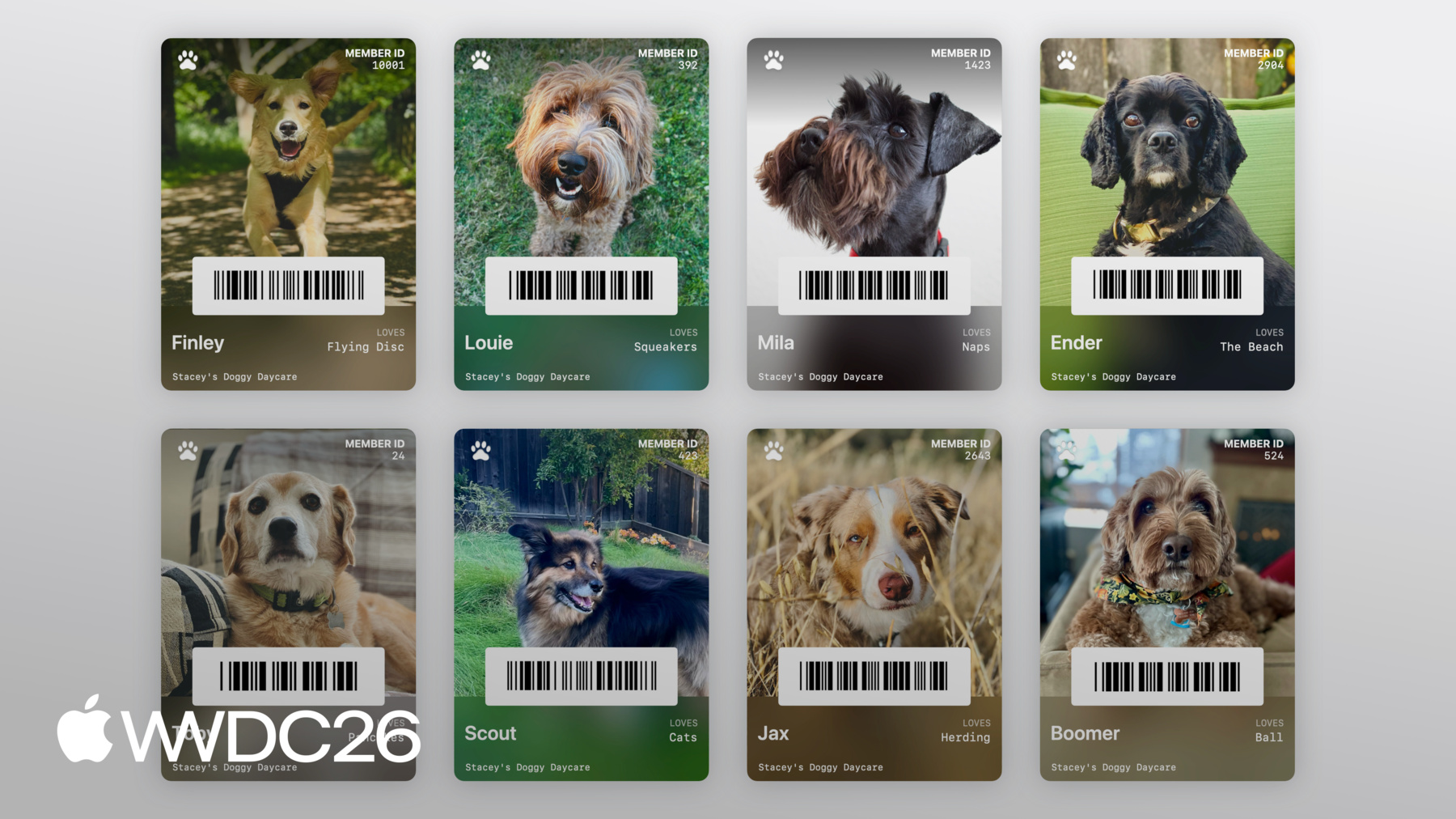
私の友人StaceyはDoggy Day Careを 経営しています。 彼女のふわふわのクライアントそれぞれに 会員カードを作成するのを手伝いたいと思います。 Pass Designerを使用して テンプレートをデザインし、 次にPass Builder on Serverを使用して テンプレートをパーソナライズします。 大規模にパスを配布します。
Pass Designerに入りましょう。
では始めます。 右側にパスのライブプレビュー、 左側にパスを編集する サイドバーがあります。
サイドバーでは、パスのIdentity & Signing 設定を構成できます。 パスタイル、画像、バーコード、フィールド、 そしてセマンティクス (パススタイルがサポートしている場合)。 これは少し白紙の状態です。 でもStaceyは各犬の素晴らしい ポートレート写真を撮影しているので、 新しいPoster Genericスタイルで 実験して、 それらの写真が どのように見えるか確認しましょう。 Styleに移動して、パススタイルを Poster Genericに変更します。
次に、サイドバーの Imagesに移動します。 デスクトップからStaceyが提供してくれた サンプル写真をドラッグします。
うまく合っているようです。 次にフィールドを追加しましょう。
サイドバーのHeader Fieldsに移動し、 新しいヘッダーフィールドを追加します。
キーをDOG_ID、ラベルをMember IDに 設定します。 プレースホルダーIDを追加して どのように見えるか確認します。
良いですね。 では犬の名前とお気に入りのおもちゃのための プライマリフィールドを追加しましょう。 サイドバーで Primary Fieldsに移動します。 名前のプライマリフィールドを追加します。
キーをDOG_NAMEに設定します。
Poster Genericパス面での 便利なトリックがあります。 最初のプライマリフィールドの ラベルを省略すると、 フィールド値のクールな太字 タイトルが表示されます。
プレースホルダー名としてFinleyと入力します。 お気に入りのおもちゃのプライマリフィールドを 追加します。 再びPrimary Fieldsに移動します。 新しいフィールドを追加します。
キーをLOVES、ラベルをLovesに設定します。 プレースホルダー値として Flying Discを追加します。 Staceyが各犬のチェックインと チェックアウトを簡単にできるようにしましょう。 会員IDをバーコードとして エンコードします。
Barcode & NFCに移動します。
プレースホルダーバーコードメッセージを 入力します。 これは動作しますが、QRコードに そんなにスペースを使う必要はないと思います。 代わりに細いバーコードタイプを 試してみましょう。 PDF417などです。
フォーマットピッカーをクリックします。
PDF417を選択します。 ずっと良くなりました。
次に仕上げの手を加えましょう、 プライマリロゴを追加します。
Imagesに移動します。
デスクトップからプライマリロゴを ドラッグします。
Styleに移動して 色を調整します。 ラベルカラーを設定します。 最後の仕上げとして、 フッターに「Stacey's Doggy Day Care」を追加します。
Footer Fieldsに移動して、 新しいフィールドを追加します。
テキスト値を Stacey's Doggy Day Careに設定します。
とても可愛いパスです、 とても可愛い犬のための。
最後にすべきことは、 テンプレートを保存することです。
Pass Designerはテンプレートを pkpasstemplateファイルとして保存します。
Fileに移動して、Saveを選択し、 テンプレートを保存します。
Pass Designerで Stacey's Doggy Day Careの メンバー全員に個別のパスを 作成したくはありません。 代わりに、このテンプレートを サーバー上でPass Builderを使用して 大規模にパーソナライズしたいと思います。
Stacey's Doggy Day Careの Swiftサーバーに 切り替えます。 まず、PassBuilderを追加します。 Swiftパッケージマニフェストへの 依存関係として、 サーバーターゲットにも追加します。
次に、サーバーソースでこの createPass関数を実装します。 パーソナライズされたパスを 生成するために。 createPass関数は、データベースから 既に読み込まれたモデルを受け取ります。 犬の名前、会員ID、お気に入りのおもちゃ、 各犬の素晴らしい写真への URLが含まれています。 まず、先ほど作成した テンプレートを読み込みましょう。 PassPackageタイプを使用します。 PassPackageはパスバンドルにアクセスして 設定するタイプセーフな方法を提供します。 pass.jsonの内容と対話するための passプロパティを含みます。 フィールドをパーソナライズしましょう。
passフィールドプロパティのsetValueを呼び出して、 犬の名前を設定します。 会員IDと お気に入りのおもちゃを設定します。
次に背景画像を 犬の写真に設定しましょう。
PassImageのインスタンスを作成し、 犬の写真へのURLを渡します。 そしてpassパッケージタイプの backgroundImageプロパティに割り当てます。 バーコードを設定しましょう。 犬をデイケアに 素早くチェックインとチェックアウトできるように。
Pass.Barcodeを作成します。 エンコードされたメッセージが 犬の会員IDになるように、 PDF417フォーマットを使用します。
最後に、クライアントが会員資格を 確認するためのフィーチャードアクションがあると 素晴らしいと思います。 featuredActionsにPass.Actionを設定して 追加しましょう。 これだけで、サーバーは パーソナライズされたパスを生成しています。
次に、パスをビルドして 配布のために署名する必要があります。
念のため、Wallet用にパスを ビルドして署名するには、 パスのコンテンツのマニフェストを 生成して書き込む必要があります。 パスバンドルに書き込みます。 次にマニフェストのデタッチされた 署名を作成します。 そして署名を パスバンドルに書き込みます。 次に結果のディレクトリを圧縮して .pkpassファイル拡張子を追加します。 Pass Builderがこれらすべてを 処理してくれます。 証明書を提供するだけで 大丈夫です。 サーバーソースに戻ります。 PassCertificateタイプを使用して、 パス署名証明書を 読み込みます。 そしてWWDR中間証明書も読み込みます。 次に、PassSignerの インスタンスを作成します。 証明書を渡します。 最後に、PassSignerの signPass関数を呼び出します。 先ほど作成した パーソナライズされたパッケージを渡します。 そして、署名済みパスを 配布のために書き込むディスク上のURL。
そしてURLを返します。
これでStacey's Doggy Day Careは すべてのクライアントに素晴らしいWallet Passesを 持つことができます。
Pass Builderは他のプログラミング言語からも 使用できます。 swift-javaプロジェクトはSwift APIの ネイティブJavaバインディングを生成できます。 Javaランタイムから Pass Builderを呼び出せるようにします。 パスパッケージフォーマットの protobuf定義も提供しています。 お好みのプログラミング言語で タイプセーフなモデルを生成できます。 カスタマイズメッセージを 生成し、 buildpassコマンドライン実行ファイルを 呼び出すことができます。 パスをパーソナライズして 署名するために。 swift-javaの使用に関する 詳細については、 「Explore Swift and Java interoperability」開発者セッションをご覧ください。 buildpassコマンドラインの ドキュメントについては、 Pass Builderの開発者 ドキュメントをご覧ください。 どちらもセッションの説明に リンクされています。
これがPass DesignerとPass Builderの 簡単なエンドツーエンドデモです。 テンプレートのデザインから、 パーソナライズして、 配布のために署名するまで。
Pass Designerのダウンロード、 Pass Builderのソース、 および包括的なドキュメントへのリンクは セッションの説明で見つけられます。
今日は多くのことを説明しました。 次のステップとして。 Pass Designerをチェックしてください。 Pass Designerを使用して 新しいPoster Genericスタイルを試し、 パスに最適かどうか 確認してください。
新しいバーコードタイプの いずれかを採用する場合は、 適切なフォールバックを提供する 計画を立ててください。
少し時間をとって お客様にとって最も意味があり 関連性の高いアクションを特定し、 フィーチャードアクションで それらを実現してください。
これはWallet Passesを 構築する新しい章であり、 皆さんが作成するすべての 素晴らしいパスを見るのが楽しみです。 ご視聴ありがとうございました、 素晴らしいWWDCをお過ごしください。
-
-
1:41 - Adopting Poster Generic
// Adopting Poster Generic "posterGeneric": { "headerFields": [ { "key": "memberID", "label": "Guest No.", "value": "102035" } ], "footerFields": [ { "key": "membershipType", "value": "Family Pass" } ] } -
2:11 - Adopting Poster Generic with Generic fallback
// Adopting Poster Generic and supporting Generic on iOS 26 and earlier "posterGeneric": { "headerFields": [ { "key": "memberID", "label": "Guest No.", "value": "102035" } ], "footerFields": [ { "key": "membershipType", "value": "Family Pass" } ] }, "generic": { "headerFields": [ { "key": "memberID", "label": "Guest No.", "value": "102035" } ], "footerFields": [ { "key": "membershipType", "value": "Family Pass" } ] } -
2:52 - Barcodes: Add new types for iOS 27
// Adopting new barcode types "barcodes": [ { "format": "PKBarcodeFormatCodabar" "message": "…" "messageEncoding": "…" } ] -
3:37 - Barcodes: Supporting iOS 26 and earlier
// Adopting new barcode types and supporting iOS 26 and earlier. "barcodes": [ { "format": "PKBarcodeFormatCodabar" "message": "123456789" "messageEncoding": "iso-8859-1" }, { "format": "PKBarcodeFormatQR" "message": "123456789" "messageEncoding": "iso-8859-1" } ] -
4:48 - Featured actions
// Featured actions "featuredActions": [ { "identifier": "my-offer-id", "type": "membershipBenefits", "url": "www.example.com/offers" } ] -
10:56 - Package.swift
// Package.swift import PackageDescription let package = Package( name: "MyServer", products: [ .library( name: "MyServer", targets: ["MyServer"] ), ], dependencies: [ .package(path: "./path/to/PassBuilder") ], targets: [ .target( name: "MyServer", dependencies: [ .product(name: "PassBuilder", package: "PassBuilder") ] ), … ] -
11:05 - CreatePass.swift
// CreatePass.swift import PassBuilder func createPass(for doggo: MemeberModel) async throws -> URL { var package = PassPackage(url: "template.pkpasstemplate") package.pass.fields.setValue(doggo.name, forKey: "DOG_NAME") package.pass.fields.setValue(doggo.favoriteToy, forKey: "LOVES") package.pass.fields.setValue(doggo.id, forKey: "MEMBER_ID") package.background = PassImage(url: doggo.photoURL) package.pass.barcodes = [ Pass.Barcode(message: doggo.id, format: .pdf417) ] package.featuredActions = [ Pass.Action(id: "action-1", type: "viewMembership", url: doggo.membershipURL) ] … } -
13:11 - CreatePass.swift
// CreatePass.swift

import PassBuilder

func createPass(for doggo: MemeberModel) async throws -> URL {
    var package = PassPackage(url: "template.pkpasstemplate")

    package.pass.fields.setValue(doggo.name, forKey: "DOG_NAME")
    package.pass.fields.setValue(doggo.favoriteToy, forKey: "LOVES")
    package.pass.fields.setValue(doggo.id, forKey: "MEMBER_ID")

    package.background = PassImage(url: doggo.photoURL)

    package.pass.barcodes = [
        Pass.Barcode(message: doggo.id, format: .pdf417)
    ]

    package.featuredActions = [
        Pass.Action(id: "action-1", type: "viewMembership", url: doggo.membershipURL)
    ]

    let passCertificate = try PassCertificate(url: "pass.p12", password: "s3cr3t")
    let wwdrCertificate = try PassCertificate(url: "wwdr.cer")

    let signer = PassSigner(
        passCertificate: passCertificate,
        wwdrCertifiate: wwdrCertificate
    )

    let destinationURL = URL(string: "/www/passes/" + doggo.id)
    try signer.signPass(package, writingTo: destinationURL)

    return destinationURL
}
-