

-
画像理解の新機能
最新のVisionフレームワークとFoundation Modelフレームワークのアップデートを活用し、高品質な画像理解を実現しましょう。新しいTap to Segmentリクエストにより画像を新しい方法でセグメント化できるようになったほか、VisionはwatchOSにも対応するようになりしました。AppleのFoundation Modelによる画像の新たなサポートをOCR、バーコードスキャン、デベロッパ独自のツールと組み合わせることで、LLMを活用した高度なビジュアル理解をアプリ上で提供できます。
関連する章
- 0:00 - はじめに
- 1:36 - Tap-to-Segmentによる画像のセグメント化
- 5:50 - Foundation Model用の画像入力
- 7:57 - 画像に基づくツール呼び出し
- 13:09 - watchOS対応のVision
- 14:39 - 次のステップ
リソース
- Segmenting objects using taps, scribbles or rectangles
- Implementing saliency-based image cropping in iOS and watchOS
関連ビデオ
WWDC26
WWDC25
WWDC24
-
このビデオを検索
こんにちは、Vision frameworkチームの Megan Williamsです。
今年は画像理解において 強力な進歩があり、 それを使ってアプリで 素晴らしい体験を作れるようになりました。 いくつかについてお話しします。 まずは新機能から—— あれ、おかしいな。アジェンダがありません。 すぐに作れるか試してみましょう。 カバーしたいトピックの メモを取ってあります。 AIがアジェンダ作成を 手伝ってくれるはずです。 このメモの写真を使います。 そして大規模言語モデルに アジェンダを生成してもらいます。 Foundation Models frameworkを使えば これはとても簡単です。 ありがたいことに、今年は Foundation Modelsが画像入力に対応しました。 すばらしい! モデルがアジェンダを作ってくれました。 これでプレゼンに戻れます。 今年は、アプリに画像理解を 取り込む方法がかつてないほど増えました。 まずはVisionの新機能から。 タップしてセグメントするAPIにより、 画像内の任意のオブジェクトを タップするだけで切り出せます。 また、新しく強力な方法として、 大規模言語モデルを使った 画像分析が可能になりました。 Foundation Models frameworkを使った 方法をご説明します。 次に、LLM向けの画像ベースツールを 作成する方法をご紹介します。 これにより画像理解の可能性が さらに広がります。 最後に、VisionはwatchOSでも 利用できるようになりました。 Visionを使ってウォッチアプリを 強化する方法をご紹介します。 ではまず、タップしてセグメントするAPIで できる素晴らしいことを お見せします。 Visionにはすでにいくつかの 画像セグメンテーション機能があります。 たとえば、人物セグメンテーションでは 画像内のすべての人物を 切り出せます。 でも、画像内の別のものをセグメントしたい 場合はどうでしょうか? たとえば、この花瓶は? VisionのタップしてセグメントするAPIで、 画像内の任意のオブジェクトを選んで セグメントできます。 このボードゲーム、衣類、 床でさえもセグメントできます。 セグメントするオブジェクトを選ぶ 方法はいくつかあります。 いくつかをデモします。
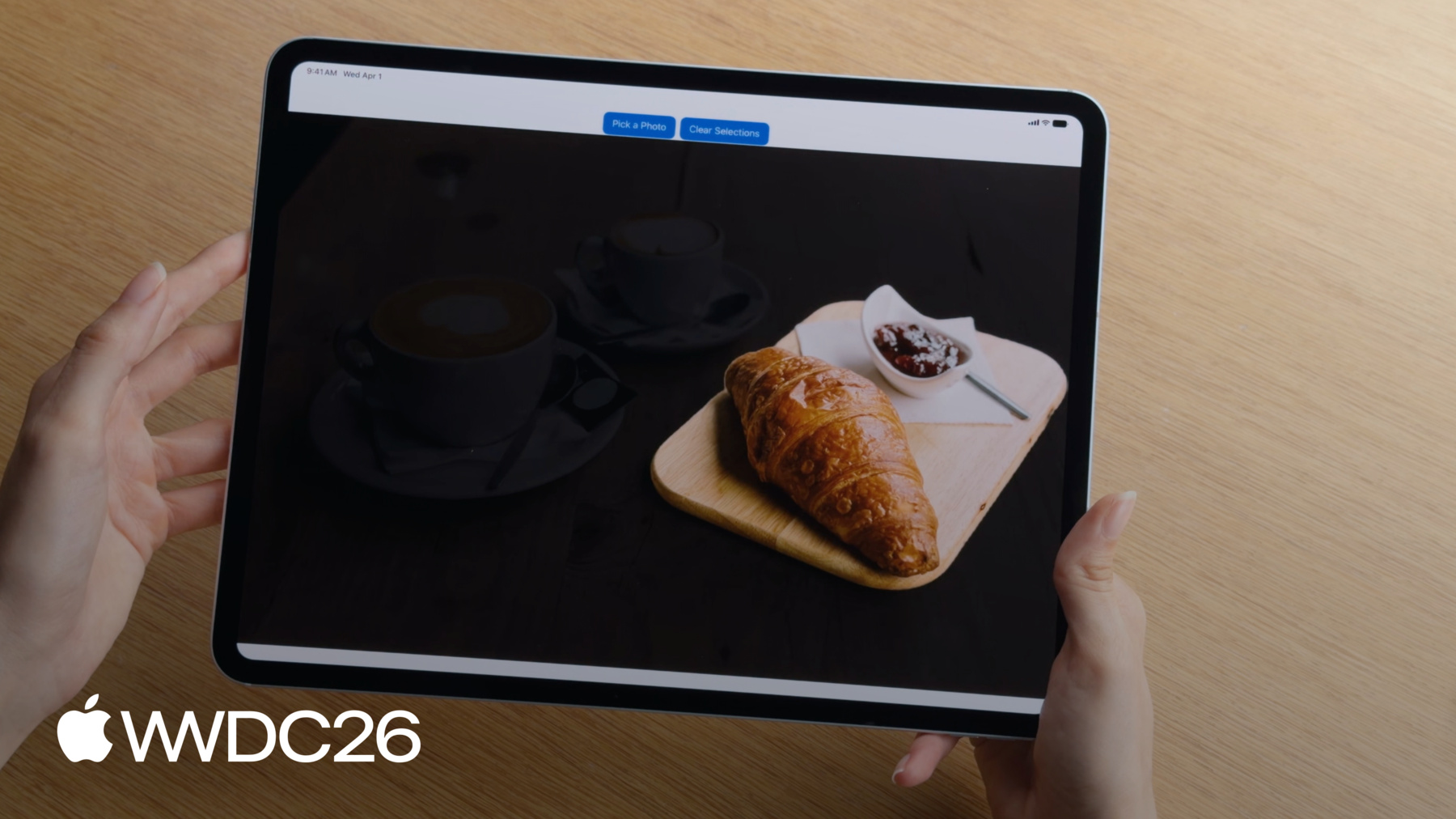
アプリにカフェの写真があり、 テーブルのコーヒーカップを セグメントしたいとします。 まず、カップ上の点を選択します。 するとカップが切り出されました。 単純なオブジェクトではうまく機能しますが、 被写体が複雑な場合は、 1点だけの選択では 不十分なことがあります。 たとえば、お皿も含めたい 場合があります。 代わりにバウンディングボックスを描いて セグメントしたい全オブジェクトを 囲みます。 これでカップとお皿の 両方を取得できます。
オブジェクトの周りにラッソを描くこともできます。 ラッソを使ってこのクロワッサンを セグメントします。
もう一つの優れた方法は スクリブルを描くことです。 複数のオブジェクトにスクリブルして 一度に簡単にすべてをセグメントできます。
マスクを取得したら、 点を追加または削除して マスクを精密化できます。 このカップを最初の点で セグメントしましたが、 今度はお皿も含めたいとします。 お皿をタップするだけで 含まれるようになります。
マスクからセクションを取り除くこともできます。 コーヒーだけが欲しく、 カップは不要な場合は、 マスクから除外する点を カップ上で選択すると、 コーヒーだけが得られます。
APIを使うには、 まず画像から始めます。 ImageRequestHandlerを使って 画像を保持できます。 Visionでは、画像は リクエストを使って処理されます。 オブジェクトをセグメントするには、 GenerateIterativeSegmentationRequestを使います。
ImageRequestHandlerを使って リクエストを実行します。 これによりセグメントされたオブジェクトの マスクが生成されます。 マスクはPixelBufferで、 どのピクセルがセグメントされた オブジェクトに属するかを示します。 コードはこちらです。 画像から始めて、 ImageRequestHandlerを作成します。 次にリクエストを作成します。 セグメントしたいオブジェクト内の点を 開始シードとして使います。 ImageRequestHandlerを使って 画像に対してリクエストを実行します。 これによりオブジェクトの セグメンテーションマスクが生成されます。 必要に応じて新しい点を追加して このマスクを精密化できます。 そのためには、リクエストに 点を含めるだけです。 そしてリクエストを再度実行します。 注意すべき点が いくつかあります。 Visionは座標原点が 左下角にある 正規化された座標系を使います。 点は画像の幅と高さに 正規化される必要があり、 座標値は0から1の間になります。
ラッソを描く際は ストローク幅が十分広いことも重要です。 細いストロークでは 最良の結果が得られない場合があります。 線幅は画像全体の幅の 少なくとも1%必要です。
最後に、デバイスで初めて セグメンテーションリクエストを実行する前に、 モデルをダウンロードする必要がある ことをお伝えします。 downloadAssets APIを使って ダウンロードを開始できます。 モデルがダウンロード済みかどうか わからない場合は、 assetStatusを確認して モデルが使用可能かどうかを確認できます。 タップしてセグメントすることで、 画像の任意の部分を インタラクティブにセグメントできるようになりました。 次に、画像を分析する 新しくエキサイティングな方法として Foundation Models frameworkを 使った方法についてお話しします。 先ほど、大規模言語モデルを使って 付箋の写真からアジェンダを まとめた例をご紹介しました。 でも大規模言語モデルは もっと多くのことができます。 モデルに依頼して、 アプリ内の画像の キャプション生成を助けてもらうこともできます。 モデルは説明的なタスクが得意です。
インテリアデコレーションの 相談もでき、 リビングルームへの 役立つ提案もしてもらえます。
そして私の個人的なお気に入りは、 大規模言語モデルを使って冷蔵庫の写真から レシピを作れることです。 可能性は無限大です。 そしてこれを行うAPIは非常にシンプルです。 画像のキャプションを生成する コードはこちらです。
Foundation Modelsの プロンプトビルダー構文を使っています。 画像の処理方法について モデルへの指示を含む テキストプロンプトがあります。 次に、画像を添付ファイルとして プロンプトに含めます。 モデルにプロンプトへの 応答を求めると、 キャプションを生成してくれます。 これで自分のプロンプトで 試せます。 画像を分析する方法が 複数あり、それぞれに利点があります。 Foundation Models frameworkは 大規模言語モデルを活用しており、 ほぼ何でも 依頼できます。 一方、Visionのような従来の 画像処理フレームワークは、 固定されたコンピュータビジョン APIセットを使います。 Vision APIは特定のタスクに ファインチューニングされており、 非常に優れた結果を出します。 そしてVisionは高速です。 多くの場合、映像フレームを リアルタイムで分析できるほど高速です。
ただし、VisionとFoundation Modelsの どちらかを選ぶ必要は 常にあるわけではありません。 ツール呼び出しを使って、 Visionの専門性と Foundation Modelsの汎用性を 組み合わせる方法があります。 大規模言語モデルに、従来の 画像処理APIを実行する ツールへのアクセスを与える方法を デモします。 Visionのようなものです。 画像理解を新たなレベルに 引き上げます。 まず、ツール呼び出しについて 簡単に復習します。 先ほど、モデルにプロンプトを与えて 応答を生成させる方法を ご紹介しました。 ツール呼び出しでは、 モデルがツールを呼び出して 外部コードを実行し、 結果を得ることができます。 モデルはこの結果を 応答に使用できます。
たとえば、天気ツールを用意して、 特定の日の天気予報を 取得できます。 プロンプトは天気についての 質問です。 モデル単独では 質問に答えられないため、 天気ツールへのツール呼び出しを 行います。 モデルがツール呼び出しをする際、 ツールに必要な引数を 生成します。 この場合、引数はモデルが 天気を取得したい 日付になります。 ツールは要求された日付の 天気を取得して モデルに報告します。 これでモデルは天気についての 質問に答えられます。 ツール呼び出しの詳細については、 「Foundation Models frameworkの 詳細」をご覧ください。
今年、ツール呼び出しは 画像引数に対応しました。 たとえば、植物の写真を提供して 質問を尋ねられます。 モデルが植物を 単独で識別できない場合、 独自の植物識別ツールを 作成して モデルにアクセス権を与えられます。 モデルは画像に対してツールを呼び出し、 植物を識別します。 画像全体を引数として渡す代わりに、 モデルは代わりに画像への 参照を渡します。 ツールは画像を分析して 植物の名前を返します。 これでモデルは正しい情報で 応答できます。 コードはこちらです。 ツールはFoundation Models frameworkの ツールプロトコルに準拠しています。 ツールは入力引数を 定義する必要があります。 植物識別ツールでは、 引数をImageReferenceに したいと思います。 これはモデルに、引数が 現在のチャットセッションの 既存の画像への参照である必要がある ことを知らせます。
ツールはcallメソッドも 定義する必要があり、 モデルがツールを呼び出した際に 実行されます。 callメソッド内では、 ツール引数からimageReferenceに アクセスできます。 ただし、この参照を実際の画像に 解決する必要があります。 各imageReferenceは、 それが生成されたトランスクリプトの コンテキスト内でのみ有効です。 このトランスクリプトにアクセスするには、 historyセッションプロパティを使います。
トランスクリプトを使って、imageReferenceを imageAttachmentに解決し直します。 次に添付ファイルをpixelBufferに変換して 分析できるようにします。 ツールはモデルに多くの ユーティリティを提供でき、 特にモデルが苦手な タスクに役立ちます。 独自のツールを作成することもできますが、 一般的なタスク向けに VisionがいくつかのツールをAPIとして提供しています。
一部のモデルはバーコードや QRコードの読み取りが苦手です。
ここにイベントのチラシがあり、 日付、場所、 ウェブサイト登録情報などを 抽出するようモデルに依頼しています。 ツールを有効にしないと、モデルは場所と日付は 見つけられますが、 QRコードは読み取れません。 Visionはモデルを助ける バーコードリーダーツールを提供します。 これでモデルはバーコードリーダーへの ツール呼び出しが可能になります。 ツールが画像を分析して QRコードからウェブサイトを返します。 これでモデルはすべての情報を 正しく読み取れます。
Visionは2つのツールを提供します。 バーコードリーダーツールは すでにご覧いただきました。 バーコードとQRコードのスキャン用です。 OCRツールもあります。 非常に細かいまたは密なテキストを モデルが読むのを助けます。 30以上の言語のテキストを 読み取れます。
ツールを使うには、 Visionをimportして、 使用するツールで 言語モデルセッションを 設定するだけです。 これでモデルはツールを呼び出して プロンプトへの回答を 助けられます。 画像ベースのツール呼び出しをモデルに させたい場合は、添付画像に ラベルを付けることも重要です。 このラベルによって、モデルはどの画像を ツールに渡すかを識別します。 Visionを使って独自の ツールを作成することもできます。 Visionは30種類以上の 画像分析をサポートしています。 画像セグメンテーションについて触れましたが、 他のものもいくつかご紹介します。
Visionは顔分析、 ポーズ推定、 検出と画像分類、 さらには軌道分析や オブジェクトトラッキングも行えます。 「Vision frameworkにおける Swift強化の発見」をご覧ください。 全リストはそちらで 確認できます。 今年、Visionはかつてないほど 多くの場所で利用できます。 VisionをwatchOSアプリの 強化にも使えます。 ハイキング中に見られる 地元の野生生物の情報を 表示するウォッチアプリがあります。 遭遇するかもしれない さまざまな動物が 表示されており、動物を選んで 詳しく調べられます。 アプリは動物の写真を表示しますが、 ウォッチの画面がとても小さいため、 見づらいです。 Visionが助けてくれます。 Visionの顕著性分析を使って 写真内の注目される被写体を 識別できます。 そして、主被写体がより目立つように 画像をクロップできます。 Visionを使ってクロップを生成する コードはこちらです。 まずリクエストを作成します。 GenerateObjectnessBasedSaliencyImageRequestを 使います。 次に画像に対して リクエストを実行します。 これにより顕著性の観測が 生成されます。 この観測から、画像内で検出された 顕著なオブジェクトの バウンディングボックスにアクセスできます。 最も目立つオブジェクトを取得して クロップに使います。
画像の顕著な部分のみを 表示するようアプリを更新しました。 これで動物を選ぶと ズームインされた表示になります。 ずっと見やすくなりました。
このビデオでは多くの内容を カバーしました。 簡単に振り返ります。 VisionのタップしてセグメントするAPIにより、 画像内のオブジェクトをインタラクティブに セグメントできます。 Foundation Modelsが大規模言語モデルの 画像入力に対応しました。 これにより、これまでできなかった 新しい方法で画像を分析できます。 これまでできなかった新しい方法で。 VisionなどのフレームワークをツールとしてVisionに組み込み、 画像分析をさらに 向上させられます。 watchOSを含むすべてのプラットフォームで Visionを使ってアプリを強化できます。
watchOSの タップしてセグメントする サンプルアプリを デベロッパーウェブサイトから ダウンロードできます。 「Vision frameworkにおけるSwift強化の発見」も お見逃しなく。 Vision APIの詳細が学べます。 「Foundation Models frameworkの新機能」も ご覧ください。 大規模言語モデルがアプリを強化する その他の方法を学べます。 ご視聴ありがとうございました。
-
-
4:15 - Segment images (tap-to-segment)
// Generate a segmentation mask of an object with a seed point let handler = ImageRequestHandler(image) let request = GenerateIterativeSegmentationRequest(seed: point) let observation = try await handler.perform(request) let mask = observation?.pixelBuffer // Refine the mask with a new point request.addIncludedPoint(newPoint) let refinedObservation = try await handler.perform(request) -
6:41 - Generate an image caption with Foundation Models
// Generate an image caption with Foundation Models import FoundationModels let prompt = Prompt { "Generate a caption for this image" Attachment(image) } let response = try await session.respond(to: prompt) let caption = response.content -
9:55 - Create an image-based tool
// Create an image-based tool struct PlantIdentifierTool: Tool { @SessionProperty(\.history) var history @Generable struct Arguments { var image: ImageReference } func call(arguments: Arguments) async throws -> String { let imageReference = arguments.image let transcript = Transcript(history) guard let imageAttachment = imageReference.resolve(in: transcript) else { throw AppError.imageNotFound } let image = try imageAttachment.pixelBuffer() return classifyPlant(image) } } -
12:09 - Use Vision tools
// Use Vision tools import FoundationModels import Vision let session = LanguageModelSession(model: model, tools: [BarcodeReaderTool()]) let response = try await session.respond(generating: EventInfo.self) { "Get the date, location, and website from this flyer" Attachment(image) .label("flyer") } -
13:54 - Create a crop that highlights a prominent subject (watchOS / saliency)
// Create a crop that highlights a prominent subject
func generateImageCrop(in image: CGImage) async throws -> NormalizedRect? {
    let request = GenerateObjectnessBasedSaliencyImageRequest()
    let observation = try await request.perform(on: image)
    let prominentObjects = observation.salientObjects
    return prominentObjects.first
}
-