

-
Music Understandingフレームワークについて
新しいMusic Understandingフレームワークをアプリに導入すると、オーディオを6つの要素(音程、リズム、構造、テンポ、楽器のアクティビティ、ラウドネス)についてデバイス上で分析できます。このセッションでは、分析結果の各項目を視覚的に把握するためのMusic Understanding Labのサンプルアプリも紹介します。
関連する章
- 0:00 - はじめに
- 1:39 - 音楽的な特徴
- 3:19 - フレームワークの統合
- 3:55 - Music Understanding Lab
リソース
-
このビデオを検索
こんにちは。私はConnerです。 Computational Music Teamに所属しています。 Music Understandingというフレームワークを ご紹介できることを嬉しく思います。 このフレームワークは、すべてのAppleプラットフォームで オンデバイスの音楽インテリジェンスを提供します。 すべての信号処理と モデル推論を自動的に処理するので、 信号処理や機械学習の専門知識が なくても使用できます。 また、完全にオンデバイスで動作するため、 分析した音声はプライベートに保たれ、 オフラインでも動作します。 Appleでは、Final Cut Proチームが Music Understandingフレームワークを使って アプリの2つの機能を実現しました。
ビート検出機能では、 Final Cut Proが曲のリズムを分析し、 構造を解析してビートグリッドを表示します。
これにより、編集者は 曲のパート、小節、ビートに合わせて 編集を視覚化・整列できます。
そしてiPad向けFinal Cut Proでは、 モンタージュ機能がリズム、ペース、 構造を分析することで、 クリップを音楽に自動的に 同期させます。
まず、このフレームワークで できることを説明します。 次に、フレームワークの使い方を 説明します。 最後に、APIを詳しく説明し、 音楽理解のためのサンプルアプリを どのように構築したかを 紹介します。
このフレームワークは6つの主要な領域の 分析を提供します:
キー、 リズム、 構造、 ペース、 楽器アクティビティ、 そしてラウドネス。
リズムは曲の鼓動であり、 個々のビートによって駆動されます。 これらのビートが積み重なって 小節を形成します。 1分間のビート数は 「ビート・パー・ミニット」と呼ばれ、 BPMと略されます。 小節はフレーズを形成し、 音楽的な文章として 捉えることができます。 フレーズが組み合わさってセグメントになり、 より完全な音楽的表現を 作り出します
そしてそれらのセグメントが 最終的にセクションを構築します。 セクションとは、 コーラス、バース、イントロ、 ブリッジのことです。 曲の中で、 ドラムなどの楽器が、 ベース、 またはボーカルが 異なるタイミングで 異なる強度で演奏されることがあります。 これらの楽器は、共通の音符の集まりの 周りで演奏されます。 それがキーと呼ばれます。 曲全体を通じて一定のパルスやBPMがあっても、 曲の部分によって遅く感じたり 速く感じたりすることがあります。 これをペースと呼びます。
時間の経過とともに、曲は ある部分では他の部分より大きく聞こえます。 これらがMusic Understandingフレームワークの 構成要素であり、 アプリに統合することで、 まったく新しいレベルの 可能性が広がります。
次に、フレームワークの 使い方について説明します。 概要として、 アプリはMusicUnderstandingSessionと 連携し、 AVAssetまたは カスタムオーディオプロバイダーで 初期化します。 分析を開始するには、analyzeを呼び出して 結果をawaitします。 デフォルトでは、フレームワークはすべての 分析タイプを解析します。 最高のパフォーマンスを得るには、 必要な分析タイプを 指定することができます。 これにより不要な計算を 避けることができます。
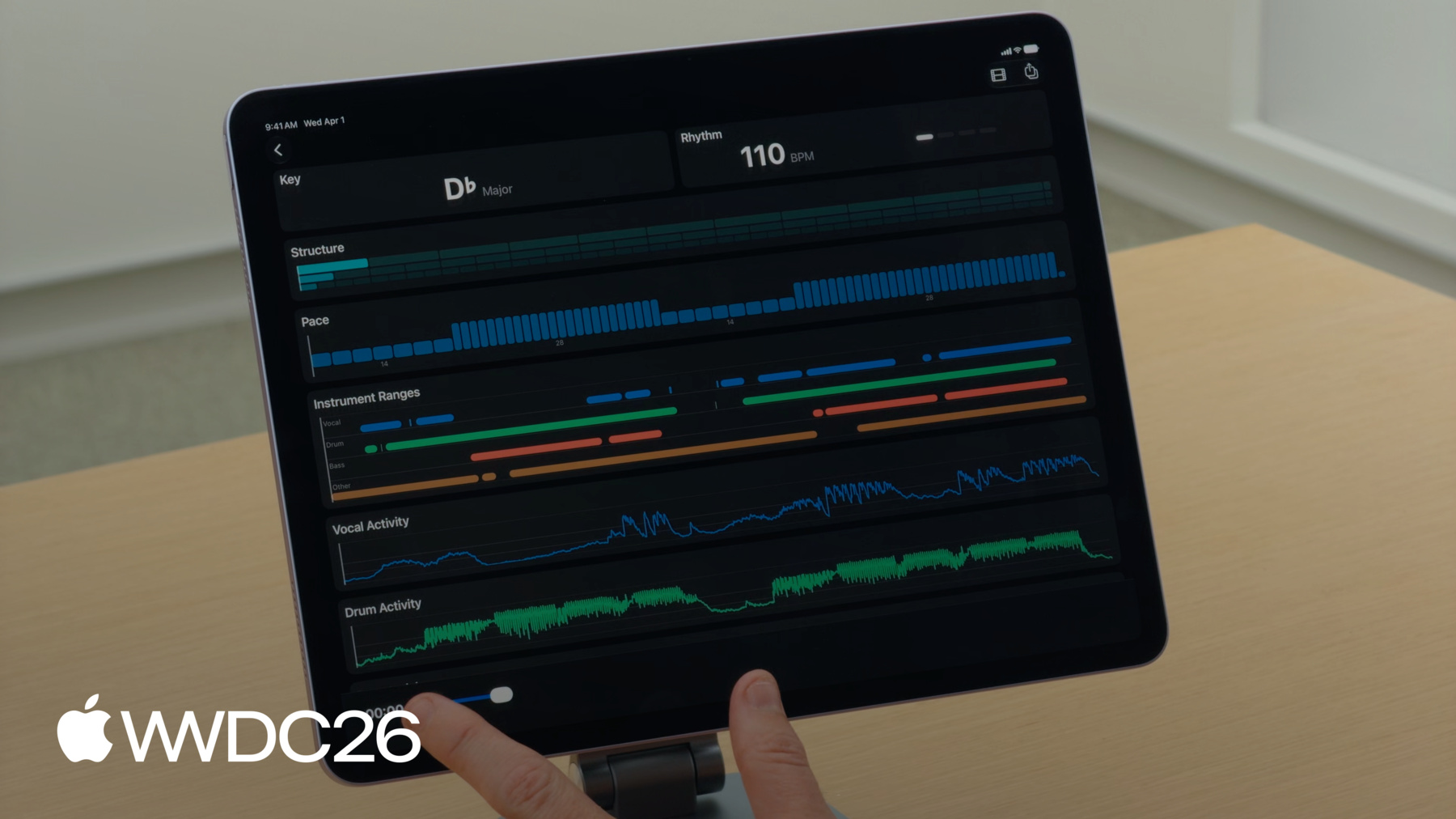
フレームワークをより詳しく探索するため、 Music Understanding Labという サンプルアプリを確認します。 developer.apple.comで入手できます。 Music Understanding Labの 動作をご覧ください。 まず、デバイス上で曲を選択します。
アプリはMusic Understandingフレームワークを使って 音声を分析し、 ビジュアル体験に変換して、 各結果に専用のタイルを表示します。 再生ボタンを押すと、 曲が再生されるにつれてRhythmと StructureのタイルがUpdateします。 再生ヘッドが体験をまとめ、 音楽に合わせて追いかけることができます。
まず、「Select Song...」ボタンの 実装方法から説明します。 SwiftUIのfileImporterを使って、 ファイルを選択してURLを取得します。 次に、そのURLを使って AVURLAssetを作成します。 最も正確な結果を得るために、 PreferPreciseDurationAndTimingKeyをtrueに 設定してください。 次に、アセットから セッションを作成し、 analyzeを呼び出してセッション結果の 返却をawaitします。 SessionResult構造体の中では、 Music Understandingが分析する 各フィーチャーは独自の結果フィールドを持ちます。 これらはすべてOptionalです。 一般的なanalyze() APIを使用すると、 すべての結果が利用可能になります。 ただし、ターゲットを指定した analyze(for:) APIを使用すると、 フレームワークはリクエストした 結果のみを返し、 残りはnilになります。
Music Understandingフレームワーク全体において、 時間と値を関連付けるための 標準タイプが2つあります。 TimedValueは値をCMTimeと 関連付けます。 TimedValueと同様に、 RangedValueはCMTimeRangeを 値に関連付けます。 これらの時間ベースの型を踏まえて、 Music Understandingが分析するフィーチャーについて Music Understanding Lab UIでの 使用方法を交えて説明します。 まず、Keyタイルから 始めます。 この曲の音楽的キーは D♭メジャーです。 キー分析では、 Music Understandingフレームワークは KeyResult構造体を返します。 結果には範囲の配列が含まれており、 KeySignatureを特定の時間範囲に マッピングします。 RangedValueを使用して。 KeySignatureにはtonicが含まれており、 modeも含まれています。 tonicは標準的なクロマティックピッチの いずれかになります。 CやGのようなルートノートを表し、 曲がその周りに構築されます... そしてmodeは majorまたはminorのいずれかです。
Keyの隣にはRhythmタイルがあります。 タイルは左にBPMを表示し、 右には各ビートが再生されるたびに 点灯するインジケーターを表示します。 リズムを分析すると、 RhythmResultが返されます。 この構造体では、Music Understandingが すべてのビートと小節の タイムスタンプをCMTimeの 配列として提供します。 フレームワークはまた、 全体的なグローバルテンポを beatsPerMinuteで提供します。 BPMはOptionalであることに注意してください。 フレームワークが少なくとも 2つのビートを見つけるほど 十分な音声を処理していない場合、 BPMはnilに設定されます。 次に、Structureタイルについて 説明します。 タイルには3行の長方形があり、 曲の構造的な階層を 示しています。 各長方形は曲の 時間範囲を表しています。 Music Understandingは構造の 3つのレベルをサポートしています: セクション、セグメント、フレーズです。 上の行は曲のセクションを表します。 各ブロックはセクションの 時間範囲を示しています。 各セクションは1つ以上のセグメントで 構成されており、 セクションの長方形の下に 表示されます。 また、各セグメントはフレーズで 構成されています。 再生中は現在のセクション、 セグメント、フレーズがハイライト表示されます。
構造分析をリクエストすると、 フレームワークはStructureResultを返します。 3つのプロパティがあります。 セクション、セグメント、 フレーズのためのものです。 それぞれについて、 CMTimeRangesの配列が得られます。 次のタイルはPaceです。 リスナーに音楽がどのくらい 速く感じられるかを示します。 速く感じたり よりエネルギッシュに感じたりする曲のパートは、 ゆっくりまたはエネルギーが低い パートと比べて高い値を持ちます。 このUIでは、高いバーは 高いエネルギーを表し、 低いバーは低いエネルギーを表します。 ペース分析をリクエストすると、 PaceResultが返されます。 この構造体には1つのプロパティがあり、 範囲付き値の配列が含まれています。
次に、楽器アクティビティタイルについて 説明します。
Music Understanding Labは 複数のタイルを表示し、 楽器のアクティビティを視覚化します。 時間範囲として、 カラーコードされたバーで 存在するアクティブな楽器を示すか、 または詳細なアクティビティグラフとして 表示されます。 グラフは0から1の間の値をプロットし、 各楽器の強度を 表現します。 値が1に近いほど、 ミックスにおいてその楽器は 大きくなります。 楽器アクティビティをリクエストすると、 フレームワークはInstrumentActivityResultを 返します。 2つのプロパティがあります。 1つはrangesのためのもの、 もう1つはactivityのためのものです。 Ranges APIはディクショナリを提供し、 各InstrumentをCMTimeRangesの 配列にマッピングします。 これは楽器が存在するかどうかだけを 知りたい場合に 最適です。 しかし、より詳細が必要な場合は activityがそれを提供します。 ActivityはInstrumentを FloatのTimedValueにマッピングします。 アクティビティ結果は、楽器が時間とともに どれほど強く演奏しているかを表現し、 オーディオリアクティブアニメーションを 駆動するための優れたソースです。 Loudnessタイルは楽器アクティビティの 下に表示されます。
フレームワークは Loudness Units Full Scale、 つまりLUFSでの 測定値を提供します。 これは業界標準であり、 人間の耳が音量を 知覚する方法をモデル化します。 タイルの上部には 単一のIntegrated Loudness値があり、 曲全体の平均ラウドネスを 示します。 その下にはmomentary loudnessの グラフがあり、 時間とともにラウドネスがどのように 変化するかを示します。 フレームワークはピーク値も提供し、 デシベル単位で最も高い 絶対的な音量を示します。 ラウドネス分析をリクエストすると、 フレームワークはLoudnessResult構造体を 返します。 Music UnderstandingはIntegrated、 MomentaryおよびShortTermラウドネスをサポートします。 Integratedは単一の値を提供し、 音声の全体的なラウドネスを 表します。 MomentaryとShortTermは 100ミリ秒ごとにタイムスタンプ付きの 値を提供します。 Momentary値は400ミリ秒の ウィンドウで計算されます。 ラウドネスの短い突発的なスパイクを 検出するのに便利です。 ShortTerm値は3秒のウィンドウで 計算されます。 時間とともにラウドネスのトレンドを より滑らかに表示します。 ピーク値は、トラックが最大レベルに 達する正確な場所を示し、 デシベルで測定されます。 MusicUnderstandingSessionはラウドネスの ストリーミングAPIも提供します。 値はAsyncSequenceを通じて 配信されます。 フレームワークが分析した 100msの音声ごとに。
使用例を示します。 以前と同様にセッションを 初期化しますが、 今回は2つのタスクを設定します: 1つはラウドネス結果が 配信されるたびに消費するもの、 もう1つは分析を開始するものです。
次に、この例のAudioProviderについて 説明します。 AudioProviderはAsyncSequenceに準拠し、 AVReadOnlyAudioPCMBufferオブジェクトを yieldします。 AudioProviderがすべての オーディオバッファを送信したら、 完了を知らせるために最後に nilを送る必要があります。
Music Understanding Labの 上部にある2つのアイコンに注目してください。 右端にはShareボタンがあります。 タップすると、すべての分析データを 含むJSONファイルがエクスポートされます。
すべてのMusicUnderstandingの 結果はCodableです。 JSONにエンコードするには、 JSONEncoderを作成して セッション結果をエンコードするだけです。 フィルムストリップアイコンのボタンが エクスポートボタンの隣に表示されます。
タップすると、Videoタイルが開きます。 VideoタイルはStructureとPaceを使って 音楽に同期したビデオを作成します。 その仕組みを説明します。 Videoタイルは音楽の雰囲気に合わせた 一連のビデオクリップを表示します。 アルゴリズムはまず曲のセクションの 時間範囲を特定することから始まります。 次に各セクションのペースを使って、 その時間範囲に表示する クリップ数を決定します。
ペースは1分あたりのイベント数なので、 60秒で割ることで 1クリップあたりの時間を求めます。 これにより、各セクションの冒頭で 必ず始まるクリップが生成され、 セクション内のクリップが 曲のエネルギーに合致します。
このタイミング情報を使って、 音楽に同期したビデオを構成しました。 ビデオクリップは目標クリップ時間に 合わせて再タイミング調整され、 エネルギーが低い部分では 長くゆっくりとしたクリップになり、 エネルギーが高い部分では 短く速いクリップになります。 この概要で、これらのAPIが実際に どのように連携するかがわかるはずです。 基本をカバーしたので、 準備完了です! Music Understandingを使えば、 ビジュアルを曲のビート、 ラウドネス、ペースに同期させ、 強力なビデオ編集機能を構築したり、 テンポやキーで音楽カタログを整理して DJアプリを動かしたり、 分析データを事前計算してバンドルして 音楽に合わせてゲームをアニメートすることができます。 Music Understandingフレームワークの ドキュメントをご覧ください。 developer.apple.comにあります。 また、「Music Understanding Lab」を ダウンロードして、 独自アプリ開発の きっかけにしてください。
このテクノロジーはAppleで 実際の課題を解決するために構築されました。 アイデアはありましたが、 それを実現するツールが 存在しませんでした。 そのツールが今、 あなたの手の中にあります。 素晴らしいものを作ってください。 ご視聴ありがとうございました!
-
-
4:47 - Initialize the session
import MusicUnderstanding .fileImporter(isPresented: $isPresented, allowedContentTypes: [.audio]) { result in switch result { case .success(let url): let asset = AVURLAsset(url: url, options: [AVURLAssetPreferPreciseDurationAndTimingKey : true]) let session = try await MusicUnderstandingSession(asset: asset) let results = try await session.analyze() } } -
5:24 - Inside SessionResult
import MusicUnderstanding public struct SessionResult: Codable, Sendable { public let instrumentActivity: InstrumentActivityResult? public let key: KeyResult? public let loudness: LoudnessResult? public let pace: PaceResult? public let rhythm: RhythmResult? public let structure: StructureResult? } -
5:53 - TimedValue
import MusicUnderstanding public struct TimedValue<Value>: Codable, Equatable, Sendable where Value: Codable & Equatable & Sendable { public let time: CMTime public let value: Value } -
5:58 - RangedValue
import MusicUnderstanding public struct RangedValue<Value>: Codable, Equatable, Sendable where Value: Codable & Equatable & Sendable { public let range: CMTimeRange public let value: Value } -
6:27 - Key analysis
public struct KeyResult: Codable, Sendable { public let ranges: [MusicUnderstandingSession.RangedValue<KeySignature] } -
6:43 - KeySignature
public struct KeySignature: Codable, Hashable, Sendable { public let tonic: Tonic public let mode: Mode } -
6:48 - Using tonic
@frozen public enum Tonic: String, Codable, Hashable, Sendable { case aFlat, aSharp, a, bFlat, b, c, cSharp, d, dFlat, dSharp, eFlat, e, f, fSharp, g, gFlat, gSharp } -
6:59 - Using mode
public enum Mode: String, Codable, Hashable, Sendable { case major, minor } -
7:16 - Rhythm analysis
import MusicUnderstanding public struct RhythmResult: Codable, Sendable { public let beats: [CMTime] public let bars: [CMTime] public let beatsPerMinute: Float? } -
8:42 - StructureResult
import MusicUnderstanding public struct StructureResult: Codable, Sendable { public let sections: [CMTimeRange] public let segments: [CMTimeRange] public let phrases: [CMTimeRange] } -
9:26 - Analyzing pace
import MusicUnderstanding public struct PaceResult: Codable, Sendable { public let ranges: [MusicUnderstandingSession.RangedValue<Double>] } -
10:13 - InstrumentActivityResult
import MusicUnderstanding public struct InstrumentActivityResult: Codable, Sendable { public let ranges: [Instrument: [CMTimeRange]] public let activity: [Instrument: [MusicUnderstandingSession.TimedValue<Float>]] } -
11:45 - LoudnessResult
import MusicUnderstanding public struct LoudnessResult: Codable, Sendable { public let integrated: MusicUnderstandingSession.TimedValue<Float> public let momentary: [MusicUnderstandingSession.TimedValue<Float>] public let shortTerm: [MusicUnderstandingSession.TimedValue<Float>] public let peak: MusicUnderstandingSession.TimedValue<Float> } -
12:48 - Streaming API for loudness
import MusicUnderstanding public var loudnessResults: some AsyncSequence<LoudnessResult, any Error> & Sendable -
12:55 - Streaming API for loudness
import MusicUnderstanding let audioProvider = AudioProvider() let session = MusicUnderstandingSession(audioProvider: audioProvider) await withThrowingTaskGroup(of: Void.self) { taskGroup in group.addTask { for try await result in await session.loudnessResults { updateAudioLevel(result.momentary.value) } } group.addTask { try await session.analyze(for: [.loudness]) } } -
13:19 - Audio Provider
import MusicUnderstanding struct AudioProvider: AsyncSequence, AsyncIteratorProtocol { func makeAsyncIterator() -> Self { return self } mutating func next() async -> AVReadOnlyAudioPCMBuffer? { // Return the next audio buffer, or nil to signal completion } } -
13:55 - Encode to JSON
import MusicUnderstanding let session = try await MusicUnderstandingSession(asset: asset) let results = try await session.analyze() let encoder = JSONEncoder() try encoder.encode(results) -
14:47 - Suggestion for using pace
let timePerClip = 60 / paceValue
-