

-
Device Hubを最大限に活用する方法
開発ワークフローを加速させるDevice Hubの概要を紹介します。各機能を確認した上で、デバイスやシミュレータを使って問題を迅速に診断および再現する方法をデモで解説します。
関連する章
- 0:00 - はじめに
- 1:04 - Device Hubの概要
- 3:00 - コントロール
- 4:39 - 整理
- 6:04 - 設定
- 8:08 - バグの再現
- 15:52 - devicectl
- 16:30 - 次のステップ
リソース
関連ビデオ
WWDC26
WWDC19
-
このビデオを検索
私はMattです。Devicesチームの エンジニアを担当しています。 後ほど、同僚の Hassanも加わります。 アプリがどこでも美しく表示されることが 皆さんにとってどれほど重要かは すべてのデバイス、あらゆる外観、 あらゆるテキストサイズで よく分かっています。 そして、それを考慮するのは 大変なことだとも理解しています。 そこで、このセッションでは Device Hubをご紹介します。 これを簡単にしてくれる アプリです。 そして、できることすべてを 一緒に見ていきましょう。 プランはこちらです。 まず、Device Hubの概要を説明します。 デバイスとシミュレータの両方を扱う ホームとなるアプリです。 次に、機能のウォークスルーを行います。 デバイスを整理する方法を学びます。 制御し、設定する方法も ご紹介します。 最後に、実際の動作をご覧いただきます。 例をお見せします。 HassanとわたしがDevice Hubを 実際のワークフローで使用します。
では、始めましょう。 これがDevice Hubです。 Xcode 27と一緒に提供される アプリです。 ただし、使用するために Xcodeを起動する必要はありません。 デバイスを扱うすべての人に 向けて作られているからです。 アプリを開発している方も、 さまざまなデバイス設定でテストしている方も、 デバイスのインベントリを 管理している方も含まれます。
同じツールセットを提供します。 デバイスでもシミュレータでも 同様に機能します。 必要に応じてどちらでも 設定できます。
アプリを開発している場合は すぐにDevice Hubに出会います。 Xcodeでシミュレータにビルドして実行すると 自動的に起動します。 ライブでインタラクティブな 画面表示のウィンドウが開きます。
これはコンパクトモードの Device Hubです。 集中型で軽量な ウィンドウです。 画面といくつかの必須項目 だけがあります。
下部にはデバイスコントロールがあります。 ホームボタン、スクリーンショット、 回転などが含まれます。 コンテキスト対応なので、表示している デバイスによって変化します。 たとえば、Apple TVでは 再生/一時停止とナビゲーションの 両方のコントロールがあります。 Apple Vision Proでは 環境のコントロールが カメラの動きとともにあります。 Apple Watchでは、サイドボタンと Digital Crownの両方があります。
しかし、Device Hubは これ以上のものです。 これらの基本機能で 十分でない場合は、 上部の展開ボタンをクリックして フルウィンドウに切り替えます。 そこでは、はるかに広いツールセットに アクセスできます。 フルウィンドウには 多くの機能があります。 すべての機能を 一緒に見ていきましょう。
3つのエリアに分かれています。 デバイスを制御、整理、 設定する機能です。 デバイスの制御方法について 詳しくお話するため、 Hassanに引き継ぎます。
ありがとう、Matt! 開発中、デバイスがあちこちに あることがあります。 画面からデバイスを操作すると 作業に集中できます。 Device Hubはこれをより 簡単にしてくれます。 デバイスを制御するための 高度な機能が備わっています。 これらはウィンドウ中央の キャンバスにあります。 画面のライブ表示があります。 直接操作できます。 クリック、ドラッグ、スクロール、 または自然なトラックパッドジェスチャーを使用します。 デバイスでもシミュレータでも 同じように動作します。 こちらをご覧ください。 Apple Watchが接続されています。 Device Hubを使って操作できる様子をご覧ください。
下部にはコンパクトウインドウと 同じコントロールがあります。 コンパクトウインドウと同様に、 デバイスによってコンテキスト対応で変化します。 キャンバスの上には コンパクトウインドウにないコントロールがあります。 ズームインおよびズームアウトができます。 または1対1の実物大サイズにスナップして 現実世界の寸法でアプリを確認します。
リサイズモードでは、アプリの サイズを自由に変換できます。 これについては「Modernize your UIKit app」 セッションで詳しく説明します。 キーボードキャプチャは、Macの キーストロークをデバイスに直接送信します。 キーコマンドとハードウェアサポートの テストが簡単になります。 コンパクトモードに戻るボタンも あります。 以上がキャンバスです。 Device Hubからデバイスを直接 操作する強力な方法です。 Mattに戻って、整理する方法と デバイスの設定についてお話します。 ありがとう、Hassan。 わたしは数十台のデバイスと シミュレータを使っています。 すべてを把握するのが 難しくなることがあります。 幸い、Device Hubには整理するための ツールとクイックアクセス機能があります。
サイドバーにあります。 そこでは、完全なインベントリを 確認できます。 すべてのデバイスとシミュレータが 一か所にまとまっています。
上部のフィルターメニューを使って 表示するものを変更します。 または複数のオプションから インベントリをソート・グループ化します。
任意のデバイスをコンテキストクリックして クイックアクションを使います。 iPhoneとApple Watchシミュレータを 再起動またはペアリングするなどです。 クイックアクセスのために、 複数のデバイスを同時に表示できます。 タブまたはスタンドアロンの コンパクトウインドウを使用します。 たとえば、iOS アプリを 作成しているとします。 異なる電話サイズで正しく 表示されることを確認したい場合。 すべてを選択して、 サイドバーでダブルクリックします。 それぞれのコンパクトウインドウが 開きます。 画面サイズ間でアプリを 比較しやすくなります。 サイドバーのツールを使って デバイスを整理できます。 しかし、異なるテキストサイズのテスト、 異なる場所のシミュレーション、 または異なるプロファイルのインストールは まだ時間がかかる場合があります。
そのため、Device Hubはデバイス設定の 詳細な制御を提供します。 5つの異なるパネルがあります。
右側のインスペクタエリアに あります。
最初のタブにはデバイス設定があります。 デバイスの見た目と動作を 変更できます。 最初のセクションには 外観オプションがあります。 ダークモード、テキストサイズ などが含まれます。 これらの変更は即座に 反映されます。 デバイスの設定を掘り下げる 必要はありません。 2つ目では、アプリが異なる条件に どう対応するかをテストできます。 位置情報の変更など。 3つ目にはオーディオオプションがあります。 サウンドレベルとI/Oの オーディオオプションがあります。 中央のタブには 診断レポートがあります。 アプリがハングまたはクラッシュした場合に 調査を始める場所です。 デバイスが記録したすべてのものが 含まれています。 クラッシュ、スピン、その他の 診断情報などです。
3番目のタブには3つのパネルがあります。 デバイスのInfo、Apps、Profilesです。 それぞれ見ていきましょう。
Infoパネルにはストレージ、モデル、 シリアル番号などが含まれます。 一目で確認できる情報です。
Appsパネルでは、アプリの インストール、アンインストール、管理ができます。 データコンテナのダウンロードや 置き換えも含まれます。
Profilesパネルでは 設定プロファイルと プロビジョニングプロファイルの 両方を管理できます。
以上で、Device Hubの 機能ウォークスルーが完了しました。 機能豊富なアプリで、 多くのことをカバーしました。 サイドバーでのデバイス整理から、 キャンバスからの制御、 インスペクタの5つのパネルでの 設定まで説明しました。
次に、Hassanに引き継ぎます。 Device Hubが開発ワークフローに どう組み込まれるかをお見せします。 シナリオを一緒に見ていきます。 実機でバグを見つけて シミュレータで再現します。 ありがとう、Matt! すべてが組み合わさるのを 見てみましょう。
MattとわたしはワークアウトアプリWhereの 機能を構築しています。
現在地の高度に基づいて ユーザーに回復アドバイスを 表示します。 しかし、この機能にはバグがあります! たとえば、横向きモードでは テキストの一部が切れてしまいます。
ワークフローを見ていきましょう。 Device Hubのどの機能を 最もよく使いますか? このような問題を見たとき 何をしますか?
3つのことに集中します。 デバイスのペアリング、十分なログの確保、 診断の取得です。 ワークアウトアプリはApple Watchと iPhoneで動作します。 Device Hubを使って、両方を Macにワイヤレスでペアリングできます。 iPhoneはすでにペアリング済みです。 Apple Watchのペアリング方法を 見てみましょう。
サイドバーの追加ボタンをクリックして 「近くのデバイスをペアリング」を選択します。
画面の指示に 従います。
Macがすぐに Apple Watchに表示されます。 それを選択してペアリングをタップし、
Device Hubに表示される PINナンバーを入力します。
以上です。 Watchがペアリングされました。 iPhoneと同様に、サイドバーの ここに表示されます。 これ以降、近くにあるときは Device Hubで使用できます。
次に、位置情報ベースの機能に 取り組んでいるので、 CoreLocationログプロファイルを インストールしておきたいです。 設定プロファイルの追加方法を 見てみましょう。 Profilesパネルに移動して、
設定プロファイルをドラッグ&ドロップして iPhoneでのインストールを確認します。
次に、プライバシー上の理由から iPhoneを再起動します。
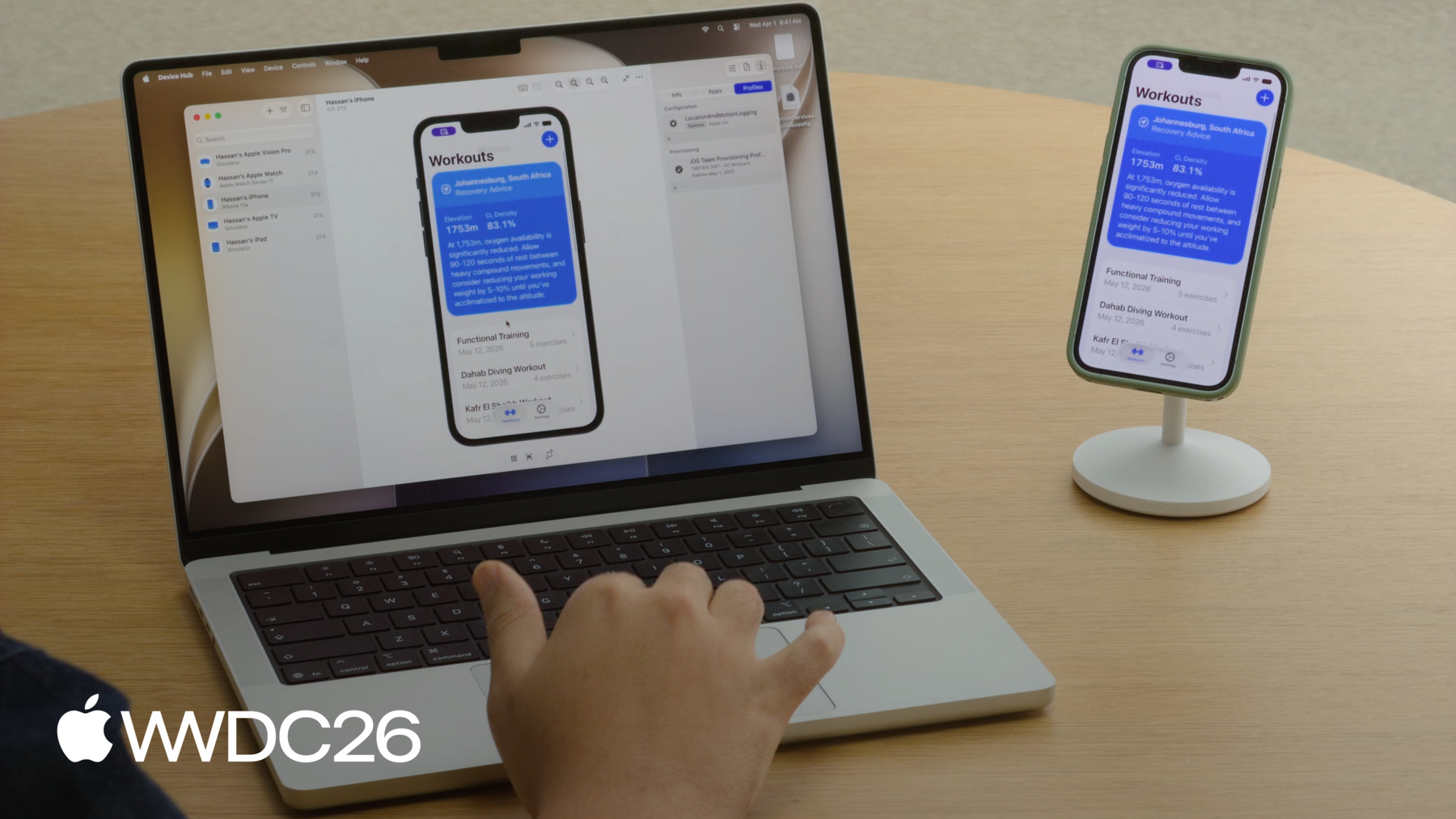
最後に、MattはUIエンジニアなので、 この問題を調査するのに 最適な人物です。 彼がデバッグに何が必要か 分かりません。 だからできるだけ多くの 診断を集めます。 その方法を見てみましょう。 Xcodeからアプリをビルドして 実行した後、 Macでアプリを見て 操作できます。
バグを再現する必要があるので デバイスを回転させます。
バグです! 回復の推奨事項が 切れています! まず、バグのスクリーンショットを 撮ります。 UIが壊れているのをMattに 見せるためです。
次に、Mattがより詳しく調査する必要がある場合に備えて sysdiagnoseを実行します。 システムレベルの診断を 取得するためです。
それには時間がかかります。 実行中に、切れているテキストを Mattに送ります。
デバイス上で直接選択します。
コピーして
Macのファイルに ペーストします。
MattにはバグをReproduceするために アプリのデータが必要かもしれません。 アプリデータコンテナの操作は ワークフローのよくある部分です。
Device Hubはアプリデータコンテナを操作するのに 必要なすべてを提供します。
現在、Finderで保存済み状態を 検査したり、 既知のベースラインに 復元したり、 後のためにスナップショットを 取得したりできます。
アプリが保存しているすべてのデータが こちらです。
それをダウンロードします。
Mattが自分のシミュレータに ロードできるようにするためです。
それで十分のはずです。 Mattに送って 確認してもらいましょう。 Matt、このUIの問題はあなたに 任せます。
ありがとう、Hassan。 パフォーマンスに影響しない このようなUI問題を見たとき、 シミュレータを使って 再現するのが好きです。 そのために好む いくつかのステップがあります。
まず、正しいシミュレータを 選択する必要があります。 次にアプリのデータを合わせます。 最後にデバイスの設定を ミラーリングします。 シミュレータの選択から 始めましょう。
Hassanが使っていたのはiPhone 17eで、 わたしは持っていません。 でも、対応するシミュレータは あります。 サイドバーにあります。 それを選択して、 InfoパネルでiPhone 17eと 表示されていることを確認します。
次に、同じデータを 使用していることを確認します。 バグを報告したアプリと 同じものです。 万一、データに問題がある場合に 備えてです。 アプリがHassanのアプリデータと 一致する必要があります。 わたしのアプリのバージョンは 空です。 でも、Hassanがデータコンテナを 送ってくれたので、 Appsインスペクタに行って 彼のデータで置き換えます。
アプリを再起動すると、 彼のワークアウトがすべて見えます。
最後に、彼の設定を ミラーリングします。 シミュレータの設定をデバイスの設定に できるだけ合わせます。
外観を合わせていきましょう。 UIに影響する可能性のある アクセシビリティ設定も含めます。 まず、彼が送ってくれた スクリーンショットを見ると、 彼の電話が横向きモードだったことが わかります。 それをミラーリングします。 デバイスコントロールを使って シミュレータを回転できます。
次に、彼の場所が ヨハネスブルグに設定されているのがわかります。 その高地では 回復の提案に 長い文字列があります。 設定インスペクタに移動して 彼の場所をシミュレートします。 ヨハネスブルグを選択します。
今は彼のように同じテキストが 切れているようには見えません。 他に何か違うことがあるはずです。 スクリーンショットをもう一度 確認します。
彼のテキストサイズがかなり 大きいことがわかります。 それが原因かもしれません。 それも合わせましょう。 上げてみると、そうです!
切れているのが見えます。 元に戻すと 起きないはずです。 このバグは、かなり際立った 複合的な原因があるようです。 デバイスが横向きで、 特定の場所にいる必要があり、 テキストサイズが 最大になっている必要がありました。 これらすべてが揃って初めて 問題を再現できました。 Device Hubでそのすべてができました。 再現できたので、 修正の確認がしやすくなりました。 これがワークフローの例でした。 Hassanがバグを見つけ、 わたしが再現しました。 すべてDevice Hubを使いました。 すばらしい診断情報をありがとう、Hassan! もちろんですよ、Matt! シミュレータでもデバイスでも 使用している場合でも、 Device Hubは両方で 一貫した体験を提供します。 ライブ画面とハードウェアコントロールから アプリ管理、外観設定など さまざまなものがあります。 何か問題が発生した場合も、 Device Hubは必要なすべてを提供します。 診断を収集して 問題を調査するために。 しかし、それだけではありません! スクリプトや自動化には devicectlを使用します。 コマンドラインツールです。 Device Hubと同じ 基盤技術をベースにしています。 テスト環境でのデバイス管理に 最適です。 アプリ管理、診断のキャプチャ などにも使えます。 たとえば、devicectlを使って デバイスをリストアップしたり、
デバイスにアプリを インストールしたり、
ダークモードとライトモードの切り替えなど 設定を変更したり、 デバイスの詳細情報を 取得したりできます。 構造化された出力が必要な場合は json-outputオプションを使用して スクリプトやCIワークフローに 簡単に統合できます。
探索できることはまだたくさんあります。 Xcode 27をダウンロードして Device Hubを試してみてください。 スクリプトやCIワークフローに統合したい場合は devicectlを確認してください。 Device Hubがリサイズ対応で アプリを改善するのに どう役立つかは 「Modernize your UIKit app」セッションをご覧ください。 WWDC 2019の「Getting the Most Out of Simulator」もご覧ください。 その他については、 Device Hubのドキュメントを 動画の説明にリンクしています。
ご覧いただきありがとうございました。 次に皆さんが作るものを 楽しみにしています。
-