

-
進化したRealityKitの機能
アプリやゲームのイマーシブ感とリアルさをこれまで以上に高めるために設計された、RealityKitの最新機能を確認しましょう。インタラクティブな布シミュレーション、NavMeshによる経路探索、MR(複合現実)の照明、空間オーディオを強化するためのカスタマイズ可能なリバーブメッシュなどのパワフルな新機能を紹介します。シャドウの向上、キャラクターレンダリングの強化、ガウシアンスプラッティングのサポートを通じて、より忠実度の高いビジュアルを実現できます。
関連する章
- 0:00 - はじめに
- 2:00 - 照明と影
- 7:44 - Navigation Mesh
- 11:01 - 布地のシミュレーション
- 13:42 - パフォーマンス
- 17:09 - 3Dガウシアンスプラッティング
- 19:08 - イマーシブオーディオ
- 22:42 - 次のステップ
リソース
関連ビデオ
WWDC26
-
このビデオを検索
こんにちは Dennisです。 RealityKitチームの ソフトウェアエンジニアです。 私のセッションへようこそ 「Explore advances in RealityKit」 RealityKitの最新機能を 紹介します。 2019年にRealityKitを導入しました 幅広いAppleプラットフォームで 3D空間体験を構築できます。 RealityKitなら アプリやゲームを一度構築して visionOS、 iOS、 iPadOS、 macOS、 tvOSにデプロイできます。
今年はこれらのアプリやゲームを より良く構築するための Reality Composer Pro 3を導入します。 Reality Composer Pro 3の詳細は 以下のセッションをご覧ください 高速なシーン編集ツールから 強力なグラフインターフェイスまで 複雑なパーティクルと キャラクターの動作をモデル化します。 また皆様からの 素晴らしいフィードバックにより 今年のRealityKitには 新機能を追加しました。 これらの機能により これまで以上に簡単に 高精度でイマーシブな 体験を制作できます。 まずはRealityKitの ライティングとシャドウの 改善点から紹介します より現実的でシームレスな エフェクトが可能になります。 次にRealityKitの ナビゲーションメッシュを紹介します プレイヤーとNPCが 制作した世界を移動できます。 精巧なクロスシミュレーションの 構築方法も紹介します 仮想の家具やキャラクターに 衣装を着せられます。
これらの機能を適切に使わないと パフォーマンスが低下します。 対処するために 利用可能なツールを紹介します 問題の軽減と 監視に役立ててください。 パフォーマンスを把握したら 次は実演します 現実世界の一部を アプリやゲームに取り込む方法を RealityKitの 3D Gaussian Splatレンダリング機能で。 最後にRealityKitの イマーシブオーディオ機能と 仮想世界の 空間リアリズムを高める方法を紹介します。
では早速RealityKitの ライティングとシャドウの新機能を 新作ゲーム「Chaparral Village」で 見ていきましょう。 このゲームでは謎の村が プレイヤーの世界に転送されます。 プレイヤーはフクロウに縮められ 道を切り開きながら この村を通り抜けて 錬金術エリアへ向かいます フクロウの指示に従い 様々なポーションを調合します。 Chaparral Villageの 錬金術エリア内部を見てみましょう。 悪くないですが 角が少し暗いですね。 RealityKitの機能を 活用して改善できます ライトマップでエリア内部の ライティングを向上します。 Reality Composer Pro 3の ライトベイカーを使って 間接照明ライトマップを作成し シーンに適用します。 角とシャドウが 明るくなりました 反射光の寄与を 正しく受けているためです。 RealityKitのAPIでは以下の ライトマップテクスチャを添付できます 間接照明、 アンビエントオクルージョン、 そしてビューティー。 最良の結果を得るには Reality Composer Pro 3の ライトベイカーの使用を お勧めします。 Reality Composer Pro 3での ライトベイクの詳細は こちらのセッションを ご覧ください 「Iterate your spatial scenes faster with Reality Composer Pro 3」 ライトマップは複雑な ライティングエフェクトのレンダリングに役立ちます ただし静的ライティングのみです。 これらの複雑なエフェクトの1つを 動的ライトに適用できます RealityKitの ソフトシャドウを使ってです。 デフォルトではRealityKitの シャドウはハードエッジです。 これが正確なシナリオもあります 例えば 光源が 無限小の場合です。 ただし光にある程度の面積がある場合は 正確ではありません。 投影されるシャドウの エッジが柔らかくなります これらの領域では 光の一部のみが遮られているためです これをシャドウの 半影ともいいます。 半影のサイズは 光の面積に影響されます。 光の面積が大きいほど 半影も大きくなります。 これは錬金術エリアの炉です。 現在スポットライトを使って 炉からの光をシミュレートしています。 このスポットライトが作る シャドウを柔らかくしましょう。 まず炉のスポットライトの シャドウを取得します。 次にシャドウの lightSize変数を更新します。 これはライトの直径を メートル単位で表します。 デフォルト値は0で ハードシャドウになります。 0.7メートルに設定して 柔らかなシャドウを作ります。 シャドウのqualityも 設定する必要があります。 この変数はソフトシャドウの計算に 使うサンプル数を制御します。 qualityをhighに設定すると より良い結果が得られます ただしパフォーマンスへの 影響が大きくなります。 そのためここでは mediumを使います 視聴距離では 十分きれいに見えます。 qualityをlowに設定した場合は ライトサイズに関わらず シャドウはハードになります。 ソフトシャドウには qualityをmediumかhighに設定します。 最後にシャドウを hearthSpotLightエンティティに追加します。 シャドウに変更を適用すると シャドウが柔らかくなりました 特に大釜が作る シャドウが顕著です。 これまで紹介したライティングは すべて仮想オブジェクトに当たっています。 ライトを仮想世界の外に 広げるにはどうすれば? 現実世界に光を当てるには? RealityKitで作った プラネタリウム投影機です。 投影機が回転すると 現実世界の環境に 仮想の星や星雲が 描かれます。 部屋の壁に リアルに沿っていることに注目してください。 このエフェクトは 2つのRealityKit機能で実現しました プロジェクティブテクスチャと 物理空間ライティングです。 まずプロジェクティブテクスチャを 見てみましょう。 懐中電灯と フィルムを想像してください。 フィルムに光を当てると フィルムの映像が現れます 懐中電灯が向けている どんな面にでも。 これがRealityKitの プロジェクティブテクスチャが再現するエフェクトです。 プロジェクティブテクスチャで 様々なエフェクトをレンダリングできます 複雑な窓から差し込む光が 作る模様や アニメーション化すると 海底で見られる輝くコースティクスも。 仮想プラネタリウムでは 星と星雲を回転するスポットライトの プロジェクティブテクスチャとして添付しています。 このスポットライトを構築するために まず Entityを作成して SpotLightComponentを添付します。 カラーを白に設定します プロジェクティブテクスチャに 色がつかないようにするためです。 いる部屋に合わせて 他のパラメータを調整します。 広い部屋では より多くの強度が必要です 壁にプロジェクティブテクスチャを 表示するためです。 次に星と星雲の テクスチャを生成します。 これはプラネタリウムから 投影するテクスチャです。 最後にSpotLightの projectiveTextureコンポーネントを作成して添付します 生成したテクスチャを 添付します。 星と星雲が仮想の壁に 投影されています。 では現実の部屋の壁に 投影するにはどうすれば? そのために物理空間ライティングを 有効にします。 この機能により仮想ライトが システム環境と連携できます RealityKitのシーン理解メッシュを使って 周囲の世界とインタラクションします。 現在物理空間ライティングは スポットライトとポイントライトのみ対応です。
プラネタリウムのスポットライトに この機能を有効にしましょう。 先ほどの spotLightEntityです。 物理空間ライティングを 有効にするには SpotLightの SurroundingsLightコンポーネントを追加します。 以上です。 これで星と星雲が 現実の部屋に投影されます。
Chaparral Villageの 錬金術エリアでも この物理空間ライティングエフェクトを 有効にしています。 ところでプレイヤーのキャラクターは どうやって 錬金術エリアへの 経路を選ぶのでしょうか?
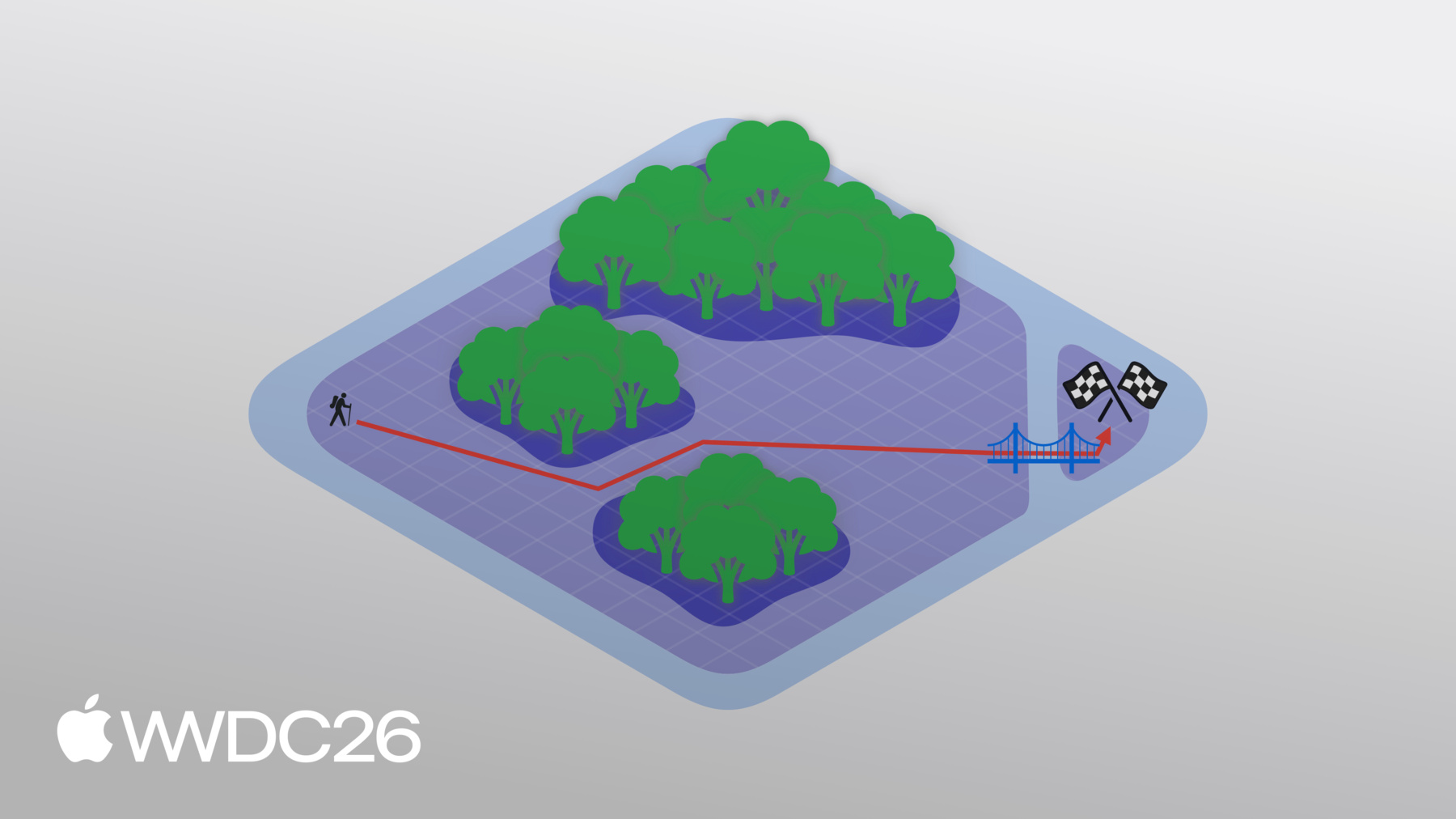
この経路はRealityKitの ナビゲーションメッシュで決定されます。 簡単な例で メッシュの仕組みを説明します。 マップの片側から始まり 反対側のフラグに たどり着くのが目標です。 簡単そうですね。 しかし大変 障害物が現れました! ナビゲーションメッシュでこのシーンの 移動可能な部分を定義できます 密林を回避しながら。 RealityKitはナビゲーションメッシュを使って フラグへの経路を計算します。 森を完全に除外したくない 場合はどうすれば? 森の中を通ることはできます 少し遅くなるだけです。 これをナビゲーションメッシュに 反映できます これらの領域に 異なる移動コストを設定します。 これは森の中を移動するときの 速度低下を反映します。 経路を計算すると このコストが考慮され 新しいルートが選ばれます。 しかしこれは何でしょう? 亀裂がシーンを分断して フラグが孤立しました。 2つの領域が切り離された 2つのナビゲーションメッシュで表されます。 でも大丈夫 オフメッシュコネクションで接続できます この場合は橋です。 ただしこの接続の配置により 新しい経路を計算する必要があります。
RealityKitのナビゲーションメッシュを使うには まずNavigationMeshResourceを 定義する必要があります。 ナビゲーションメッシュの ジオメトリデータを保持します エリアのカスタムフラグと エリア間の接続も含みます。 Swift APIまたは Reality Composer Pro 3で定義できます。 Reality Composer Pro 3での ナビゲーションメッシュ構築の詳細は こちらのセッションを ご覧ください 「Supercharge your spatial workflows with Reality Composer Pro 3」 このNavigationMeshResourceは NavigationComponentに 渡されます。 このコンポーネントにはフィルタがあり エリアのコストを定義します エリアのフラグに基づいて 含めるまたは除外するエリアを定義します。 NavigationComponentは NavigationControllerが 経路を計算するために使います。 同期または非同期で 行えます。
Chaparral Villageでは ナビゲーションメッシュが navigate entity拡張関数内で クエリされます。 navigate内でまず NavigationControllerを作成します。 コントローラーにはNavigationComponentを 持つエンティティが必要です。 エンティティ自体から 取得します。 次に非同期のcomputePath関数を使って 経路を取得します エンティティの現在位置から プレイヤーがタップした 目的位置まで。 結果がnilの場合、 NavigationControllerが 有効な経路を見つけられなかったため returnします。 配列が空の場合は 目的地に到着したため returnします。 それ以外の場合この配列には パスノードが含まれています NavigationControllerが計算した 経路を表します。
これらのノードを反復して エンティティが取るべき 最終経路を決定します。 ナビゲーションメッシュ上の ノードであれば その位置を 経路に追加します。 オフメッシュコネクションの場合は はしごを移動する必要があります。 この状況は 別途処理します。 プレイヤーのキャラクターが 村を移動しています RealityKitのナビゲーションメッシュを使って。 頂上に到達すると 2つのカーテンを通り抜けます 錬金術エリアの 入口を飾るカーテンです。
これらのカーテンはRealityKitの 高度なクロスシミュレーションで作られました。 RealityKitのクロスシミュレーションでは クロスはメッシュで記述されます 頂点はパーティクルを表し 頂点をつなぐエッジは バネを表します。
十分な頂点を持つ メッシュがあれば RealityKitは正確に シミュレートできます このゴールドのドレスの揺れから ベッドカバーまで。
カバーを引っ張ると リアルにしわが寄り折りたたまれます すべてリアルタイムで。 RealityKitのクロスシミュレーションを使うには シーンにクロスボディコンポーネントを 追加します。 このコンポーネントは クロス自体を表します。 マテリアルプロパティへの 参照を含みます パーティクルとバネの配置を記述する クロスメッシュリソースも含みます。 ClothColliderComponentも 追加できます クロスが衝突できる剛体オブジェクトで 床やマネキンのような物を表します。 クロスボディコンポーネントと同様に マテリアルプロパティへの 参照を含みます コライダー自体の ジオメトリも含みます。 シミュレーションを実行するには ClothSimulationComponentを追加します。 このコンポーネントには マテリアルの配列が含まれます クロスボディとコライダーから 参照されます。 各マテリアルにはバネの剛性や 摩擦などのプロパティがあります。 プロパティはこれが クロスかクロスコライダーの マテリアルかによって異なります。 シミュレーション自体にも 多くのプロパティがあります クロスシミュレーションに関わる すべての子孫エンティティに影響します。 これらのプロパティには 使用するソルバー 適用する重力とシミュレーションの タイムステップサイズが含まれます。 Chaparral VillageではRealityKitの クロスシミュレーションを使って 錬金術エリアの入口に カーテンを飾っています。 カーテンが落ちないようにする フープはどう実装するのでしょうか? そのためにカスタムの curtain pinコンポーネントを使います。 ここでpinsを反復します タプルの配列を保持します これらのカスタムコンポーネントと 対応するエンティティです。 このエンティティの位置を使います カーテンをピン留めする 位置として使います。 次にピン自体のサイズを表す 球を構築します。 サイズは カスタムコンポーネントで制御します。 位置と 作成した球を使って ピン留めまたは固定すべき すべての頂点の配列を取得します。 これらの頂点を キネマティックに設定します。 キネマティック頂点はエンティティの トランスフォームによってのみ移動できます クロスシミュレーション自体では 移動できません。 これにより実質的に 定位置に固定されます。 これにより錬金術エリアに カーテンをピン留めして フープの位置で固定し 落ちないようにできます。
ここまで多くの機能を 紹介しましたが 注意して使わないと パフォーマンスコストが発生します。 これに対処するためまず パフォーマンスを改善できる テクニックを紹介します 次にパフォーマンス指標を 追跡する方法を紹介します アプリやゲームが 適切に対応できるようにするためです。 メッシュのレベルオブティテールとは ジオメトリを低精度でレンダリングする手法です 視覚的な影響が 無視できる程度になるようにします。 これを示すために大釜を使います Chaparral Villageの 錬金術エリアから。 慣例として「レベルオブディテール」 またはLODはインデックス0から始まります。 インデックス0からです。 大釜の幾何学的複雑さが 減少していることに注目してください 移動すると LOD 1、 2、 3、 4、 そして最後に5。 LOD 5では大釜はかなり粗く見えます。 ただし大釜が遠くにあるように 縮小すると LOD 0と比較できます。 差は無視できるほど小さく 大釜のレンダリング計算も少なくなります。 RealityKitでLODを 設定する方法を見てみましょう。 異なるLODはエンティティの 配列として指定します。 この例では3つの異なるLODを持ち それぞれ1つのエンティティで構成します。 次にLOD自体を保持して 切り替えるエンティティを作成します 切り替えを行います。
RealityKitはどのLODを 使うかをどう判断するのでしょうか? そのために 切り替えアルゴリズムを選択します。 RealityKitの切り替えアルゴリズムから 2つを紹介します。 1つ目は カメラまでの距離に基づきます。 エンティティがカメラから 遠ざかるほど より高いLODを選択できます。 2つ目はエンティティが占める 画面領域に基づきます。 エンティティが画面上で 占める領域が少ないほど より高いLODを選択できます。 ここではLevelOfDetailComponentの addByCameraDistance コンビニエンス関数を使います カメラ距離ベースのLODを設定します。 各LODにはそのLODを使用する 最大距離を指定します。 エンティティがこの距離を 超えると 次のLODに切り替わります。 最後のLODには最大距離を infinityに設定します 前のしきい値を超えてどんなに遠くても このLODを使用することを示します。 このLODを使用します。 画面領域に基づいて LODを切り替える場合は addByScreenAreaコンビニエンス関数を 使用します。 ここでは画面領域の割合として 最小面積を指定します。 エンティティが指定した 画面領域より小さくなると 次のLODに切り替わります。 アプリやゲームでLODを使うことは パフォーマンス改善に効果的です。 ただしアプリやゲームで パフォーマンスが問題になったときに 対応することも重要です。 thermalStateDidChange通知で オブザーバーを登録することで対応できます。 デバイスのプロセッサが 過熱しているかを確認できます。 サーマル状態に変化があれば 現在の状態をクエリできます。 nominalまたはfairであれば 対策が成功しています アプリやゲームは そのまま実行できます。 ただしseriousまたはcriticalであれば パフォーマンスを改善するための 対策が必要です LOD切り替えのしきい値を より積極的にしたり シャドウの品質を 下げたりします。 アプリやゲームの パフォーマンスを管理することは重要です ユーザーの快適性を確保し RealityKitの高度な機能を 活用できるようにするためです。
そのような機能の1つが RealityKitの3D Gaussian Splatのレンダリングです。 3D Gaussian Splatは ハイパフォーマンスで 高品質なボリュームデータの レンダリング技術です 現実世界から キャプチャしたデータです。 この技術では 3Dシーンが 3D Gaussianの集合として 表現されます。
これらを異なる透明度を持つ 楕円体と考えることができます。 このようなシーンをレンダリングするには 各ピクセルでレイを すべてのGaussianに対して評価します。 この処理には多くの 最適化が可能です RealityKitのAPIを使えば 自動的に処理されます。 このAPIの動作を確認するには developer.apple.comから Gaussian Splatサンプルをダウンロードしてください。 こちらはApple Vision Proで 実行しているサンプルです。 鉢植えのサキュレントの 細部に注目してください。 植物の複雑な幾何学的形状を キャプチャできました 植物が植わっている土も含め RealityKitは両方を完璧にレンダリングしました。 RealityKit APIはGaussian Splatの 特定のファイル形式を想定しません。 代わりにバッファを提供する必要があります キャプチャ内のSplatのプロパティを 記述するバッファです。 具体的には 位置、 スケール、 回転、 透明度、 そして球面調和関数です。 球面調和関数により 楕円体のカラーを制御できます 視線方向に応じて。 球面調和関数の次数も 指定する必要があります。 これは楕円体周囲を 移動するときの カラーバリエーションの数を 表します。 例えば次数0は すべての視線方向で単一カラーを意味します。 これらすべてのバッファを BufferResourceに統合して GaussianSplatResourceを 作成します。 このリソースから GaussianSplatComponentを作成します。 次に3D Gaussian Splatを レンダリングするために シーン内のエンティティに コンポーネントを添付します。 これで3D Gaussian Splatを 仮想体験に取り込めます 現実世界のオブジェクトの 高精度キャプチャをユーザーに提供できます。
最後にRealityKitの 新しいイマーシブオーディオ機能を紹介します 強化されたリアリズムを実現します Apple Vision Proのアプリやゲームで サウンドを通じて。 空間オーディオレンダリングは 重要な要素です 空間コンピューティングの サウンドデザインにおいてです。 正確な方向と ダイレクトパスのタイミング そしてリフレクションパスが 現実的な空間オーディオ体験に必要です。 人とオーディオソースが 環境内を移動するとき リアリズムを維持するためにタイミングと 方向を更新する必要があります。 環境のジオメトリと マテリアルは オーディオソースの 聞こえ方に大きく影響します。 例えば同じオーディオソースでも 全く異なって聞こえます 小さなリビングと 大きな博物館では。 RealityKitを使って リフレクションをシミュレートできます レイトレースによる 幾何音響学で環境の残響も。 例えばこのキッチンと ダイニングルームのシーンでは RealityKitのカスタム リバーブメッシュを使って 木の床 石膏の壁 石のカウンタートップを音響モデル化できます。 シーン内での人とオーディオソースの 位置によって 配置に適した残響が 適用されます。 この機能を実際に示すために サンプルをリリースします カスタムリバーブメッシュを 活用したサンプルです。 このサンプルでは 仮想バンドの演奏を聴けます 大型博物館環境を 移動しながら。 各楽器からの音を 独立して制御することもできます。 RealityKitの カスタムリバーブメッシュにより 楽器から発せられる音が 博物館内をリアルに散乱します 耳に届く前に。 これはApple Vision Proでのみ 真に体験できます。 developer.apple.comから サンプルをダウンロードして試してください! カスタムリバーブメッシュを作成するには まずシーンのジオメトリを定義します ReverbMeshResourceで。 これはメッシュデスクリプタまたは メッシュリソースから作成できます。 最も簡単な始め方は シューボックスを使うことです 内側に面が向いた ボックスです。 幅5メートル 高さ4メートル 奥行き6メートルに設定します。 次にこのメッシュを dryWallプリセットの オーディオマテリアルと組み合わせて シミュレートされた残響を作成します。 最後にこの残響を使って リバーブコンポーネントを作成し シーン内のエンティティに 添付します。 これによりリバーブメッシュが 有効になります。 ただし組み込みのプリセットマテリアルに 限りません。 カスタムリバーブメッシュ用の カスタムマテリアルを作成してみましょう。 まずthickCarpetマテリアルを 定義します。 このマテリアルをプリセットの カーペットマテリアルより吸音性を高めたいので scalingAbsorptionを呼び出して すべての周波数の吸収を 少し増加します。 次にbookshelfマテリアルを作成します 今度はゼロから作ります。 吸収係数と 散乱係数の両方を定義する必要があります 散乱係数も定義します。 これらは異なる周波数で 吸収される音エネルギー または散乱される量を定義します。 まず吸収係数を設定します 10バンドの中心周波数に対して。 特定の周波数の係数しか わからない場合はどうすれば? 特定の周波数の散乱係数を定義します RealityKitが推定して 可聴周波数帯域全体を カバーします。 最後にbookshelfマテリアル自体を 吸収データと 散乱データを組み合わせて作成します。 これはイマーシブスペースでのみ 機能することに注意してください。 シェアードスペースの場合は システムのroom-senseリバーブジオメトリが 代わりに使用されます。 これはApple Vision Proが 構築したリバーブメッシュです 現実世界の周囲環境に 基づいています。
このセッションで 多くの内容を取り上げました ただしこれは今年のRealityKitが 提供する機能のほんの一部です。 今年リリースする さらに多くの機能があります 複数エンティティにわたる精密で 同期したオーディオ再生を可能にする coordinated multi-source audioや 複数エンティティへの対応や キャラクターをリアルに表現する 高品質キャラクターレンダリング サブサーフェススキャタリングと 高度なヘアシェーダーで キャラクターをリアルに表現します カスタムポータルマテリアルを作成できる portal customizationsや ポータルの透明度と形状を 変更できます さらに多くの機能があります。 developer.apple.comの Appleデベロッパポータルをご覧ください このセッションのサンプルを ダウンロードしてください RealityKitの新機能を 実際に確認できます。 また訪れた際にはぜひ Reality Composer Pro 3もご確認ください Reality Composer Proの メジャーな新リリースです RealityKitの機能を より活用できるようにします。 これらのセッションで Reality Composer Pro 3の詳細と すべての新機能を ご確認いただけます。 皆様がRealityKitで 素晴らしい空間体験を構築されることを楽しみにしています。 ご視聴ありがとうございました!
-
-
4:02 - Soft shadows
// Enable soft shadows for the hearth spotlight guard var shadow = hearthSpotlight.components[SpotLightComponent.Shadow.self] else { // handle error } shadow.lightSize = 0.7 // meters shadow.quality = .medium // or .high // shadow.quality = .low // will result in hard shadows hearthSpotlight.components.set(shadow) -
6:13 - Projective textures
// Create one of the planetarium spotlights let spotLightEntity = Entity() spotLightEntity.components.set(SpotLightComponent( color: .white, intensity: intensity, innerAngleInDegrees: innerAngle, outerAngleInDegrees: outerAngle, attenuationRadius: attenuationRadius, )) let projectiveTexture: TextureResource = generateStarsAndNebulaeTexture() spotLightEntity.components.set(SpotLightComponent.ProjectiveTexture( texture: projectiveTexture )) -
7:13 - Physical space lighting
// Enable physical space lighting spotLightEntity.components.set(SpotLightComponent.SurroundingsLight()) -
9:46 - Querying the navigation mesh
// Querying the navigation mesh in Chaparral Village extension Entity { public func navigate(/* ... */) async { let navigator = try! NavigationController(entity: self) guard let result = await navigator.computePath(from: fromPosition, to: toPosition) else { return } if result.isEmpty { return } for node in result { switch node.category { case .meshPoint: finalPath.append(node.position) case .offMeshConnection: // handle ladders } } } } -
12:51 - Pinning cloth to anchor points
// Pin the curtains to the Alchemist's lab for (pin, pinComponent) in pins { let position = pin.position(relativeTo: event.entity) let selectionSphere = ClothSphereShape(radius: pinComponent.radius) let vertices = clothMesh.vertices(in: .sphere(selectionSphere), center: position) clothBody.motionTypes.set(vertexIndices: vertices, value: .kinematic) } -
14:42 - LOD by camera distance
// Create entity with LODs let lod0 = [ModelEntity(mesh: lodMesh0)] let lod1 = [ModelEntity(mesh: lodMesh1)] let lod2 = [ModelEntity(mesh: lodMesh2)] let entity = Entity() LevelOfDetailComponent.addByCameraDistance(to: entity, levels: [ (entities: lod0, maxDistance: 1.0 /* meters */), // highest detail (entities: lod1, maxDistance: 5.0), // medium detail (entities: lod2, maxDistance: .infinity), // lowest detail ]) -
15:58 - LOD by screen area
// Create entity with LODs let lod0 = [ModelEntity(mesh: lodMesh0)] let lod1 = [ModelEntity(mesh: lodMesh1)] let lod2 = [ModelEntity(mesh: lodMesh2)] let entity = Entity() LevelOfDetailComponent.addByScreenArea(to: entity, levels: [ (entities: lod0, minArea: 0.2 /* fraction of screen area */), // highest detail (entities: lod1, minArea: 0.1), // medium detail (entities: lod2, minArea: 0.01), // lowest detail ]) -
16:26 - Responding to thermal state changes
// Respond to changes in device thermal state NotificationCenter.default.addObserver(of: ProcessInfo.self, for: .thermalStateDidChange) {_ in switch ProcessInfo.processInfo.thermalState { case .nominal, .fair: // Stay the course case .serious, .critical: // Improve performance by: // More aggressive LOD switching // Lower shadow quality } } -
18:44 - Creating a Gaussian splat
// Create Gaussian splat resource and component let resource = try GaussianSplatResource.BufferResource(count: splatCount, position: positionBuffer, scale: scaleBuffer, rotation: rotationBuffer, opacity: opacityBuffer, sphericalHarmonics: (sphericalHarmonicsBuffer, degree)) let splatResource = GaussianSplatResource(resource) let splatComponent = GaussianSplatComponent(splatResource) splatEntity.components.set(splatComponent) -
20:49 - Creating a custom reverb mesh
// Create and use custom reverb mesh let mesh: ReverbMeshResource = .shoebox(size: [5, 4, 6]) let reverb: Reverb = .simulated(mesh: mesh, materials: [.dryWall]) entity.components.set(ReverbComponent(reverb: reverb)) -
21:33 - Creating custom reverb materials
// Create custom materials for custom reverb mesh

let thickCarpet: Audio.Material = .carpet.scalingAbsorption {freq in 0.1 }

let bookshelf: Audio.Material

// Absorption coefficients by center frequency:
// 31.5Hz, 63Hz, 125Hz, 250Hz, 500Hz, 1kHz, 2kHz, 4kHz, 8kHz, 16kHz
let bookshelfAbsorption = Audio.Absorption(
    [0.10, 0.15, 0.28, 0.20, 0.15, 0.10, 0.10, 0.07, 0.07, 0.05])

// Scattering coefficients for: 500Hz, 1000Hz, 4000Hz
let bookshelfScattering = Audio.Scattering([500: 0.5, 1000: 0.6, 4000: 0.7])

bookshelf = .init(absorption: bookshelfAbsorption,
              scattering: bookshelfScattering)
-