

-
Spatial Previewフレームワークの詳細
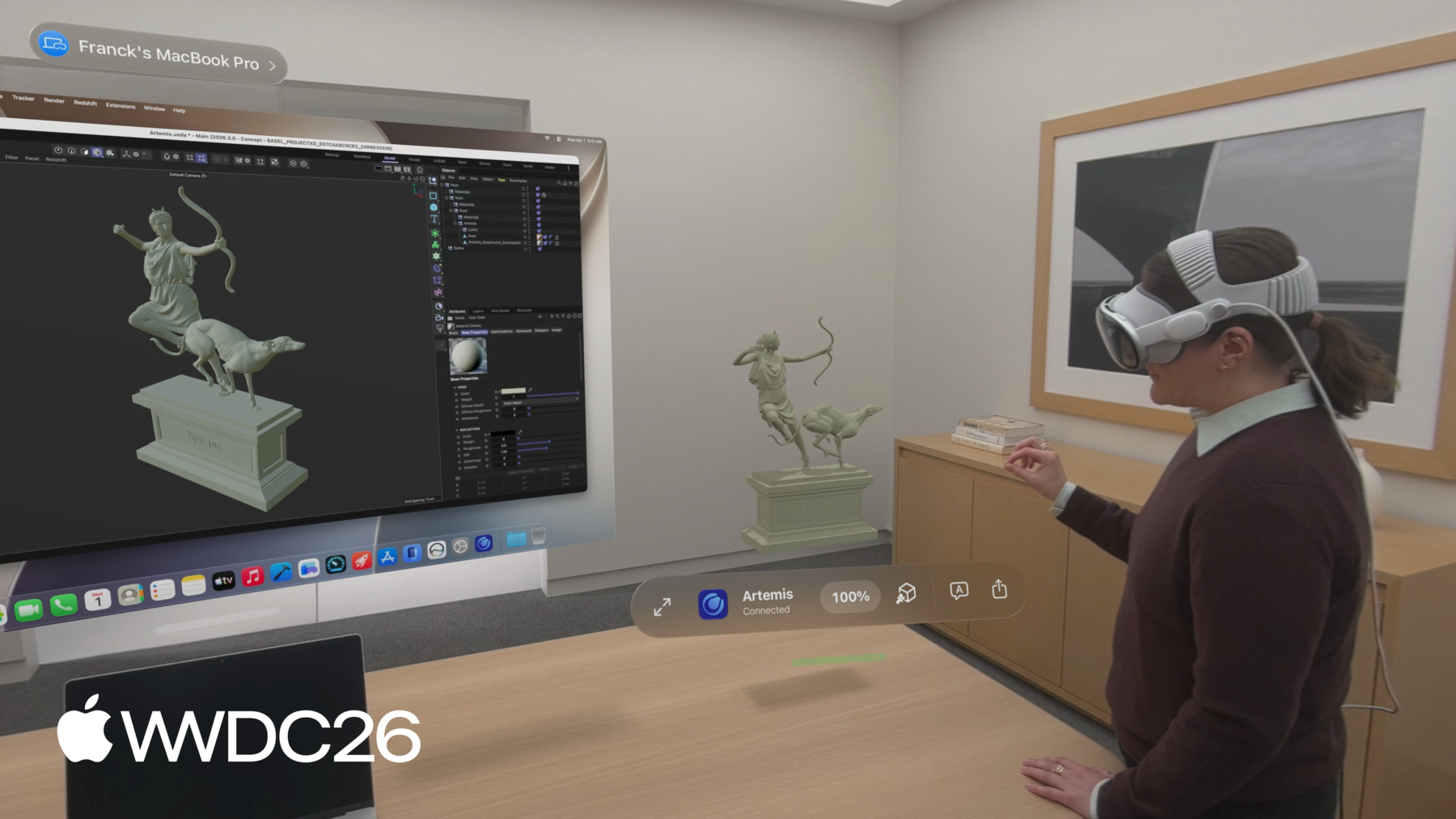
MacのコンテンツをvisionOSに直接取り込むことのできる、新しいSpatial Previewフレームワークを紹介します。2つのプラットフォーム間でのライブ同期と双方向編集を活用して、柔軟なワークフローを確立する方法を確認しましょう。SpatialPreview API、デバイス検出、2Dおよび3Dセッションの統合、Macアプリの空間コンピューティングを向上させるクイックルックの新機能といったトピックも取り上げます。
関連する章
- 0:00 - はじめに
- 2:37 - Spatial Previewについて
- 3:30 - ドキュメントプレビュー
- 6:36 - USDプレビュー
- 9:16 - 編集機能
- 13:28 - 次のステップ
リソース
- Bridging an external USD runtime to Spatial Preview
- Working with content from your Mac app using Spatial Preview
- Reducing the rendering cost of RealityKit content on visionOS
- Spatial Preview
関連ビデオ
WWDC26
WWDC22
-
このビデオを検索
こんにちは Quincy Germanです visionOSチームのソフトウェアエンジニアです。 Apple Vision Proで最もよく使う機能の 1つが Mac Virtual Displayです Vision Proが提供する 仮想スクリーンでMacの作業ができます。 macOS 27とvisionOS 27では MacからVision Proへのコンテンツの プレビューがさらに簡単になりました。 Spatial Previewをご紹介できることを 嬉しく思います。 Spatial PreviewはvisionOSの空間 コンピューティング機能をMacのコンテンツに 活用するフレームワークです。 macOS向けPreviewアプリで Spatial Previewフレームワークの 動作を確認できます。 3Dコンテンツ編集、フォトリアリスティックな レンダリング、カメラビューポイント、 Appleイマーシブビデオフレームや 空間写真など 空間メディア出力など 空間コンテンツの 作業をサポートする機能も含まれています。 Mac Virtual Displayを使って コンテンツをVision Proにシームレスに 共有できます。 visionOSのQuickLookアプリが このコンテンツを受け取り イマーシブに作業できるようになりました このリビングルームシーンに設置された さまざまなカメラ間を移動するなど。 3Dデザインのスケールやレイアウトを 把握するのに非常に役立つツールです。 Spatial Previewにより Macのコンテンツを 周囲の世界に拡張できるようになりました。 これらの機能はPreviewアプリだけで 使えるわけではありません。 APIとしても公開されています。 新規または既存のmacOSアプリを拡張し Vision Proの性能を活用できます。 これらのツールは空間コンテンツとの 動的なワークフローを実現します デバイス間のライブ同期や編集などが 可能です。 リアルタイム同期によって Cinema 4DやSketchUpなどの アプリがクリエイティブ プロセスを変革しています マテリアル変更をライブで反復するような リアルタイムの共同3Dワークフローを 実現します。 このセッションでは それを実現する方法を ご説明します。 まずフレームワークの概要を説明します コンテンツ作成ツールや 空間コンテンツを 扱うアプリを構築するデベロッパ向けに 設計されています。 次に Apple Immersive Video Framesなどの ドキュメントを共有・更新するサンプル ワークフローを説明します。 最後に Universal Scene Descriptionを使って 作業中の3Dコンテンツへの 完全なイマーシブ体験を可能にする アプリの作成方法をご紹介します USDは3Dシーンを記述するための フォーマットです。 このセッションの終わりには Spatial Previewフレームワークを活用し visionOSでMacの コンテンツを扱うために必要なものが すべて揃います。
それではフレームワークが提供する コンポーネントを見て いかに簡単に セットアップできるかを確認しましょう。
最初のステップは 共有先デバイスを 指定するエンドポイントの選択です。 Mac Virtual Displayを使用中なら すでに接続されているデバイスを そのまま使うことができます。 または アプリにデバイスピッカーUIを 追加して同じiCloudアカウントの近くにある Vision Proから選択できるようにもできます。 次に コンテンツの空間 プレビューセッションを作成します。 プレビューセッションには2種類あります。 ドキュメントプレビューセッションは 空間 写真、動画、PDFなどのドキュメント形式に 対応します。 USDプレビューセッションは3Dコンテンツを 扱います。
セッションが開始されると Vision ProでQuickLookが 起動し アプリがセッションに提供した コンテンツが表示されます。 visionOS側でのコード記述は不要です。
空間プレビューセッションの動作の概要が 分かったところで ドキュメントプレビューで ドキュメントを送信・更新する例を 見てみましょう。 この例では macのPreviewアプリで 生成されたApple Immersive Videoの スチルフレームを使います。 次にMac Virtual Display Endpoint を使って ドキュメントプレビュー セッションを開始します。 そのセッションに画像を提供して QuickLookに表示させます。 設定のコードを見てみましょう。
ConnectedSpatialEndpointObserverを まず 作成してMac Virtual Displayから Spatial Previewエンドポイント を取得します。 次にドキュメントの種類とセッション名を 指定してドキュメントプレビューセッションを 作成します。
返されたエンドポイントを使って 選択した デバイスでセッションを開始し コンテンツのURLを提供します。 Mac Virtual Displayが常時有効とは 限らないのでUIのビューとして Spatial Preview デバイスピッカーを組み込み 別のデバイスを 選択できるようにすることを検討してください。 SwiftUIのsheetを使って 表示タイミングを制御します。 その後 UIで選択したデバイスエンド ポイントを使って 先ほどと同様に ドキュメントプレビューセッションを 作成します。 Spatial Previewの導入は これだけ簡単です。 結果を確認しましょう。 UIのボタンに記述したコードによって ボタンを押すとvisionOS上で コンテンツが起動し イマーシブモードで表示できます。 とても素晴らしいですね。 もう一歩進めて イマーシブな建築 レンダリングのギャラリーを作成ましょう。
update contentsを呼び出すと セッション開始時に 起動したシーンが再利用されます。 新しいドキュメントプレビュー セッションを作成してstartを呼び出すと 新しいシーンが起動します。 ギャラリービューでは 同じシーンを再利用 するためにupdate contentsを 使用します。 このビューでは ギャラリー内のすべての ビデオフレームのボタン行を作成し 選択時に セッションの update contentsを呼び出して 別のファイルに切り替えるようにします。 セッション状態を監視する タスクも設定しました。 visionOS上でシーンが閉じられると セッションが無効化されたという 状態変化を受信します。 セッションを終了するには closeを呼び出します。 visionOSはそのシーンを 自動的に閉じます。 これでギャラリーは Document Preview Sessionの Update Contents関数を使って 同じシーン内で イマーシブなレンダリングをライブで 切り替えられるようになりました。 デザインのレンダリングを確認し 実際の スケールで作業中のコンテンツを 把握するのに最適な方法です。 Apple Immersive Video以外にも 多くのコンテンツ形式が Spatial Previewで利用でき 空間写真なども含まれます。 PDFや標準的な画像・ファイル そして3Dコンテンツも対応しています。 ドキュメントの送信・更新の簡単さを 確認したところで Spatial Previewと USD kitを使った3Dコンテンツの 扱い方を見てみましょう。 USDが初めての場合は「Understand USD Fundamentals」の動画から 始めることをお勧めします。 新しいSwift USDKitフレームワークの 使用方法については「Discover USD Kit」 と「What's New in OpenUSD」 をご覧ください。
このセクションでは visionOS上のmacOSアプリから USD kitを使って3Dコンテンツを 扱う方法をご説明します。 USDプレビューセッションの設定と 3Dシーンのナビゲーション開始が いかに簡単かをご紹介します。 カメラのルックスルーと マテリアルオーバーライドの適用についても 説明します。 次に コンテンツの編集方法と アノテーションの 追加やオブジェクトの移動など visionOS上での USD変更のインタラクション方法を ご説明します。 最後に アニメーション再生や セッション同期進行状況のイベントなど 空間プレビューセッションのイベントと 監視可能なプロパティ、 セッション内の機能のカスタマイズ方法を ご説明します。 USDプレビューセッションの作成は ドキュメントプレビューセッションと 似ていますが コンテンツがUSD kitステージである 点が異なります。 session startを呼び出すと visionOS 上でシーンが開き USDコンテンツが ボリューメトリックビューに表示されます。 その後 イマーシブビューに切り替えて フルスケールで表示できます。 設定のコードを見てみましょう。 ドキュメント共有と同様に まずターゲット デバイスのエンドポイントを選択します。 次にUSD kitを使ってUSDコンテンツを ステージに読み込みます。 そのステージをUSDプレビューセッションに 提供し 選択したデバイスエンドポイントで セッションを開始します。
visionOS上でコンテンツがこの バウンデッドビューに3Dで表示されます。 シーンを回転させて検査し イマーシブモードに 切り替えてフルスケールで確認できます。 先ほど見たように このシーンには カメラが設定されています。 カメラを選択すると そのビューポイントに 移動します。 マテリアルをワイヤーフレームモードに オーバーライドしてジオメトリを より詳しく確認することもできます。 これらはすべてSpatial Previewを使った 場合にvisionOSに組み込まれている機能です。 Macアプリ側で追加の設定は必要ありません。 USDシーンには非常に高品質なコンテンツが 含まれることがあり Vision Proでの レンダリングが複雑すぎる場合があります。 デフォルトではSpatial Previewは共有前に USDコンテンツを自動的に最適化します メッシュデシメーション、テクスチャダウン サンプリング、必要に応じてシーン全体の 再構築が含まれます。 すべてVision Proで良好な パフォーマンスを確保するためです。 シーンを再構築する必要がある場合 編集は できませんが 表示やアノテーションの 追加は可能です。
この最適化を無効にするには セッション 作成時にunmodifiedパラメータを渡します。 ただし最適化を無効にすると 複雑なシーンは Vision Proに共有できない場合があり startファンクションからエラーが スローされます。 コンテンツのレンダリングコストを削減する 方法については デベロッパドキュメントを ご参照ください。
次にmacOSとvisionOSでの USDコンテンツ編集の動作を見てみましょう。 USDプレビューセッションでは どちらのデバイスからも変更できます。 通常のUSD kit APIを呼び出すことで ライブUSDステージを使ってmacOSと visionOS間でコンテンツが同期されます。 Macでコンテンツを変更してvisionOSの 空間上で確認したり visionOSでの レビューセッション中に編集内容を キャプチャしたい場合に非常に役立ちます。 コードに進む前に USDステージとは何か そしてUSDの用語についていくつか 説明しましょう。 ステージは1つまたは複数のレイヤーで構成 されレイヤーにはUSDプリムが含まれます。 USD Primは3Dトランスフォームや メッシュなどさまざまな機能を表せる オブジェクトです。 バリアントセットはプリムの 代替データを切り替えることができます。 このリビングルームシーンにバリアント セットを使ってUSDバリアントを設定し 家具の位置と回転を変更しています。 USD kitでバリアントを選択すると ステージが 変更され 家具を別の場所に移動する編集が macOSとvisionOS間で適用・同期されます。 ツールバーのボタンでmacOS上のバリアントを 切り替えると 結果として家具の配置が visionOS上に反映されます。 QuickLookのメニューでバリアントを選択して Mac上での変化を確認することもできます。 visionOS上でMacのコンテンツを 素早く反復する優れた方法です。 次にvisionOSからの変更を 監視する方法を見てみましょう。 USDステージへの変更は自動的に同期され 標準USDノーティスを使用して アノテーションの追加などセッション内で 起きている更新を監視できます。 ここでは 変更されたUSD Primパスの 情報を提供するobjects did change ノーティスを購読します。 パスを反復してアノテーションを見つけ UIで更新します。
テキストアノテーションには 実際の テキストに加えて 作者や 一意の識別子などの情報が必要です。 このようにアノテーションデータを 設定することで document annotation groupとして 指定された USD Primの子として配置されていれば visionOS上に表示されます。 ジェスチャを使ってvisionOS上で USD Primを編集可能にするには spatial editableメタデータを 設定する必要があります。 macOSのPreviewアプリを使ってUSD アセットに簡単に設定することもできます。 実際に動作を確認しましょう。 macOS上でアノテーションを適用すると visionOS上に表示されます。 ここに「I like layout A」と コメントすると macOS上のアプリに反映されます。 この家具にはspatial editable メタデータがあるので移動できます。 この椅子を窓の外に移動してみましょう。 macOSにも反映されます。 USDプレビューセッション内で監視できる イベントと設定可能なオプションを 説明しましょう。
USD Preview Session Startに設定した オプションを使ってvisionOSのQuickLookで 利用可能な機能を制御できます。 デフォルトでは アノテーション、オブジェクト の操作、USDエクスポートがすべて有効です。 Spatial Preview APIイベントを通じて アニメーション再生時間など 非USDイベントも購読できます。 Progress Reporterを使ってセッションの 共有進行状況を監視できます。 Vision Proで大容量データを同期中に macOS上でロードバーを表示したい場合に 役立ちます。 例えば ここではUSDプレビューセッションが 提供する再生時間イベントを 接続しています。 再生ボタンを押すと 両方のアプリで 窓の外のハチドリがアニメーションします。 アプリでSpatial Previewを採用すると クリエイターのための新しいワークフローが 多数解放されます。 SharePlayサポートは visionOS上に組み込まれており コラボレーターが 同じライブセッションに参加して 空間コンテンツをリアルタイムで 確認・編集できます。 友人のJoyがルームレイアウトの問題を 指摘したので リアルタイムで調整します。 すべての参加者のビューが即座に更新され 従来のアセットレビューの往復作業が 不要になります。
Spatial Previewを今日から 使い始めるには? Spatial Previewは USD kit Swift APIと シームレスに連携するため その使用を 推奨します。 すでにMacアプリにUSDが ある場合は USDのインストールとUSD kitの間で 編集を転送するブリッジを設定できます。 詳しくはSpatial Previewの デベロッパドキュメントをご確認ください。 次に ドキュメントプレビューセッションと USDプレビューセッション それぞれの プレビューセッションの 活用方法を探りましょう。 ドキュメントのプレビュー・更新や 3Dコンテンツのイマーシブな作業など Macアプリへの統合は容易です。 数行のコードで導入できます。 USD kitとSpatial Previewを使って USDステージのライブ編集をサポートすることで 3Dをさらに深く活用できます。 SharePlayを含む デバイス間のリアルタイム コラボレーションを実現します。 最後に マテリアルオーバーライド、カメラ ビューポイント、オブジェクト操作、バリアント、 アノテーションなどのアセットレビュー ツールを活用してください。 クリエイティブアプリ、コンテンツレビュー ツール、または全く新しいものを作成する際も Spatial Previewをどのように 活用されるか楽しみにしています。 ご視聴ありがとうございました。
-
-
3:58 - Document Preview Session with Device Picker
// Send and update documents using the Spatial Preview framework import SwiftUI import SpatialPreview let deviceObserver = ConnectedSpatialEndpointObserver() let previewSession = DocumentPreviewSession(name: "Immersive.aivu", contentType: .aivu) func startPreview(contentURL: URL, endpoint: SpatialPreviewEndpoint) async throws { let endpoint = try await deviceObserver.endpoint try await previewSession.start(endpoint: endpoint) try await previewSession.updateContents(url: contentURL) } @State var showDevicePicker: Bool = false var body: some View { ... .sheet(isPresented: $showDevicePicker) { SpatialPreviewDevicePicker(isPresented: $showDevicePicker) { endpoint in showDevicePicker = false Task { try await startPreview(filename: filename, endpoint: endpoint) } } } } -
5:20 - Update Document Contents
// Send and update documents using the Spatial Preview framework import SwiftUI import SpatialPreview ForEach(contentURLs, id: \.self) { url in Button { Task { try await previewSession?.updateContents(url: url) } } } .task(id: previewSession.map { ObjectIdentifier($0) }) { for await state in Observations({ session.state }) { if state.isInvalidated { previewSession = nil break } } } try await previewSession?.close() -
7:36 - Edit USD Live
// Edit USD live using USDKit and Spatial Preview import SpatialPreview import USDKit let deviceObserver = ConnectedSpatialEndpointObserver() var usdSession: USDPreviewSession? func shareStage(to endpoint: SpatialPreviewEndpoint) async throws -> USDPreviewSession { let endpoint = try await deviceObserver.endpoint let stageURL = Bundle.main.url(forResource: "sampleScene", withExtension: "usdz") let stage = try USDStage.open(stageURL) usdSession = USDPreviewSession(stage: stage) try await usdSession?.start(endpoint: endpoint) } -
8:56 - Opt out of optimization
// Optimization import SpatialPreview let endpoint = try await deviceObserver.endpoint do { try await usdSession.start(endpoint: endpoint, parameters: .unmodified) } catch USDPreviewSession.Error.assetUnshareable { // Handle Asset Unshareable error } -
10:10 - USD Layout Variants
// LayoutVariants.usda #usda 1.0 over "furniture" ( variantSets = "Layout" variants = { string Layout = "LayoutA" } ) { variantSet "Layout" = { "LayoutA" { // Default furniture position and rotation } "LayoutB" { // Moves furniture prims to a different position and rotation } ... } } -
10:17 - Edit USD live using USDKit and Spatial Preview
// Edit USD live using USDKit and Spatial Preview import SpatialPreview import USDKit func applyLayoutVariant(named layoutVariantName: String) throws { let prim = stage.prim(at: SdfPath("/root/furniture")) try prim.variantSets?.setSelection("Layout", variantName: layoutVariantName) } -
10:49 - USD Stage Observations
// Edit USD live using Spatial Preview import SpatialPreview import USDKit let observerToken: ObservationToken observerToken = stage.addObserver(for: UsdStage.ObjectsDidChange.self) { notice in for path in notice.resyncedPaths { let prim = notice.stage.prim(at: path) guard prim.isValid else { continue } if prim.isAnnotation { // Handle annotation change break } } } -
11:13 - Annotation Spec
// Annotation spec example AppleTextAnnotation { // The textual representation of this annotation string text // The identifier for this specific author uniform string author // An identifier that is unique to your data tracking system uniform string identifier } /__documentAnnotationGroup__ -
11:33 - Metadata for Object Manipulation
// Metadata required for object manipulation in Quick Look customData = { dictionary apple = { bool spatialEditable = 1 } } -
12:16 - Session Options and Events
// Spatial Preview session options and events import SpatialPreview import USDKit session.start(endpoint: endpoint, options: [.annotations, .perObjectManipulation, .export]) func listenForEvents(session: USDPreviewSession) async { for await event in session.events { if case .timeChanged(let time) = event { playbackModel.timeCode = time } else if case .playbackStateChanged(let isPlaying) = event { playbackModel.playbackStateChanged(isPlaying) } } } -
12:38 - Observe Session Progress
// Observe Spatial Preview session progress

import SpatialPreview
import USDKit

@State private var sessionProgress: Double = 0

var body: some View {
    ...
    .task(id: usdSession.map { ObjectIdentifier($0) }) {
        guard let session = usdSession else { return }
        for await fraction in Observations({ session.progress.fractionCompleted }) {
            sessionProgress = fraction
        }
    }
    .overlay(alignment: .bottom) {
        ProgressView(value: sessionProgress)
            .padding()
    }
}
-