

-
visionOSでの構造化3Dモデルの共同作業
visionOSで構造化3Dモデルを最大限に活用する方法を学びましょう。USDZの作成方法を確認した上で、階層アセンブリ内の個々のエンティティを操作する方法や、断面を用いてモデル内の内部コンポーネントを調べる方法を解説します。Apple Vision Proで、デザインレビューや共同作業に最適な、インパクトのある分解図アニメーションを作成できるようになります。
関連する章
リソース
関連ビデオ
WWDC26
WWDC25
WWDC24
-
このビデオを検索
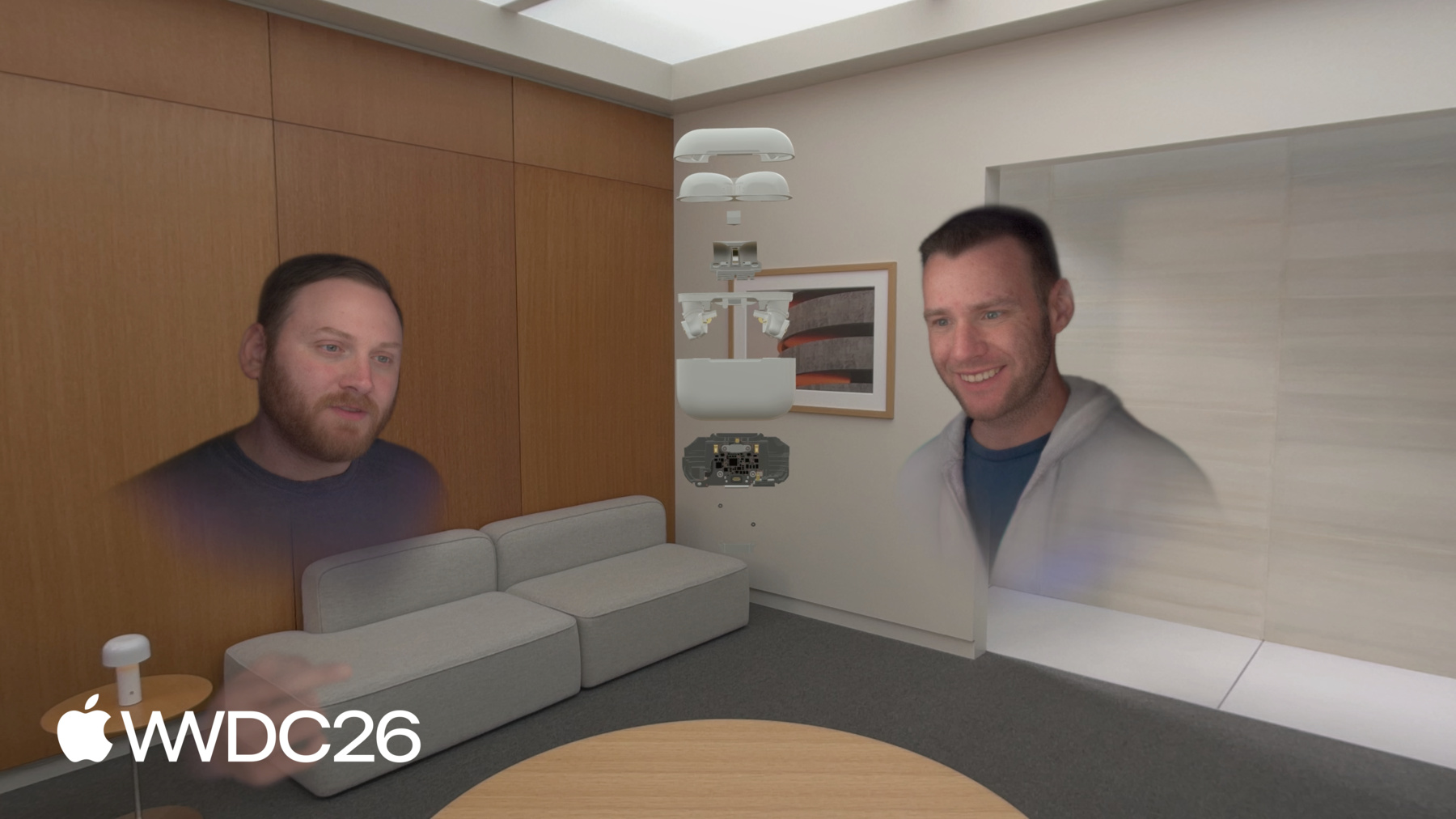
visionOSで構造化3Dモデルを 共同作業する方法へようこそ。 私はBillです。 本日はApple Vision Proで 空間体験を構築することについてお話しします。 特に、複雑なアセンブリや 多次元データを扱う方法について、 フラットスクリーンでは 実現できない形で説明します。 まず、その体験がどのようなものか 見てみましょう。 SharePlayコールでチームが AirPods Proのデザインレビューを行っています。 コール参加者全員が同じアセットを、 同じ忠実度で、同じ空間で見ています。 ケースが近づいてきます。 ロックが解除されます — ワークベンチ上にあるように、 ただしワークベンチは あなたがいる場所どこでも。 底部のアセンブリが取り出されます。 一人が内部を調べ、 それを回転させます。 同僚がまったく 同じものを見られるように。 指差し — アノテーションでも、 スクリーンショットでもなく、 重要なパーツへのジェスチャーだけで グループが理解します。 モデルが元に戻ります。 クリッピングが有効になり、 断面が開き、 メインロジックボードがそこに — 2Dスクリーンでは実現できない方法で、 文脈の中に露出されます。 クリッピングが無効になります。 全アセンブリが展開します。 誰かが手を伸ばし、 マザーボードを引き出し、 チームの残りのメンバーに 見せます。 3人、1つのモデル、 そしてそれを理解するために必要なツール。 これをすべて可能にするのは 3つのことに集約されます。 Apple Vision Proが 本当に得意とすることです。 リアルタイムコラボレーション: 複数の人が、共有空間で、 同じ瞬間に リッチな表現の操作: 十分な次元を持つすべてのデータは フラットスクリーン以上のものに値するから。 環境ライティング: あなたの物理的な世界が、 すべての仮想的な決断を基盤とします。 そしてこれら3つの機能は CADだけに役立つわけではありません。 複雑で多次元的な情報を 推論する必要がある場所なら — 都市計画、物流、不動産、 プロダクションデザイン — 同じ原則が適用されます。 SharePlayをアプリで機能させる 技術的な詳細については、 「近くにいる人々とvisionOS体験を共有する」 をご覧ください WWDC25から。 サンプルコードの構築において 4つの主要な考慮事項があります。 まず、3Dアセットの準備において 重要な側面をいくつか共有します。 人々が簡単に操作して 作業できるように。
複雑な空間アセットは コンポーネントの構造化コレクションで、 アセンブリとして整理されています。 これらのアセンブリの操作を 有効にする方法を示します。
次に、クリッピングについて説明します。 アセンブリの内部を 外部と同様にアクセスしやすくします。
そして最後に自動展開について、 アセットが自分自身を展開し、 すべてのサブアセンブリが分離して 所定の位置に移動し、 全体の構造が明らかになります。 アセットの準備に移ります。 構造のないアセットは 推論しにくく、コードで使いにくいです。 構造がなければ コードは判断を下せません。 何を表示または非表示にするか、 何を操作可能にするかを。 アセットを準備する際には 多くのことを考慮する必要がありますが、 ここで焦点を当てるのは アセットの構造についての考え方、 どのアセンブリが どのサブアセンブリを含むか。 言い換えれば、 モデルの階層構造です。 より技術的な側面の その他の考慮事項については、 別の場所でカバーされています。
詳細については、以下をご確認ください。 「空間コンピューティングのための 3Dアセットの最適化」 WWDC 24から。 3Dモデルは部分と全体の関係です。 すべてをルートにフラット化すると、 単純な操作でさえ 驚くほど困難になります。 すべてのジオメトリはあります — ただし整理されていないだけです。 このエンジンブロックは 構造を保持せずにエクスポートされました。 すべてがルートにフラット化されています。 InteriorPart_01、InteriorPart_03、 パーツ25、以下同様。 サブアセンブリなし。 グループ化なし。 そして、ここが問題です。 このアセットはビューポートでは 完全に問題なく見えます。 ジオメトリはすべてあり、 正しくレンダリングされます。 しかし、インタラクティブにするための 構造は? 消えています。 1つのピストンを分離したい場合、 どこかにあります。 InteriorPart_47だったか InteriorPart_18だったか。 わかりません、 コードもわかりません。 この更新されたアセットを見てください、 深いネスト階層があります。 複雑です — そして、それは意図的です。
ここではエンジンの外部と、 1本を除くすべてのピストンを非表示にしました。 ピストンとクランクシャフトを 単独で見ることができます。 それぞれが独自のノードです — 名前付き、整理済み、グループ化済み。 ピストンだけをアニメーションしたい場合 — 分離し、ハイライトし、 人が手を伸ばして引き抜けるようにする — できます。 整理されているので、 コードで見つけることができます。 それが階層構造が 本来の機能を果たしている状態です。 良い階層構造ができたので、 この階層構造を分解できるようにする 方法を示します。 良い階層構造は 人々に能力を与えます。 個々のパーツを選択する、 またはApple Vision Proの 自然な入力システムを使って移動させる。 これはRealityKitのManipulationComponent APIを正しく使うことで実現できます。 その方法を説明します。 実際のデモをご覧ください。 これはプレゼンテーションの冒頭で お見せしたサンプルアプリです。 このAirPods Proアセットを 紹介しています。 後でデザインレビューセッションで 使用する予定のものです。
Openをタップしたときに何が起こるか見てください。
少し前、これは1つのオブジェクトでした。 今はすべての部分が 個別にインタラクティブです — 1つのピースを掴んで、 残りはそのまま。 どうやってこれを実現したか 説明します。 このアセンブリを移動できるようにするには、 ManipulationComponentを アタッチするだけです。 それが出発点です。 オブジェクトを操作可能にして 向きを変えられるようにし、 自然な手の動きで 移動、拡大縮小できるようにします。 ManipulationComponentの詳細については、 WWDC 25の 「RealityKitの新機能」をご覧ください。 このアセンブリを移動できるようにするには、 ManipulationComponentを アタッチするだけです。
そのためにManipulationComponentを 子要素に移動します。 突然、上部エンクロージャを 引き離せるようになります。 下部エンクロージャは そのまま固定されたまま。 コラボレーターが 一方のイヤーバッドを回転させている間に、 別の人が もう一方を調べている 同時に。 「見るもの」から「探索するもの」への その変化は、 そのコンポーネントがツリーの どこにあるかだけで生まれます。 他は何も変わっていません。 部品を分解したら、 ManipulationComponentを ルートに戻すことができます。 これで全体のスプレッドが 再び1つのオブジェクトとして動きます。 一緒に位置を変え、回転させ、 一部を近づける — 内部の関係は 設定した通りそのままです。 階層構造は変わっていません。 ジオメトリも変わっていません。 変わったのはコンポーネントが ツリーのどこにあるかだけです。 そしてこれが核心です: コンポーネントの配置が動作を決める。 これを機能させるコードを見てみましょう。 ManipulationComponentと InputTargetComponentをエンティティから削除します。 これでこのエンティティは 操作不可になります。 次に、コードがサブエンティティを反復処理します。 InputTargetComponentを追加します。 そしてManipulationComponentを 各サブエンティティに追加します。 サンプルコードでは確実に ManipulationComponentの releaseBehaviorを.stayに設定します。 これにより、人がリリースしたときに エンティティがその場所にとどまります。 もう1つ重要な注意点があります。 CollisionComponentの追加は あえて示していません。 しかしイベント処理には不可欠です。 エンティティに コリジョンコンポーネントが必要なことを 忘れずに追加してください。 もちろん、アセンブリを 開く予定があるなら、 閉じる機能も必要でしょう。 アセンブリを閉じるには 逆の手順で同じ処理を行います。 Manipulationコンポーネントと InputTargetコンポーネントを サブエンティティから削除します。 Manipulationコンポーネントと InputTargetコンポーネントを エンティティに戻します。 これだけです。これでツリーは 1つの要素として操作できるようになります。 閉じている場合は1つとして、 開いている場合は独立したエンティティとして。 次はクリッピングです。 十分に複雑なアセットには 表面から見えない層があります。 建物の内部構造、 パネルの裏側の配線、 街区の下のインフラ。 クリッピングにより、文字通り アセットを透視できます。 visionOS 27における RealityKitの新しい機能です。 まずデモをお見せしてから、 クリッピング平面の編集方法を 説明します。 ここで、クリッピングなしで 空間に浮かぶアセンブリが見えます。 クリッピング状態は.offです。 次にクリッピングをオンにして アセンブリのクリッピング状態を有効にします。 クリッピング平面はアセンブリ内部に 主軸の1つに垂直に配置されています。 この場合は+zベクトルです。 内部構造が表示されます。 クリッピング状態は.onです。 次にクリッピング平面が移動します。 これが私が説明する クールな機能です。 その前に、 ClippingComponentを見てみましょう。 ClippingComponentには4つの プロパティがあります。 サンプルコードで使用されているものを 説明します。 boundsは最もよく使う プロパティです — エンティティのローカル空間における 軸に沿ったバウンディングボックスです。 その外側にあるものは レンダラーがフレームごとに破棄します。
shouldClipChildrenのデフォルトはfalseです。 親アセンブリに追加しても子がクリッピング されない場合、それが原因です。 サンプルコードではtrueに設定しています。 shouldClipSelfのデフォルトはtrueで、 ほぼ常にこれが望ましい設定です。 目標はboundsを編集可能にすることです。 その方法は、 軸に沿ったバウンディングボックスを 簡単に見た後で説明します。 バウンディングボックスの6つの面が6つの インタラクティブな平面エンティティになります 軸ごとに1つ、 正と負。 各面は 異なる色で表現されています。
誰かが+x面を掴んで 引いて内部を さらに露出させたり、 押し戻して 元に戻したりします。 各平面はboundsの中の スカラー値1つだけを制御します。 それがインタラクションモデルの全てです。 6つの平面、6つの数値。 実装を進める際に この点を念頭に置いてください。 クリッピングを管理するために 3状態マシンを用意しています。 クリッピングは.off — アセンブリはクリッピングされません。 クリッピングが.onのとき モデルはバウンディングボックスに従って クリッピングされます。 .editing状態ではクリッピング平面が 表示されインタラクティブになります。 人々はクリッピングバウンドを 移動させることで変更できます。 実際の動作を見てみましょう。
.off状態では アセンブリのクリッピングはなく、 アセンブリの外側だけが 見えます。 .on状態ではクリッピングが有効になり サブアセンブリの内部構造と レイアウトが表示されます。 .editing状態ではクリッピング平面が有効になり、 人々が平面を移動できます。 平面が移動すると クリッピングバウンドが変更され、 モデルの内部レイアウトが 多かれ少なかれ見えるようになります。 これらすべてを機能させる 技術的な詳細を見てみましょう。
3つのコンポーネントが関与しています。 off状態では ClippingBoundsCacheがあります。 サンプルコードの カスタムコンポーネントです。 最後に編集された クリッピングバウンドを追跡し、 状態が.onに切り替わったときに ClippingComponentにその値を提供します。
.on状態ではClippingComponentが 作成されエンティティに追加されます。 これは先ほど説明した RealityKitコンポーネントです。 バウンドの外側にあるジオメトリは 破棄されます。 .editingでは、ClippingTransformSyncという 別のカスタムコンポーネントを追加します。 サンプルはそれを使ってアセンブリの トランスフォームを追跡し、 トランスフォームが変化したときに ClippingControlを更新します。 ClippingControlはクリッピング平面を 管理するために使用するエンティティで、 インタラクティブにします。 これはクリッピング平面の場所を 人々が確認できるよう 視覚的なアフォーダンスを 提供します。 4つの座標フレームが関与しています。 最初はワールド座標系で、 他のすべてが存在する場所です。 モデルはモデルが存在する場所で、 クリッピングコンポーネントが 動作する座標フレームです。 バウンドへの変更は このフレームで行う必要があります。 クリッピングコントロールフレームは 編集平面を配置する場所で、 ClippingComponentのバウンディングボックスを 人々が変更できるようにします。 クリッピング平面座標フレームは 編集平面が存在する場所で、 ドラッグジェスチャーイベントが 表現される場所です。 平面の位置への変更は このフレームで表現され、 モデルフレームで表現された方向に 制約して移動させる必要があります。
ワールドには2つの子があります。 クリッピングコントロールとモデルクリッピング コントロールが編集平面を含んでいます。 クリッピング平面はドラッグジェスチャーが 表現される座標フレームです。 タスクは、モデルフレームで表現された ドラッグジェスチャーの変化を取得し、 制約してクリッピング平面に 変換して戻すことです。 ここまでクリッピングを 一体のものとして説明してきましたが、 分離する価値がある 2つの異なる部分があります。 ClippingComponentは モデルの座標空間にあるので、 これらのバウンドを編集するには 変化を表現する必要があります。 そしてその座標フレームで 制約する必要があります。 ビジュアル平面は 動きが何をするかの 視覚的な理解を提供します。 平面もイベントに合わせて 移動する必要がありますが、 クリッピング平面座標系で 表現されているため、 位置の更新はその座標フレームで 表現する必要があります。 両方のフレームで変化は 制約される必要があります。 バウンディングボックスの平面に対して 法線方向に。 これらすべてがどのように 組み合わさるか説明します。 ドラッグジェスチャーから バウンドと平面位置の更新まで 4つの明確なステップがあります。 クリッピング平面に ドラッグジェスチャーを追加します。 各平面に1つ。 これがイベントが到着する 座標フレームです。 それをワールド座標フレームに 変換します。 そこから モデルフレームに変換します。 次にデルタを適切な方向に 制約します — +x、-yなど — 人が動かしている 平面によって異なります。 これで必要な値が得られました。 必要な座標フレームで、 正しい方向に制約されています。 クリッピングバウンドを 更新できます。 平面の位置を更新するには、 このベクトルを平面の 座標フレームに変換する必要があります。 すぐに見ていきます。 ジェスチャーコンポーネントの 詳細については、 WWDC 25の「Better Together: SwiftUI and RealityKit」をご確認ください。 全体像を念頭に置いて、 各ステップを詳しく見てみましょう。
ジェスチャーはクリッピング平面 座標フレームで表現されます。 このようなものになります。 ドラッグデルタの値は 0.5、-0.75、0.1です。 これらの値はドラッグデルタを クリッピング平面座標フレームで 表現したものです。 タスクはこのベクトルの表現を モデル座標フレームに変更することです。 ドラッグデルタベクトルは変換されます。 クリッピング平面座標フレームから ワールド座標フレームへ。 覚えておいてください、ベクトル自体は変わらず、 ベクトルが表現される 座標フレームだけが変わります。 クリッピング平面とワールドは 同じ座標フレームではないので、 数値は変わります。 同じベクトルで、 ただ表現が違うだけです。 クリッピングバウンドを更新する前に、 ドラッグデルタベクトルは モデル座標フレームにある必要があります。 そこで、もう一度変換します。 ワールド座標フレームから モデル座標フレームへ。 ここでもベクトル自体は変わらず、 表現されている座標フレームが 変わるだけです。 ここで数学的なマジックが起こります。 ドラッグデルタを適切な方向に 射影します。 これは、ドラッグデルタが 私たちが気にする方向に どれだけの長さがあるか、を 数学的に言い換えたものです。 AirPods Proケースを取り除いて プロセスをより見やすくしましょう。 射影は複雑に聞こえますが、 本当にただ ドラッグデルタが私たちが気にする方向に どれだけの長さかを求めるだけです。 ドラッグデルタベクトルの影を 方向ベクトル上に落とした長さを 測るようなものです。 こちらが数式です、 怖がらないでください。 分解して説明します。 まず、私たちが気にする方向の ベクトルを求めます。 やったことがあるかもしれません、 ベクトルをその長さの二乗で割ります。 私たちの場合、これは簡単です。 私たちが気にする方向は 平面の法線で、 ここでは+x、つまり{1, 0, 0}です。 次に内積を計算します。 これはベクトルの掛け算の一種で、 ドラッグデルタと 方向ベクトルで行います。 これでバウンディングボックスを 変化させたい量が得られますが、 それはただの数値なので、 方向も必要です。 そこで、私たちが気にする方向、 平面の法線を 前のステップで求めた量で掛けます。 これでモデル座標フレームの 制約されたデルタが得られました。 これがまさに必要なものです。 ClippingComponentの バウンディングボックスを更新するために。
アセンブリがクリッピングされた状態で、 内部が外部と同様に見えます。 なかなかクールです。 次に、同じ制約プロセスを行います。 ただし今回は クリッピング平面座標フレームで。 制約されたドラッグデルタを 変換する必要があります。 モデル座標フレームから クリッピング平面座標フレームへ。 それを平面の法線に 射影します。 前回と 同じ方法で。 これで平面を移動させるために 必要な値が得られます。 ただし、法線に射影されているので、 変化はその方向にのみ 移動するように制約されます。 人が手を動かした どこかではなく。 これにより、ジェスチャーからの変化が 自然に感じられます。 平面がオンになり 人々がインタラクトするのを待っています。 .editing状態でそれらをオンのままにして 人々が手を伸ばせることを知らせます。 そして6つの平面のどれかを 動かせるようにします。
6つの平面、4つの座標フレーム。 それぞれの間の 単純な変換が 個々の計算を 推論しやすくします。 座標システムの階層を 頭に入れて、 射影のとてもクールな 数学のトリックを使えば、 このインタラクションを アプリで自然に感じさせることができます。 次に、3Dモデルを構成する サブアセンブリの自動展開について説明します。
人々はこれを使って モデルの内部構造を明らかにします。 この機能は機械的なアセンブリや 建物に最適です。 部品が全体に どう関連するかを理解することが 役立つあらゆるアセットに。 モデルが直感的な方法で 展開してほしいです。 ただし、人にその方向を 選ばせたくありません。 コードが決定を下せるよう 少し数学を使います。 それを説明して、 どのように機能するかを正確にお見せします。 アセンブリが読み込まれると、 子要素はファイルで定義された 正確な位置に置かれます。 よく構成されたアセットでは おそらくオーバーラップしています — 実際のオブジェクトに存在するように お互いの内側にネストされています。 それは正しいですが、 探索には役立ちません。 展開は1つの軸に沿って 子要素を扇状に広げ、 それぞれが独立して 見えて掴めるスペースを与えます。 ワンタップで、アセンブリが自分で開きます。 そのプロセスは複雑ではありません、 一度に少しずつ見てみましょう。 x軸に沿って広げてアセンブリを このように表示できます。 空間でパーツが引き離されて 内部レイアウトが露出するという アイデアを捉えています。 ただし、展開がより自然に 感じられるようにしたいです。 デザインレビューで人が期待するような 感じに。 そしてy軸に沿って このように展開します。 問題は、コードがどの軸に沿って 展開するかをどう選ぶかです。 そのために、分散と重み付けという 2つの概念に少し寄り道します。 低分散とは単純に言えば、 持っているすべての値が 基本的に同じ場所にある、ということです。 例えば、このダーツボードの図では 値は何でも構いません。 アイスクリームの売り上げと 日焼けの発生件数のように。 これは単に値が どんな値であれ、 互いに近い というアイデアを伝えるためです。
高分散は 値が広がっています。 分散の感覚をつかんだので、 もう少し詳しく見てみましょう。 少し明確にするために 1次元に移ります。 繰り返しますが、これらの値は単なる数値で、 何でも表せます。 6本のギターの弦の周波数、 または他の何でも。 サンプルごとに 1つの値を持つもの。 各ポイントは数直線上に配置されます。 値が平均からどれだけ離れているかの 指標とともに。 平均からの距離を 偏差といいます。 これが分散を求める 最初のステップです。 次は各偏差値を 二乗し、 それらを足し合わせ、 カウントで割って 平均を求めます。 それが分散です。 十分に簡単な数学です。 「分散」と「偏差」という 専門用語が 通常、人々を困らせます。 概念的には、値のセットが 平均からどれだけ広がっているかを 数値で示す方法にすぎません。 ここで、これらの値のいくつかが 他よりも重要かもしれないと考えてみましょう。 それが重み付けの登場する場面です。 個々の値の重要度を 区別するために使います。 各ポイントに重み係数を表す 半径が付きました。 円が大きいほど 値が重要です。 重み係数は何でも構いません。 グラデーションの彩度、 または重要度を表す その他の値。 プロセスを説明するために 抽象的なままにしています。 重み(重要度)を使って 加重分散を計算します。 偏差値を二乗するのに加えて、 各値にその重みを 掛け合わせます。 これで 加重分散が得られました。 重みにより、各値は 異なる重要度を持てます。 そしてそれがまさに アセンブリをどの軸に沿って 展開するかを決めるためにすることです。 「体積加重位置分散」を 計算します。 長い名前ですが、 各軸に沿って計算し、 最も分散が大きい軸に沿って展開します。
ここで表を見てください: 各サブアセンブリに1行。 それらのボリュームと 位置が示されています。 これらが自然な展開軸を 見つけるために使う値です。 x、y、z値を使って 各方向の分散を計算します。 ドットのサイズは 各要素のボリュームを反映しています。 ボリュームを 重み係数として使います。
こちらがx軸の 体積加重分散です。 ほとんどのサブアセンブリは x軸上の同じ位置、 またはその非常に近くにあります。 これによりx方向に沿った 分散は小さくなります。 ほとんどのサブアセンブリが 互いに同じかほぼ同じ位置なので、 体積重み係数はx軸方向で 違いを生みません。 2つのイヤーバッドは x軸上に広がっており、 できる限り寄与しようとしていますが、 そのボリュームは補いきれません。 同じ場所にある他の すべての要素に対して。 z軸に沿った結果は さらに小さいです。 底部インサートには 貢献度を重み付けする体積がありますが、 平均位置に近すぎて 大きな影響を与えられません。 ヒンジと蓋の保持マグネットは ボリュームが小さすぎて 分散を大きく引き上げることができません。 これでy軸に行き着きます。 ここでの明らかな勝者です。 大きなパーツは y軸に沿ってより遠くにあり、 大きなボリュームが その距離に重みを与えます。 yが明らかな勝者なので、 FromToByアニメーションの セットを組み立てて、 サブアセンブリをy軸に沿って 所定の位置に移動させます。
これで完成です。 モデルの内部が露出して 人々がインタラクトできます。 今日は多くのことを説明しました。 アセット階層の準備方法を示し、 パーツの操作、 クリッピング平面を使って 複雑なアセンブリを透視する方法、 さらに軸に沿ってパーツを展開して アセンブリの最も小さなパーツの 詳細なビューを得る方法まで。 このワークフローは デザインレビューアプリを構築するのに役立ち、 人々の生産性を 大幅に向上させることができます。 developer.apple.comからサンプル プロジェクトをダウンロードして探索してください。 ぜひお勧めします。 統計学の概念を 自分でよく知っておいてください。 ベクトル数学、 および線形代数。 今日私たちが大いに頼りにした 数学の部分です。 以前よりも少し恐ろしくなくなったことを 願っています。
Macアプリからリアルタイムで モデルを制御したい場合、 空間プレビューフレームワークが 最適な選択肢かもしれません。 ぜひセッションをご確認ください。 「空間プレビューフレームワークの発見」 で詳細をご覧ください。 さらに、レースカーシミュレーターの コックピットのような 物理的なオブジェクトを 拡張することもできます。 バーチャルコンテンツを シミュレーターの上にオーバーレイして、 このセッションで学んだことで その内部構造を探索できます。 物理的なオブジェクトの拡張について 詳しくは、 「visionOSオブジェクトトラッキングの 拡張を探索する」セッションをご覧ください。 今日はご注目いただきありがとうございます。 これらのアイデアでアプリに クールなものを作るのを楽しみにしています。
-
-
7:10 - Opening an assembly
func openAssembly() { components[ManipulationComponent.self] = nil components[InputTargetComponent.self] = nil for child in assemblyChildren { child.components.set(InputTargetComponent()) var manipulation = ManipulationComponent() manipulation.releaseBehavior = .stay child.manipulationComponent = manipulation } } -
7:11 - Closing an assembly
func closeAssembly() {
    for child in assemblyChildren {
        child.manipulationComponent = nil
        child.components[InputTargetComponent.self] = nil
    }

    components.set(InputTargetComponent())
    var manipulation = ManipulationComponent()
    manipulation.releaseBehavior = .stay
    manipulationComponent = manipulation
}
-