

-
応答性が高く起動の速いカメラアプリの構築
完璧なショットを逃すことがないよう迅速に起動できるカメラアプリを構築する方法を紹介します。アプリの起動から最初のプレビュー表示までに至るカメラ起動のシーケンス全体を最適化する方法を確認します。起動を高速化する新しいAPIや、プレビューのスムーズなレンダリングと持続的なパフォーマンス維持のためのベストプラクティスについて学び、アプリのカメラ体験を洗練させましょう。
関連する章
- 0:00 - はじめに
- 2:02 - 高速起動
- 6:52 - 遅延開始の導入
- 15:06 - 安定したプレビュー
- 18:04 - 持続的なパフォーマンス
- 21:14 - 確定的なファイル書き込み
リソース
- Build a responsive camera app that launches quickly
- Performance and metrics
- AVCam: Building a camera app
関連ビデオ
WWDC26
WWDC23
-
このビデオを検索
こんにちは Jakeです Camera Performance Teamのエンジニアです 「起動の速いレスポンシブな カメラアプリの構築」へようこそ 起動が遅いと すぐに気づかれます ネイティブのカメラアプリを 長年最適化してきた経験から 最も重要な要素が1つあると 学びました カメラの起動を速く感じさせるには プレビューフレームが画面に 表示されるまでの速さが鍵です
ドミノの素敵な写真を 撮りたいのですが カメラアプリの起動を 忘れていました ドミノが倒れ始める前に 中央に赤いドミノを置いたので 素早く起動してキャプチャする必要があります 赤いドミノが倒れる 直前の瞬間を
アプリの起動中 プレビューが 表示されない時間があります プレビューの表示が始まる頃には 赤いドミノが倒れる瞬間を 既に逃してしまっています アプリの起動直後に プレビューが表示されることで 素早いアクションショットを 撮影できます 大事な瞬間を見逃しません パフォーマンスを重視した カメラアプリの構築をお手伝いします このビデオではパフォーマンス向上の 4つのメインテーマを取り上げます まず カメラの起動体験を 高速化する方法を説明します プレビューがスムーズに 起動するようにします
次に プレビューレンダリングの ベストプラクティスを説明します フレームドロップを防ぎます
3つ目は パフォーマンスの維持に 役立つAPIについてです 過酷な環境下でも有効です
最後に 新しいAPIを紹介します 決定論的なファイル書き込み パフォーマンスを提供するために設計された 高データレートのビデオキャプチャ向けです まず高速起動から始めましょう
カメラアプリの起動シーケンスには 4つのステージがあります まず アプリが起動します リンカがバイナリをロードし 静的イニシャライザを実行するまでの時間です UISceneを作成し キャプチャセッション作成前に アプリが行うその他の処理が含まれます
次に セッションが設定されて 開始されます
キャプチャセッションの初期化と 設定のコミットには セッションの開始まで 時間とシステムリソースが必要です
3つ目は セッション開始後に すべてのAVCaptureOutputオブジェクトが初期化されます この時間は出力数と 品質設定によって異なります
最後に プレビューのストリーミングが始まり フレームがアプリに流れ始めます 各ステージの具体的な最適化を 順を追って説明します アプリのUIはカメラの起動体験に 重要な役割を果たします 起動フローを設計する際は 作業を2つのフェーズに分けます 起動とプレビュー表示に 必要なリソースと プレビュー起動後に 作成できるリソースです
例えば AVFoundationのクラシックな サンプルカメラアプリであるAVCamを見てみましょう カメラプレビュー シャッターボタンなど いくつかのUI要素があります イメージウェルと モードピッカーもあります カメラプレビューは 最も重要なUI要素です アプリを起動した瞬間に カメラがすぐ使えると感じさせる 要素だからです イメージウェルとモードピッカーは プレビュー前には不要です この処理はプレビュー開始後に 行うべきです UI要素だけが起動時間に 影響するわけではありません プレビューのレンダリング前に作成された リソースはすべて起動時間に影響します AVCamにこの2フェーズを適用し 起動時にシャッターボタンとプレビューを作成し 起動完了後に残りのUI要素を フェードインします アプリが起動時間に与える影響が 減ったので AVCaptureSessionと関連オブジェクトが 次のステージに与える影響を見ていきます セッション設定です
AVCaptureSessionの設定と起動には 多くのシステムリソースと アロケーションが必要で アプリの起動に直接影響します
通常のAVCaptureSessionは AVCaptureDeviceInputで構成されます 通常はカメラまたは マイクロフォンです AVCaptureConnectionはキャプチャデバイスを 出力に接続します この例では プレビュー用と キャプチャ用の2つの出力が必要です AVCaptureVideoPreviewLayerは プレビュー表示用の出力です AVCapturePhotoOutputは 画像キャプチャ用の出力です これらのオブジェクトが連携して アプリのカメラ体験を実現します
AVCaptureSessionはすべての キャプチャオブジェクトを調整するため メインスレッドのUIセットアップが 完了したらすぐに最初に作成します
AVCaptureSessionの作成は メインスレッドをブロックします ハングを避けるには UI初期化と並行して作成します 起動時にプレビューを表示する場合 AVCaptureSessionの作成を メインスレッド外にディスパッチします これによりセッションのセットアップが バックグラウンドで実行され アプリのUISceneが作成されている間も 続けられます
複数の設定をコミットすると 起動時間が長くなります 長い再設定を避けるため 最初に1つの設定をコミットします 起動中に行います AVCaptureSessionのstartRunningと stopRunningはブロッキング呼び出しです メインスレッドで呼び出すと アプリがハングします 次はカメラ起動で最も負荷の高い 部分を説明します AVCaptureOutputの初期化です
AVCaptureOutputの初期化は 起動を著しく遅くします プレビュー表示には プレビューレイヤーか 出力が1つあれば十分です MovieFileOutputやPhotoOutputは プレビューには不要です 出力の初期化時間を減らすには Deferred start APIを採用します iOS 26以降で利用できます Deferred startを使うと 起動完了まで 出力の初期化を先送りできます この起動シーケンスでは すべてのAVCaptureOutputが初期化されます 最初のプレビューフレームが 表示される前に
Deferred startのアイデアは 不要な出力の処理を プレビュー開始後まで 先送りにすることです Deferred startを使うと 起動シーケンスが変わります アプリが起動し セッションを設定して 開始します 最初のフレーム表示前に プレビュー出力だけが初期化されます システムは条件が整い次第 自動的に遅延初期化を実行するか アプリからのシグナルを 待ちます
すべてのAVCaptureOutputと AVCaptureVideoPreviewLayerは isDeferredStartEnabledプロパティを 持っています trueに設定するとその出力が 遅延されます 起動を最適化するには プレビュー用以外のすべての出力を遅延します
Deferred startの実行タイミングを 指定する方法は2つあります 自動起動と手動起動です iOS 26以降のSDKに対して 再コンパイルされたアプリは デフォルトで自動モードを使用します このモードでは automaticallyRunsDeferredStart プロパティがtrueに設定されます 自動モードでは 初期化に最適な タイミングをシステムが選択します 遅延された出力の これはデバイスにプレビューが 表示された直後に行われます
セッションは2つのデリゲートコールバックを 送信します Deferred startの開始と終了を アプリに通知します SessionWillRunDeferredStartは 出力の初期化が始まる前に発火します SessionDidRunDeferredStartは 完了後に発火します 採用方法を説明します
まず デリゲートコールバックを処理する クラスを作成します Deferred start APIのコールバックです
SessionWillRunDeferredStartは Deferred start開始前に呼び出されます アプリが必要とするバックグラウンドリソースを 作成するのに適したタイミングです
SessionDidRunDeferredStartは Deferred start完了後に呼び出されます この時点で すべてのキャプチャ出力が 初期化され使用準備が整います captureSessionに Deferred startを追加します 設定中に automaticallyRunsDeferredStart をtrueに設定します AVCaptureSessionに iOS 26以降のSDKで 再コンパイルした場合 これは自動的にtrueに設定されます 次に 起動に不要なすべての出力で Deferred startを有効にします ここでは フォトキャプチャ出力を遅延して ビデオプレビューレイヤーを使用します プレビューのレンダリングに
次に デリゲートコールバッククラスを 先ほど作成したものを キャプチャセッションにアタッチします
セッションの設定が完了したので 設定をコミットして startRunningを呼び出します
より細かい制御が必要なアプリには Deferred start APIに runDeferredStartWhenNeededを使った 手動モードも用意されています 手動モードでは Deferred startを開始する タイミングをアプリがシステムに伝えます 設定の読み込みやUIのセットアップを 行いたいアプリに便利です 重い初期化が始まる前に またはVideoDataOutputを使って プレビューをレンダリングするアプリにも このビデオの後半で 詳しく説明します
手動モードでは シーケンスが変わります
アプリが起動処理を完了したら 重要でないリソースの作成後 runDeferredStartWhenNeededを呼び出します キャプチャセッションで Deferred startを実行できると システムに伝えます 手動モードを使うには automaticallyRunsDeferredStartを AVCaptureSessionでfalseに設定します この例では自分でプレビューを レンダリングします AVCaptureVideoDataOutputを使って この出力ではDeferred startを 無効にします 残りのコードは 前の例と同じにします 次に 遅延した出力でDeferred startを いつ実行するか決める必要があります そのため 最初のフレームが 表示されたかどうかを追跡します
ここではCAMetalLayerを使っています 最初のフレームが表示されたら 重要でないUI要素をセットアップして 遅延した出力のDeferred startを 実行するようAVCaptureSessionに伝えます 最初のフレーム表示後は 特別な処理は不要です
Deferred startで起動が速くなることを 確認するため ラボでライトボードを設置しました プレビューのLEDパターンの位置の 違いを比較することが目的です 右側のスマートフォンは Deferred startが有効で 左側は無効です 赤と緑のLEDが両方画面にある パターンをキャプチャしたいです
一方のデバイスが正常にプレビューを 表示した瞬間のスクリーンショットです 右側のDeferred start対応 スマートフォンは 広がるパターンを鮮明に キャプチャできています
Deferred startなしのスマートフォンが 起動を完了する頃には 緑のLEDがほぼ消えており 明確な分離が見られません
両方のスマートフォンで 起動シーケンスの時間も計測しました Deferred startなしでは アプリの起動に1秒近くかかりました
Deferred startを使うと 起動時間が半分になりました 2倍の高速起動です 起動時間において 大きな前進です プレビューがかつてないほど 速く表示されます 複雑なキャプチャセッションでは さらに大きな改善が期待できます
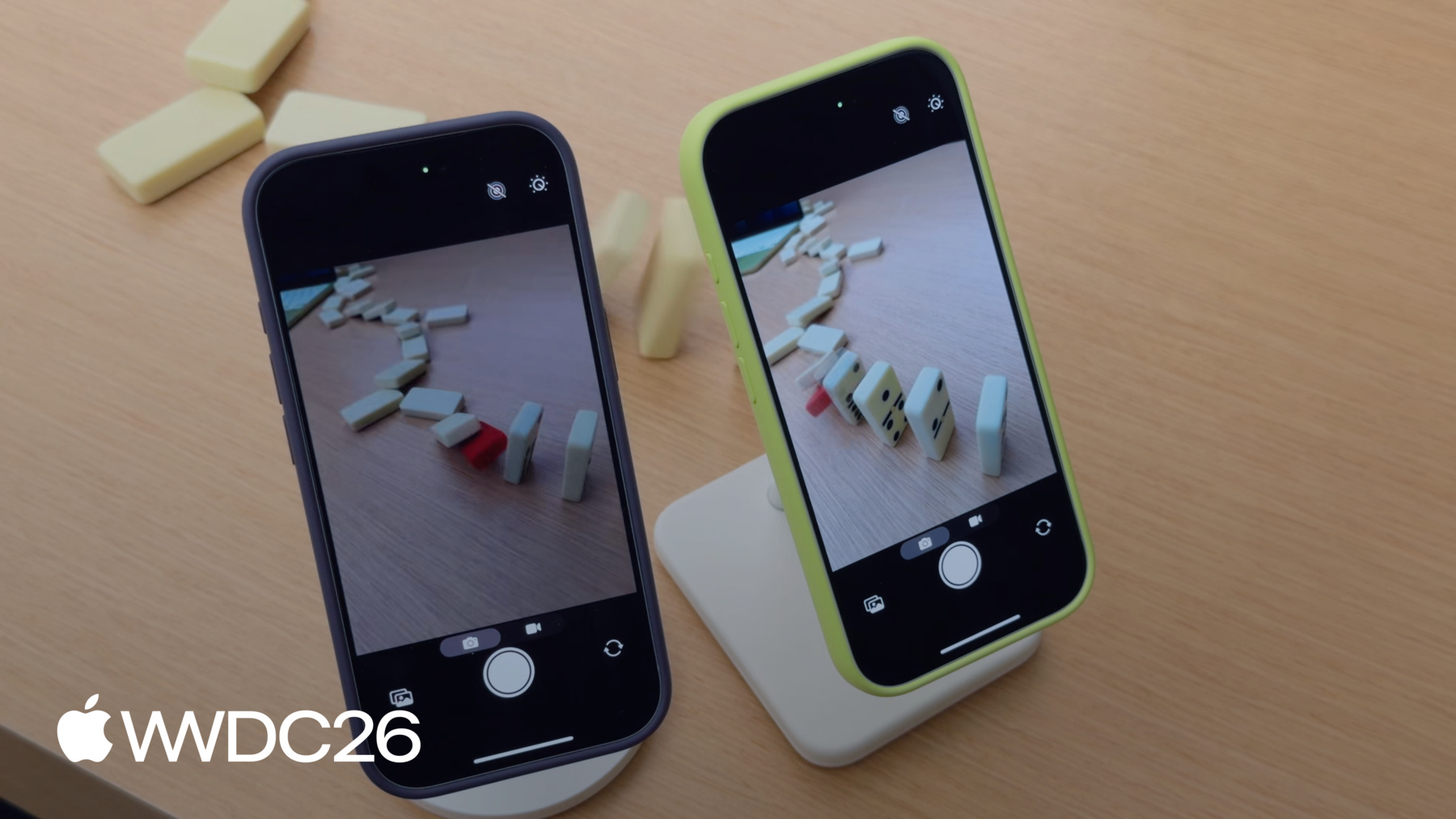
AVCapturePhotoOutputの遅延には 注意点があります プレビューははるかに速く開始しますが 最初のキャプチャまでの時間は 変わりません フォト出力が遅延されているため システムはその初期化を完了する必要があります キャプチャを開始する前に プレビューはすぐに表示されますが シャッターチャンスを逃す可能性があります この問題を解決するには isResponsiveCaptureEnabledをtrueに設定します AVCapturePhotoOutputで このプロパティはキャプチャ開始から 処理開始までの間に バッファリングを追加し フォト出力が完全に準備できていなくても 瞬間を捉えられるようになります 緑のスマートフォンは Deferred startと組み合わせて レスポンシブキャプチャを有効にしています ドミノが倒れる中 素早く起動して 写真を撮ります
緑のスマートフォンで ドミノの完璧なショットが撮れましたが 紫のスマートフォンは 瞬間を逃しました
レスポンシブキャプチャの使い方の詳細は 素晴らしい高解像度の画像を キャプチャする方法は WWDC26の「Implement high resolution photo capture」をご覧ください
プレビューが起動したら 安定した フレームレートを維持することが重要です そうでないとカメラが 遅延しているように感じます 次にプレビューのレンダリングの ベストプラクティスを紹介します
先ほどのセッションアーキテクチャに 戻ります プレビューをレンダリングする 最も簡単な方法は AVCaptureVideoPreviewLayerです カメラが見ているものを そのまま表示します アプリのUIに直接 AVCaptureVideoPreviewLayerは プレビューのレンダリングに最適化されています アプリ内でビデオフレームを 処理する必要はありません AVCaptureVideoPreviewLayerが自動的に処理し 複雑な状況にも対応します HDRトーンマッピングなどです CPUとGPUのオーバーヘッドも 抑えられ 電力を節約しUIに 余裕をもたらします 低レイテンシプレビューに調整されているので カメラが捉えたものをアプリが ほぼ遅延なく表示します シンプルさと引き換えに AVCaptureVideoPreviewLayerでは フレームごとのアクセスはできません プレビューレンダリングを より細かく制御したいアプリには AVCaptureVideoDataOutputが 適しています AVCaptureVideoDataOutputは AVCaptureVideoPreviewLayerの代わりに セッションアーキテクチャ内で デバイスにフレームを表示するための 主要な出力となります
AVCaptureVideoDataOutputはプレビューの フローをより細かく制御できます アプリが個々のフレームを 処理できます 各フレームにカスタムUIオーバーレイを 適用することもできます
フレームごとの処理により Metalとの統合も容易になります フレームデータの分析にも役立ちます カメラフィードを表示するだけなら AVCaptureVideoPreviewLayerを使います AVCaptureVideoPreviewLayerを 使うアプリは iOS 26以降に再コンパイルすると 自動的にDeferred startが有効になります
フレームごとの処理が優先される場合は AVCaptureVideoDataOutputを使います AVCaptureVideoDataOutputでは Deferred startは自動的に適用されません 同じ起動効果を得るには 手動のDeferred startを採用します プレビューをレンダリングする際は フレームごとの処理を短くします フレームドロップを防ぎ 体験をスムーズに保ちます
デバイスが熱くなると パフォーマンスの維持が難しくなります システムが適応するため スロットリングが発生します セッションのパフォーマンスを監視して 持続可能な体験のために システム状態に適応します 次に パフォーマンスの監視と システム状態への適応を可能にするAPIを説明します システム状態に適応するAPIです 先ほどのアーキテクチャに戻ると キャプチャセッションがあります フォト出力とプレビューレイヤーです
これは基本的な構成ですが アプリがカメラや入力デバイスを追加すると複雑になります 複雑さが増します
複雑さが増すにつれ パフォーマンスコストも増加します キャプチャセッションのコストを把握することで 持続可能な体験を 設計できます hardwareCost APIは 0から1の値を返します セッションのハードウェアのうち 使用中の割合を示します 1を超えた場合 その設定は システムが対応できないことを意味します このコストに寄与する 要素がいくつかあります 使用しているカメラの数 1080pや4KなどのソースデバイスのActiveフォーマット ソースデバイスのフォーマットの フレームレート hardwareCostはフォーマットの 最大フレームレートを前提とします 低いフレームレートで 動作している場合は 60fpsではなく30fpsの場合は フレームレートオーバーライドプロパティを使って コストを削減します 最後に ビニングフォーマットの使用です ビニングフォーマットはピクセルをグループ化するため ハードウェア帯域幅の消費が少ないです
systemPressureCost APIも 0から1の値を返します セッションの現在の設定コストを 表します 1を超えると その設定は持続不可能です 現在のシステム状態に適応するには AVCaptureDeviceの systemPressureStateプロパティを監視します システムプレッシャー状態が 高くなったら キャプチャデバイスのフレームレートを 下げるか GPUやApple Neural Engineの 使用を抑制するか UIの処理を最小化します hardwareCostとsystemPressureState APIは 初期セッション設定後に使用します
設定コミット後に hardwareCostが デバイスの性能を 超えていないか確認します
hardwareCostが1以下になったら AVCaptureDeviceの systemPressureStateを観察して 状態変化のハンドラを登録します このハンドラを使って 説明した テクニックで適応します ビデオキャプチャもパフォーマンスの 影響を受けやすいです デバイスがプレッシャー状態に 入ったときに 従来のファイルシステムの 入出力は可変的です システムが競合する操作を 調整しているためです メモリのフラグメンテーションや デバイスストレージの消耗もあります つまり ファイルの入出力動作は 非決定論的です ProResなどの 高データレートビデオキャプチャは フレームドロップなしに録画するために 持続的な高帯域幅入出力が必要です この課題への対応として iOS 27の新機能AVProVideoStorageを使います このクラスは事前割り当てされた ストレージを追跡・管理します 高データレートビデオキャプチャ用の すべてのアプリが共有する システム全体のリソースです
AVProVideoStorageは既存の ムービー録画APIと連携します
アプリはusesProVideoStorageを 設定することでオプトインします AVCaptureMovieFileOutput またはAVAssetWriterに設定します AVCaptureVideoDataOutputを使って コンテンツを録画する場合です
システムがアロケーションと ファイルの入出力を処理することで 高データレートコーデックの書き込みパフォーマンスが 一定に保たれます カメラの設定が更新され 割り当てる ストレージ量を制御できるようになりました remainingCapacityメソッドは 残りのストレージ量を報告します 録画中はその値が減少し 録画が止まると 減少が停止します
openSettingsメソッドを使うと アプリから設定UIへ 移動できます
AVProVideoStorageを使うには まずストレージがサポートされているか確認します
AVProVideoStorageはシングルトンなので sharedメソッドを使って このオブジェクトのインスタンスを 取得します
次に MovieFileOutput AVCaptureSession AVCaptureConnectionsを作成して 録画フォーマットを選択します
AVCaptureMovieFileOutputの新しい isProVideoStorageSupportedメソッドを使って 互換性を確認します
録画前に ストレージがサイズ変更中か ファイルの作成・削除リクエストを 処理中でないことを確認します 最後に MovieFileOutputでProVideoStorageを 有効にして録画を開始します キャプチャ中 録画は 事前割り当てされたストレージに書き込まれ キャプチャ完了後に指定した 場所に移動されます
この機能はAVAssetWriterとも うまく連携します
起動最適化の方法 プレビューの レンダリングのベストプラクティス 持続的なパフォーマンスのためのAPI そしてProResキャプチャの 決定論的なファイル書き込み速度の実現を説明しました 高品質なフォト出力と組み合わせて Deferred startを採用してください 起動を速く保ちながら 美しい画質も実現できます カメラアプリの他の部分でも パフォーマンスを分析してください InstrumentsとXcodeを使って パフォーマンスの問題を 測定・特定し修正します 開発中はデスクや 管理された環境にいることが多いですが 実際にはユーザーは実際の環境で アプリを使うことを忘れないでください 管理された環境での開発と 実際の世界でアプリを使います あらゆる状況で パフォーマンスをテスト・測定してください 暑い晴れの日でも 最後に WWDC23の「Create a more responsive camera experience」と WWDC26の「Implement high resolution photo capture」をご覧ください キャプチャのレスポンシブ性を アプリに組み込む方法が学べます
パフォーマンスは単なる機能ではなく 優れたカメラ体験の 基盤となるものです 最適化を続け 撮影を楽しんでください ご視聴ありがとうございました
-
-
9:14 - Automatic deferred start delegate
import AVFoundation class DeferredStartDelegate: NSObject, AVCaptureSessionDeferredStartDelegate { func sessionWillRunDeferredStart(_ session: AVCaptureSession) { // This is called before deferred start begins for the deferred outputs } func sessionDidRunDeferredStart(_ session: AVCaptureSession) { // This is called after deferred start completes for all outputs } } -
9:46 - Adopt automatic deferred start
import AVFoundation let captureSession = AVCaptureSession() captureSession.beginConfiguration() captureSession.automaticallyRunsDeferredStart = true let videoPreviewLayer = AVCaptureVideoPreviewLayer(session: captureSession) videoPreviewLayer.isDeferredStartEnabled = false let photoOutput = AVCapturePhotoOutput() photoOutput.isDeferredStartEnabled = true captureSession.addOutput(photoOutput) captureSession.setDeferredStartDelegate(deferredStartDelegate, deferredStartDelegateCallbackQueue: sessionQueue) captureSession.commitConfiguration() captureSession.startRunning() -
11:30 - Adopt manual deferred start
import AVFoundation let captureSession = AVCaptureSession() captureSession.beginConfiguration() captureSession.automaticallyRunsDeferredStart = false let videoOutput = AVCaptureVideoDataOutput() captureSession.addOutput(videoOutput) videoOutput.isDeferredStartEnabled = false let photoOutput = AVCapturePhotoOutput() photoOutput.isDeferredStartEnabled = true captureSession.addOutput(photoOutput) captureSession.setDeferredStartDelegate(deferredStartDelegate, deferredStartDelegateCallbackQueue: sessionQueue) captureSession.commitConfiguration() captureSession.startRunning() -
11:53 - Manage runDeferredStartWhenNeeded
import AVFoundation import QuartzCore private var firstFramePresented = false guard let drawable = layer.nextDrawable() if (!firstFramePresented) { drawable.addPresentedHandler({ drawable in // Set up postponed UI elements captureSession.runDeferredStartWhenNeeded() }) firstFramePresented = true } -
14:07 - Enable responsive capture
import AVFoundation func configurePhotoOutput(for session: AVCaptureSession, device: AVCaptureDevice) { let photoOutput = AVCapturePhotoOutput() guard session.canAddOutput(photoOutput) else { return } session.addOutput(photoOutput) photoOutput.maxPhotoQualityPrioritization = .quality // Responsive capture lets the photo output capture immediately photoOutput.isResponsiveCaptureEnabled = photoOutput.isResponsiveCaptureSupported } -
20:16 - Monitor for system pressure
import AVFoundation let captureSession = AVCaptureSession() let device = activeVideoInput?.device captureSession.beginConfiguration() // ... captureSession.commitConfiguration() guard captureSession.hardwareCost <= 1.0 else { print("hardwareCost \(captureSession.hardwareCost) — cannot start session. Reconfiguring.") setupLowCostConfiguration() } captureSession.startRunning() let systemPressureObserver = device?.observe(\.systemPressureState, options: [.initial, .new], changeHandler: { /* Handle state change */ }) -
22:17 - Manage pro video storage
import AVFoundation func configureProVideoStorage() { guard AVProVideoStorage.isSupported else { return } let storage = AVProVideoStorage.shared guard storage.remainingCapacity != 0 else { storage.openSettings() return } } -
22:43 - Adopt AVProVideoStorage for deterministic file write speeds
import AVFoundation

guard AVProVideoStorage.isSupported else { return }
guard let pvs = AVProVideoStorage.shared else { return }

// Configure and set up AVCaptureSession, AVCaptureConnections and format
// ...
let movieOutput = AVCaptureMovieFileOutput()

guard movieOutput.isProVideoStorageSupported else { return }
guard !pvs.isBusy else { return }

let movieFileURL = FileManager.default.temporaryDirectory
            .appendingPathComponent(UUID().uuidString)
            .appendingPathExtension("mov")

movieOutput.usesProVideoStorage = true // Also available with AVAssetWriter
movieOutput.startRecording(to: movieFileURL, recordingDelegate: delegate)
-