

-
CSSグリッドレーンについて
あらゆる形やサイズのコンテンツに対応する、適応性に優れた柔軟なWebレイアウトを構築しましょう。グリッドレーンを使って、さまざまな形の要素を、シンプルなCSSですっきりした柔軟なデザインに配置する方法を紹介します。レイアウトの柔軟性を保ちながらアクセシビリティを向上させるのに役立つ、フロートレランスについても取り上げます。
関連する章
- 0:00 - はじめに
- 1:35 - CSSフレックスボックスとCSSグリッド
- 2:45 - CSSグリッドレーン
- 3:55 - グリッドレーンコンテナの作成
- 4:31 - レンガのバリエーションの実装
- 4:49 - さまざまなレイアウトの試行
- 5:40 - 個々のアイテムの制御
- 7:05 - フロートレランス
- 8:46 - Webインスペクタ
- 9:20 - 次のステップ
リソース
- WebKit.org - CSS Grid Lanes Field Guide
- WebKit.org – Report issues to the WebKit open-source project
- Submit feedback
関連ビデオ
WWDC26
-
このビデオを検索
こんにちは、私はBrandonです。 Safariチームのエンジニアです。 本日は、CSS Grid Lanesという ウェブ向けの新しいレイアウトモードをご紹介します。 あらゆるサイズのアイテムが 利用可能なスペースに自然に流れ込む デザインを望んだことがあれば、 わずか数行のCSSでその 構築方法をお見せします。
このパターンは別の名前でご存知かもしれません。 マソンリーレイアウトです。 滝を想像してみてください。コンテンツが ページを列ごとに自然に流れ落ちます。 各アイテムが直前のものの下に 自然に収まります。 方向を変えると レンガの壁のようになります。 アイテムがページを行ごとに横に流れます。 そして最も良い点は、 待つ必要がないということです。 Grid LanesはSafari 26.4で 今日から利用できます。 また、他のブラウザでも フラグの後ろで利用できます。 このレイアウトを構築しようとしたことがある方は、 簡単ではないことをご存知でしょう。 おそらくJavaScriptライブラリに 頼ったことがあるでしょう。 あるいはfloatやFlexboxで 工夫したかもしれません。 ほぼうまくいく—でも うまくいかないこともあります。 CSS Grid Lanesはまさに このために作られています。 Grid Lanesを理解するには、一歩引いて レイアウトモードが実際に 何をするかを考えることが助けになります。 すべてのレイアウトモードは 同じ2つの質問に答えます。 アイテムはどこに配置されるか、 そしてどれだけのスペースを得るか? FlexboxとGridはそれぞれ それらの質問に異なる方法で答えます。 Grid Lanesはその間のどこかに 収まる新しいモードです。 こういうことです。
例えばFlexboxは1つの軸を与えます。 そしてその軸に沿って流れる アイテムの単一のレーンがあります。 アイテムが折り返すと、 同じ方向に流れ続けます。 その方向を選択します。 行または列です。 そしてアイテムは一つずつ配置されます。 列に切り替えると、 同じルールが適用されます— アイテムは上から下へと流れ、 次の列に折り返します。
Gridは異なるアプローチを取ります。 Flexboxが1つの軸を与える一方で、 Gridは2つ—列と行を与えます。 Gridはアイテムをそれらのトラックの 交差点にあるセルに配置します。 しかし、アイテムのアスペクト比が 異なる場合、 短いアイテムがセルを埋めない 大きな空白エリアが生まれます。 ここで、これらのボックスが画像だとすると、 実際には3つの選択肢しかありません。 どれも良くありません。 各画像をセルに合わせて 伸ばすことができますが、 それは歪みを生じさせます。 または、ズームインしてスペースを 埋めることもできますが、 画像がコンテナの範囲から はみ出してしまいます。
画像をトリミングすることもできますが、 重要な情報を失う リスクがあります。 そこでGrid Lanesの出番です。 GridとFlexの間に位置します。 Gridのように2次元にわたって 構造化するのではなく、 1次元だけを構造化し、 もう一方は自由のままにします。 しかし、コンテンツが単一のレーンに流れ ページを折り返すFlexとは異なり、 Grid Lanesはコンテンツを 複数のレーンに分散します。
結果は密に詰まった、 段差のあるレイアウトで、 各アイテムの自然な比率を保持します。 アイテムは一つずつ配置され、 それぞれが 最も上部に近い列に収まります。 だから早いアイテムはより上に配置され、 後のアイテムは下を埋めます。 ここまでは、すべて画像でした。 しかし、Grid Lanesは細かいことを言いません。 あらゆる種類のコンテンツで動作します。 テキストを追加してみてください。 各ブロックはその列に合わせて折り返し、 ブラウザが高さを自動的に設定します。 そして何かを目立たせたい場合、 見出しのように、 列をまたいで表示できます。
何を変更しても関係ありません— 異なる形、異なるサイズ、 または完全に異なるデザイン。 Grid Lanesが対応します。
Grid Lanesができることをご覧いただきました。 では、作成してみましょう。 新しいdisplayタイプ— grid-lanesから始めます。 次に列を定義します。 grid-template-columnsはトラックの数と 各トラックの幅を設定します。 ここでfrユニットに気づくでしょう。 frは「フラクショナルユニット」を表します。 コンテナ内の利用可能なスペースを取り、 分数に分割するようブラウザに指示します。 このコードは、スペースを分割して 3つの等分に分けることを示し、 同じサイズの3つの列を作成します。 Gridと同じように、 10pxのgapを追加します。
これをレンガの壁に変えたいですか? 列を行に入れ替えるだけです。
grid-template-columnsプロパティを grid-template-rowsに置き換えると レイアウトがレンガの壁に変わります。 唯一の制約は、1つの方向を選ぶこと— 両方ではありません。
それが3行のCSSによるGrid Lanesです。 しかし、その3行は 思ったよりも多くのコントロールを与えます。 どういうことか見せましょう。 まず3つの等しい列から始めます。 しかし、列は等しくなくてもいいです。 ここでは、中央の列が 左右の列の2倍のスペースを取ります。 今度は、列の数を自分で選ぶ代わりに、 ブラウザに決めさせましょう。 auto-fillは収まる限り 多くの列を作成します。 minmax()は各列が少なくとも200ピクセルで あるべきとし、 スペースを埋めるように大きくなれることを示します。 同じアイデアを取り、 今度は狭い列と広い列の繰り返しパターンで。 正直、私が最も気に入っているのは、 できることの多さです。 わずか数行のCSSで。 探索を始めると、 あなたも驚くと思います。
それがレイアウトです。 しかし、Grid Lanesは個々のアイテムを 形成することもできます。 3つの等しいサイズの列を持つ シンプルなgrid-lanesコンテナから もう一度始めましょう。 オレンジ色のアイテムに もっとスペースを与えたいと思います。 Grid Lanesを使えば、Gridにすでに存在する プロパティを使ってそれができます。 grid-column: span 2; を使うと アイテムが2列にまたがり、 残りのレイアウトが それに合わせて調整されます。 または、正確に望む場所に 配置することもできます。 ここでは、アイテムを列2から始まるように設定し、 列2と列3にまたがらせます。 列の配置はコントロールできますが、 行はできないことに注意してください。 Grid Lanesが行を決定します。 アイテムの1つを2列にまたがる レシピカードに変えました。 カードの中には画像とテキストがあり、 どちらもGrid Lanesレイアウトには 参加していません。
display: grid-lanesと grid-template-columns: subgridを カードに追加すると、 その内容が独自のアイテムとして 親レイアウトに参加します。 画像が1列を取り、 テキストがもう一方を取り、 それぞれがコンテンツに合わせたサイズになります。 好きなように入れ子にすることができます。 Grid Lanesコンテナの中に 通常のGridがある、 またはその逆。 すでに知っているのと同じツールと構文が 引き継がれますので、 Grid Lanesはすぐに馴染みます。
Grid Lanesは最も短い列に 各アイテムを配置します。 ほとんどの場合、 それは素晴らしく見えます。 しかし時々… 少し違和感を覚えることがあります。 そこでflow toleranceの出番です。 ブラウザは通常、次のアイテムに 最も短い列を選択します。 flow toleranceはそのルールを 緩めたり締めたりするダイヤルです。 詳しく説明します。 このレイアウトを見ると、 一行の2つのアイテムはほぼ同じ高さですが、 全く同じではありません。 2番目のアイテムは アイテム1より数ピクセル短いです。 つまり、アイテム2の下の領域は コンテナの上部に近く、 2列目がブラウザが次のアイテムを 配置する場所となり、 アイテム4は1列目を埋めます。
これにより、アイテムのレイアウトが 最初の行では左から右へ、 最後の行では右から左へとなります。 タブ順序とコンテンツが視覚的に 表示される方法の違いは、 人々のアクセシビリティに影響を与え、 混乱するエクスペリエンスを生む可能性があります。 flow-toleranceをオンにしてください。 2列に2つのアイテムに戻りましたが、 flow-toleranceがルールを変えます。 新しいアイテムごとに、 ブラウザは同じ質問をします。 高い列はより短い列に flow-toleranceを加えたものより小さいか? アイテム3では、はい— ギャップは許容範囲内で、 1列目を埋めます。 しかし今、1列目はさらに高くなっています。 アイテム4では、ギャップが 無視するには大きすぎるので、 より短い列に落ちます。2列目です。 デフォルトでは、Grid Lanesは 1emのflow-toleranceを使用します。
コンテンツに合うものを見つけるために、 さまざまなflow-tolerance値を試してください。
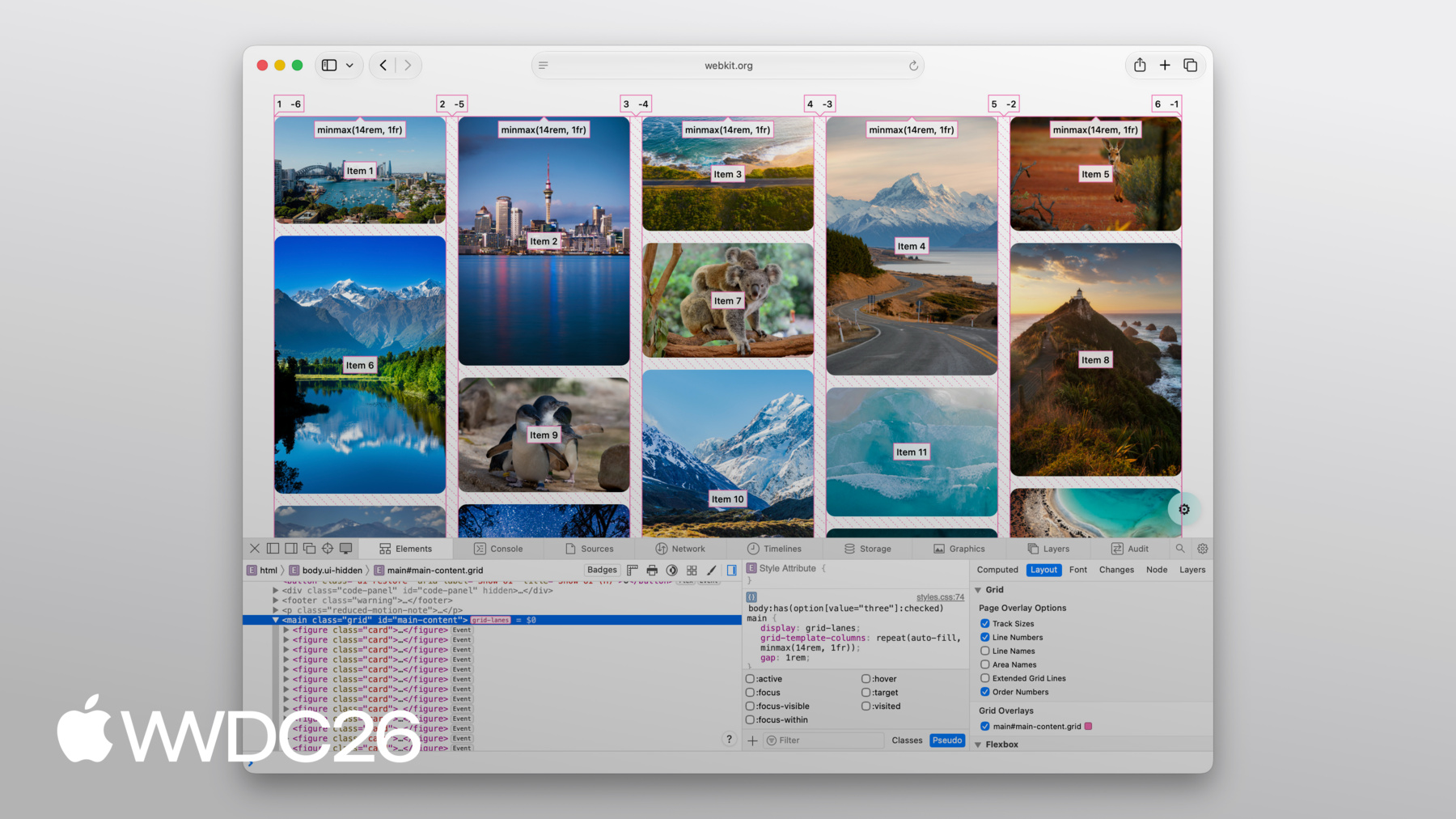
flow-toleranceはコンテンツに 合う場合に素晴らしいですが、 ブラウザに柔軟性を与える裏返しとして、 時々結果が予想外に なることがあります。 そのような場合は、 Web Inspectorを開いて 何が起きているか確認してください。 良いニュースは、Web InspectorはGrid Lanesを 完全にサポートしていることです。 列と行を示す線が表示されます。 各アイテムに直接表示される 順番号が得られ、 アイテムがどのように配置されているか 正確にわかります。
アイテム間のギャップも描画されます。 オーバーレイをオンにするだけで それらすべてが表示されます。
CSS Grid Lanesは、かつてJavaScriptが 必要だったレイアウトを、 わずか数行のCSSで提供します。 Gridからすでに知っていることを 基に構築されており、 コンテンツに適応します。 逆ではありません。 ウェブプラットフォームへの 素晴らしい追加です。 それで何を作るか早く見たいです。 WebKitチームが作成した Grid Lanes Field Guideをご覧ください。 詳細なウォークスルーと インタラクティブなデモがあります。 本日カバーしたすべてのプロパティを 試してみることができます。 自分のプロジェクトでgrid-lanesを試してください。 Safari 26.4から利用できます。 画像が多いレイアウトへのアプローチを 本当に変えられると思います。 フィードバックを共有してください。 grid-lanesがどのように 機能しているか 次に何を見たいかをぜひ お聞かせください。 Safariに追加される他のすべての 機能について学ぶには、ぜひご覧ください。 「Safari 27のWebKitの新機能」 ご視聴ありがとうございます。 素晴らしいWWDCを!
-
-
3:58 - Create a Grid Lanes Container
.container { display: grid-lanes; } -
4:02 - Create a Grid Lanes Container
.container { display: grid-lanes; grid-template-columns: repeat(3, 1fr); } -
4:26 - Create a Grid Lanes Container
.container { display: grid-lanes; grid-template-columns: repeat(3, 1fr); gap: 10px; } -
4:33 - Implement a Brick Variation
.container { display: grid-lanes; grid-template-columns: repeat(3, 1fr); gap: 10px; } -
4:36 - Implement a Brick Variation
.container { display: grid-lanes; grid-template-rows: repeat(3, 1fr); gap: 10px; } -
4:58 - Experiment with different layouts
.container { display: grid-lanes; grid-template-columns: 1fr 1fr 1fr; gap: 10px; } -
5:02 - Experiment with different layouts
.container { display: grid-lanes; grid-template-columns: 1fr 2fr 1fr; gap: 10px; } -
5:10 - Experiment with different layouts
.container { display: grid-lanes; grid-template-columns: repeat(auto-fill, minmax(200px, 1fr)); gap: 10px; } -
5:24 - Experiment with different layouts
.container { display: grid-lanes; grid-template-columns: repeat(auto-fill, minmax(8rem, 1fr) minmax(14rem, 2fr); gap: 10px; } -
5:45 - Control Individual Items
.container { display: grid-lanes; grid-template-columns: 1fr 1fr 1fr; gap: 10px; } -
5:59 - Control Individual Items
.container { display: grid-lanes; grid-template-columns: 1fr 1fr 1fr; gap: 10px; } .item { grid-column: span 2; } -
6:07 - Control Individual Items
.container { display: grid-lanes; grid-template-columns: 1fr 1fr 1fr; gap: 10px; } .item { grid-column: 2 / span 2; } -
6:22 - Integrate Subgrid
.container { display: grid-lanes; grid-template-columns: 1fr 1fr 1fr; gap: 10px; } .item { grid-column: span 2; } -
6:34 - Integrate Subgrid
.container { display: grid-lanes; grid-template-columns: 1fr 1fr 1fr; gap: 10px; } .item { display: grid-lanes; grid-template-columns: subgrid; grid-column: span 2; } -
6:48 - Integrate Subgrid
.container { display: grid-lanes; grid-template-columns: 1fr 1fr 1fr; gap: 10px; } .item { display: grid; grid-template-columns: subgrid; grid-column: span 2; } -
8:37 - Improve item positioning
.container { display: grid-lanes; grid-template-columns: 1fr 1fr; gap: 10px; flow-tolerance: normal; } -
8:41 - Improve item positioning
.container {
	display: grid-lanes;
  grid-template-columns: 1fr 1fr;
  gap: 10px;
  flow-tolerance: 2.1em;
}
-