

-
SwiftUIの遅延スタックとスクロール処理の詳細
SwiftUIの遅延スタックの内部構造について詳しく学びましょう。サイズの推定、サブビューの遅延読み込み、コンテンツのプリフェッチによってスムーズなスクロール体験を実現する、LazyVStackとLazyHStackの仕組みを解説します。また、高度なパフォーマンス最適化、状態管理に関するベストプラクティス、プログラムにより正確なスクロールを行うためのヒントについても取り上げます。このセッションの内容を十分理解できるよう、SwiftUIでのスタックを使ったレイアウトに関する基本的な情報を確認しておくことをおすすめします。
関連する章
- 0:00 - はじめに
- 1:24 - レイアウト
- 9:13 - サブビューの読み込み
- 13:15 - 事前フェッチ
- 17:40 - プログラムによるスクロール
- 19:55 - 次のステップ
リソース
関連ビデオ
WWDC26
WWDC22
WWDC20
-
このビデオを検索
こんにちは、Rensと申します。 UI Frameworksエンジニアです。 Lazy stackは、 長いカスタムスクロールコンテンツを表示する SwiftUIアプリに欠かせないコンポーネントです。 そしてSwiftUIの一部として 長い歴史があります。 他のSwiftUIコンポーネントと同様に、 lazy stackの強みは そのシンプルさにあります。 さまざまなSwiftUIコンポーネントを 他の多くのSwiftUIコンポーネントと組み合わせて 複雑なアプリを構築できます。 例えば、2027年のリリースでは reorderableを使ってビューを ドラッグして並び替えることができます。 詳しくはこちらで学べます 「Code-along: Build powerful drag and drop in SwiftUI」 また、SwiftUIではリスト以外の ビューにもスワイプアクションを追加できます。 もちろん、どちらもlazy stackと 組み合わせると非常に効果的です。 今こそlazy stackとスクロールについて おさらいし、深く掘り下げる良いタイミングです。 その仕組み、できること、 そして避けるべき点について説明します。 その後、皆さんはより深く lazy stackの内部構造を理解し、 自分のアプリのlazy stackに 活用できるようになります。
このビデオでは、stackを使った SwiftUIレイアウトの基本的な知識があることを前提としています。 SwiftUIが初めての方は 「Stacks, Grids, and Outlines in SwiftUI」をおすすめします。
私は折り紙アプリを開発しています 人気の折り紙作品の 折り方を表示するアプリです。 この初期バージョンでは、 白鳥の折り方だけが表示されています。 メインビューの設定はこちらです。 ScrollViewの中にLazyVStackがあり、 各ステップのStepViewが 含まれています。 lazy stackにより、非常に多くのステップを すべてのビューを一度に読み込まずに スクロールできます。 それではLazyVStackに注目してみましょう。
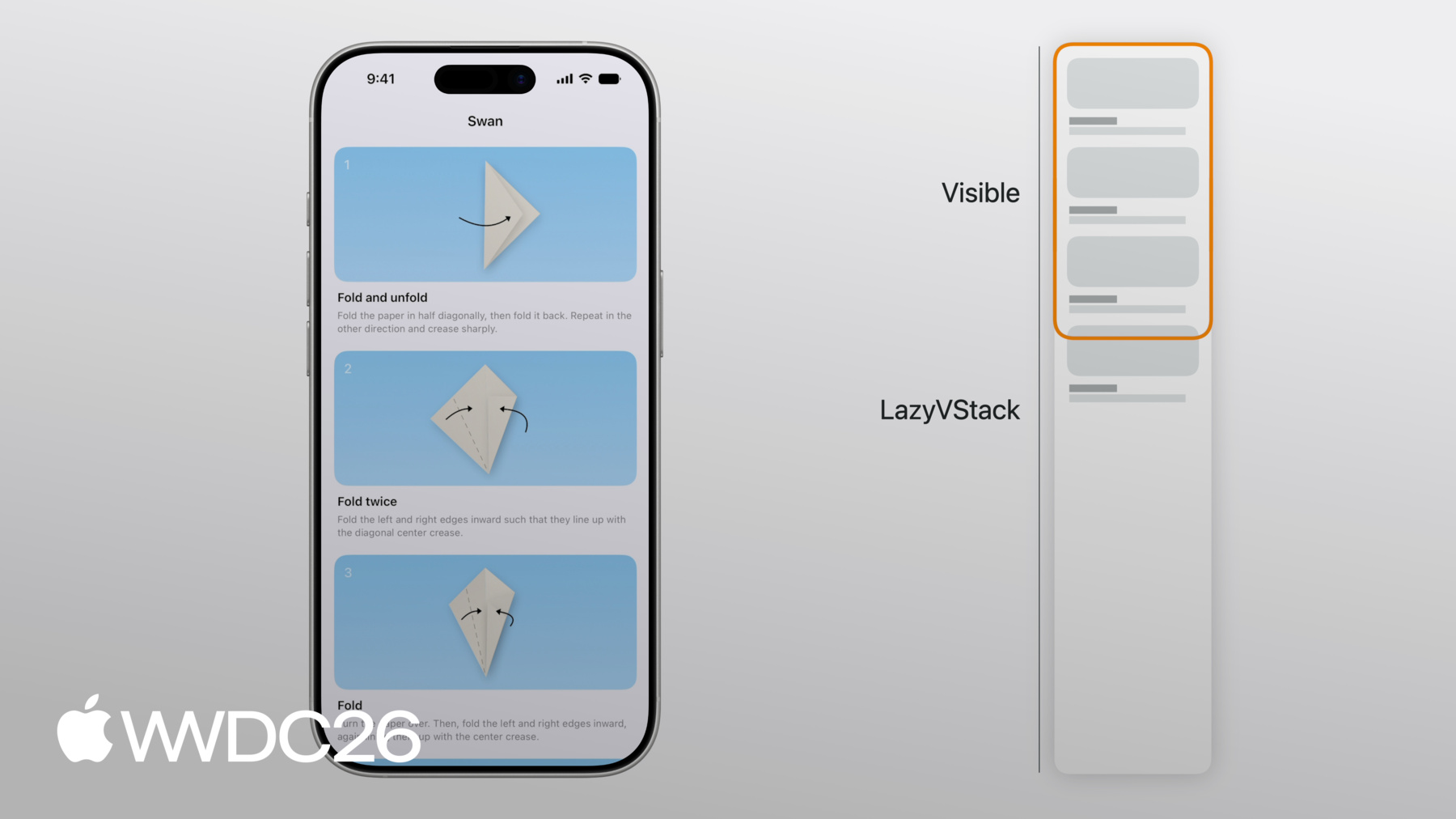
折り紙の白鳥を作るステップのうち 3つが完全に表示されています。 ステップ4のStepViewの 一部も表示されています。 LazyVStack全体は、表示されているビューより はるかに大きいです。 しかし、VStackとは異なり、 LazyVStackは表示されていないビューを 評価・レンダリングしません。 LazyVStackは単純にビューを 上から下にレイアウトし、 表示領域が埋まると停止します。 下にスクロールすると、LazyVStackは 適切にビューを追加し 表示領域が埋まるように 維持します。 ビューが画面外にスクロールされると、 lazy stackから削除されます。
すべてのビューを一度に読み込まないことで、 LazyVStackはVStackよりも 効率的になります。 しかし、正確さという面でのコストがあります。 LazyVStackはすべてのビューを 読み込まないため、 画面外のサブビューの高さは 推定値になります。 この推定高さは、これまでに 配置されたビューの平均サイズと それ以前に配置されたビューと、 残りのサブビューの 推定数に基づいています。 また、lazy stackは画面外のビューの 変更を認識できません。 読み込んでいないためです。
同様に、すべてのビューが 読み込まれていないため、 すべてのビューの最大幅を 見つけることができません。 そのため、LazyVStackの理想的な幅は 最初のサブビューの幅になります。 私のOrigamiアプリの場合、 最初のビューは無限に柔軟なので、 LazyVStackの幅は 画面幅と等しくなります。
LazyVStackの高さは推定値であり 正確ではないため、 新しいビューが画面にスクロールされるにつれて lazy stackがレイアウトについて より詳しく学ぶことで スクロール中に変化する場合があります。 例えば、 一番下までスクロールして 最後のビューが他のビューより 少し小さい場合 lazy stackは調整する必要があります これを考慮して当初の 推定サイズを調整します。
表示領域の上のスペースも 正確ではありません。 スクロール位置、つまり scroll viewのコンテンツオフセットは、 表示されているアイテムの 推定位置に依存します。 表示領域の上のスペースが 正確でない例として、 iPhoneで画面の向きを 変えた後があります。
StepViewは横向きでは 縦向きより高さが低くなります。 サブタイトルのテキストは横向きでは 通常より少ない行数に収まります。 向き変更中、 lazy stackはステップ4のStepView、 最上部に表示されているビューを アンカーとして保持します。 LazyVStackは最初の いくつかのStepViewの正確な レイアウト変更をまだ認識していません 読み込んでいないためです。 しかし、一番上までスクロールして戻ると、 lazy stackはscroll viewの 上端に合わせる必要があります。 つまり、その過程で 推定スペースを修正する 表示領域上のスペースを 修正する必要があります。 ScrollViewのコンテンツオフセットを 同じ量だけ更新し、 上部でのコンテンツオフセットも ゼロになるようにします。
lazy stackと 埋め込みscroll viewは、 位置とコンテンツオフセットを 連携して管理します。 そうすることで、 推定値が更新されても、 表示されているサブビューの 相対位置は scroll view内で変わりません。
同じlazy stack内に異なるタイプの ビューやコンテンツを組み合わせることはよくあります。 私のOrigamiアプリでは、 完成したときに作品の写真を 他の人と共有できると素敵だと思います。 これらの写真を下部に 水平スクロールビューで表示したいと思います。 これらの写真用に Showcaseビューを追加しました。 ShowcaseビューはLazyHStackを含む 水平スクロールのScrollViewを持っています。 これにより、アプリには LazyHStackがネストされた構造になります 外側のLazyVStackの中に。
このようにLazyVStackの中に LazyHStackをネストすることは パフォーマンスにも良い影響を与えます。 すべてのユーザーがネストされたscroll viewを スクロールして追加のビューを見るわけではないためです。
LazyHStackの理想的な高さ、つまり 縦方向のScrollViewでの高さは、 最初のサブビューの高さになります。 私のOrigamiアプリでは、 すべての写真が同じ高さを使用しています。 しかし、すべての写真に行数が可変の ユーザー説明ラベルがある場合、 長いサブタイトルが切れてしまいます。 LazyHStackはすべてのビューの中で 最も大きなサブタイトルが何かを事前に知ることができません。 すべてを読み込んでいないためです。 最善の解決策は ビューの高さを固定することです。 例えば、テキストの場合は 行数制限を設定したり、 短いテキスト用のスペースを確保したりできます。 でも実際には、私のOrigamiアプリの写真は もう少し大きくすべきだと思っています。 ステップの下に縦に 追加するだけの方がいいかもしれません。 セクションに追加すれば、 セクションヘッダーをピン留めすることもできます。 セクションヘッダーをピン留めするには、 pinnedViewsパラメータを使います LazyVStackの。
Showcaseビューの中にheaderビューを含む 新しいSectionを追加しました。 下にスクロールすると、 Showcaseセクションのヘッダーが 上部に固定されます。
次に、lazy stackが最高のパフォーマンスを発揮するために 避けるべきパターンについて説明します。 先ほど追加した写真のshowcaseを 使って説明します。 写真が画面にスクロールインおよびスクロールアウトする際に スクロールトランジションを追加すると 良いかもしれません。 ここでは、.scrollTransitionモディファイアを 使って ステップが画面内外にスクロールする際に エフェクトを付けています。 しかし、lazy stackは画面上にあるビューのみを 読み込みます、 元の位置に基づいて。 そして、ここのトランスフォームはビューを 元のフレームの外に押し出しています。
これにより、表示されるべきときに 消えてしまいます、 lazy stackがそれらを 画面外と判断するためです。 ここでは、下にスクロールすると、 ピンクの白鳥が早すぎるタイミングで 消えてしまいます。 lazy stack内のビューにスクロールトランジションを 適用する場合、通常表示されないビューが 通常は表示されないビューが 表示領域に押し込まれないようにしてください。 ここでは、別のスケールエフェクトを使用しています。
これは問題なく動作します。 一般的に、通常表示されないビューが トランスフォームで表示領域に 押し込まれないようにしてください。 lazy stackはそれを認識しません。 Showcaseまで少しスクロールダウンする 必要があるので、 すぐにそこにスクロールできる ボタンを追加します。
しかし、そのボタンは 常に表示する必要はありません。 scroll viewの上部付近にいるときだけ 表示されるようにしたいと思います。 下にスクロールすると、 消えるようにします。
ここでは、scroll viewに .onScrollGeometryChangeを使って 絶対コンテンツオフセットを取得しています。 100ポイント以上スクロールダウンすると、 ボタンが消えます。 これは機能しますが、lazy stackの コンテンツオフセットは推定値なので、 ボタンが消える 正確な位置は、 推定値が変わると変化することがあります。 代わりに、サブビューの相対位置を 使う方が良いです scroll viewの表示領域内の。
その方法の1つは、 .onScrollTargetVisibilityChange モディファイアを使うことです。 そのモディファイアのクロージャは、 サブビューの可視性が変わると呼び出されます scroll viewの表示領域内の。 ここでは、「Scroll to Showcase」 ボタンの表示は 80%のしきい値で表示されている サブビューのみに依存します。
lazy stackのレイアウトについて 詳しく説明しました。 lazy stackはサブビューを追加すると 説明しました、 それらがscroll viewの 表示部分に入ろうとするときに。 しかし、lazy stackが個別に 読み込むサブビューは、 コードで定義したビュー構造体に 常に直接対応するわけではありません。 元のコードに戻り、 ContentViewをもう一度見てみましょう。 このシンプルなケースでは、StepViewインスタンスと LazyVStackが認識するサブビューは 1対1の対応関係があります。 ScrollViewがあり、ScrollViewは LazyVStackをサブビューとして持ち、 LazyVStackはForEachを サブビューとして持っています。 でも、もちろん ForEachは単一のビューではありません。 各ステップに対して 1つのStepViewに解決されます。 そしてほとんどの場合、 これらがLazyVStackが読み込むサブビューです。 しかしここでは、StepViewが 少し複雑になっています。 これが重要になります。 bodyにはStepDiagramとStepInstructionsという 2つのビューが含まれています bodyのトップレベルに。 また、VStackのような別のレイアウトに 埋め込まれていません。
この場合、 LazyVStackには依然としてForEachがあります 各ステップに対して StepViewに解決されます。 しかし、ForEachが複数のStepViewに 解決されるのと同様に、 各StepViewも 2つのビューに解決されます。 LazyVStackはStepDiagramを 評価・読み込みます そしてStepInstructionsを別々に。 もちろん、lazy stackがそれらを作成するには StepViewを評価する必要があります どちらかを作成するために。 ビューは動的な数のビューに 解決されることもあります。 しかし、それには 注意が必要です。 この場合、StepViewは detailLevel環境値を使って、 表示すべきかどうかを 確認しています。 ForEachは再び各ステップに対して StepViewに解決されます。 しかし各StepViewは今や 1つまたは0のサブビューに解決されます。 この場合、現在の詳細レベルでは ステップ2は表示されませんが、 1つ目と3つ目のステップは表示されます。 これは機能し、StepViewのコンテンツは lazilyに読み込まれますが、 StepView自体は予想よりも 長く生き続けることがあります。 これは、LazyVStackが表示されているサブビューを そのインデックスを使って参照するためです。
以前のStepViewを 保持しておく必要があります、 detailLevel環境値が 変更された場合に備えて、 それがインデックスに 影響するためです。
StepViewのように、ForEachで何度も 作成されるリーフサブビューでは、 動的な数のサブビューを 作成しないようにしてください。 detailLevel環境値を使って ステップをフィルタリングする例は、 したがって良い考えではありません。
例えば、writingStyleのような 無関係な環境値が StepViewのbodyのコンテンツで 使用されているとします。 この環境値が変更されると、 画面外にスクロールされたビューの body評価が発生し、 不必要なビューの更新が引き起こされます。 また、lazy stackはStepViewに 割り当てられた状態を解放しません。 代わりに、データレベルで フィルタリングしてください。 SwiftDataを使用している場合は、 PredicateをQueryのフィルタリングに使用してください。 ここでは、Predicateで detailLevelを使用しています。 これにより、LazyVStackに サブビューの数がすぐに明確になります。 ビューの数やインデックスを計算するために ビューを構築する必要がありません。 ビューのbodyでオプショナルをアンラップすることも 同じ効果があることに注意してください。 ここでは、apiToken環境変数を オプショナルにアンラップしています。 bodyが返すのは そのトークンがnilでない場合のみです。
トークンはNetworkClientモデルオブジェクトで 処理できるものです。 認証されていない場合は、 階層の上位にあるビューが ContentUnavailableViewを表示できます。 最初からlazy stackを 表示する代わりに。
lazy stackはデータのごく一部のみを メモリに保持するため、 コンテンツの全差分を 実行する必要がありません。 表示されているビューの変更のみを 最小限にチェックします。
lazy stackは必ずしもサブビューを すべて一度に読み込むわけではありません。 次に、プリフェッチについて説明します。 これはlazy stackが使う 内部メカニズムです アプリのスクロールパフォーマンスを 向上させるための。
特定の方向にスクロールするとき、 lazy stackの表示部分が 配置コンテンツの末端に達すると、 lazy stackは画面に追加する前に ビューをプリフェッチします。 プリフェッチとは、lazy stackがビューの 表示作業の一部を実行することです ビューが表示される前に。 スクロール中、ScrollViewは 一定のレートでフレームを描画する必要があります。 つまり、利用可能な時間は 限られています フレームデッドラインまでに 計算を実行するための。 この作業には、ScrollViewが コンテンツオフセットを更新すること、 ビューが新しい位置で レンダリングされること、 そしてコンテンツオフセット変更に応じて アプリが実行する作業が含まれます。 ScrollViewにlazy stackが 含まれている場合は、 画面にスクロールされたビューを 評価する作業が含まれます、 レイアウトの実行と レンダリングも含めて。 しかし、新しいビューを 画面に配置する作業は負荷が高い場合があります。
作業がデッドラインを超えて 長くかかると、 フレームドロップが発生します。 これはスクロール中のカクつきとして 見えるので、避けるべきです。
プリフェッチはそのような フレームドロップを防ぐために使用されます。 スクロール中、lazy stackは 十分な時間があるかどうかを確認します 新しいサブビューのレンダリング作業の 一部を実行するための 画面にスクロールされる前に。 例えば、lazy stackは bodyを評価できる場合があります 表示されようとしているビューの レイアウトを、表示前に。 ビューが実際に表示されると、 作業のほとんどは すでに実行されており、 複数のフレームにわたって 分割されています。
LazyVStack内にネストされた LazyHStackを表示する作業も 複数のフレームにわたって 分割できます。 ビューが表示されると、 onAppearが呼び出されます。 そのため、通常はビューのbodyが 一度呼び出され、 ビューが画面に配置されると 少し後でonAppearが呼び出されます。 スクロール方向が逆になると、 ビューのbodyがプリフェッチの一部として 呼び出され、 onAppearが一度も 呼び出されない可能性もあります。 lazy stackでonAppearを使用することは データの読み込みを含む 多くのことに役立ちます。 そのようなユースケースの1つは 無限スクロールです。 ここでは、Origamiアプリは末端までスクロールすると Webからさらに多くの写真を取得します。 最後のビューであるProgressViewには .onAppearモディファイアがあります。 そのビューが表示されると、 新しいページが取得されます。
しかし、各ビューのonAppearで すべてを読み込むのは良い考えではありません。 この例では、onAppearを使って すべてのビューをセットアップしています。 ビューのサイズとコンテンツの 大部分が 配置後に完全に変わります。 プリフェッチが以前に行った 作業は破棄され、 ビューが表示されるときに 再実行する必要があります。 また、lazy stackは必要以上の ビューを読み込む可能性があり、 後で説明するように スクロールに影響することがあります。 代わりに、イニシャライザで ビューをセットアップして 画面に表示される前に 適切な状態にしてください。
必須ではない場合でも、 ビューが表示される前に コンテンツを読み込むことが有益な場合があります。 ここでは、taskモディファイアを 使用しています ビューが表示されたときに インターネットから図を遠隔で読み込むために。 しかし実際には、プリフェッチを活用して もう少し早く読み込むことができ、 表示される時点で読み込まれている 可能性が高くなります。 例えば、DiagramLoaderオブザーバブルオブジェクトを キャッシュに接続して使用できます。 キャッシュに特定のIDのデータが 含まれていない場合、 初期化時にすぐに データを読み込むことができます。 イニシャライザで図の 読み込みを開始するため、 図は少し早く 取得されます。 画面外にスクロールされたビューは レンダリングや更新がされなくなります。 しかし、すぐにメモリから 削除されるわけではありません。 lazy stackはこれらを 数回のアップデートの間保持します、 再び画面にスクロールされる 場合に備えて。 ビューが最終的に メモリから削除されると、 状態変数も一緒に削除されます。
画面外にスクロールされたビューに 関連するデータは削除されるので、 スクロール後も保持する必要があるデータには ビューの状態に依存しないでください。 ここでは、StepViewは isHighlightedという状態変数を使用しています。 しかし、ビューがスクロールで外れると、 そのハイライト状態は失われます。 代わりに、重要な状態を モデルオブジェクト、 またはここのようにbindingを使って 外部ビューに移してください。
通常、lazy stackは scroll viewの中で使用します。 次に、lazy stackでスクロールを うまく機能させるためのヒントをいくつか紹介します。 先ほど、私のOrigamiアプリに ボタンを追加しました、 ユーザーの写真のshowcaseに スクロールするための。
プログラム的にセクションにスクロールする コードはこのようになります。 ScrollPositionバインディングを使って、 showcaseのセクションヘッダーまでスクロールしています。
プログラム的なスクロールは lazy stackで機能します、 ターゲットビューが画面上にない 場合でも。
画面外のビューへのスクロールでは、 lazy stackはその位置を推定する必要があります。 アニメーション付きスクロールでは、 lazy stackはすべてのフレームで この推定位置を更新します。 それでも、いくつかの要素があります スクロールのスムーズさと速度を 妨げる可能性のある。 例えば、ここでも StepViewに動的な数のビューがあると パフォーマンスに影響します。 IDを持つビューへの プログラム的なスクロールは ForEach内の各ビューが 常に1つのサブビューに解決される場合に 最もパフォーマンスが高くなります。 その場合、lazy stackはビューを構築せずに ForEachにクエリを実行して スクロール先のIDを 見つけることができます。 末端近くのサブビューへのスクロールも より高いパフォーマンスが得られます lazy stackがサブビューを すばやくカウントできる場合に。 以前と同様に、ビューのbodyで 条件付きにビューをフィルタリングする代わりに、 データレベルでフィルタリングすべきです、 例えば、QueryのPredicateを使って。
プログラム的なスクロールも スムーズでなくなります、 あまりにも多くのビューが画面に表示された後に レイアウトを変更すると。 これを行う一般的なパターンは、 onGeometryChangeを使うことです、 状態値を設定して 別のレイアウトパスで使用するために。
ここでは、StepViewには subtitleHeightという状態変数があり、 サブタイトルの onGeometryChangeで更新されます。 その後、ビューは再度評価され、 subtitleHeightが図のフレームを 計算するために使用されます。 これにより、スクロールの 信頼性が低下します。 lazy stackはビューの 元の高さを計測しますが、 ビューが表示された後に 高さが変わり、 他のコンテンツが押し下げられます。
このような場合、SwiftUIの レイアウトプリミティブを使えない場合は、 代わりにカスタムレイアウトを使用してください。 ここでは、そのカスタムレイアウトはStepLayoutです。 カスタムレイアウトの使用について 詳しくは 「Compose custom layouts with SwiftUI」を ご覧ください。
さて、lazy stackの多くの 側面をお見せしました。 そのレイアウトについて説明しました、 ビュー構造体が必ずしも 単一のサブビューに解決されるわけではないことと それがlazy stackに どのように影響するか、 lazy stackがより良いスクロールパフォーマンスのために ビューをプリフェッチする方法、 そして画面外のビューへの プログラム的なスクロールを可能にする方法。 その過程で、いくつかのヒントを ご紹介しました アプリのlazy stackに使える ベストプラクティスとして。 例えば、lazy stackでは 絶対コンテンツサイズの使用を避けてください またはコンテンツオフセットも。 これらは推定値で不安定です。 データをフィルタリングするために リーフビューで条件付きビューコンテンツを使用しないようにしてください、 SwiftUIビューが予想より長く 存続する可能性があるためです。 可能な限りonAppearが呼び出される前に lazy stackのサブビューをセットアップして プリフェッチが最も効果的に 機能するようにしてください。 また、lazy stackのサブビューが 表示された後にそのレイアウトを変更しないようにしてください、 それがlazy stackを目標のスクロール位置から ずらす可能性があるためです。
SwiftUIコンポーネントが機能する メカニズムのいくつかを理解することで それらをより上手に 使えるようになります。 そして、このビデオを準備した後で、 今や白鳥を作るのが上手くなったと思っています。
-
-
1:23 - Origami app
// Origami app struct ContentView: View { var body: some View { ScrollView { LazyVStack { ForEach(steps) { step in StepView(step: step) } } } } } struct StepView: View { /* ... */ } -
5:11 - Horizontally scrolling showcase
// Horizontally scrolling showcase struct ContentView: View { var body: some View { ScrollView { LazyVStack { ForEach(steps) { step in StepView(step: step) } Showcase() } } } } struct StepView: View { /* ... */ } struct Showcase: View { var body: some View { ScrollView(.horizontal) { LazyHStack { ForEach(photos) { photo in PhotoView(photo: photo) } } } } } -
6:30 - Showcase section
// Showcase section struct ContentView: View { var body: some View { ScrollView { LazyVStack(pinnedViews: [.sectionHeaders]) { ForEach(steps) { step in StepView(step: step) } Showcase() } } } } struct StepView: View { /* ... */ } struct Showcase: View { var body: some View { Section { ForEach(photos) { photo in PhotoView(photo: photo) } } header: { /* ... */ } } } -
7:04 - Scroll effect
// Scroll effect struct ContentView: View { /* ... */ } struct StepView: View { /* ... */ } struct Showcase: View { var body: some View { Section { ForEach(photos) { photo in PhotoView(photo: photo) .scrollTransition { effect, phase in effect .rotationEffect(.degrees(phase.value * 20)) .scaleEffect(1 + phase.value * 0.2) } } } header: { /* ... */ } } } -
7:36 - Scroll effect
// Scroll effect struct ContentView: View { /* ... */ } struct StepView: View { /* ... */ } struct Showcase: View { var body: some View { Section { ForEach(photos) { photo in PhotoView(photo: photo) .scrollTransition { effect, phase in effect .scaleEffect(1 - abs(phase.value) * 0.1) } } } header: { /* ... */ } } } -
8:20 - Scroll to Showcase button
// Absolute offset struct ContentView: View { @State var isScrollToShowcaseVisible = false var body: some View { ScrollView { /* ... */ } .overlay(alignment: .bottom) { /* ... */ } .onScrollGeometryChange(for: Bool.self) { geo in geo.contentOffset.y <= 100 } action: { _, newValue in self.isScrollToShowcaseVisible = newValue } } } -
8:51 - Scroll to Showcase button
// Absolute offset struct ContentView: View { @State var isScrollToShowcaseVisible = false var body: some View { ScrollView { /* ... */ } .overlay(alignment: .bottom) { /* ... */ } .onScrollTargetVisibilityChange( idType: Step.ID.self, threshold: 0.8 ) { visibleIDs in isScrollToShowcaseVisible = shouldShowScrollButton(visibleIDs: visibleIDs) } } } -
9:29 - One resolved subview
// Origami struct ContentView: View { var body: some View { ScrollView { LazyVStack { ForEach(steps) { step in StepView(step: step) } } } } } struct StepView: View { /* ... */ } -
10:03 - Multiple resolved subviews
// Multiple subviews struct ContentView: View { /* ... */ } struct StepView: View { let step: Step var body: some View { StepDiagram(/* ... */) StepInstructions(/* ... */) } } -
10:52 - Dynamic number of subviews
// Dynamic number of views struct ContentView: View { /* ... */ } struct StepView: View { let step: Step @Environment(\.detailLevel) var detailLevel var body: some View { if step.isVisible(in: detailLevel) { VStack { /* ... */ } } } } -
11:46 - Filtering on the view level
// Dynamic number of views struct ContentView: View { /* ... */ } struct StepView: View { let step: Step @Environment(\.detailLevel) var detailLevel @Environment(\.writingStyle) var writingStyle var body: some View { if step.isVisible(in: detailLevel) { /* ... */ } } } -
12:15 - Filtering on the data level
// Filter at the data level struct ContentView: View { @Query var steps: [Step] init(detailLevel: DetailLevel) { _steps = Query(filter: #Predicate<Step> { step in step.detailLevel >= detailLevel }) } var body: some View { /* ... */ } } struct StepView: View { /* ... */ } -
12:35 - Optional unwrapping
// Optional unwrapping struct ContentView: View { /* ... */ } struct StepView: View { let step: Step @Environment(\.apiToken) var token var body: some View { if let token { /* ... */ } } } -
12:48 - Optional unwrapping
// Optional unwrapping struct ContentView: View { /* ... */ } struct StepView: View { let step: Step @Environment(NetworkClient.self) var networkClient var body: some View { /* ... */ } } -
15:28 - Loading more content
// Loading more content struct Showcase: View { @State var pager = ShowcasePager() var body: some View { ForEach(pager.pages) { page in PageView(page: page) } if !pager.atEnd { ProgressView() .progressViewStyle(.circular) .onAppear { pager.fetchPage() } } } } -
15:53 - Setting up lazy stack subview in onAppear
// onAppear struct StepView: View { let id: Step.ID @State var viewModel = StepViewModel() var body: some View { VStack { if let content = viewModel.content { /* ... */ } } .onAppear { viewModel.configure(with: id) } } } -
16:14 - Lazy stack subview ready before onAppear
// onAppear struct StepView: View { @State var viewModel: StepViewModel init(id: Step.ID) { _viewModel = State(initialValue: StepViewModel(id: id)) } var body: some View { /* ... */ } } -
16:23 - Loading diagram with task modifier
// Diagram loading struct StepView: View { let step: Step @State var diagramLoader = DiagramLoader() @State var diagram: Diagram? var body: some View { VStack { /* ... */ } .task { diagram = await diagramLoader.loadDiagram(id: step.id) } } } -
16:40 - Loading diagram in initializer
// Diagram loading struct StepView: View { let step: Step @State var diagramLoader: DiagramLoader init(step: Step) { self.step = step _diagramLoader = State(initialValue: DiagramLoader(id: step.id)) } var body: some View { /* ... */ } } @Observable class DiagramLoader { /* ... */ } -
17:16 - Highlight @State variable
// Highlighting struct ContentView: View { /* ... */ } struct StepView: View { let step: Step @State var isHighlighted = false var body: some View { /* ... */ } } -
17:33 - Highlight @Binding
// Highlighting struct ContentView: View { @State var highlighted: Set<Step.ID> = [] var body: some View { /* ... */ } } struct StepView: View { let step: Step @Binding var highlighted: Set<Step.ID> var body: some View { /* ... */ } } -
17:58 - Programmatically scroll to showcase
// Programmatically scroll to showcase struct ContentView: View { @State var scrollPosition = ScrollPosition() var body: some View { ScrollView { /* ... */ } .scrollPosition($scrollPosition) .overlay(alignment: .bottom) { Button { scrollToShowcase() } label: { /* ... */ } } } func scrollToShowcase() { withAnimation { scrollPosition.scrollTo(id: "showcase-header") } } } -
18:24 - Dynamic number of views
// Dynamic number of views struct ContentView: View { /* ... */ } struct StepView: View { let step: Step @Environment(\.detailLevel) var detailLevel var body: some View { if step.isVisible(in: detailLevel) { /* ... */ } } } -
18:53 - Filter at the data level
// Filter at the data level struct ContentView: View { @Query var steps: [Step] init(detailLevel: DetailLevel) { _steps = Query(filter: #Predicate<Step> { step in step.detailLevel >= detailLevel }) } var body: some View { /* ... */ } } struct StepView: View { /* ... */ } -
19:16 - Using onGeometryChange in lazy stack subview
// Don't change layout after views appear struct ContentView: View { /* ... */ } struct StepView: View { let step: Step @State var subtitleHeight: CGFloat? var body: some View { VStack { StepDiagram(diagram: step.diagram) .frame(height: diagramHeight(subtitleHeight: subtitleHeight)) Title(step.title) Subtitle(step.subtitle) .onGeometryChange(for: CGFloat.self, of: \.size.height) { _, value in subtitleHeight = value } } } } -
19:17 - Using custom layout in lazy stack subview
// Don't change layout after views appear

struct ContentView: View { /* ... */ }

struct StepView: View {
    let step: Step

    var body: some View {
        StepLayout {
            StepDiagram(diagram: step.diagram)
            Title(step.title)
            Subtitle(step.subtitle)
        }
    }
}

struct StepLayout: Layout { /* ... */ }
-