

-
Core AIモデルのオーサリングと最適化の詳細
新しいCore AIフレームワークを利用した、Appleシリコン向けの完全なカスタムモデルのデプロイワークフローについて詳しく解説します。カスタムMetalカーネルを活用するモデルオーサリングのパワフルな手法や、プラットフォームに応じた圧縮の戦略を学びましょう。新しいCore AI Debuggerでは詳細な内在的分析を実行するほか、AI支援ワークフローが初期の構想からデバイス上での最適化された実行までのプロセス全体をガイドします。
関連する章
- 0:00 - はじめに
- 1:49 - モデルとスキル
- 3:27 - Pythonのワークフロー
- 5:54 - モデルの最適化
- 10:40 - Core AI Debugger
- 19:27 - 高度なオーサリング
- 20:43 - カスタムのMetalカーネル
- 23:01 - モデルの再オーサリング
- 28:46 - 次のステップ
リソース
- Core AI PyTorch Extensions
- Core AI Python
- Core AI Optimization
- Inspecting, debugging, and profiling Core AI models
- Inspecting Core AI models with Core AI Debugger
- Core AI
関連ビデオ
WWDC26
-
このビデオを検索
こんにちは Sachinです Core AIチームのエンジニアです 後ほど同僚のNicoleが 加わります。 本日はCore AIを使って Apple Siliconで モデルを効率よく実行する方法を ご紹介します。 基本から より高度なアプローチまで。
「Meet Core AI」でお伝えしたように Core AIはテクノロジーの 完全なスイートです。 モデルのデプロイメント ライフサイクルを網羅しています。 モデルの最適化と変換から デバッグとアプリへの統合まで。
このトークではCore AIの Pythonエコシステムに注目します。 Core AIが提供する 各種ライブラリとツールを Apple Siliconへのモデル デプロイのためにご紹介します。
Core AI Debuggerも紹介します。 ワークフローの重要な 一部として 主要な問題の理解と デバッグに役立ちます。 では始めましょう。
本日のアジェンダです。 まずCore AIの モデルリポジトリを紹介します。 そしてCore AIスキル、 旅を加速する強力なツールも。 次に基本的な変換と 検証のプロセスをご紹介します。 Core AIはすでにご存知の PythonとPyTorchのワークフローを 基盤としており、Core MLを 使ったことがあれば馴染みやすいです。
続いてモデルの最適化を説明し ユースケースとターゲット プラットフォームに合った 適切な選択をする方法を お見せします。
モデルの理解を深めるために NicoleがCore AI Debuggerを 紹介します。 最後にCore AIが提供する モデルのオーサリングと変換での 高度なカスタマイズ方法を紹介します。 では モデルとスキルから始めましょう。
Core AIエコシステムの中心に coreai-modelsリポジトリがあります。 アプリでLLMを実行するための Swiftパッケージが含まれています。 しかし核心はすぐに使える モデルのオープンソースリポジトリで 最先端の大規模言語モデルなど 生成アーキテクチャも含みます。
さまざまなユースケースや 制約を考慮したサンプルがあり 独自モデルをCore AIに 持ち込むためのコンポーネントもあります。 そして最後に Core AI modelsには エージェントスキルが付属します。 これらのスキルをお気に入りのコーディング アシスタントにインストールして Core AIを初日から エキスパートのように使えます。 Core AIスキルはあなたと連携し 高レベルのアイデアを 下流タスクのための 明確なデプロイ計画に変換します。 対象モデルや ターゲットハードウェアについて アプリの制約を含め 確認することがあります。 これらの要件がCore AIの 必要な機能を決定します。 PyTorchモデルコードへの 変更点から 変換、最適化、 モデルの実行まですべて。 AIスキルはコーディングエージェントに ベストプラクティスと エンジニアのドメイン知識を 提供します。 これによりCore AIを プロのように活用でき コーディングアシスタントで さらに深く理解できます。
実際、このトークで見る コードの大部分は これらのスキルを積極的に活用した エージェントとの共同開発です。
では、PythonでCore AIを使って モデルの変換と実行を見ていきましょう。
Core AIのPythonライブラリ、 主にCore AI PyTorch extensionsが エコシステムへの入口です。 インストールは簡単で pip install coreai-torchで coreaiパッケージと その上に構築されたcoreai-torch ライブラリがインストールされます。
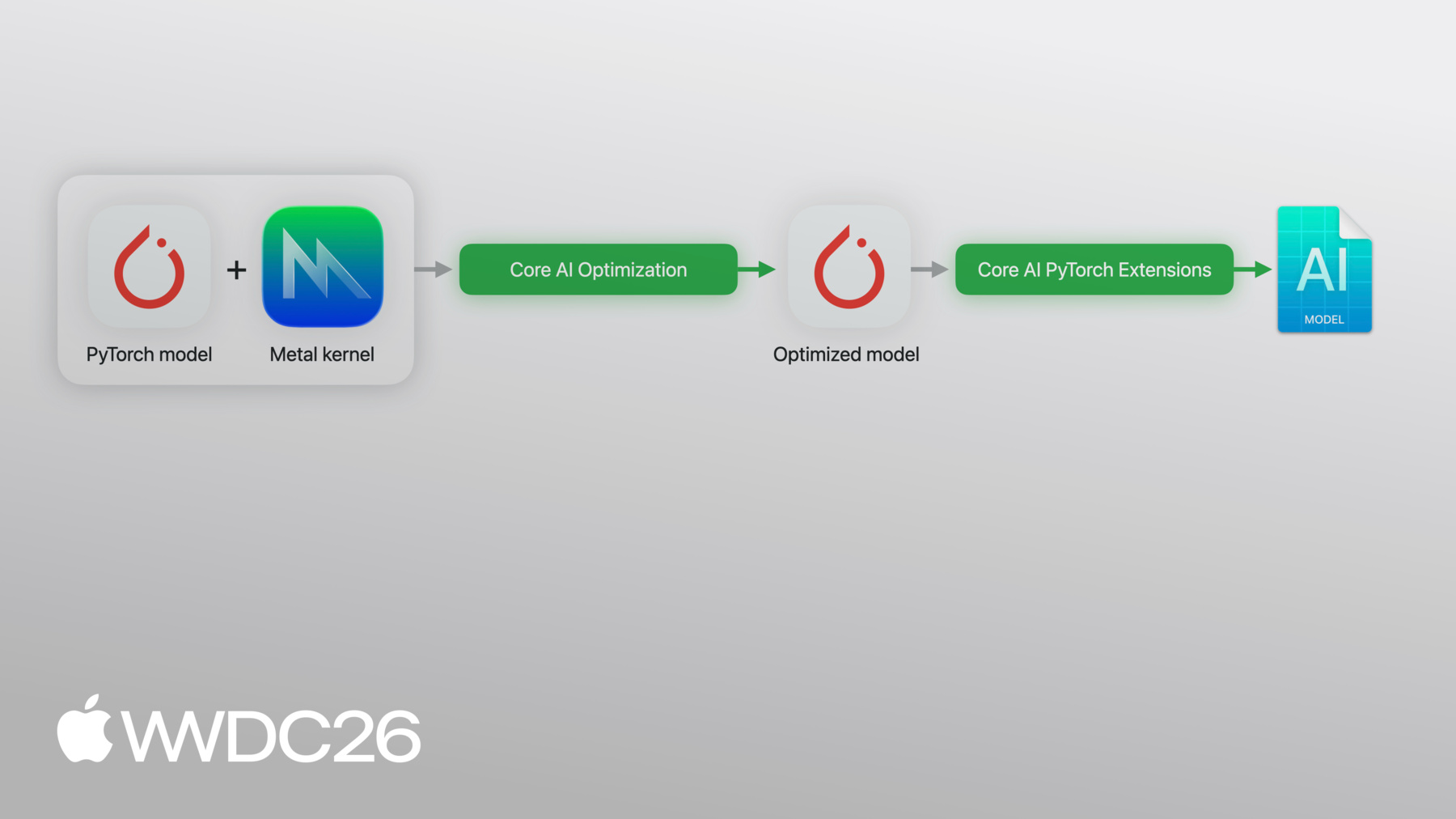
coreai-torchにPyTorchの エクスポートされたプログラムを渡すと Core AIモデルに 直接変換されます。 Core AIプログラムをユースケースに 合わせてカスタマイズできる 高度な機能をサポートします。 例えば、複数のモデルを 1つのアーティファクトにまとめたり 特定の操作にカスタムの ローワリングを登録したり Metal 4カーネルを変換済みモデルに 直接インライン化できます。 そしてモデルを最適化された アセットにスペシャライズして Apple Silicon上でPythonから 完全にネイティブ実行できます。
今説明したパイプラインです。 では実際に見てみましょう。
簡単な例を説明します。 ここにニューラルネットワークがあります。 relu活性化を持つ2つの線形レイヤー。 標準的なPyTorchです。
次にtorch.exportを実行し モデルとexample_inputを渡すと exported_programが得られます。 このexported_programが Core AI変換の出発点です。 完全な計算グラフをキャプチャします。 重み、演算、形状を coreai-torchが処理できる フォーマットで。
次にCore AI側です。
Core AIのTorchConverterが エクスポートされたプログラムを受け取り 入力名と出力名とともに core_ai_programに変換します。 CoreML toolsを使ったことがあれば 馴染みやすいでしょう。
変換されたモデルは最適化され aimodelアセットとして保存されます。 Apple Siliconで実行できる オンデバイスフォーマットです。
スペシャライズされたアセットが得られたら プログラムから関数を読み込み Pythonから直接推論を実行できます。 スペシャライゼーションオプションを 渡してプロセスをカスタマイズできます。 推論を実際に実行するには 入力名を 対応するnumpyテンソルに マッピングする辞書を渡すだけです。
これだけです… ワークフロー全体です。 変換、最適化、実行 すべてPythonから。
次はモデルを小さくする方法を 説明します。 Core AIの最適化ライブラリを 使用します。 Core AIの最適化機能を 紹介するために Segment Anything Model、 SAM3を使用します。
SAM3は8億5000万パラメータの モデルで プロンプトベースの 画像セグメンテーションを行います。 モデルを最適化する前に 内部構造を大まかに 理解することが重要です。 SAM3には3つの 主要なパーツがあります。 画像を処理する Image encoder。 ユーザーのプロンプトを扱う Text encoder。 この2つのコンポーネントを合わせると モデルのパラメータの96%を占めます。 ここを正しく処理することが重要です。 全体像を補うために DEtection TRansformerをラップした Detectorモジュールが マスクデコーダーと組み合わさって 最終出力を生成します。 セグメンテーションマスクです。
ご覧のとおり、SAM3は複雑な エンドツーエンドのタスクを実行します。 これはまさにデベロッパが オンデバイスで実行したいと 考えるユースケースです。
最適化にはCore AIの最適化ライブラリ coreai-optを活用します。 coreai-optは設定ベースの モデル圧縮を可能にします。 圧縮する箇所と そのままにする箇所を記述します。 さまざまな最適化スキームをサポートし 1つを選んで 例えばmacOSとiOSで 異なる最適化が可能です。
int4、int8、FP4も サポートしています。 FP8の重み圧縮も 柔軟な粒度で対応。
最後にcoreai-optは 量子化APIを含み 少量のキャリブレーションデータで 使用するか 大規模なデータセットで量子化 アウェアトレーニングを行えます。
先ほどのシンプルな パイプラインです。
ここにステップを追加します。 変換前に圧縮設定を指定して coreai-optでモデルを実行します。 または便利なプリセットを 使用することもできます。 同じエクスポートパイプラインを経る より小さなモデルが得られます。 SAM3で試して 結果を確認しましょう。
まずSAM3をエクスポート用に ラップします。 このラッパーはtorch exportが モデルの完全な 計算グラフをキャプチャするための インターフェースを定義します。
そしてスライドの変換パイプラインを 再利用可能なヘルパーに まとめました。 いくつか興味深い点があります。
まず、PyTorchの exported_programで分解を実行します。 Core AIのカスタムテーブルを使用。 これによりattentionなどCore AIが サポートする高レベルのセマンティクスが グラフに保持されます。
次に、プログラムの キャストもサポートします。 必要に応じてcoreai-optのヘルパーを 使って16ビット浮動小数点に変換します。
完全な変換は数分かかるためベースライン アセットを事前に計算しています。
ここではベースラインの 32ビット変換モデルを読み込み実行します。
ご覧のとおり サイズは3GB超です。 実行するとデフォルトの スペシャライゼーションが適用されます。
これがベースラインです。 この画像で すべての花に対する セグメンテーションマスクを要求します。 デフォルトの閾値で すべて正常に検出されました。 オンデバイスで実行。 圧縮後もこの結果を 保つ必要があります。
圧縮を見てみましょう。 coreai-optにはプリセット設定が 付属しています。 presets.w4で1行で 4ビットのチャネルごと対称量子化が得られます。
ExecutionModeをEAGERに設定します。 重み圧縮に最適です。 アクティベーションには GRAPHモードを使います。
次にcoreai-optのQuantizerを 設定で初期化し サンプル入力を渡してファイナライズします。 モデルが圧縮されます。
先ほどと同様に モデルを読み込んでオンデバイスで実行します。
モデルは約430MBになりました。
結果を確認します。 遮蔽された花の1つが 検出されなくなりました。
すべてのレイヤーに同じ 積極的な圧縮を適用しましたが すべてのレイヤーが 同様に対応できるわけではありません。 問題はどのレイヤーが 原因なのかです。 出力だけからでは診断が 難しい問題です。 モデルの内部を 確認する必要があります。 Nicoleに引き継ぎます。 方法をお見せします。
ありがとう Sachin! Core AI Debuggerについて お話しします。 Core AIモデルの作成と 最適化の方法を確認しました。 モデルとその動作を より深く理解したい場合は Core AI Debuggerを 使用できます。 Core AI Debuggerは 新しいスタンドアロンアプリで Appleプラットフォームで モデルを検査できます。
デバッガーでモデルの構造を わかりやすいグラフ形式で 可視化できます。 特定のハードウェアでモデルを実行して 実際のランタイム結果を取得し リファレンス実行と推論の正確性を 検証できます。すべて1か所で。 Core AI Debuggerの 動作をご紹介します。 SAM3モデルの量子化で 何が起きたかを調べます。 元のモデルを 開くことから始めます。
をクリックして 開始します。
モデルが開いたのでデバッガーの ワークスペースが表示されます。 左側はナビゲーターで モデル内の演算の 構造化されたリストがあります。
これらの演算はPyTorchモジュールで グループ化されており SAM3のような大きなモデルに 特に効果的です。 馴染みのある方法で モデルをナビゲートできます。
ナビゲーターでPyTorchモジュールを 選択すると detector decoderなど 対応するすべてのノードが ワークスペース上部の structure viewerでハイライトされます。 このビューはモデルの グラフィカルな表現を示し 演算の接続性を 明確に把握できます。 実行順序とデータの依存関係も。
下部のsource viewerで モデルの元のPythonコードを 常に確認でき 特定の行まで辿れます。
さらに演算を選択することで 詳細を確認できます。
右側のインスペクターを 開きます。 ここで説明と 演算の入出力に関する 追加の詳細を確認できます。
これらのビューを組み合わせることで スムーズに移動できます。 グラフ構造、ソースコード 実行の詳細の間を行き来でき 認知的負荷を大幅に軽減します。 SAM3のような複雑なモデルの デバッグに有効です。 静的解析を超えて デバッガーはランタイム解析を 可能にします。 モデルがオンデバイスで 実際にどう実行されるかを。 量子化が問題を引き起こした 箇所を特定するのに 特に役立ちます。 モデルを実行するにはワークスペース上部の をクリックします。 スキーム設定でターゲットリストから Macを選択します。 次にモデルに提供する 入力を指定します。 ピクセル値から始めます。
次にinput_IDs
そしてattention_mask。
最後にをクリックします。
SAM3が私のデバイスで 実行するためにスペシャライズされています。 準備ができたら structure viewerが更新されて モデルが表示されます。 Macで実行される状態と まったく同じです。 任意の演算をクリックすると インスペクターで出力テンソルを 直接確認できます。 何も変更する必要はありません。 問題に戻りましょう。 まず最終的な検出マスクを 確認したいです。 モデルの末尾までスクロールして
最後の演算を選択します。
インスペクターでテンソルのプレビューを クリックしマスクを詳しく確認します。 花が見えますが ノートブックと同様に 1つが欠けています。
この結果が元のPyTorch実行と どう違うかを理解したいです。 ノートブックに戻り 新しいsave intermediates APIを使います。 このAPIはPyTorchモデルを実行し 各演算での中間テンソル値を キャプチャします。 量子化した結果をSachinが 示したベースラインと比較したいため int4モデルと 元のSAM3を両方渡します。
実行します。
中間データが保存されたので デバッガーに戻って 結果を比較します。 ワークスペース上部の比較アイコンを クリックします。 新しい比較セッションを開始します。 左側は先ほど指定した 既存の設定です。 右側では比較する 別の設定を選択できます。 別のTargetやCompute Unitなど。 この場合はをクリックして Intermediates Fileから リファレンス実行を読み込みます。
先ほどエクスポートした ファイルを使います。 比較を開始します。
ナビゲーターに 演算ペアが表示されます。 スペシャライズされたモデルの演算と PyTorchモデルが組み合わされます。
これらのペアはsync pointsと 呼ばれます。 スペシャライズされたモデルの出力が 元のPyTorchの結果と一致する 箇所です。 デバッガーがモデル全体で これらの点を自動的に特定し 比較プロセスを容易にします。
各sync pointには2つの出力の 類似度を示すメトリクスが付いており どこで乖離するかを 簡単に見つけられます。 デフォルトのメトリクスはPSNR (ピーク信号対雑音比)ですが 変更できます。 モデルに最適な類似度指標を 選べます。 SAM3にはPSNRを使います。
類似度メトリクスの値は 右側のステータスインジケーターから すばやく確認でき グラフからも確認できます。 緑のノードは類似したテンソルを示し 赤のノードは大きな差異を 示します。
演算をスクロールすると 複数の黄色のsync pointが見えます。 モデルの一部が期待される結果から 中程度に乖離しており 期待値から外れています。 類似度でソートし 最も類似度の低い sync pointsを調査します。
ナビゲーターでsync pointを クリックすると source viewerが演算の PyTorchモジュール階層を表示します。 例えばこの演算は detector decoderから来ています。
上矢印キーを使って PSNRの低いsync pointsを 1つずつナビゲートし パターンが現れるか確認します。
PSNRの低いsync pointsの大部分が detector decoderから 来ていることに気づきます。 これは先ほど適用した 量子化スキームが detector結果を わずかに劣化させたことを示しています。 detector blockは モデルパラメータの わずか4%にすぎないため 圧縮してもあまりメリットが ありません。 Jupyter notebookに戻り detectorを除外するように 量子化スキームを変更します。
新しいスキームが適用されたので モデルを再エクスポートします。
変更が機能したか確認します。
素晴らしい! ベースラインの品質に 再び達しました。 すべての花が検出され モデルはサイズの ほんの一部になりました。 Core AI Debuggerは数時間の手動 テンソル比較を視覚的な診断に変えました。 検出漏れから始まり 数分で改良された 量子化スキームに到達しました。 本日紹介した内容を超えて Core AI Debuggerはより複雑な 問題も解決できます。 モデルの動作を深く可視化し Appleプラットフォームへのモデル展開に より高い信頼性をもたらします。 Sachinに戻します。
ありがとう Nicole! さらに一歩進めましょう。 これまで、モデルを1つのエンドツーエンド の単位として変換してきました。 多くのモデルでは それで十分です。 しかし常に十分とは限りません。 ユースケースや 特に制約によっては。 ここでCore AIがより深く 探求する力を発揮します。 具体的には、PyTorchのソース自体に 注目します。 入力から出力までの計算の グラフを定義します。 高度なモデルオーサリングとは この計算グラフの内部を 見て ハードウェア上での実行を 細かく調整することです。 簡単な例として 一連の演算を考えましょう。 これらの演算をグループ化して 1つの演算に融合できます。 複数のステップを置き換えて グラフ内で単一の カーネルディスパッチにします。 Core AIにはあらかじめパッケージ化された 高速カーネルが付属しており Scaled Dot Product Attentionなどの 重い演算に対応しています。 Transformerで よく使われます。 これらの演算の活用例は coreai-modelsリポジトリにあります。 しかしさらに先端を行き さらなるカスタマイズを望むなら カスタムMetal 4カーネルもサポートします。
パイプラインに戻ります。 カスタムMetalカーネルを使う場合の 変更点です。 coreai-torchへの 2つ目の入力を追加します。 Metal Shading Language(MSL)で 書かれたカーネルのソースコードです。 コンバーターはPyTorchモデルと カスタムカーネルの両方を受け取り 1つのアセットに まとめます。 MSLがその中に 直接埋め込まれます。 モデルと一緒に 配布されます。 コードでどう見えるか ご紹介します。 まずPyTorchのリファレンスを 定義します。 標準的なSigmoid Linear Unit(SiLU)です。 生成型Transformerモデルで よく使われる活性化関数です。 これはtorch.exportが トレース中に見るものです。 その下にMSLで実際の Metalカーネルを実装します。 シンプルな要素ごとの カーネルで 1スレッドが1要素を担当し GPUで融合した活性化を直接計算します。 この2つがあれば 登録できます。 Core AI TorchMetalKernelを Metalソースを渡し PyTorchのリファレンスと 入力名と出力名を渡します。 この場合、入出力名は それぞれ「x」と「y」で 上のMSLカーネルで 使われているのが確認できます。 Metalを書きます。 PyTorchのリファレンスを書きます。 Core AIがそれらを結びつけます。 モデルで使用する際は 他のPython関数と同様に呼び出します。 入力を渡し、スレッドグリッドを 指定すれば完了です。 1点注意があります。 カスタムカーネルのすべての インスタンス化に 結果の形状を渡します。 PyTorchのソースで。 これによりCore AIが 入力の形状からカーネルの 出力形状の計算を モデルの動的な入力形状でも 組み込めます。
TorchConverterで変換する際 カスタムカーネルを コンバーターに登録し エクスポートされたプログラムを 先ほどと同様に追加します。 Metalソースがアセットに 直接埋め込まれます。 1つのアーティファクトです。 カーネルはモデルと一緒に 配布されます。
Core AI向けの効率的な Metalカーネルの書き方や SAM3モデルで最適化された カーネルの実際の動作については 「Optimize custom machine learning operations with Metal tensors」を ご覧ください。
ここまでグラフ内の複数の演算を 取り上げて 1つに融合する方法を 示しました。 しかしより高度な最適化では 特にiOSの場合 さらに進んで書き直す必要があります。 特定のターゲットを念頭に置いて モデル全体を。 このプロセスを モデルのリオーサリングと呼びます。 シンプルな一連の演算に戻ります。 リオーサリングは通常この計算グラフの 多くの側面を置き換えます。 異なる演算を使用したり 新しいテンソルレイアウトや モデルのインターフェースを変更することも あります。 本質的にはソースコードの 完全に異なる実装です。 ソースコードの。
さらに掘り下げるとこのオーサリングには 何が含まれるでしょうか。 1つの例はPyTorchコードで 事前定義されたパターンを使用して 特定の概念をCore AIに 伝えることです。 これによりフレームワークが これらのセマンティクスを ランタイムで最適化された 実装にマッピングできます。 その例がKey-Valueキャッシュの インプレース更新です。 大規模言語モデルで よく使われます。 もう1つのメカニズムは 特にiOSをターゲットにする際の 静的テンソル形状の使用です。 チャネルファーストのテンソルレイアウトと 畳み込み演算パターンも含みます。 これによりCore AIが強力な 基盤プリミティブを活用できます。 オンデバイスの制約を 満たしながら。 このような新しいPyTorch実装を 設計する際は 厳密なテストが 不可欠です。 モジュールレベルと モデルレベルの両方で。 個々のビルディングブロックと モデル全体が 意図通りに動作することを確認します。 このテストはユニットテストや 統合テストの形を取れます。 はじめるために、Core AI modelsリポジトリには 複数の例が含まれています。 このような再利用可能な コンポーネントと さまざまなモデルにわたる ベストプラクティス。 Core AIスキルはコーディングアシスタントに 初日からApple Silicon向けに最適化した PyTorchコードを書く力を与えます。 SAM3に戻りましょう。 モデルをそのまま変換する代わりに 目標に合わせて手作りした新しい PyTorch実装を書けます。 最大の変更点は 3つの独立した関数を持つことです。 1つではなくCore AIモデルに。 coreai-torchにはこれを 可能にするAPIがあります。 Image Encodeが画像を処理し Text Encodeがプロンプトを処理し Detectが最終的な後処理をラップして 出力を生成します。 このように作業を分割することで それぞれの部分を 異なるタイミングで実行できます。 例えば、単一のプロンプトを 一度だけ処理して アプリのさまざまな画像に 使い回せます。 各関数にクリーンな インターフェースを持たせ それぞれを独立して 圧縮とオーサリングができます。 実際に見てみましょう。 Image Encoder Transformerの attentionブロックです。 iOSでの省電力実行のために 書き直しました。
標準的な線形レイヤーの代わりに 畳み込みプロジェクションを使います。 これはCore AIが適切な compute unitでネイティブハードウェア プリミティブを活用できる パターンの1つです。 text encoderも 同様の処理を行います。 小さいdecoderは ほぼそのままです。 計算量のわずかな部分を占めるため リオーサリングの効果は 最小限です。
リオーサリングされたモデルを 3つの独立したモジュールとして構成します。 ImageEncoder
TextEncoder そしてDetector。 先述のとおり この分離によりモデルの各側面を それぞれ独自に活用できます。
圧縮には4ビットのパレタイゼーションを 適用します。 チャネルごとのスケールで 2つのエンコーダーに。 プリセットも利用できますが ここではAPIを紹介するために 低レベルの表現を使います。 このルックアップテーブルベースの 圧縮は iOSでの省電力効率に 適しています。
先ほどと同様に KMeansPalettizerを構築します。 Quantizerと同様に モデルと設定を渡します。 次にprepareとfinalizeを行います。 また、入力画像サイズを 1008ピクセルから336ピクセルに 変更してiPhoneで実行します。
detectorは圧縮しません。 以前の演習から圧縮に 敏感なことがわかっています。
次に各モデルを torch exportで実行します。 すべて半精度に キャストされます。
ここでまとまります。 1つのTorchConverter、 3つのエクスポートされたプログラム それぞれに独自の エントリポイント名があります。
まずimage_encode。 次にtext_encode。 最後にdetect。
保存すると1つのモデルアセットが 得られます。
内部に3つの呼び出し可能な 関数を持ちます。
では事前計算済みのアセットを 読み込んで実行しましょう。
まずすべての花が 期待通りにセグメントされています。
これが3関数分割の 恩恵です。
プロンプトをbutterflyに 切り替えて text encoderとdetectorだけを 再実行しました。
その結果、2回目の推論は ウォームアップ後でも76%高速です。 これがリオーサリングの メリットです。
今日からできることをまとめます。 Core AIのPythonライブラリで PyTorchモデルを変換します。 coreai-optで最適化し 内部で何が起きているか理解したい時は デバッガーを使います。 coreai-modelsのサンプルを 活用してください。 そしてCore AI Skillsをお気に入りの AIエージェントに組み込んで 新しいフレームワークを エキスパートのように活用しましょう。 皆さんがプラットフォームに 持ち込むモデルを楽しみにしています。 ありがとうございました!
-
-
3:27 - Define and export a PyTorch model
import torch import torch.nn as nn # Define a simple model class MLP(nn.Module): def __init__(self): super().__init__() self.fc1 = nn.Linear(256, 512) self.fc2 = nn.Linear(512, 10) def forward(self, x): return self.fc2(torch.relu(self.fc1(x))) # Export with torch.export model = MLP().eval() example_input = (torch.randn(1, 256),) exported_program = torch.export.export(model, example_input) -
4:02 - Convert, optimize and run inference with Core AI
import coreai import coreai_torch from coreai.runtime import NDArray # Convert to Core AI converter = coreai_torch.TorchConverter() converter.add_exported_program( exported_program, input_names=["features"], output_names=["logits"]) core_ai_program = converter.to_coreai() # Optimize and save to .aimodel core_ai_program.optimize() asset = core_ai_program.save_asset("mlp.aimodel") # Run inference specialized_model = await AIModel.load("mlp.aimodel") specialized_function = specialized_model.load_function("main") result = await specialized_function({"features": NDArray(example[0].numpy())}) -
21:12 - Define a SiLU Metal kernel with PyTorch reference
import torch from coreai_torch.dsl import TorchMetalKernel, MetalParameter def silu_torch(x): return x * torch.sigmoid(x) SILU_MSL = """ float val = float(x[gid]); float sig = 1.0f / (1.0f + exp(-val)); y[gid] = TYPE(val * sig); """ silu_kernel = TorchMetalKernel( name="fused_silu", input_names=["x"], result_names=["y"], src=SILU_MSL, torch_defn=silu_torch, metal_params=[MetalParameter("gid", "uint", "thread_position_in_grid")], template_dtypes={"x": "TYPE"}, ) -
22:09 - Use a custom Metal kernel and convert with TorchConverter
class MyModel(torch.nn.Module):
    def __init__(self):
        super().__init__()
        self.linear = torch.nn.Linear(256, 256)

    def forward(self, x):
        h = self.linear(x)
        n = h.numel()
        return silu_kernel(
            h,
            threads_per_grid_size=(n, 1, 1),
            threads_per_thread_group=(min(n, 256), 1, 1),
            result_shapes=[h.shape],
        )

exported_program = torch.export.export(MyModel(), (torch.randn(1, 256),))

converter = coreai_torch.TorchConverter()
converter.register_custom_kernels([silu_kernel])
converter.add_exported_program(exported_program,
                               input_names=["x"], output_names=["y"])
deployable = converter.to_coreai()  # MSL integrated into asset
-