

-
TextKitによるアプリのテキスト体験の向上
内蔵のテキストビューの利便性とTextKitの高度なコントロール性を組み合わせる方法を紹介します。新しいAPIを使用すると、行番号や折りたたみ可能なセクションなどのカスタム動作によりUITextViewやNSTextViewを簡単に拡張できます。TextKitのアーキテクチャの詳細と、テキストアタッチメントの新しいキャッシュポリシーおよび再利用ポリシーについても解説します。このセッションの内容を十分理解できるよう、WWDC21の「Meet TextKit 2」とWWDC22の「What's New in TextKit and text views」を視聴することをおすすめします。
関連する章
- 0:00 - はじめに
- 3:09 - TextKitのアーキテクチャ
- 9:17 - TextKitの新機能
- 11:27 - フレームワークのテキストビュー拡張
- 12:58 - 例: 行番号付きコードエディタ
- 17:52 - 例: 折りたたみ可能なレシピセクション
- 19:56 - テキストアタッチメントとビュープロバイダの再利用
- 23:00 - 次のステップ
リソース
関連ビデオ
WWDC26
WWDC22
WWDC21
-
このビデオを検索
「TextKitでアプリのテキスト体験を 高める」へようこそ。 私はTarun Udayです。 TextKitチームのエンジニアです。 TextKitはAppleの次世代 テキストエンジンです。 テキストレイアウトの基盤として Appleのすべてのプラットフォームで レンダリングを担っています。 SwiftUI、UIKit、AppKitの テキストコントロールは、 すべてTextKitを使用してテキストコンテンツを レイアウト・レンダリングしています。 このビデオでは、 あることについてお話ししたいと思います。 開発者からずっと 聞いてきたことです。 利便性とコントロールの間の 緊張関係、 そしてそれを解消するために 構築した新しいAPIについてです。 Appleのプラットフォームで テキスト編集体験を構築する場合、 2つの方法があります。 1つ目の方法は、 フレームワークのテキストビューを使用することです。 AppKitではNSTextView、UIKitではUITextView、 SwiftUIではTextEditorがそれにあたります。 これらを使えば、 多くの機能が最初から提供されます。 テキスト入力、選択、 アクセシビリティ、元に戻す・やり直し、 ディクテーション、インライン予測など 多数の機能が含まれています。 これらのテキストビューは内部でTextKitを使用していますが、 その内部実装は ほとんど隠されています。 テキストの描画方法や ビューポートがビジュアル要素を管理する方法を カスタマイズする能力は限られています。 2つ目の方法は、TextKitを テキストエンジンとして使用し、 ビューやレイヤーに 直接テキストをレンダリングすることです。 これをカスタムテキストビューと呼び、 フレームワークのテキストビューと 区別しています。 NSTextLayoutManagerをセットアップし、 独自のビューやレイヤーに ビューポートレイアウトを実装し、 すべてのレンダリングを 自分で処理します。 カスタムテキストビューを構築すると、 ストレージ、レイアウト、 ビューポートレイアウトプロセスを 完全にコントロールできますが、 フレームワークのテキストビューが 提供するすべての機能を失います。 また、本番品質の テキスト編集体験をゼロから構築するのは 多大な作業が必要です。 ただし、一部のシナリオでは、 フレームワークのテキストビューの利便性と、 カスタムテキストビューのコントロール性の どちらを選ぶかが難しい場合があります。 今日は、両方の長所を 活かす方法を見ていきます。 TextKitアーキテクチャの 詳細な紹介については、 WWDC21の「Meet TextKit 2」を ご覧ください。 フレームワークのテキストビューが TextKitを採用した詳細については、 WWDC22の「TextKitとテキストビューの 新機能」をご覧ください。 このトークは独立した内容ですが、 この2つのセッションは、今日カバーする すべての内容の深い基礎を提供します。 まず、TextKitのアーキテクチャの 概要をご説明します。 その後、TextKitで導入した いくつかの新しいAPIについてお話しします。 最後に、いくつかの例を使って テキストビューを拡張する新しい方法をご紹介します。
TextKitアーキテクチャを理解することは、 優れたカスタムテキスト体験を 作るために不可欠です。 そこから始めましょう。
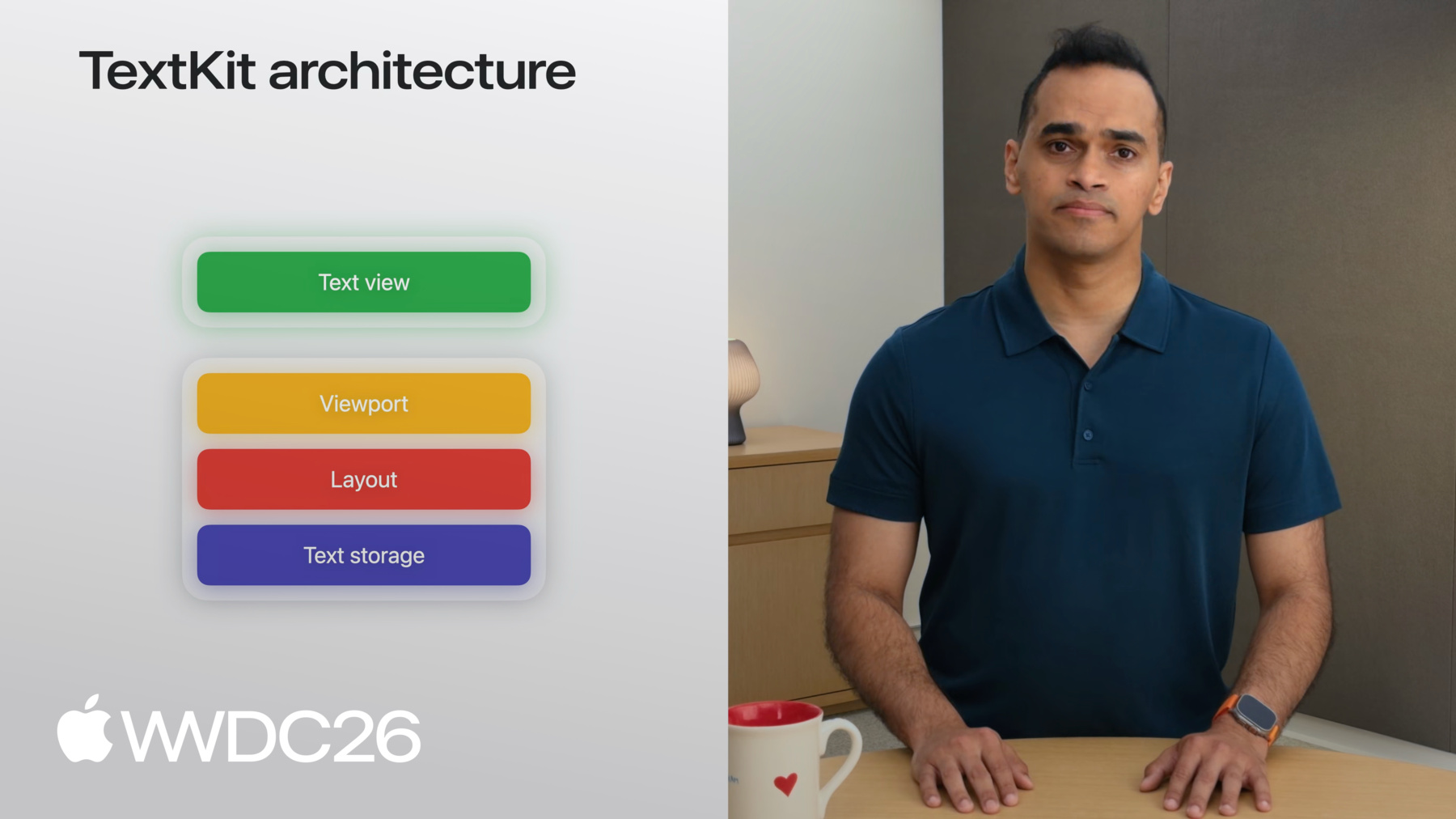
TextKitはテキストレンダリングに 4層アーキテクチャを使用しています。 ベースにはテキストストレージ層があります。 これはレンダリングされる すべてのテキストデータをカプセル化します。 レイアウト層は テキストストレージの上に位置します。 テキストをレンダリング用の チャンクに分割する役割を担います。 次はビューポート層です。 レイアウトのチャンクのうち どれが表示されているかを追跡します。 最上部はビュー層です。 アプリでテキストが 表示される場所です。 ストレージ層、レイアウト層、ビューポート層は Appleのすべての UIフレームワークで共有されています。 これらの共有層を使用して、 任意のビューにテキストをレンダリングできます。 またはUIフレームワークが提供するビューに類似した 描画可能なビジュアル要素にも対応しています。 次に、各層の仕組みを説明します。 各層を構成するパーツを理解することで、 TextKitをカスタマイズして アプリで独自の体験を作れます! そのために、長いNSAttributedStringを レンダリングする例を使います。 カスタムテキストビューでの例です。 テキストコンテンツストレージは、 この属性付き文字列を 段落に分割する役割を担います。 この例では、 テキストコンテンツストレージが NSTextParagraphオブジェクトを作成します。 基になる属性付き文字列の 各段落に対してです。 NSTextContentStorageとNSTextParagraphは NSAttributedStringsと連携する 具体的な型です。 異なるバッキングストレージ型がある場合は、 対応する抽象クラスの 独自サブクラスを記述できます。 NSTextContentManagerと NSTextElementです。
以上がテキストストレージ層でした。 例を続けて、 次はレイアウトを見ていきます。 テキストコンテンツストレージが 属性付き文字列を段落に分割した後、 NSTextLayoutManagerが段落を レンダリング用に準備する処理を行います。 テキストレイアウトマネージャーは 表現されたテキストを構成する グリフのメトリクスを 効率的に測定し、 NSTextLayoutFragmentを 動的に作成します。 段落の計算されたレイアウト情報を 格納します。 これらのオブジェクトは不変です。 つまり、段落が編集されると、 NSTextParagraphと NSTextLayoutFragmentが再作成されます。 例えば、「sandwich」という単語を 「slider」に置き換えると、 その段落に対して 新しいNSTextParagraphが作成され、 対応する新しい NSTextLayoutFragmentも 新しいレイアウト情報とともに 作成されます。 次に、上位2つの層、 ビューポートとビューが どのように連携して大量のテキストを 効率的にレンダリングするかを見ていきます! テキストビューは動的にサイズが変わるビューで、 テキストがレイアウトされて 描画されるにつれて大きくなり、 テキストが削除されると縮小します。 ビューポートはユーザーに 表示されるテキストビューの部分です。 TextKitはすべての処理を ビューポートを中心に構成し、 ユーザーが見えるテキストのみを レンダリングします。 つまり、TextKitを使う際の 主要なタスクのひとつは、 ユーザーのインタラクションを 強化することです。 ビューポートが提供する レイアウト情報に基づいて行います。 レイアウトフラグメントをテキストビューに レンダリングするために、 TextKitは専用クラスを提供しています: NSTextViewportLayoutControllerです。 NSTextViewportLayoutControllerは、 ビューポートコントローラーと 呼ぶことにします。 ビューポートコントローラーは テキストレイアウトマネージャーと連携し、 テキストビューと協力して段落を 効率的にレイアウト・レンダリングします。 仕組みをご説明しましょう。
テキストビューはスクロール位置を把握しており、 ドキュメント全体に対する ビューポートのサイズも把握しています。 そしてこれをビューポートコントローラーに 提供します。 ビューポートコントローラーは テキストレイアウトマネージャーに要求します。 ビューポートと交差する すべてのレイアウトフラグメントを提供するよう要求し、 それらをレンダリングのために テキストビューに送信します。 ビューポートコントローラーによって 促進されるこの連携は、 ビューポート状態の変化のたびに繰り返されます。 つまり、スクロール、編集、 または選択イベントのたびに行われ、 これをビューポートレイアウト プロセスと呼びます。 ビューポートレイアウトプロセスは、TextKitの 高性能なレイアウトとレンダリングの中核です。 以上です! 独自のカスタムテキストビューを構築するには、 NSTextContentStorageをインスタンス化し、 NSTextLayoutManagerと、 NSTextViewportLayoutControllerを使用して テキストをレンダリングします。 そのデリゲート、 UIフレームワークが提供するビューに テキストをレンダリングします。 テキストビューをビューと呼んでいますが、 UIフレームワークが提供する 任意の描画可能なビジュアル要素でも かまいません。 例えば、 UIKitでは、UIViewを選択できます。 またはCALayerを選択して、カスタムテキスト ビューにテキストをレンダリングできます。 UIフレームワークも独自タイプの テキストビューをパッケージ化しています。 これらのTextKit層を使って、 便利に利用できるようにするためです。 UIKitでは、UITextViewを使用して すぐに使えるテキスト編集体験を 実装できます。 AppKitとSwiftUIにも同様のビューがあります。 フレームワークのテキストビューが アプリのニーズを満たさない場合があります。 例えば、構築しているアプリが 同じテキストの 複数のプレゼンテーションを 持つ場合などです。 複数のテキストレイアウトマネージャーを 同じテキストコンテンツストレージに接続すると、 一方のビューでの編集が 共有コンテンツストレージを通じて もう一方に伝播します。 同じドキュメントを 2つの異なるビューで 自動的に同期して表示できます。 TextKitが提供する柔軟性により、 カスタムテキストビューを構築できます。 自分のシナリオに適した レイヤー構成で実現できます。
では、新しいAPIの一部を 見ていきましょう。 TextKitで導入しているものです。 前のセクションでは、レイアウトフラグメントから ビューポートにテキストをレンダリングする ことについて説明しました。 それがビューポートレイアウトプロセスです。 2027年のリリース以前は、 TextKit全体でテキストがレンダリングされる 宛先ビューを 参照する方法がありませんでした。 つまり、TextKitがレイアウトフラグメントの 追跡を支援してくれましたが、 それらが描画されるビューの追跡は 支援していませんでした。 まず、NSTextViewportRenderingSurfaceを ご紹介します。 これは、ビューポート内の ビジュアル要素を表す新しいプロトコルです。 描画対象となる要素で、 レイアウトフラグメントのテキストを 実際にレンダリングするビューであり、 共通の抽象化を提供します。 UIView、NSView、またはCALayerを このプロトコルに準拠させ、 ビューポートコントローラーの デリゲートメソッドで使用することで、 ビューポートに表示されているビューを 追跡できます。 レンダリングサーフェスには コンパニオンキープロトコルがあります: NSTextViewportRenderingSurfaceKeyです。 レンダリングサーフェスキーは、 レンダリングサーフェスを一意に識別できる ビューポートレイアウトプロセスサイクルをまたいで 識別できる任意のクラスです。 NSTextLayoutFragmentなどが該当します。 つまり、NSTextLayoutFragmentを マップテーブルや辞書でレンダリングサーフェスを キャッシュするキーとして使用できます。
ビューポートレイアウトプロセスは内部で レンダリングサーフェスキーを レンダリングサーフェスへのマッピングとして 広く使用しています。
レンダリングサーフェスを キーに割り当てるには ビューポートレイアウトプロセス中に renderingSurfaceForデリゲートメソッドを 使用します。 これらはビューポートレイアウトプロセスの 開始時にクリアされます。 特定のキーのレンダリングサーフェスは didLayoutプロセス内で ビューポートコントローラーの renderingSurfaceForメソッドを使用してクエリできます。 これらの新しいAPIにより、 独自のレンダリングサーフェスを 使用・カスタマイズできます。 TextKitを使用してカスタム テキストビューを構築する際に活用できます。
2027年リリースでのTextKitの仕組みを 確認したところで、 Appleのデフォルトの テキスト体験を提供する テキストビューがどのように 機能するかを見ていきましょう。 UIKitのUITextViewとAppKitのNSTextViewは、 Appleのプラットフォームで何千もの 長文テキスト体験を支えています。 メッセージ、TextEdit、メモ、 ジャーナルなどが含まれます。 SwiftUIアプリをお持ちであれば、 長文テキスト体験を実装する 最も便利な方法は TextEditorを使用することです。 UITextViewを含めることもできます。 またはNSTextViewを ViewRepresentableを使用してアプリに組み込めます。 ご説明しましょう。
まず、MyTextViewと呼ぶ ビューを作成します。 MyTextViewのbodyに ViewRepresentableを配置します。 TextViewRepresentableと呼ぶことにします。
TextViewRepresentableは 条件によって macOSではNSViewRepresentableになり、 それ以外ではUIViewRepresentableになります。 NSViewRepresentableの内部では、 NSTextViewのイニシャライザーを 呼び出すだけです。 またはmakeNSViewメソッドでNSTextView サブクラスのイニシャライザーを呼び出します。 UIViewRepresentableの内部でも UITextViewに対して同様に行います。 具体的な例は付属の サンプルアプリで確認できます。 TextKitフックを使用してUITextViewを 拡張する方法をご説明するために、 いくつかの異なるサンプルアプリを 作成します。
最初の例では、iPadで コードエディタを構築したいと思います。 Macから離れているときに 素早くコードを書けるようにするためです。 UITextViewサブクラスから始めて、 初期化してフォントを 等幅システムフォントに設定します。
これで一歩前進です! でも、行番号が見えないと コードエディタとしては あまり良い体験ではありません。 それでは構築を始めましょう。 まず、TextViewとlineNumberViewを 保持できるビューを作成します。 これをContainerViewと呼びます。 ContainerViewはUITextViewサブクラスと、 行番号を表示するUIViewを 保持します。 基本的なセットアップができたので、 今必要なのは再計算することです。 ビューポート内のレイアウトフラグメントの NSTextParagraphインデックスを ビューポートに変化があるたびに 表示します。 そのためには、 ビューポートコントローラーが ビューポートレイアウトプロセスを 通過するたびに テキストビューに通知する必要があります。 これが今や可能です! 2027年リリース以降、 UITextViewとNSTextViewは NSTextViewportLayoutControllerDelegateに 準拠するようになりました。 つまり、UITextViewまたはNSTextViewを サブクラス化して、 デリゲートメソッドをオーバーライドして 独自の動作を追加できます。 次にそれをやってみます! TextViewサブクラスで デリゲートメソッドをオーバーライドします。 まず、willLayoutメソッドをオーバーライドして セットアップ作業を行います。 詳細はすぐにご説明します。 configureRenderingSurfaceメソッドを オーバーライドして、 レンダリングされる段落の 境界を取得します。 最後に、didLayoutメソッドを オーバーライドして、 蓄積した情報をContainerViewに 渡します。 行番号をレンダリングするためです。 これらのメソッドを説明する前に、 サブクラスにいくつかの状態を追加します。 各段落の境界を蓄積する 配列から始めます。 テキストビューがレイアウトする各段落の 境界です。 開始行番号を追跡する整数と、 クロージャーを追加します。 蓄積した情報をContainerViewに 送信するために使用します。 行番号をレンダリングするためです。 ビューポートコントローラーの デリゲートメソッドは、 スクロールが発生したタイミングを テキストビューが知る手助けをします。 または編集が発生したタイミングを 知ることができ、 行番号を再描画できます。 次にメソッドを実装します。 willLayoutから始めます。 superを呼び出すところから始めます。 これらすべてのデリゲートメソッドで 忘れずに行ってください。 lines変数をクリアして 準備します。 レイアウトフラグメントの 境界を格納する準備をします。 開始行番号も必要です。 これは基本的にビューポート開始前の すべての段落の カウントです。
それを独立した関数で行い、 willLayoutメソッド内から 呼び出します。
簡単なnilチェックと変数の命名から 始めます。 enumerateTextElementsFromTextLocation メソッドを使用します。 要素を列挙して viewportRangeに達するまで カウントを増やします。 以上です! サンプルコードでは キャッシュを使用して改善されており、 毎回のレイアウトパスで このコストを支払わずに済みます。 デリゲートメソッドに戻って、 各段落の境界を取得する方法を 見ていきましょう。
次のデリゲートメソッドを使用します: textLayoutFragmentの configureRenderingSurfaceです。 再びsuperを呼び出すところから始め、 デフォルトのテキストビューの 動作を取得します。 そしてlines配列に追記します。 レイアウトフラグメントの layoutFragmentFrame変数を使用します。 これでconfigureRenderingSurfaceForの textLayoutFragmentメソッドは 完了です。 このメソッドはビューポート内の すべての段落に対してトリガーされます。 didLayoutメソッドを見てみましょう。 この時点で、 ビューポート内のすべての段落の 境界情報が取得できており、 それをContainerViewに 渡したいと思います。 クロージャーを呼び出す前に、 フラグメントフレームを テキストコンテナ座標から ビューポート座標に変換する必要があります。 ビューポートオリジンを引くことで 行います。 そして、開始行番号と 調整済みフレームを ContainerViewに渡します。 ContainerViewに戻って クロージャーを設定します。 各フレームについて、 実際の行番号を計算します。 インデックスを開始行番号に 加算することで計算し、 行番号ビューの適切な位置に 描画します。 以上です。 変数を設定し、 テキストビュー内の各段落の 境界を収集して、 ContainerViewに渡して 表示します。 アプリを実行して結果を確認しましょう。 完璧です。 わずかなコードで UITextViewに行番号を追加できました。 まだ作業はありますが、 コードエディタ構築への素晴らしい第一歩です。
フレームワークのテキストビューの ビューポートレイアウトプロセスを使用することは、 個々の段落情報に アクセスするための強力な方法であり、 その情報を表示するためにも 活用できます。 もう一つの例をご説明しましょう。 今回は複数の段落の レイアウト変更に関するものです。 ここでは、UITextViewをセットアップして お気に入りのレシピを表示しています。 でも、一度に1つのレシピだけを 見たいと思っています。 つまり、複数段落にわたる各レシピを 見出しだけに折りたたみたいのです。 これを行うには、同じ3つの ビューポートデリゲートメソッドから始めます。 前の例で使ったものです。 さらに、段落が折りたたまれている場合、 そのレイアウトを避けたいと思います。 そのために、TextViewを NSTextContentStorageDelegateに準拠させます。
この準拠により、 textContentManager: shouldEnumerateに アクセスできます。 これによりtextElementsを折りたたみ済みか どうかとしてマークできます。 NSTextContentManagerは NSTextContentStorageの 抽象バージョンであり、 NSTextElementはNSTextParagraphの 抽象バージョンです。
どのセクションが折りたたまれているかを 保持するための状態が必要です。 整数のセットを使用して 段落オフセットを追跡します。 各段落を一意に識別するためです。
さらに、ユーザーがトグルボタンを タップしたときの処理メソッドを追加します。
必要なパーツはこれですべてです。 テキストコンテンツストレージの デリゲートメソッドを使用してレイアウトをスキップし、 ビューポートでレイアウトを行う すべての段落を処理します。 ビューポートコントローラーの デリゲートメソッドを使用して、 ユーザーインタラクションを処理します。 ユーザーがセクションの 開閉ボタンをタップしたときの処理です。 詳細はサンプルコードを ご覧ください。 何が実現されたか見てみましょう。 任意のレシピを見出しだけに 折りたたむことができます。 隣の三角形をタップするだけで、 UITextViewの中で 直接実現しました。
一歩引いて考えてみましょう。 これまでの例はテキスト、 段落、行番号、 セクション見出しについてでした。 しかし、テキストビューはテキスト以上の ものを表示します。 インライン写真やステッカーがある メッセージを考えてみてください。 または、手書きやドキュメントスキャンが あるメモも同様です。 これらの非テキストコンテンツはすべて テキストビューの内部に存在し、 TextKitによって管理されています。 これらはテキスト添付ファイルと呼ばれます。 テキスト添付ファイルは通常のテキストと 同じアーキテクチャに従います。 1つの段落に注目して、 添付ファイルをクリップのシンボルで 表現します。 シンプルにするためです。 テキスト添付ファイルはテキストストレージに 格納されます。 他の文字と同様に、 NSTextAttachmentオブジェクトを使用して 行われます。 レイアウトマネージャーが テキスト添付ファイルに遭遇すると、 NSTextAttachmentViewProviderを 要求します。 これはレイアウト層の 対応するオブジェクトです。 ビュープロバイダーは必要な情報を 提供します。 添付ファイルをテキストビューに レンダリングするためです。 ここで課題が生じます。 これらのオブジェクトは不変なので、 段落のテキストを編集すると、 すべてのインスタンスを 破棄して再作成する必要があります。 具体的な例をご説明しましょう。 インラインアニメーションを使った メッセージアプリを構築しているとします。 編集する際は注意深く見てください。 対応する段落の編集ごとに アニメーションが再起動します。 ビュープロバイダーは編集のたびに 再作成され、 それによりアニメーションが 再起動します。 これを解決するために、 UITextViewに新しいAPIを追加しました。 テキストビューを初期化したら、 register forTextAttachmentViewProviderType メソッドを使用して、 ビュープロバイダーの再利用ポリシーを 登録します。 NSTextAttachmentViewProviderの 特定のサブクラスに対して行います。 第1引数には、 onEditingInlineParagraphsの 再利用ポリシーを追加します。 これにより段落の編集をまたいで ビュープロバイダーが保持されるため、 キー入力でビュープロバイダーが 破棄されることはありません。 第2引数にはビュープロバイダーの サブクラス型を提供します。 テキストビューがその特定のクラスの すべてのオブジェクトを管理してくれます! サンプルコードでは、 2番目の再利用ポリシーを確認できます: onScrollingOutOfViewportです。 これは添付ファイルのレンダリングサーフェスを キャッシュします。 画面外にスクロールされたとき、 戻ってきたときに復元します。 シナリオに応じて両方の 再利用ポリシーを組み合わせられます。 編集時に、UITextViewはビュープロバイダーを 再利用して、 状態を維持し、 アニメーションのちらつきを防ぎます。
これで完成です! UITextViewでTextKitを使用した 3つの例をご紹介しました: テキストエディタ用の行番号、 レシピアプリでの折りたたみ可能なセクション、 シンプルなテキストビューでの インラインテキスト添付ファイルの再利用です。 サンプルアプリをダウンロードして 詳細をご確認ください。
まとめると、便利かつ強力な リッチテキストエディタ体験を作成するには、 UIKitではUITextView、AppKitでは NSTextViewでアプリを始めましょう。 SwiftUIアプリをお持ちの場合は、 ViewRepresentableを使用して これらのテキストビューをアプリに組み込みます。 テキストレンダリングをより細かく コントロールしたい場合は、 TextKitを使用してカスタムテキストビューを作成し、 新しいレンダリングサーフェスAPIを 活用してください。 サンプルコードをチェックして、 折りたたみ可能なセクション、 行番号、インライン添付ファイルの 再利用を実際に確認してください。 ご視聴ありがとうございました!
-
-
9:47 - NSTextViewportRenderingSurface conformance
class MyView: UIView, NSTextViewportRenderingSurface {} -
10:25 - NSTextViewportRenderingSurfaceKey and NSMapTable
class MyView: UIView, NSTextViewportRenderingSurface {} var cache: NSMapTable<NSTextLayoutFragment, MyView> -
12:39 - UITextView/NSTextView in SwiftUI via ViewRepresentable
// Using a TextView in SwiftUI import SwiftUI struct MyTextView: View { var body: some View { TextViewRepresentable() } } #if os(macOS) struct TextViewRepresentable: NSViewRepresentable { func makeNSView(context: Context) -> NSTextView { NSTextView() } func updateNSView(_ nsView: NSTextView, context: Context) { } } #else struct TextViewRepresentable: UIViewRepresentable { func makeUIView(context: Context) -> UITextView { UITextView() } func updateUIView(_ uiView: UITextView, context: Context) { } } #endif -
13:33 - ContainerView with TextView and line number view
// Create a text view subclass for a code editor import UIKit class TextView: UITextView {} class ContainerView: UIView { let textView = TextView() let lineNumberView = UIView() textView.font = UIFont.monospacedSystemFont } -
14:42 - Three NSTextViewportLayoutControllerDelegate overrides
// Override viewport controller delegate methods class TextView: UITextView { // Set up override func textViewportLayoutControllerWillLayout(_ textViewportLayoutController: NSTextViewportLayoutController) { super.textViewportLayoutControllerWillLayout(textViewportLayoutController) //... } // Get paragraph bounds override func textViewportLayoutController (_ textViewportLayoutController: NSTextViewportLayoutController, configureRenderingSurfaceFor textLayoutFragment: NSTextLayoutFragment) { super.textViewportLayoutController(textViewportLayoutController, configureRenderingSurfaceFor: textLayoutFragment) //... } // Share accumulated info back to ContainerView override func textViewportLayoutControllerDidLayout (_ textViewportLayoutController: NSTextViewportLayoutController) { super.textViewportLayoutControllerDidLayout(textViewportLayoutController) //... } } -
15:59 - startingLineNumber(for:) using enumerateTextElements
func startingLineNumber(for viewportRange: NSTextRange?) -> Int { guard let viewportRange, let storage = textLayoutManager?.textContentManager as? NSTextContentStorage else { return 0 } let startLocation = storage.documentRange.location var count = 1 storage.enumerateTextElements(from: startLocation) { element in guard let range = element.elementRange else { return true } if range.location.compare(viewportRange.location) != .orderedAscending { return false } count += 1 return true } return count } -
17:02 - DidLayout: convert frames to viewport coordinates
// Override viewport controller delegate methods class TextView: UITextView { private var lines: [CGRect] = [] private var startingLineNumber = 0 var onDidLayout: ((Int, [CGRect]) -> Void)? // Share accumulated info back to ContainerView override func textViewportLayoutControllerDidLayout (_ textViewportLayoutController: NSTextViewportLayoutController) { super.textViewportLayoutControllerDidLayout(controller) let origin = controller.viewportBounds.origin onDidLayout?(startingLineNumber, lines.map {$0.offsetBy(dx: 0, dy: -origin.y) }) } } -
17:16 - Draw line numbers in ContainerView closure
// Draw line numbers in the ContainerView class ContainerView: UIView { let textView = TextView() let lineNumberView = UIView() func setup() { textView.onDidLayout = {startingLineNumber, lines in let attributes: [NSAttributedString.Key: Any] = [ .font: UIFont.monospacedSystemFont(ofSize: 11, weight: .regular), .foregroundColor: UIColor.secondaryLabel ] for (i, frame) in lines.enumerated() { let number = "\(startingLineNumber + i)" as NSString number.draw(at: CGPoint(x: 8, y: frame.minY), withAttributes: attributes) } } } } -
19:22 - Collapsible sections: full TextView class
// Add collapsible sections to your text view class TextView: UITextView, NSTextContentStorageDelegate { var collapsedSections: Set<Int> = [] // Set up override func textViewportLayoutControllerWillLayout(_ textViewportLayoutController: NSTextViewportLayoutController) { super.textViewportLayoutControllerWillLayout(textViewportLayoutController) //... } // Get paragraph bounds override func textViewportLayoutController (_ textViewportLayoutController: NSTextViewportLayoutController, configureRenderingSurfaceFor textLayoutFragment: NSTextLayoutFragment) { super.textViewportLayoutController(textViewportLayoutController, configureRenderingSurfaceFor: textLayoutFragment) //... } // Share accumulated info back to ContainerView override func textViewportLayoutControllerDidLayout (_ textViewportLayoutController: NSTextViewportLayoutController) { super.textViewportLayoutControllerDidLayout(textViewportLayoutController) //... } // Skip layout for paragraphs marked as collapsed func textContentManager(shouldEnumerate textElement: NSTextElement, options: NSTextContentManager.EnumerationOptions) -> Bool { //... } // Handle section collapse toggling func toggleSection(headerOffset: Int) { if collapsedSections.contains(headerOffset) { collapsedSections.remove(headerOffset) } else { collapsedSections.insert(headerOffset) } guard let textLayoutManager = textLayoutManager else { return } let textViewportLayoutController = textLayoutManager.textViewportLayoutController textViewportLayoutController.delegate?.textViewportLayoutControllerReceivedSetNeedsLayout?(textViewportLayoutController) } } -
22:06 - Text attachment view provider reuse policy
// Cache text attachment view providers

import UIKit

class ViewController: UIViewController {

    var textView: UITextView

    func setupTextView() {
        textView = UITextView()
        textView.register(
            [.onEditingInlineParagraphs],
            forTextAttachmentViewProviderType: AnimatedAttachmentViewProvider.self
        )
    }
}
-