

-
visionOSのオブジェクトトラッキングの機能強化
visionOSにおける、オブジェクトトラッキングと空間アクセサリ入力の進化について解説します。移動するオブジェクトや手で持っているオブジェクトをトラッキングする新しい方法を学び、物理世界とデジタル世界を効果的に融合させましょう。新たにサポートが追加された空間アクセサリのクラスや、アプリで独自のインタラクションモデルを実現する上でカスタムアクセサリに求められる要件についても紹介します。
関連する章
- 0:00 - はじめに
- 2:20 - オブジェクトトラッキング
- 7:20 - 空間アクセサリ
- 7:47 - 空間アクセサリの作成
- 11:48 - プラグ&プレイのアクセサリ
- 12:22 - アプリへの実装
- 13:03 - 次のステップ
リソース
- Implementing object tracking in your app
- Working with generic spatial accessories
- Preparing spatial accessories for tracking in your visionOS app
- Spatial accessory design guidelines for Apple devices (check section 20)
- Exploring object tracking with ARKit
関連ビデオ
WWDC25
WWDC24
-
このビデオを検索
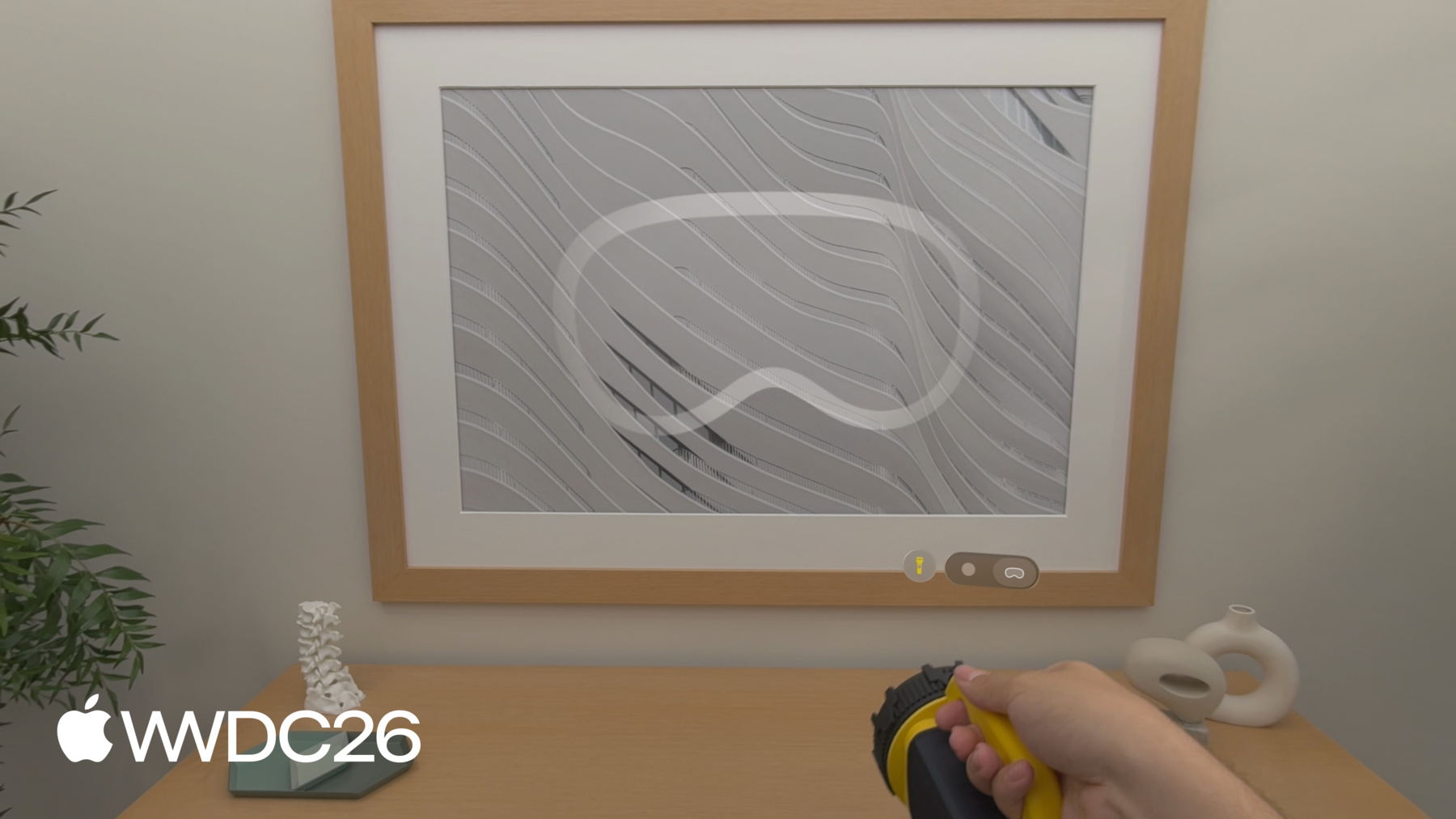
こんにちは visionOSの オブジェクトトラッキングの改良についてご紹介します Nathan Kongです visionOSチームの ストラテジックパートナーシップマネージャーです このセッションでは 新しいオブジェクトトラッキングと 空間アクセサリの機能を 以前のセッションで説明した 機能を基にご紹介します visionOS 2.0ではオブジェクトトラッキングを 導入したことを思い出してください 現実世界のオブジェクトを 仮想アンカーに変換できます トラッキングしたいアイテムの USDZモデルだけで リファレンスオブジェクトを作成できます MacのCreate MLで 機械学習トレーニングを通じて リファレンスオブジェクトをAPIに渡すことで アプリは物理オブジェクトの 位置と向きを取得でき イマーシブな空間体験を 作成できます visionOS 27では オブジェクトトラッキングを改良し 動いているオブジェクトの トラッキングが可能になりました 手持ちアイテムのトラッキングを含む その他の機能強化も含まれています たとえば 今では正確にトラッキングして この医療プローブのような手持ち器具で 物理的な空間を計測できます ここでは正確に距離を計測できます この物理的な脊椎モデルの 椎骨間の距離を エキサイティングなユースケースを 実現できます 外科トレーニング ホームリモデリング ガイド付き組み立てなどです 空間アクセサリに移ります visionOS 26では最初の 空間アクセサリセットを導入しました Logitech Museと PSVR2 Senseコントローラーが含まれます 空間アクセサリはApple Vision Proと 通信する電子デバイスです 現実世界でのリアルタイムの位置と 向きをトラッキングします これらのデバイスはインタラクティビティも 向上させます ボタンやハプティクスを通じて アプリのイマーシブ感を高めます visionOS 27では 誰でも独自のアクセサリを構築できるよう サポートを拡大しています
たとえば このSpatial Anchorのような アクセサリを 物理的なステアリングホイールの 内側に取り付けられます フルスケールのデジタル車両を シームレスに整合させるために ステアリングホイールに 手を伸ばして掴むと 本当に車の中にいるような感覚になります イマーシブなレーシングなど 素晴らしい体験が可能になります フライトシミュレーションや 車両インテリアデザインにも活用できます このセッションの残りでは オブジェクトトラッキングの 改善点を説明し 空間アクセサリの 作成方法を紹介します そして検討すべき事項で まとめます visionOSアプリに最適な アプローチを選ぶためのです では オブジェクトトラッキングに 入りましょう オブジェクトトラッキングが 高フレームレートのトラッキングに対応しました アプリがオブジェクトの位置を より正確に把握できるようになります 空間内を移動する際もです また Create MLに新しい 拡張トレーニングモードを追加しています トラッキングの精度と 堅牢性を向上させるためです 特に手でオブジェクトを持つ場合に有効です さらに精度の高い トラッキングユースケースに対応するため メトリック空間でオブジェクトのポーズを 取得するAPIを導入しています ディスプレイ補正の影響を受けません 計測アプリケーションを実現するために 必要不可欠です 先ほどの医療プローブの例がそうです 最後に 今年はiOSにも オブジェクトトラッキングを提供します このフラッシュライトを使って これらのアップデートを見てみましょう フラッシュライトの フォトリアリスティックな3Dモデルがあれば オブジェクトトラッキングの リファレンスオブジェクトとして使えます アプリがフラッシュライトの 位置を把握しているので RealityKitの新しい Physical Surroundings Lightを活用して この部屋をリアルタイムで 再照明できます 周囲の表面に投影されるデジタルパターンを 切り替えることもできます 手がフラッシュライトの一部を 覆っていても アプリはオブジェクトの位置を 確実にトラッキングできます または このようなマーカーを 3Dプリントして リファレンスオブジェクトとして フラッシュライトに取り付けられます 手持ちオブジェクトを 簡単にトラッキングできる方法です デバイスのフォトリアリスティックな 3Dモデルが入手できなくてもです では 具体的なアップデートについて 説明します 既存のオブジェクトトラッキング体験を アップグレードする方法と ゼロから新しく始める方法を ご紹介します まず 新しい高フレームレート トラッキングの有効化方法を説明します
visionOS上のARKitに新しい Reference Object Configuration APIを 追加しています 個々のリファレンスオブジェクトに対して 高フレームレートトラッキングを 有効にできます オブジェクトトラッキングセッションを 作成する前に 設定したら この設定オブジェクトを 以前と同様にリファレンスオブジェクトを ロードする際の追加パラメータとして渡せます これはトレーニング設定ではないため 任意のリファレンスオブジェクトに適用できます アプリケーションのニーズに応じて 次に Create MLに追加した 新しい拡張トレーニングモードを説明します Create MLでリファレンスオブジェクトを トレーニングする際 標準トレーニングモードと 拡張トレーニングモードを選択できます 新しい拡張トレーニング設定は 精度を高め トラッキングの堅牢性を向上させます 使用が推奨されます 高フレームレートトラッキングと 組み合わせて 拡張トレーニングには 標準モードと比べて 大幅に長い時間がかかることにご注意ください
トレーニングモード設定は Create MLアプリの Object Trackingテンプレートで 表示角度設定のすぐ下に あります それ以外はすべて同じです リファレンスオブジェクトの トレーニングに関して コマンドラインインターフェイスで リファレンスオブジェクトをトレーニングする場合も そこでもトレーニングモードを 設定できます リモートマシンで トレーニングを実行する柔軟性があります 次に メトリック空間でオブジェクトのポーズを 取得する新しい利点を確認します デフォルトでは オブジェクトアンカーの トランスフォームは最適化されています トラッキングされたオブジェクトに 整合した仮想コンテンツを配置するため ミックスイマーシブスタイルで これを実現するために オブジェクトのポーズが若干変更され 表示されているカメラ画像に合わせます 絶対的なワールド座標での 精度に影響を与えます これはオブジェクトトラッキングを 使用しようとする際の制限になりえます 空間計測タスクに visionOS 27では ARKit Coordinate Space Correction APIを追加しています 補正あり・なしでアンカーの トランスフォームを取得できます トラッキングされたオブジェクトのポーズを クエリする際 2つのオプションがあります renderedはディスプレイ補正を 適用したポーズを返し 仮想コンテンツを現実世界の オブジェクトに視覚的に整合させます noneはメトリック空間での オブジェクトのポーズを補正なしで返します トラッキングされたオブジェクト間の 距離を計測するのに便利です またはオブジェクトが物理的な空間の どこに位置するかを特定する際にも 先ほどの医療プローブデモで 示したように そして今年 iOSに オブジェクトトラッキングを提供します まず WWDC24の地球儀を 呼び戻しましょう
iOS 27では ARKit APIに リファレンスオブジェクトのサポートを追加します
機械学習トレーニングは プラットフォーム固有ではありません 一度トレーニングすれば すべてのリファレンスオブジェクトが iOSとvisionOSの両アプリで使用できます
iOSでオブジェクトトラッキングを 実行するために必要なことをご覧ください リファレンスオブジェクトをロードし ワールドトラッキング設定を作成します visionOSで使用するものと同じ リファレンスオブジェクトファイルです オブジェクトをdetectionObjectsに 割り当てます ほぼ静止しているオブジェクトには またはtrackingObjectsで動くオブジェクトの 高フレームレートトラッキングを行います セッションを実行して デリゲートでアンカーを処理します ARKitがオブジェクトを認識すると didAddが呼ばれて ARObjectAnchorが取得できます コンテンツをアタッチできます オブジェクトがトラッキングされている間 didUpdateが最新のポーズを提供します カスタムアプリの動作に 使用できます オブジェクトがシーンから 削除されると didRemoveでdidAddで作成した アンカーエンティティを削除できます
visionOS 27のオブジェクトトラッキングの アップデートは以上です オブジェクトトラッキングAPIを使った アプリ開発の詳細は "Explore object tracking for visionOS"の WWDCセッションをご覧ください またはドキュメントをご覧ください 次に 対象オブジェクトを 空間アクセサリに 変換する方法を探ります まず空間アクセサリを定義して その利点を紹介します 次にアクセサリを作成する際に 念頭に置くべき デザインの考慮事項を説明します デザインを検証するプロセスを説明し visionOS向けに準備します 簡単なプラグアンドプレイアクセサリを紹介し 最後にvisionOSアプリを準備して これらのデバイスを活用する方法を紹介します では基本から始めましょう 空間アクセサリとは 電子デバイスであり 以下のコンポーネントを含む ボードが必要です トラッキング用にApple Vision Proから 見えるLEDのコンステレーション アクセサリの向きと加速度を キャプチャするIMU そしてVision Proに信号を送る Bluetoothチップ 空間アクセサリはさまざまな 入力も搭載できます ボタンやタッチパッドなどの入力と ハプティクスなどの出力を含みます これらの主要コンポーネントを 持つアクセサリは visionOSと互換性があります 空間アクセサリの 動作を見てみましょう 前述のコンポーネントを 先ほどのフラッシュライトに 組み込むことで デバイス自体を 空間アクセサリにできます このフラッシュライトをすばやく 振っても デジタルの光のビームが 滑らかに追従します 組み込まれたIMUによる 低レイテンシトラッキングのおかげです アクセサリに追加したこの物理ボタンを使って デジタルライトをオン・オフでき 体験をさらに インタラクティブにできます Vision Proはこの空間アクセサリを トラッキングできます フラッシュライト内部に取り付けられた LEDを認識することで実現します 空間アクセサリが提供する 利点を紹介します これらのデバイスは 高頻度でトラッキングでき フル表示レートまで 低レイテンシで 高速な動きを要求する ユースケースに対応します 空間アクセサリは 確実にトラッキングし続けます 一時的に遮蔽されても 低照度条件でも アクセサリをトラッキングできます 最後に 物理ボタンとハプティクスにより 体験をさらにインタラクティブで イマーシブにできます 独自のアクセサリの作成を始める前に 念頭に置くべき重要な デザインの考慮事項があります LEDをデバイス全体に 分散させることが重要です さまざまな角度から見たときに 明確で ユニークなパターンを 作成するように LEDとIMUは正確なトラッキングのために ボードに しっかりと固定する必要があります 最後に ユーザーがアクセサリと インタクションする主な方法を検討してください たとえば 手持ちアクセサリは LEDのほとんどを ユーザーがデバイスを持たない 場所に配置すべきです バッテリーのサイズと位置も 検討して アクセサリが人間工学的に 優れていることを確認してください 腕の届く範囲外で使用する 大型アクセサリには LEDの数 LEDのサイズ 相互間の距離を検討して 遠くでもアクセサリを 正確にトラッキングできるようにしてください 具体的な要件とリファレンスデザインの 詳細については Apple Devices向け "Accessory Design Guidelines"の "Spatial Accessories"チャプターを ご確認ください 空間アクセサリを 設計したら 期待通りに動作することを 検証する方法と visionOSアプリへの準備を 探ります 最初のステップは アクセサリを BluetoothでVision Proに 接続して デバイスから送信された 信号を検証することです ARKitアクセサリトラッキング デバッグビューを使って このツールでVision Proが アクセサリをどう認識しているかを確認でき デバイスがデベロッパモードの場合 設定に表示されます 3つの点で役立ちます 1つ目 ヘッドセットのIRカメラで LEDを確認できます 明るく 明確で 適切に同期されていることを確認できます 2つ目 周波数 レイテンシ 軸ごとの値のライブメトリクスで IMUを検証できます スケール アライメント モーション応答を確認するために 3つ目 アクセサリと ヘッドセット間のタイミングをデバッグします デバイスのIR照明器を同期参照として使用して
次に visionOSアプリで 空間アクセサリをトラッキングするには CreateMLバンドルで トレーニングする必要があります
このワークフローはデバイスの 外観に関する情報を使用します そしてLEDの位置情報を使って リファレンスアクセサリファイルを作成します 開始するには デザインのUSDZを 作成します フォトリアリスティックな3Dモデルを 含む IMUとLEDの位置をアノテーションした デバイスのモデルです このアノテーション付きUSDZを使って コマンドラインインターフェイスで リファレンスアクセサリファイルを生成して アプリに追加できます アクセサリのメーカーとして このファイルをアプリにバンドルして Info.plistでエクスポートされた UTTypeとして宣言します これによりアクセサリがシステム全体に 登録され Apple Vision Proのどのアプリでも 使用できます サードパーティのアクセサリを使用する デベロッパの場合 ファイルを自分でバンドルして インポートタイプとして宣言することもでき アプリが独立して動作します
ゼロから空間アクセサリを 構築する前に テストを始めることもできます プラグアンドプレイアクセサリで アプリを開発できます DFRobotやMIKROEなどのメーカーが 既製品のリファレンスハードウェアを 今年後半に開発キットとともに リリースします これらのアクセサリはすぐに テストに使用でき visionOSアプリに実装できます これらのプラグアンドプレイアクセサリの 1つを見てみましょう
ご覧のように seeMote Capのような空間アクセサリを フラッシュライトに取り付けて Spatial Accessories APIを使うだけで 先ほどと同じデジタル 再照明体験を実現できます 空間アクセサリが用意できたら アプリに接続する方法を 見てみましょう 新しいGCSpatialAccessoryクラスを使って アクセサリを検出します referenceaccessoryバンドルがある あらゆるデバイスで動作します Accessory(device)を呼び出すと ARKitが自動的に解決します そこからAccessoryTrackingProviderを 実行できます 以前と同様に また追加しているのは 新しいupdateAccessoriesメソッドです セッションの実行中に アクセサリを切り替えて トラッキングの中断を避けられます これで独自の空間アクセサリを 作成して visionOSアプリに接続できます アプリで入力やハプティクスを使った トラッキングの有効化について詳しくは "Explore spatial accessory input on visionOS" セッションをご覧ください
まとめましょう 今日は4つの異なるアプローチを 紹介しました アプリでオブジェクトをトラッキングするための どのアプローチを使用するかを 選択する際の 考慮事項を確認しましょう オブジェクトトラッキングは正確で 精密なトラッキングが必要な場面で優れています 計測アプリケーションなどです フォトリアリスティックな3Dモデルが 入手できない場合 referenceObjectをトレーニングできます 対象オブジェクトに取り付けた マーカーで 空間アクセサリはさらに高い リフレッシュレートと低レイテンシを提供します 高速に動くオブジェクトを要求する 体験に最適です さらにインタラクティブで イマーシブな体験を 物理オブジェクトで作りたい場合 カスタムボタンとハプティクスを備えた 独自のアクセサリを設計できます これらの新しいオブジェクトトラッキング機能が 可能にする可能性は無限大です 仕事と遊びの変革的な体験を ご覧できるのを楽しみにしています あなたが作るものを 素晴らしいWWDC26を お楽しみください
-
-
3:50 - Enable high frame rate tracking
// Enable high frame rate tracking // Create reference object configuration var configuration = ReferenceObject.Configuration() configuration.highFrameRateTrackingEnabled = true // Load the reference object with ARKit API let refObjURL = Bundle.main.url(forResource: "flashlight", withExtension: ".referenceobject") let refObject = try? await ReferenceObject(from: refObjURL!, configuration: configuration) -
4:50 - Extended training mode via command-line
// Extended training mode on Mac using command-line interface % xrun createml objecttracker --source flashlight.usdz --output flashlight.referenceobject --training-mode extended --all-angles -
5:25 - Object pose coordinate spaces
// Different object pose spaces // Obtain anchor transform with display corrections let renderingPose = myObjectAnchor.coordinateSpace(correction: .rendered) // Obtain anchor transform in metric space let metricPose = myObjectAnchor.coordinateSpace(correction: .none) -
6:22 - Implement object tracking in iOS
// Implement object tracking in iOS import ARKit import RealityKit class ObjectTrackingARSessionDelegate: NSObject, ARSessionDelegate { let arView = ARView(frame: .zero) var entities: [UUID: AnchorEntity] = [:] func start() throws { let stationaryObject = try ARReferenceObject(archiveURL: Bundle.main.url(forResource: "stationary", withExtension: "referenceobject")!) let movingObject = try ARReferenceObject(archiveURL: Bundle.main.url(forResource: "moving", withExtension: "referenceobject")!) let configuration = ARWorldTrackingConfiguration() configuration.detectionObjects = [stationaryObject] // Low frame rate configuration.trackingObjects = [movingObject] // High frame rate arView.session.delegate = self arView.session.run(configuration) } func session(_ session: ARSession, didAdd anchors: [ARAnchor]) { for case let anchor as ARObjectAnchor in anchors { let entity = AnchorEntity(anchor: anchor) entities[anchor.identifier] = entity arView.scene.addAnchor(entity) } } func session(_ session: ARSession, didUpdate anchors: [ARAnchor]) { for case let anchor as ARObjectAnchor in anchors { entities[anchor.identifier]?.isEnabled = anchor.isTracked } } func session(_ session: ARSession, didRemove anchors: [ARAnchor]) { for case let anchor as ARObjectAnchor in anchors { if let entity = entities.removeValue(forKey: anchor.identifier) { arView.scene.removeAnchor(entity) } } } } -
12:26 - Discover and connect a spatial accessory
import ARKit
import GameController

// Generic accessory discovery

if let device = GCSpatialAccessory.spatialAccessories.first {

        // Resolves the .referenceaccessory bundle automatically

        let accessory = try await Accessory(device: device)
        let provider = AccessoryTrackingProvider(accessories: [accessory])
        try await arkitSession.run([provider])
}

// Update tracked accessories without restarting the session

try await provider.updateAccessories([newAccessory])
-